---
date: 2025-04-30T00:00:00.000Z
tags:
- service specification
- embedded actions
- platform-settings
- openAPI spec
- scaling
- parameters
- notification channels
- roles
- newrelic
- ui
- monthly
toc_max_heading_level: 3
doc_id: 3d623cb8-d418-404e-ad7f-1e0e2f7af24e
description: >-
April updates: simplified service creation with spec-embedded actions and new
UI for crafting service specifications
keywords:
- services
- specifications
- embedded actions
- UI editor
- platform updates
title: April 2025
slug: april-2025
---
April updates: simplified service creation with spec-embedded actions and new UI for crafting service specifications
{/* truncate */}
## ✨ Services
### Crafting services and links is now easier with spec-embedded actions
We’ve simplified how services are created, making it easier to keep them in sync and reduce maintenance.
You no longer need to manually define and maintain action specs (like create, edit, delete) for each service. Instead,
you can **opt in to embed standard actions** when crafting your service spec.
**How it works:**
- Use the `use_default_actions` flag in your service spec to enable embedded, standard actions like **create, update, and delete**.
- Configure which attributes are visible or editable at each point of the service instance lifecycle.
👉 Learn more in our [Services docs](/docs/services/getting-started).
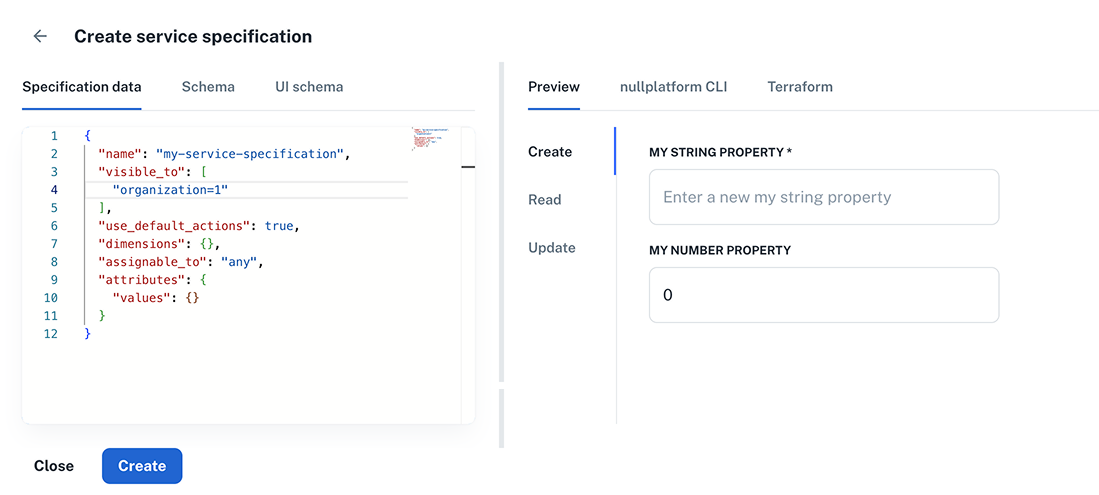
### Craft your service specifications from the UI
You can now **review and edit service and link specifications directly from the UI**, making it easier than ever to work with your services.
What's new:
- **Simplified access** – Define your specification data and JSON schema directly in the platform.
- **Live previews of your forms, CLI, and IaC provider schemas** – See how the corresponding form looks in real time as you build it.
- **Customize the look & feel of your forms** – Tailor the appearance of services, links, and action forms using the UI schema.
How it works:
- To get started, go to **Platform settings > Services** and click **New service specification**.
- Add your spec data and service attributes in the **Specification data** and **Schema one** tabs, respectively.
- Customize the look & feel of the form in the **UI schema** tab.
(You can use the examples in the UI as reference)
👉 Learn more about [crafting services in our docs](/docs/services/craft-a-service/overview).
 ## ✨ Platform settings
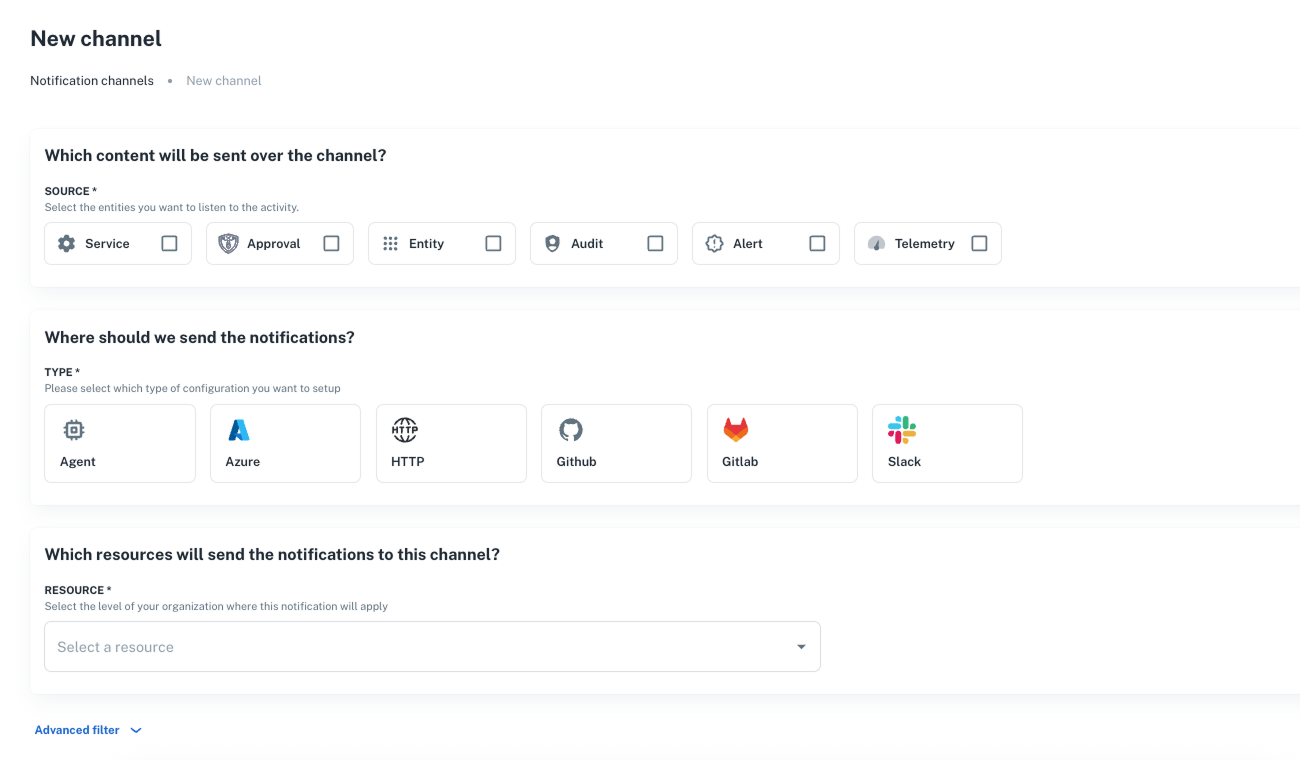
### Manage notification channels from the UI
You can now **create and configure notification channels** directly from the UI to track operations on entities.
Use them to trigger automations, approval flows, alerts, audit logs, and more.
Features:
- Choose source and configuration types.
- Select which resources to monitor.
- Add filters to fine-tune your notifications.
To create one, navigate to **Platform settings > Notifications > Channels** and click **+ New channel**.
👉 More in our [Notifications](/docs/notifications/) and [API reference](/docs/api/notification-channel-create) docs.
## ✨ Platform settings
### Manage notification channels from the UI
You can now **create and configure notification channels** directly from the UI to track operations on entities.
Use them to trigger automations, approval flows, alerts, audit logs, and more.
Features:
- Choose source and configuration types.
- Select which resources to monitor.
- Add filters to fine-tune your notifications.
To create one, navigate to **Platform settings > Notifications > Channels** and click **+ New channel**.
👉 More in our [Notifications](/docs/notifications/) and [API reference](/docs/api/notification-channel-create) docs.
 ### NewRelic logging support for K8s
We now support **NewRelic** for logging in Kubernetes environments. Track your logs by configuring it in nullplatform.
**How to set it up:**
1. Go to **Platform settings > Logging**.
2. Click **+ New configuration** and select the provider.
3. Fill in the required configuration details.
4. Click **Create configuration** to save your setup.
👉 For more info, see our [Supported integrations documentation](/docs/providers/supported-integrations).
## ✨ Parameters
### View secret parameter values
Users with the **SecOps** role can now view **secret parameter values directly from the UI**.
**What you need to know:**
- This update is **automatic, retroactive, and requires no action** on your part.
- It only applies to users with the **SecOps** role.
- The SecOps role includes permission to read secret values—typically used by security and compliance teams.
👉 More info on [accessing secret values](/docs/parameters/secret-visibility).
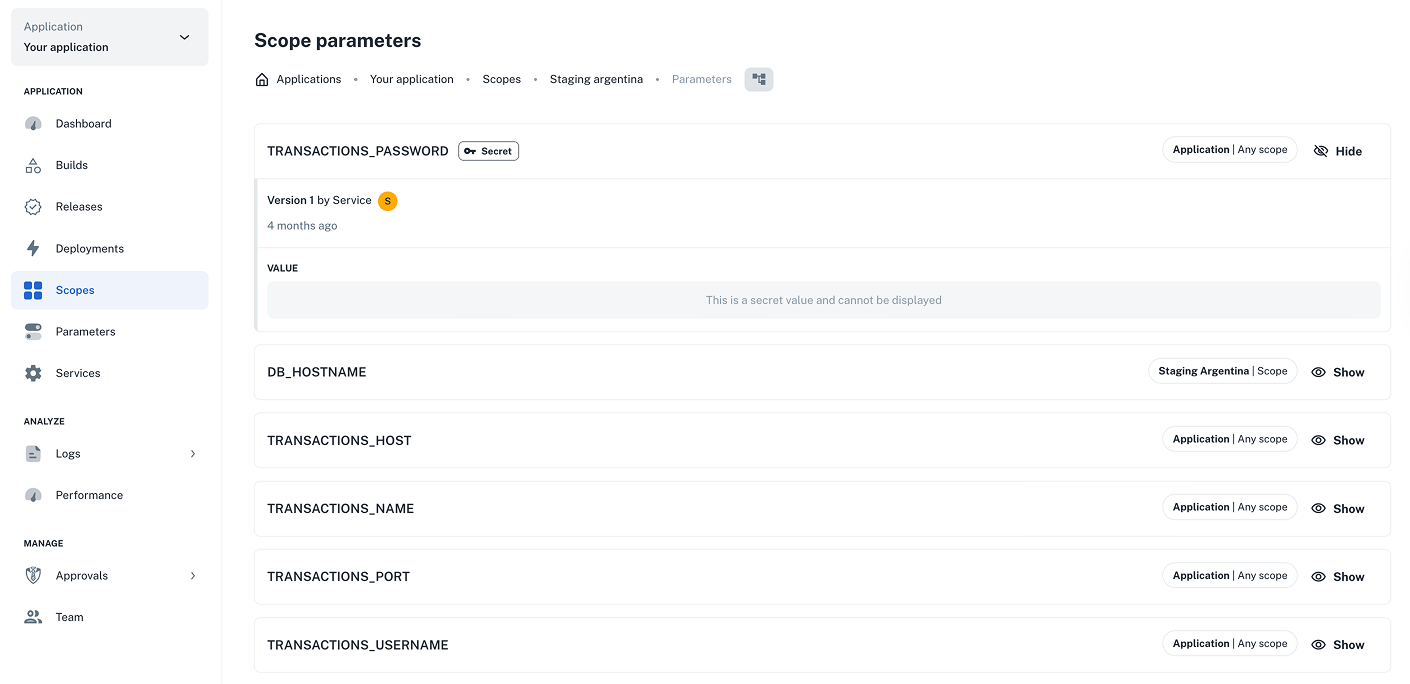
### Easily visualize which parameters apply to a scope
We’ve added a new **Scope parameters** section in the UI that lets you:
- View all parameters assigned to a scope, including whether they were defined at the **application**, **dimension**, or **scope** level.
- See **which scopes were affected** by recent parameter changes—making it easier to track and manage updates.
To check it out, select an application and go to **Scopes > Manage scopes > Parameters** from the platform menu.
### NewRelic logging support for K8s
We now support **NewRelic** for logging in Kubernetes environments. Track your logs by configuring it in nullplatform.
**How to set it up:**
1. Go to **Platform settings > Logging**.
2. Click **+ New configuration** and select the provider.
3. Fill in the required configuration details.
4. Click **Create configuration** to save your setup.
👉 For more info, see our [Supported integrations documentation](/docs/providers/supported-integrations).
## ✨ Parameters
### View secret parameter values
Users with the **SecOps** role can now view **secret parameter values directly from the UI**.
**What you need to know:**
- This update is **automatic, retroactive, and requires no action** on your part.
- It only applies to users with the **SecOps** role.
- The SecOps role includes permission to read secret values—typically used by security and compliance teams.
👉 More info on [accessing secret values](/docs/parameters/secret-visibility).
### Easily visualize which parameters apply to a scope
We’ve added a new **Scope parameters** section in the UI that lets you:
- View all parameters assigned to a scope, including whether they were defined at the **application**, **dimension**, or **scope** level.
- See **which scopes were affected** by recent parameter changes—making it easier to track and manage updates.
To check it out, select an application and go to **Scopes > Manage scopes > Parameters** from the platform menu.
 ## ✨ Scopes
### Kubernetes: auto scaling by memory
You can now scale your scopes based on memory usage in Kubernetes environments.
How to set it up:
1. When creating a scope, click **Advanced > Size & Scaling**.
2. Enable **target memory** and set a memory threshold to control when instances should scale up or down.
This feature is behind a flag and can be enabled per organization. [Reach out](/docs/support) to us and we’ll activate it for your organization.
## ✨ General
### Rename your entities from the UI
You can now **rename your namespaces, applications, and scopes** directly from the UI.
**How it works:**
- Click the pencil icon next to the entity name to make changes.
- Note: **Renaming doesn’t change the slug**, which is used in URLs, repo names, and integrations—changing it could break things.
👉 More on naming conventions in [our docs](/docs/applications/creating-new-application#naming-conventions).
### Easier role management
We've streamlined role management by **removing extra ID levels** and enforcing a one-to-one relationship between each role and its `id`/`slug`.
This update is **automatic, retroactive, and requires no action** on your part.
👉 Check our [Roles](/docs/authorization/roles) docs for more info.
### OpenAPI specs for nullplatform's API is now available
You can now **download our OpenAPI spec** in either JSON or YAML format to integrate with your tools.
- Nullplatform OpenAPI (YAML)
- Nullplatform OpenAPI (JSON)
👉 You’ll always find the latest version on our [API reference welcome page](/docs/api-getting-started).
---
Wishing you a fantastic month ahead – from the **nullplatform** team! ❤️
## ✨ Scopes
### Kubernetes: auto scaling by memory
You can now scale your scopes based on memory usage in Kubernetes environments.
How to set it up:
1. When creating a scope, click **Advanced > Size & Scaling**.
2. Enable **target memory** and set a memory threshold to control when instances should scale up or down.
This feature is behind a flag and can be enabled per organization. [Reach out](/docs/support) to us and we’ll activate it for your organization.
## ✨ General
### Rename your entities from the UI
You can now **rename your namespaces, applications, and scopes** directly from the UI.
**How it works:**
- Click the pencil icon next to the entity name to make changes.
- Note: **Renaming doesn’t change the slug**, which is used in URLs, repo names, and integrations—changing it could break things.
👉 More on naming conventions in [our docs](/docs/applications/creating-new-application#naming-conventions).
### Easier role management
We've streamlined role management by **removing extra ID levels** and enforcing a one-to-one relationship between each role and its `id`/`slug`.
This update is **automatic, retroactive, and requires no action** on your part.
👉 Check our [Roles](/docs/authorization/roles) docs for more info.
### OpenAPI specs for nullplatform's API is now available
You can now **download our OpenAPI spec** in either JSON or YAML format to integrate with your tools.
- Nullplatform OpenAPI (YAML)
- Nullplatform OpenAPI (JSON)
👉 You’ll always find the latest version on our [API reference welcome page](/docs/api-getting-started).
---
Wishing you a fantastic month ahead – from the **nullplatform** team! ❤️