August 2026
August updates: checklists turn approvals into a list of requirements, workflows let you describe an automation and have nullplatform run it, Bitbucket Cloud joins the supported code repositories, action items get owners and a board view, services and links can be archived instead of deleted, the CD branches field accepts regular expressions, and new scopes, CLI, and agent releases.
✨ Checklists: your guardrails as a list of requirements
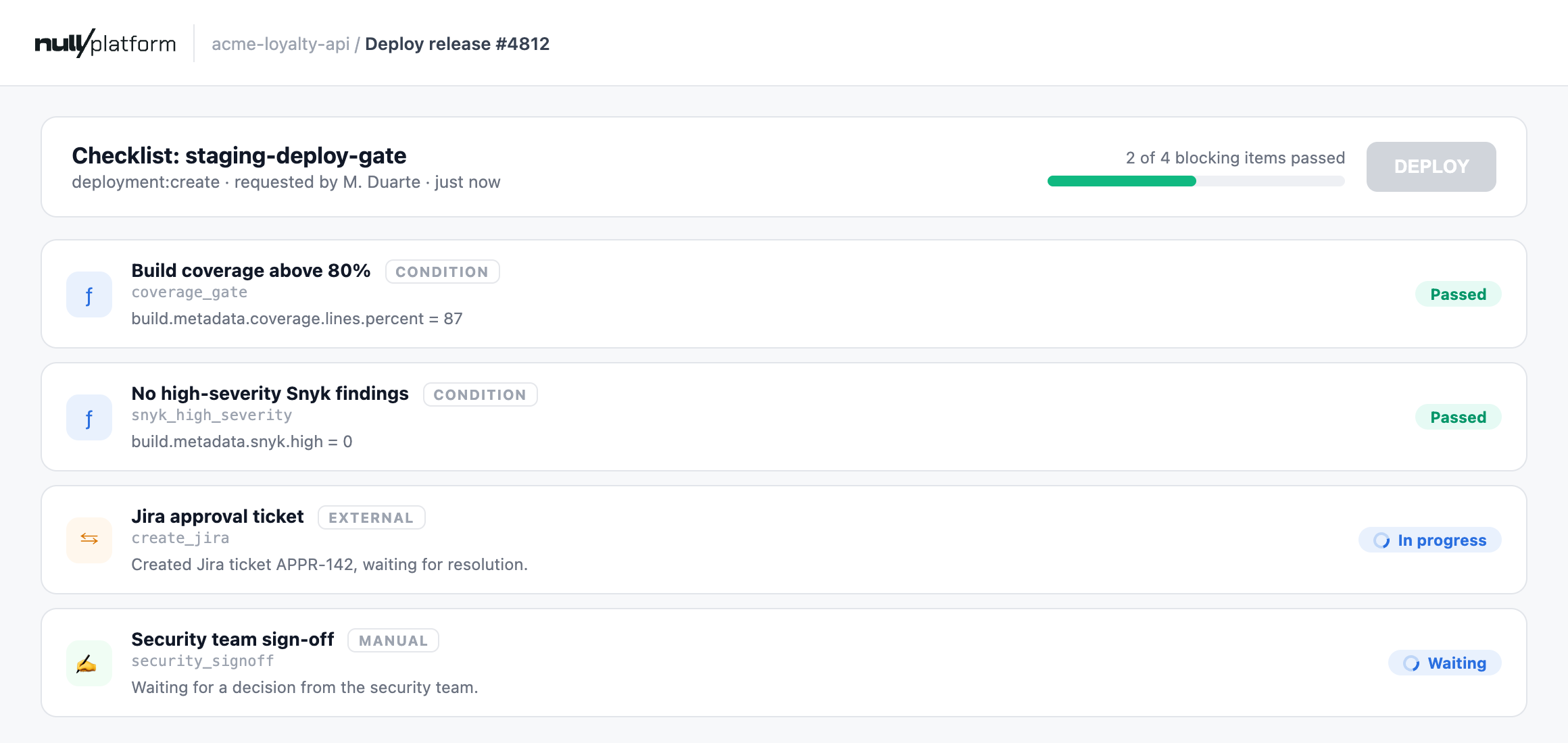
A checklist is the list of requirements an action has to meet before nullplatform lets it happen. Attach one to a production deploy, a scope creation, or any other approval action, and every request for that action gets its own run of the list: each item is checked, and the action waits until the list resolves.
One list can mix four kinds of items: rules nullplatform evaluates against the request itself (test coverage, environment, metadata), sign-offs that wait for a named person, external checks answered by one of your own systems, and groups that organize the rest. Each item also declares what its result does to the action: a gate blocks it when it fails, an informational item reports without blocking, and an override lets an authorized person send the action through anyway, with the audit trail showing who decided it.
The developer who triggered the action sees the list instead of a plain yes or no: what passed and the values it read, what's still running, and who owes a signature.
If you gate actions with policies today and want to move them to checklists, talk to the team and we'll migrate them with you.
👉 See Checklists and build your first checklist.
✨ Workflows: automations and AI agents you can see and control
Describe an automation in plain language, refine it on a canvas, and nullplatform runs it for you: on a schedule, on a platform event, on demand, or from a webhook. Every step of every run, traceable on the canvas.
- Build by describing, refine visually. Tell your coding assistant (Claude Code, Kiro, Cursor, and others) what you need, and the nullplatform AI plugins turn it into a working workflow. Open it in Platform settings → Workflow Editor to see it as connected steps, adjust a node, and hit RUN.
- Connect nullplatform to anything. Pre-built nodes for the data lake, action items, notifications, approvals, and the nullplatform APIs. Code steps and HTTP calls for everything else.
- AI agents you can actually follow. Hand a step to an agent when a decision needs judgment, give it your other workflows as tools, and inspect what it did in the run. Where a human should decide, a checklist or an action item puts them in the loop.
- Move fast, break nothing. Every save is a new version and nothing runs until you ACTIVATE it. Every run keeps the inputs, outputs, and logs of each step, so a failure shows you where and why.
This is a real suite, the AMI drift tracker from the tutorials. Switch between its three workflows and click any node to see what it runs:
Daily scan (03:00, also manual) that compares the AMI each active EC2 deployment runs against the configured one, and ensures one action item per drifted scope.
12 steps
Click a node to see the step it runs.
- Workflows is in early release and may not be enabled in your organization yet. Reach out to us if you'd like to try it.
- You don't have to start from scratch: the suites nullplatform are open source in nullplatform/workflows, each with a tutorial.
👉 See Workflows, build your first workflow, and browse the tutorials. Workflows, checklists, action items, and Insights now share one entry point: the AI Ops overview.
✨ Assign owners to action items
You can now assign an owner to an action item, so everyone knows who is working on it. Click the Owner cell in the list or the field in the detail view to pick anyone in your organization, or hit Assign to me to take the item in one click. Ownership is optional and never permanent: items start unassigned, and anyone can pick one up or hand it to a teammate.
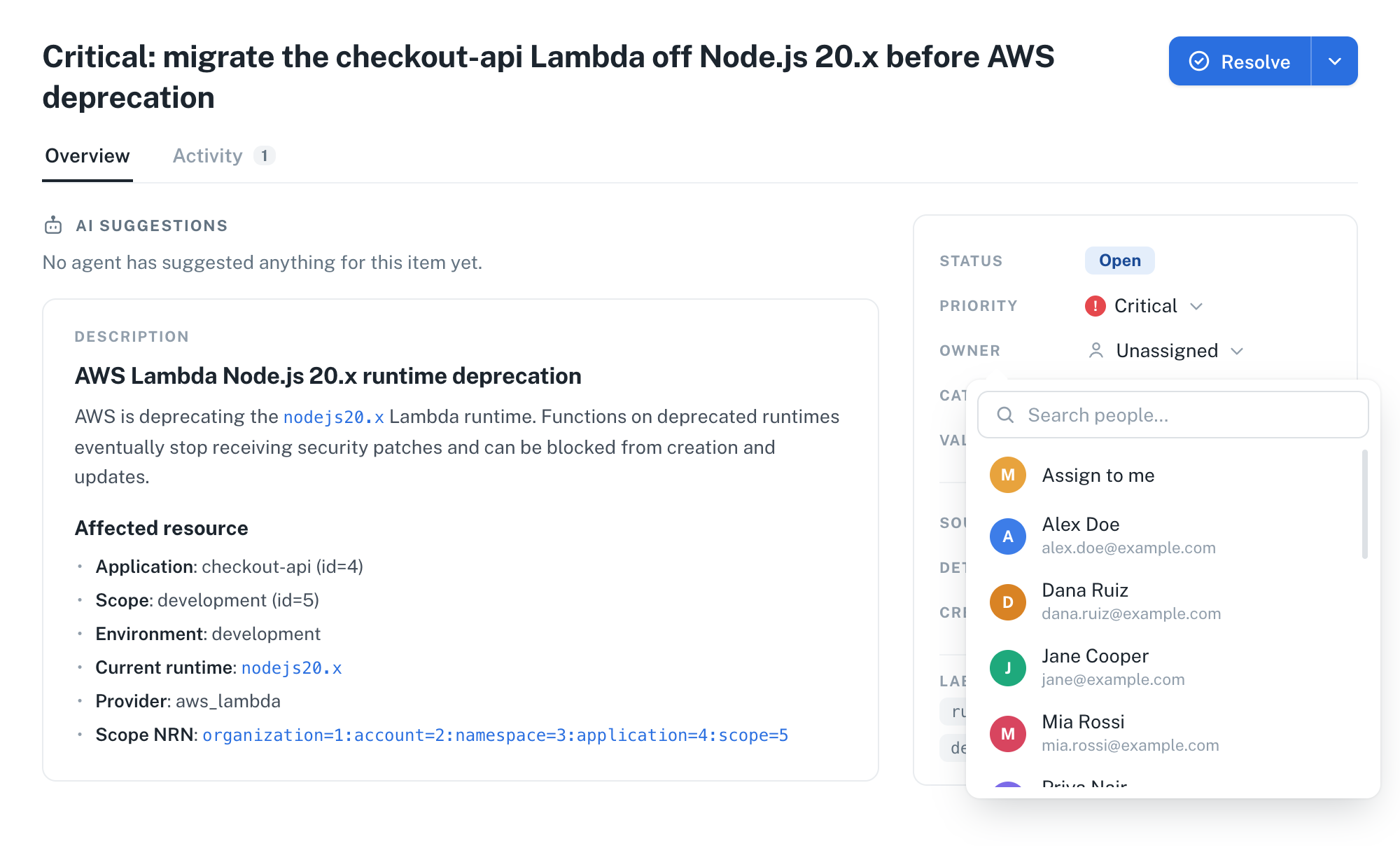
The list gets a matching Owner filter, with Unassigned as one of the choices, and every assignment is recorded in the item's Activity tab.
👉 See Action item owners.
✨ Read your action items as a board
The same items as cards in columns instead of rows. Switch between the two with the View control in the toolbar, which remembers your choice. The columns are the statuses, in the order work moves through them, and Group by splits the board into lanes by priority, owner, or category. Filters and search are shared with the list.
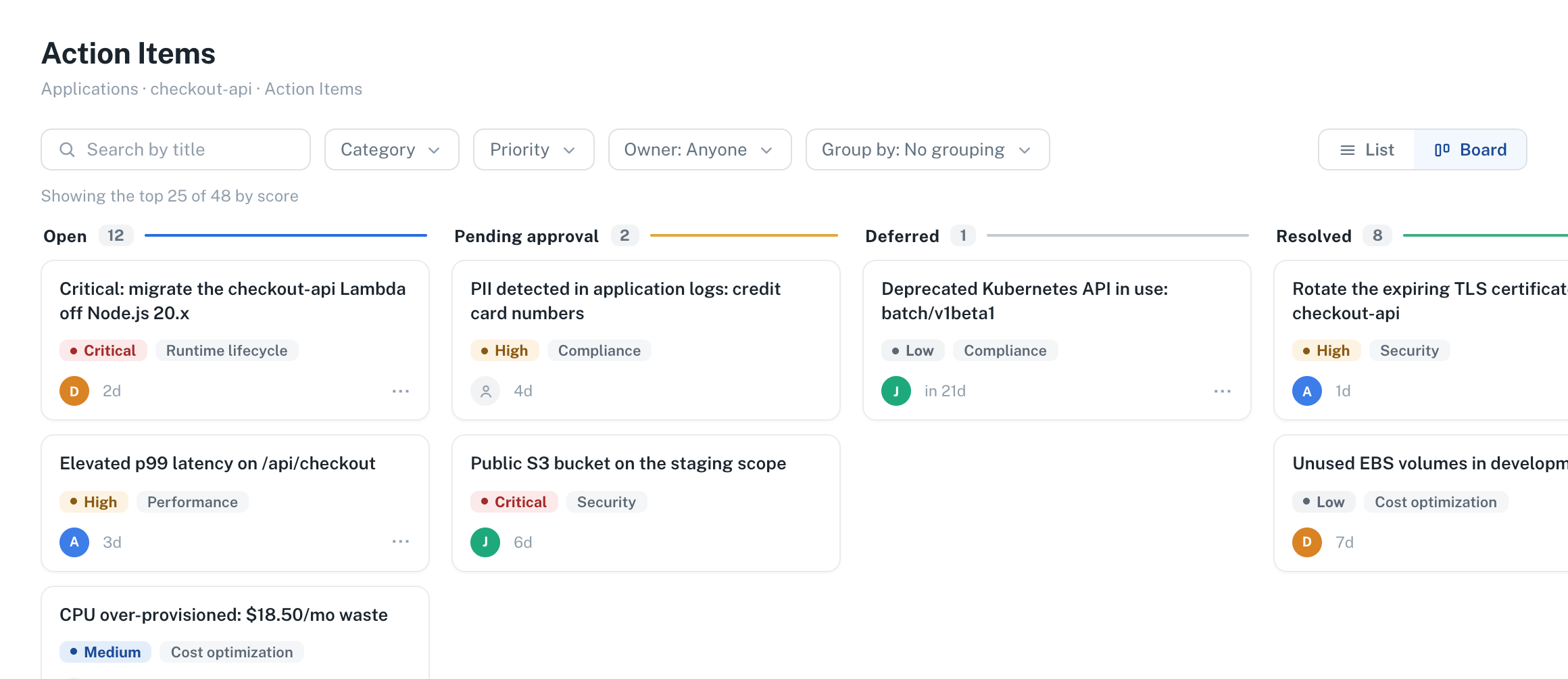
The detail view was redesigned alongside it, with Overview and Activity tabs and a properties column that always shows the item's current state.
👉 See the board view.
✨ Archive services and links instead of deleting them
Archiving is a soft delete. An archived service or link disappears from your lists, but the instance and all its attributes stay in nullplatform, so you can restore it whenever you need it. Specifications can define archive and unarchive actions so your infrastructure reacts to both, for example by pausing a database.
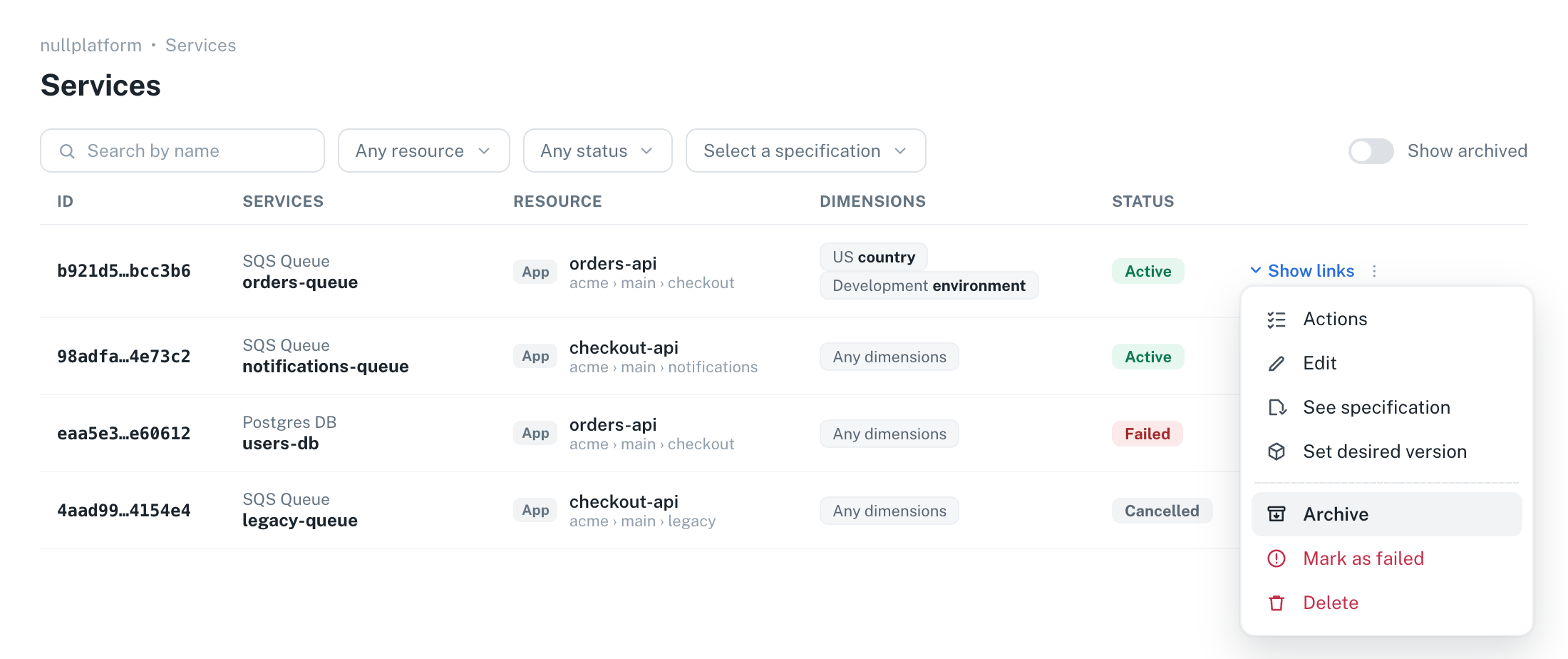
Archiving is a status change, from the UI, the CLI, or a PATCH request:
np service patch --id <SERVICE_ID> --body '{ "status": "archived" }'
Archiving is in early release and may not be available in your organization yet. Reach out to us if you'd like to try it.
👉 See Archive services and links.
✨ Bitbucket Cloud joins GitHub, GitLab, and Azure DevOps
You can now run nullplatform on Bitbucket Cloud repositories. Pick Bitbucket when you create a code repository provider configuration, point it at the workspace and project where new repositories go, and it works as with the other providers: creating an application creates its repository, and a push produces a build.
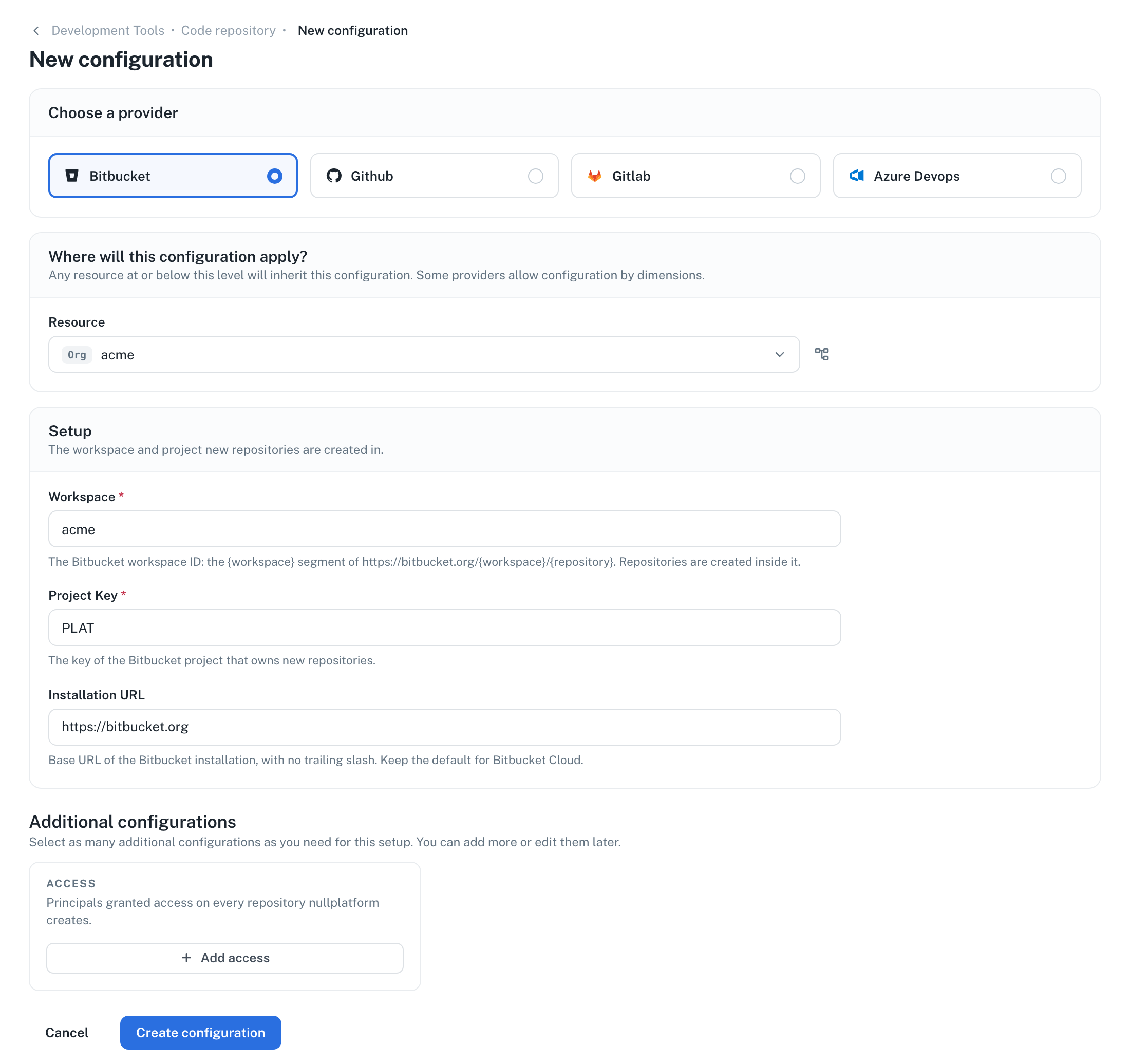
Only Bitbucket Cloud is supported, not Bitbucket Data Center.
👉 See Bitbucket repository and access for the setup, including the bot user and API token nullplatform authenticates with.
✨ The CD branches field takes regular expressions
The Branches field in a scope's continuous deployment settings accepts regular expressions, not just literal branch names. A pattern like release/.* deploys every release branch without listing them one by one, and main|develop covers both. Patterns must match the whole branch name, and matching is case-insensitive. Nothing changes for existing scopes: a plain name like main is already a valid pattern that matches only itself.
👉 See matching branches with regular expressions.
✨ Scopes 1.14.0 through 1.16.3
The scopes repository shipped seven releases, all about Kubernetes scopes:
- Step-by-step deployment progress. Creating, updating, or deleting a scope and every deployment action show their steps in the dashboard, each with its duration, and a failed deployment reports the reason on the step that failed.
- No more 5xx window on blue-green finalize and rollback. Both actions wait until the load balancer sends all traffic to the surviving deployment before deleting the other one.
- Kill instance for scheduled tasks. A new action on scheduled task scopes terminates a single running job instance.
And more: the traffic manager can move off port 80 and be pinned cluster-wide, gRPC additional ports leave the declared port free, and the Instances tab shows every pod. 👉 See every scopes release.
✨ CLI 2.8.1 through 2.10.1
The CLI shipped four releases:
np mcp installsets up the nullplatform MCP server in Claude Code, Cursor, or Codex in one command, read-only unless you pass--allow-writes.np artifactregisters and queries artifact revisions: OCI images, git repositories, ORAS artifacts, and blobs.- Archive and restore services and links from
np service patchandnp link patch.
And more: np skills list shows nullplatform's AI skills catalog, np <command> --help carries body fields and a ready-to-run example, and builds triggered from pull requests on GitHub Actions record the commit you pushed. 👉 See every CLI release.
✨ Agent 0.9.0 through 0.11.1
The control plane agent shipped three releases:
- Security update. 0.9.0 upgrades the Go runtime and patches the
x/net,x/text, andx/cryptomodules, and is recommended for every installation. - GitHub App authentication for command repositories. The agent can clone private repositories without a personal token, configured per organization.
And more: clone failures no longer print the token embedded in the repository URL, and 0.11.1 ships CLI 2.10.1. 👉 See every agent release.
Also in August
- Abandon a pending scope creation in one step. A scope still waiting on its creation approval can now be deleted directly, with no second approval. See approval actions.
repository_urlis required when you create an application through the API. APOST /applicationwithout it now returns a 400 that names the field instead of a failed application. See Creating a new application.- Dynamic reports are validated before they publish. A report pointing at fields missing from its schema is rejected on publish with a message naming the broken reference. See Publish and versions.
- Link columns in the AI dashboard builder. Ask the dashboard builder for a URL column and every row renders as a clickable link.
That's all for August, from the nullplatform team! ❤️