---
date: 2025-07-30T00:00:00.000Z
tags:
- catalog
- metadata
- services
- deployments
- cli
- errors
- platform-settings
- automation
- ui
- monthly
toc_max_heading_level: 2
doc_id: b6f201e1-a691-4806-90aa-7ad453fabeea
description: >-
July updates: UI catalog management with smart forms & validation, plus
service sync between environments.
keywords:
- catalog
- UI updates
- service sync
- metadata
- environment management
title: July 2025
slug: july-2025
---
July updates: UI catalog management with smart forms & validation, plus service sync between environments.
{/* truncate */}
## ✨ Work with catalogs directly from the UI
:::tip Heads up: metadata is now called catalog
We’ve rebranded metadata as catalog to better reflect how structured data works across nullplatform.
The docs have been fully updated. Check out the new [catalog docs](/docs/catalog/getting-started) to explore what’s
changed.
:::
Bring your catalogs to life right in the UI! Managing structured data just got way easier.
You can now create and update catalog fields directly from the UI for any application, build, or namespace.
**Here’s what’s new:**
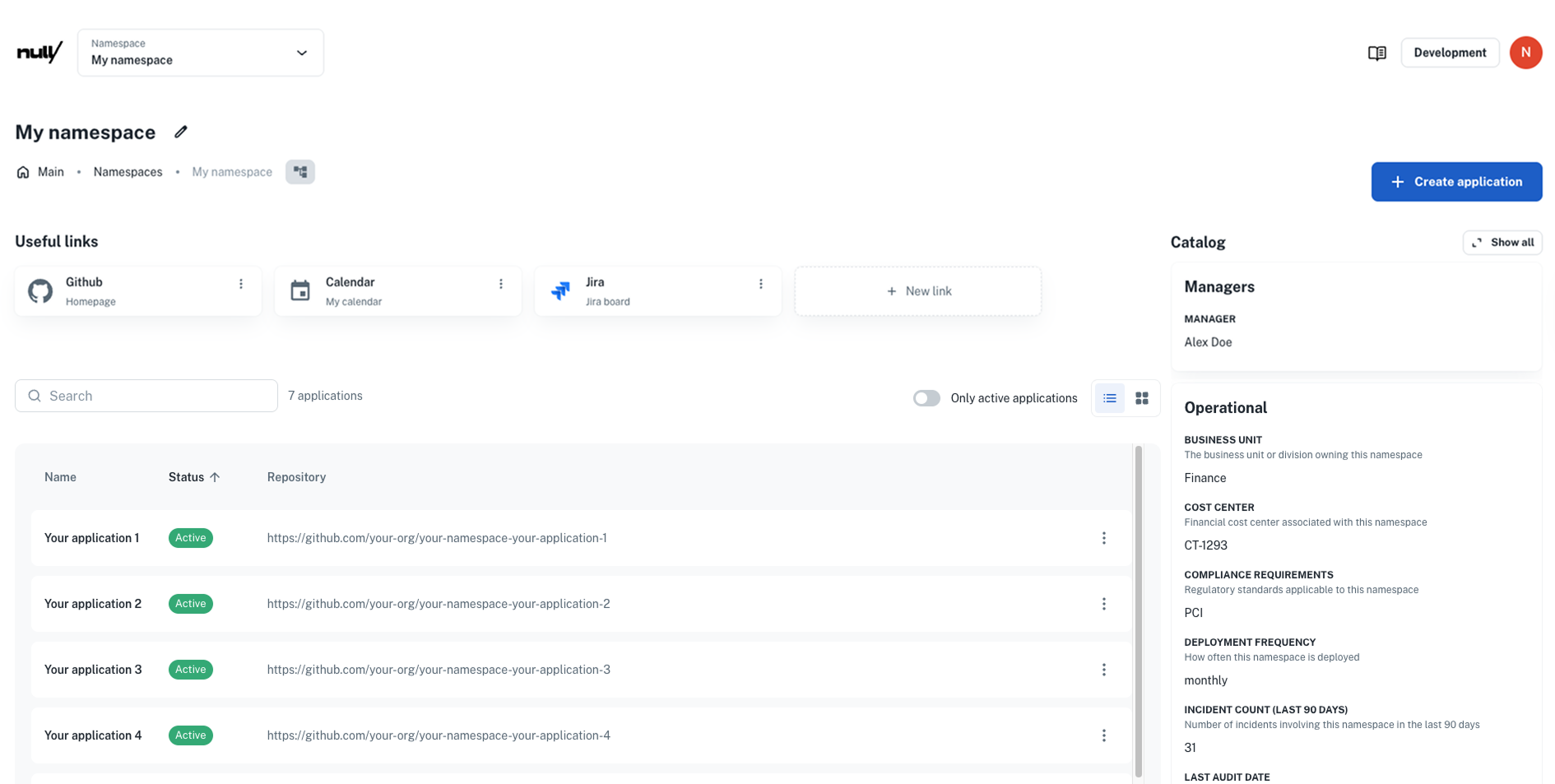
- **Smart forms:** When you create an entity, we’ll auto-generate a form using any matching catalog specs.
- **In-place editing:** After creation, catalog sections appear in the detail view. Click **Show all** to review or
update fields anytime.
- **Built-in validation:** Inputs are always checked against your JSON Schema to ensure clean, reliable data.
With this release, catalogs become a natural and seamless part of the platform experience.
👉 Check the [Catalog docs](/docs/catalog/getting-started) to learn more.
Here’s an example of how you can add useful links by clicking **+ New link**, and how the catalog section shows up in your
namespace:
 ## ✨ Sync service instances effortlessly
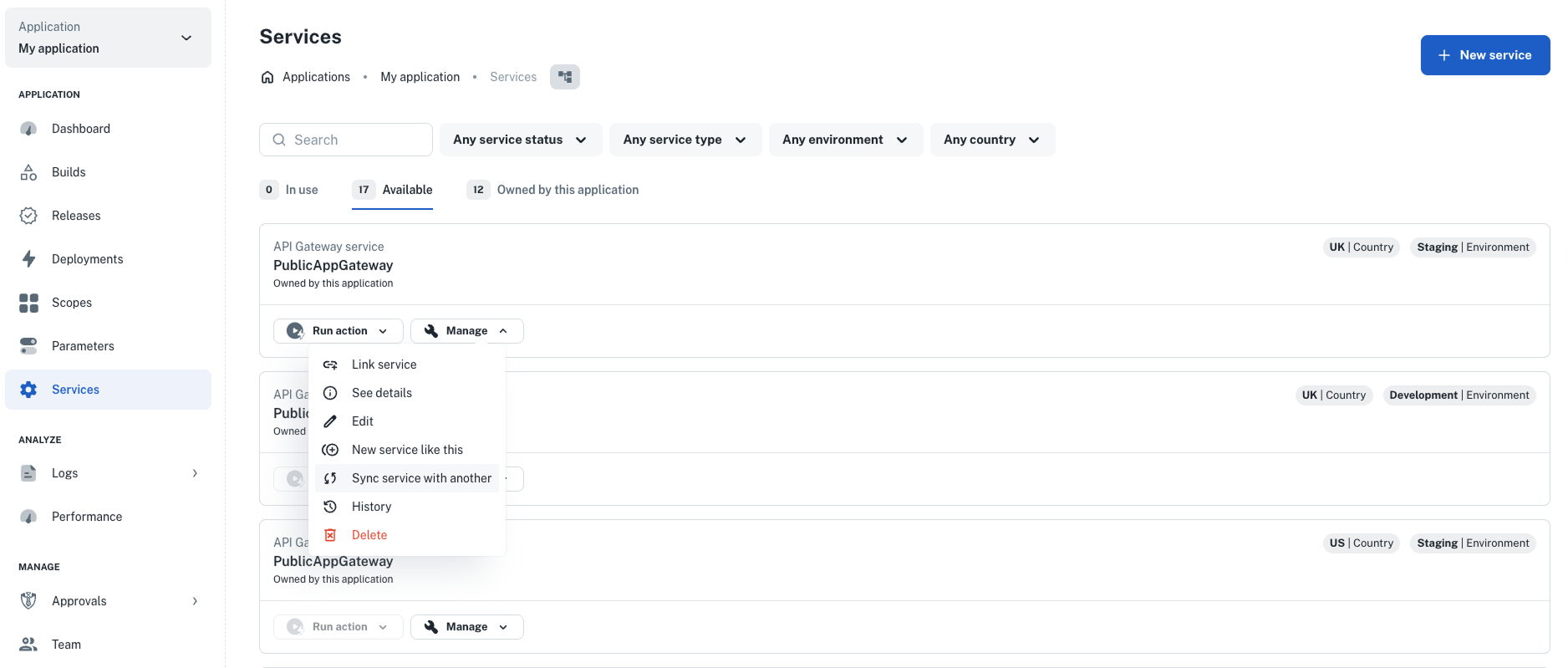
Need to promote updates, roll back changes, or fix drift between environments? You can now **sync one service’s config
with another**, right from the UI.
Perfect for keeping `dev`, `staging`, or `prod` environments aligned without doing it all manually.
How it works:
1. Go to **Development > Services** and open the service to update
2. Click **Manage > Sync service with another**
3. Pick a target service and select the fields to apply
4. Review the diff and click **Create service**
👉 Learn more in our [Sync services](/docs/services/promote-service/sync-service) docs.
## ✨ Sync service instances effortlessly
Need to promote updates, roll back changes, or fix drift between environments? You can now **sync one service’s config
with another**, right from the UI.
Perfect for keeping `dev`, `staging`, or `prod` environments aligned without doing it all manually.
How it works:
1. Go to **Development > Services** and open the service to update
2. Click **Manage > Sync service with another**
3. Pick a target service and select the fields to apply
4. Review the diff and click **Create service**
👉 Learn more in our [Sync services](/docs/services/promote-service/sync-service) docs.
 ## ✨ Import existing services directly from the UI
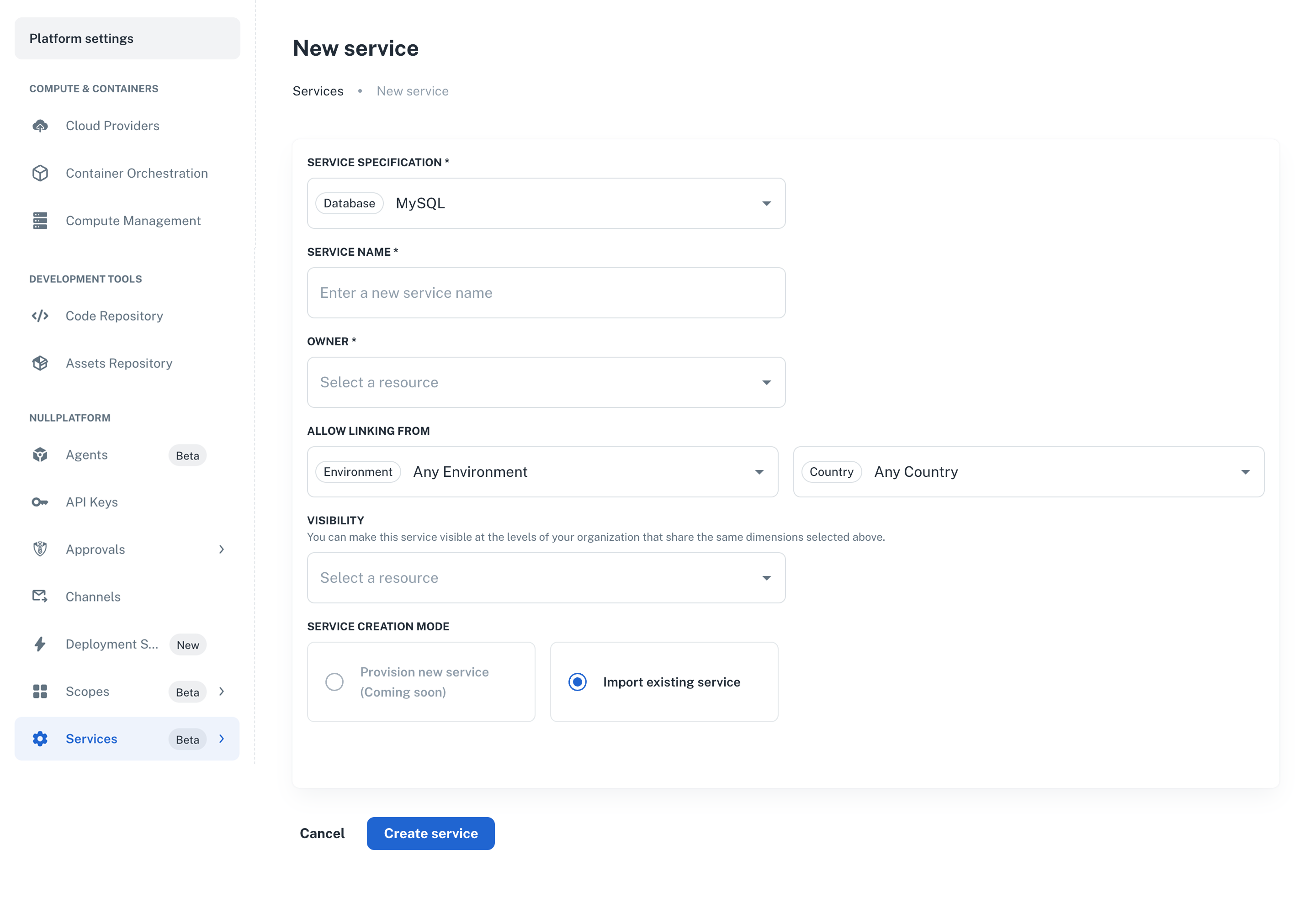
You can now **import a service that already exists** directly from the UI—making it easier to register pre-existing
cloud resources without using the API or CLI.
Instead of triggering provisioning actions, this flow allows you to define where the service is available across your
organization by associating it with specific entities like namespaces or individual applications.
**How it works:**
1. Go to **Platform settings > Services > + New service**
2. Select the service specification
3. Configure service visibility (e.g., at the namespace or application level)
4. Click **Create service**
Once created, the imported service will appear in the **Development > Services** view for the applications you selected.
👉 Learn more in [Importing existing services](/docs/services/import-services).
## ✨ Import existing services directly from the UI
You can now **import a service that already exists** directly from the UI—making it easier to register pre-existing
cloud resources without using the API or CLI.
Instead of triggering provisioning actions, this flow allows you to define where the service is available across your
organization by associating it with specific entities like namespaces or individual applications.
**How it works:**
1. Go to **Platform settings > Services > + New service**
2. Select the service specification
3. Configure service visibility (e.g., at the namespace or application level)
4. Click **Create service**
Once created, the imported service will appear in the **Development > Services** view for the applications you selected.
👉 Learn more in [Importing existing services](/docs/services/import-services).
 ## ✨ Retry failed service actions in one click
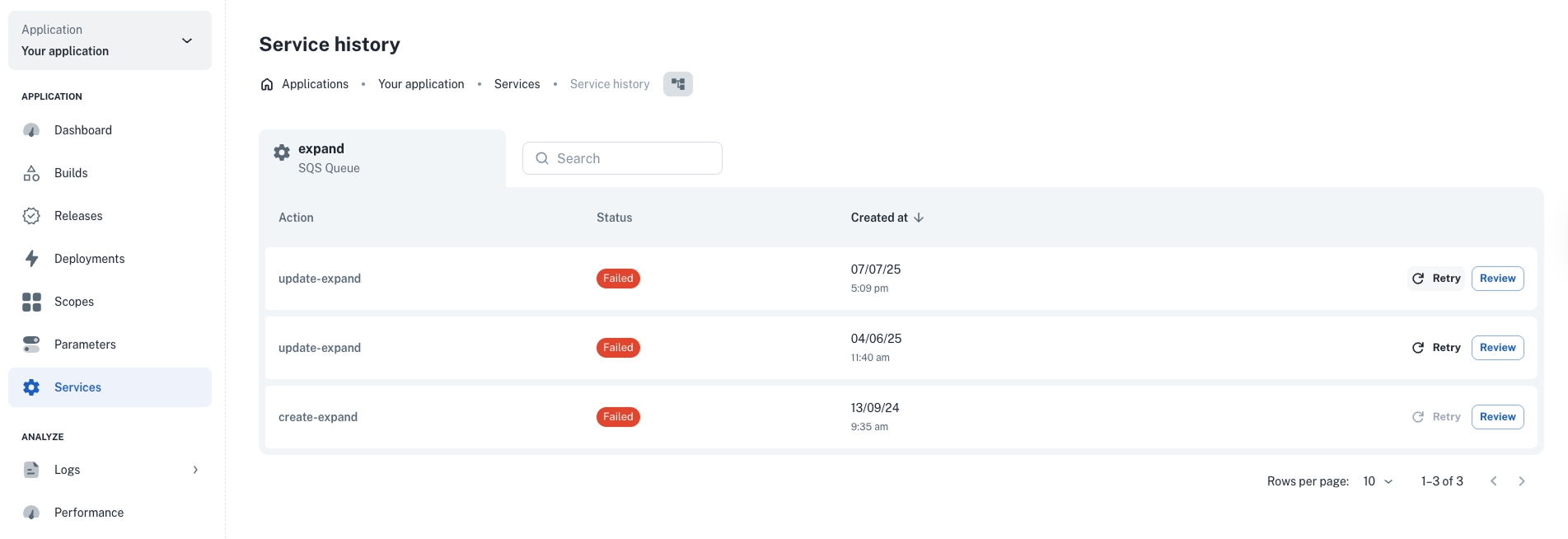
You can now **retry a failed service workflow** directly from the UI. Previously, retrying required a POST request to
the [Create a service action](/docs/api/service-action-create)
endpoint.
**How it works:**
1. Go to **Development > Services**.
2. Click **Manage > History** to view the service that failed.
3. Click **Retry** to re-run the action with the same inputs.
This is especially useful for failures caused by flaky networks, temporary resource issues, or cloud provider hiccups.
👉 Learn more about retryable actions in our [docs](/docs/services/craft-a-service/service-actions#retryable-actions).
## ✨ Retry failed service actions in one click
You can now **retry a failed service workflow** directly from the UI. Previously, retrying required a POST request to
the [Create a service action](/docs/api/service-action-create)
endpoint.
**How it works:**
1. Go to **Development > Services**.
2. Click **Manage > History** to view the service that failed.
3. Click **Retry** to re-run the action with the same inputs.
This is especially useful for failures caused by flaky networks, temporary resource issues, or cloud provider hiccups.
👉 Learn more about retryable actions in our [docs](/docs/services/craft-a-service/service-actions#retryable-actions).
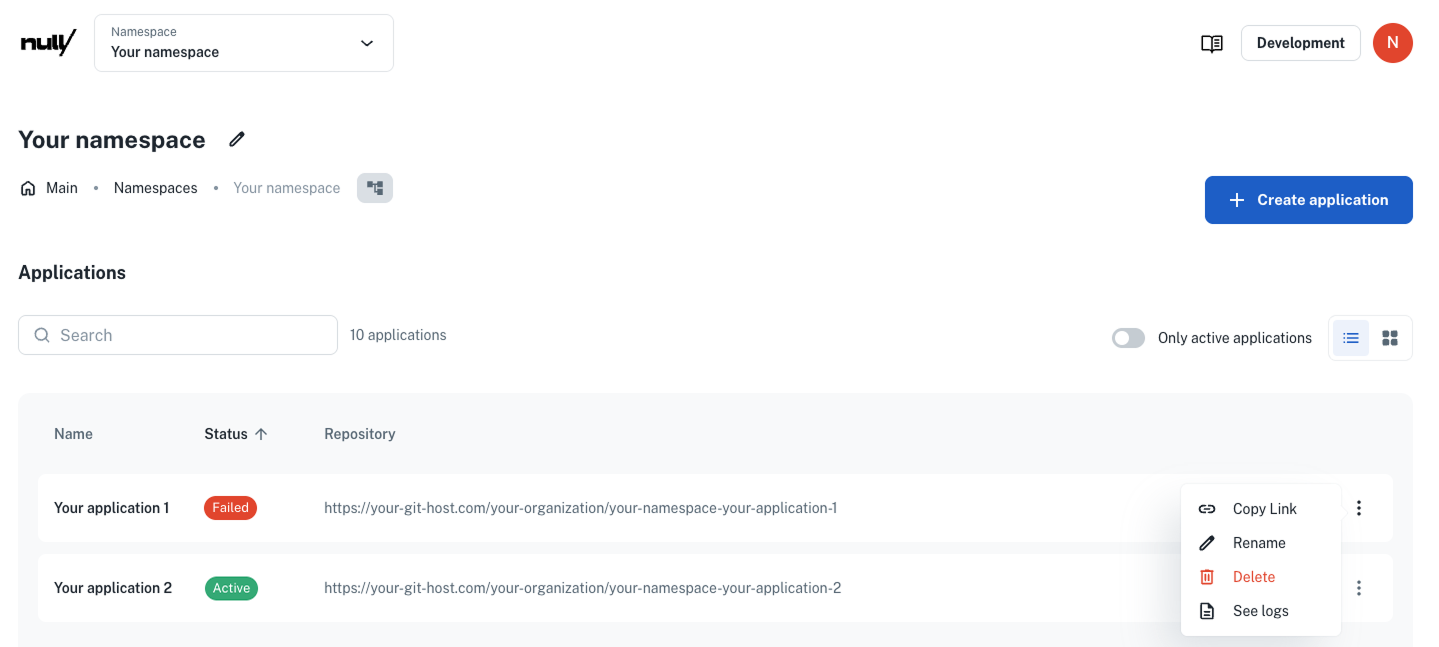
 ## ✨ Clear feedback when applications fail to create
We’ve improved how the platform handles application creation errors—so you’ll know exactly what went wrong. Now, if
something fails (like an expired token or an invalid ECR policy), the UI will show clear and **actionable error
messages** to help you troubleshoot faster.
**How it works:**
When an application fails to create, click the **⋮** menu next to it and select **See logs**.
You’ll now see detailed logs that explain the issue. For example:
```
ERROR - Request failed with status code 401 – response: {"error":"invalid_token","error_description":"Token is expired.
You can either do re-authorization or token refresh."}
```
This makes it much easier to diagnose and fix configuration or environment issues without guesswork.
## ✨ Clear feedback when applications fail to create
We’ve improved how the platform handles application creation errors—so you’ll know exactly what went wrong. Now, if
something fails (like an expired token or an invalid ECR policy), the UI will show clear and **actionable error
messages** to help you troubleshoot faster.
**How it works:**
When an application fails to create, click the **⋮** menu next to it and select **See logs**.
You’ll now see detailed logs that explain the issue. For example:
```
ERROR - Request failed with status code 401 – response: {"error":"invalid_token","error_description":"Token is expired.
You can either do re-authorization or token refresh."}
```
This makes it much easier to diagnose and fix configuration or environment issues without guesswork.
 ## ✨ CLI updates
We’ve released version `2.0.0` of the `nullplatform` CLI—bringing structural improvements, new features, and some
breaking changes.
> ⚠️ This is a **major version release**: specification-related commands have been replaced by the **nested format**
> introduced in version `1.3.0`.
### Breaking changes
- The following commands have been **removed**:
- `np service-specification`
- `np action-specification`
- `np scope-specification`
> Use the nested format instead (e.g., `np service specification`).
- The commands `np category read` and `np category list` have been renamed to:
- `np provider category read`
- `np provider category list`
### Other improvements
- You can now **filter providers by category** when listing them.
- The `np service workflow build-context` command now **auto-selects the most specific provider** when multiple options are available.
👉 See the [CLI docs](/docs/cli) for more info.
---
Wishing you a fantastic month ahead – from the **nullplatform** team! ❤️
## ✨ CLI updates
We’ve released version `2.0.0` of the `nullplatform` CLI—bringing structural improvements, new features, and some
breaking changes.
> ⚠️ This is a **major version release**: specification-related commands have been replaced by the **nested format**
> introduced in version `1.3.0`.
### Breaking changes
- The following commands have been **removed**:
- `np service-specification`
- `np action-specification`
- `np scope-specification`
> Use the nested format instead (e.g., `np service specification`).
- The commands `np category read` and `np category list` have been renamed to:
- `np provider category read`
- `np provider category list`
### Other improvements
- You can now **filter providers by category** when listing them.
- The `np service workflow build-context` command now **auto-selects the most specific provider** when multiple options are available.
👉 See the [CLI docs](/docs/cli) for more info.
---
Wishing you a fantastic month ahead – from the **nullplatform** team! ❤️