July 2026
July updates: a new parameters view in beta with an interactive tour, build your own dynamic reports with a JSON Schema form and SQL-backed queries, query parameter values in the data lake, a redesigned log policies view with a simpler temporary override selector, automatic naming and autogenerated CRUD actions for new service specifications, and CLI 2.8.0 with browser SSO login and a data lake query command.
✨ A new parameters view (beta)
The parameters detail view got a redesign, now rolling out as a beta. Every value is a row in one table you edit in place, a test resolution panel shows which value a deployment would receive, and the version history is right there in the view, so restoring a previous version takes one click.
Take the tour below, the same one you'll find in the platform under What's new:
You can switch back anytime
The new view ships as a beta, and you're never locked in: click Switch to classic view in the page header and you're back on the previous experience instantly. If you do switch back, we'll ask what didn't work for you, and that feedback goes straight to the team improving the view.
👉 See the Parameters docs.
✨ A clearer log policies view
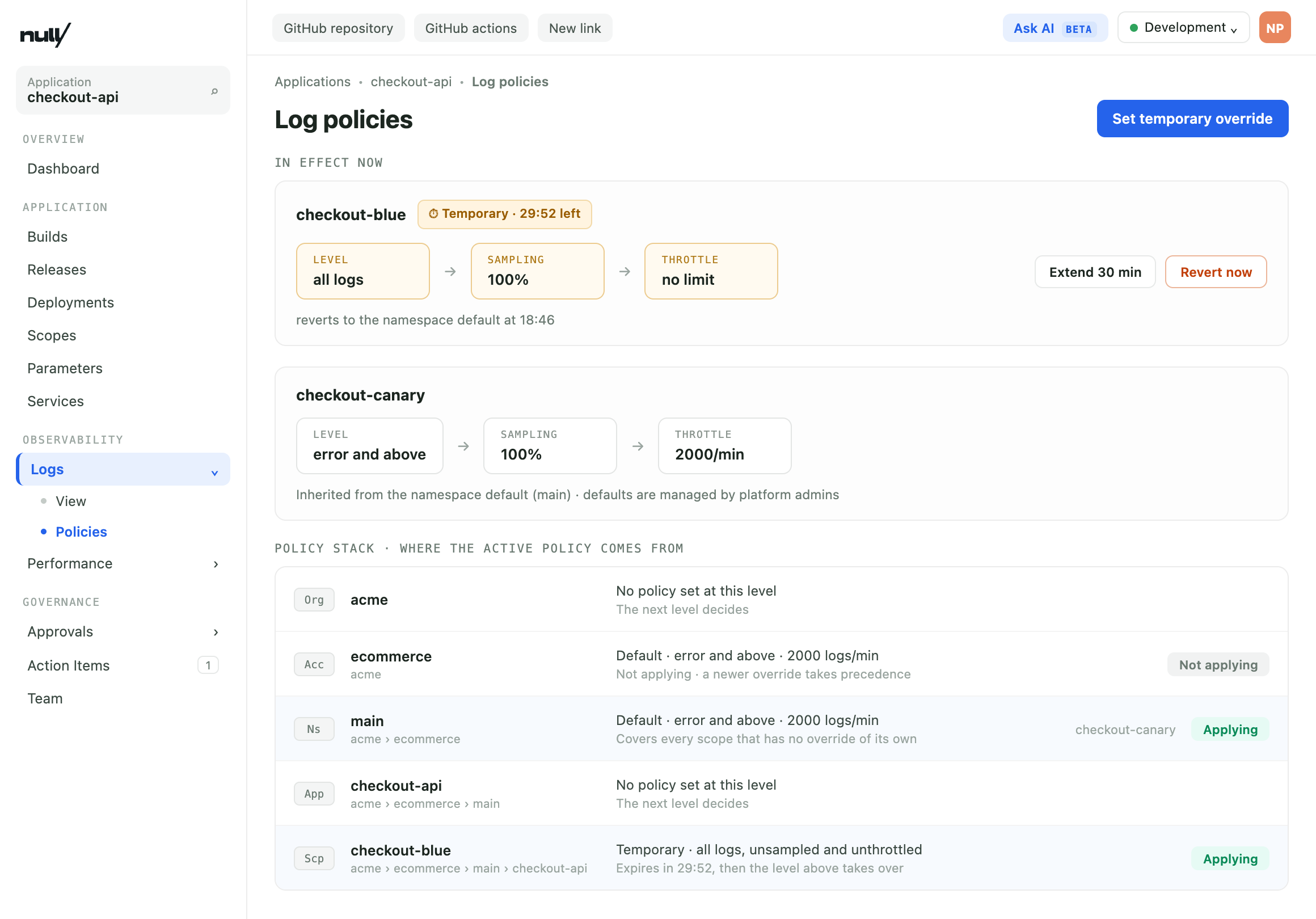
The Log policies page got a redesign. The policies in effect are front and center, one per scope, with any temporary override showing its remaining time. Below them, a new policy stack lists every level that can set a policy (organization, account, namespace, application, and scope) and marks the one that's actually applying. When a scope logs less than you expect, the answer to "where does this limit come from?" is one glance away.
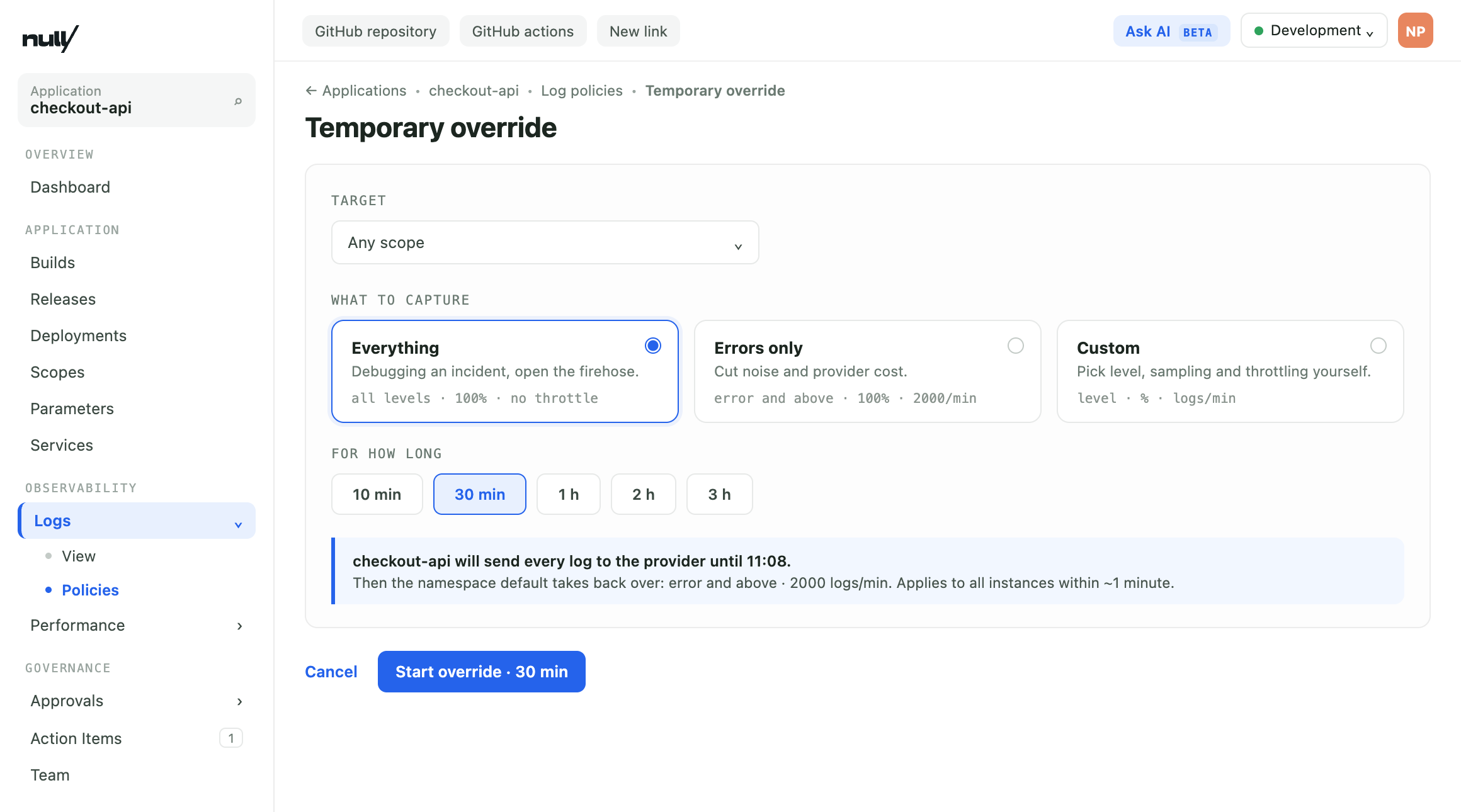
Setting a temporary override also got a new selector: pick what to capture (Everything, Errors only, or Custom), pick for how long, and start it. The override expires on its own and the previous policy takes back over, no cleanup needed.
✨ Build your own dynamic reports
You can now build a dynamic report yourself, defining its input form and queries piece by piece: a JSON Schema form, a UI Schema, and SQL-backed queries. Queries can even react to what the user picks, so choosing a value in one field populates the options of another.
Describe the report to the new np-report skill from the nullplatform AI plugins and it generates the schemas and queries, validates them against your organization's data, and saves the report as a draft for you to review.
Every report has an editable draft and immutable published versions, so you can iterate safely, roll back if a version doesn't work out, and keep a report private or share it with your whole organization. Once published, it surfaces in Insights right next to the dashboards you create with the AI dashboard builder.
👉 See Dynamic reports.
✨ Query parameter values in the data lake
Parameter values used to be redacted in the data lake: every row of parameters_parameter_value carried [REDACTED] instead of its content. Now only parameters marked as secret are redacted, and every other value is there to query. Configuration questions become plain SQL: which applications set a variable, which value applies in each environment, or which scopes still point to an old endpoint.
SELECT p.name, v.value, v.dimensions
FROM parameters_parameter AS p
JOIN parameters_parameter_value AS v ON v.parameter_id = p.id
WHERE p.name = 'LOG_LEVEL'
Secrets never reach the lake: the pipeline that fills it has no permission to read them, so a secret's content never leaves the parameters service.
👉 See the table reference for the full schema.
✨ Naming every service or link by hand is no longer a requirement
Service and link specifications now support a use_default_naming flag: when it's enabled, the name field becomes optional and nullplatform generates one from the specification name plus a short suffix (like redis a4f3). If the specification's attributes schema defines its own name property, that value is used instead.
New specifications get automatic naming out of the box. Existing specifications are untouched and keep requiring a name, and the creation form in the dashboard adapts to the flag on its own.
👉 See the Service specification docs.
✨ Autogenerated CRUD actions are now the default
You no longer need to define the create, update, and delete actions when you create a service or link specification. New specifications now default to use_default_actions: true: nullplatform generates those three actions from the specification's attributes schema, and regenerates them whenever the schema changes. Existing specifications keep the value they have saved, so nothing changes for them.
For example, creating this specification is all it takes to get working create, update, and delete actions, each taking plan as input:
{
  "name": "Redis",
  "visible_to": ["organization=1:account=2"],
  "attributes": {
    "schema": {
      "type": "object",
      "properties": {
        "plan": { "type": "string", "enum": ["small", "medium", "large"] }
      }
    }
  }
}
On new specifications you can still add custom actions, but the generated create, update, and delete can't be overridden. If you need to define your own versions of those three actions, set use_default_actions: false explicitly when creating the specification.
👉 See the Action specifications docs.
✨ CLI 2.8.0
The CLI shipped 2.8.0: interactive browser login against your organization's SSO, username and password login for organizations without SSO, and a new np query command that runs read-only SQL against the data lake.
👉 See the CLI 2.8.0 release notes for the full list.
That's all for July, from the nullplatform team! ❤️