---
date: 2025-06-30T00:00:00.000Z
tags:
- services
- scopes
- parameters
- policies
- api
- providers
- approvals
- iac
- monthly
toc_max_heading_level: 2
doc_id: c63a5915-574a-44fd-89fb-7258bb26908d
description: >-
June changelog featuring new service creation from existing configs and scope
recreation capabilities for Kubernetes recovery.
keywords:
- service creation
- Kubernetes
- scope recreation
- changelog
- nullplatform
title: June 2025
slug: june-2025
---
June changelog featuring new service creation from existing configs and scope recreation capabilities for Kubernetes recovery.
{/* truncate */}
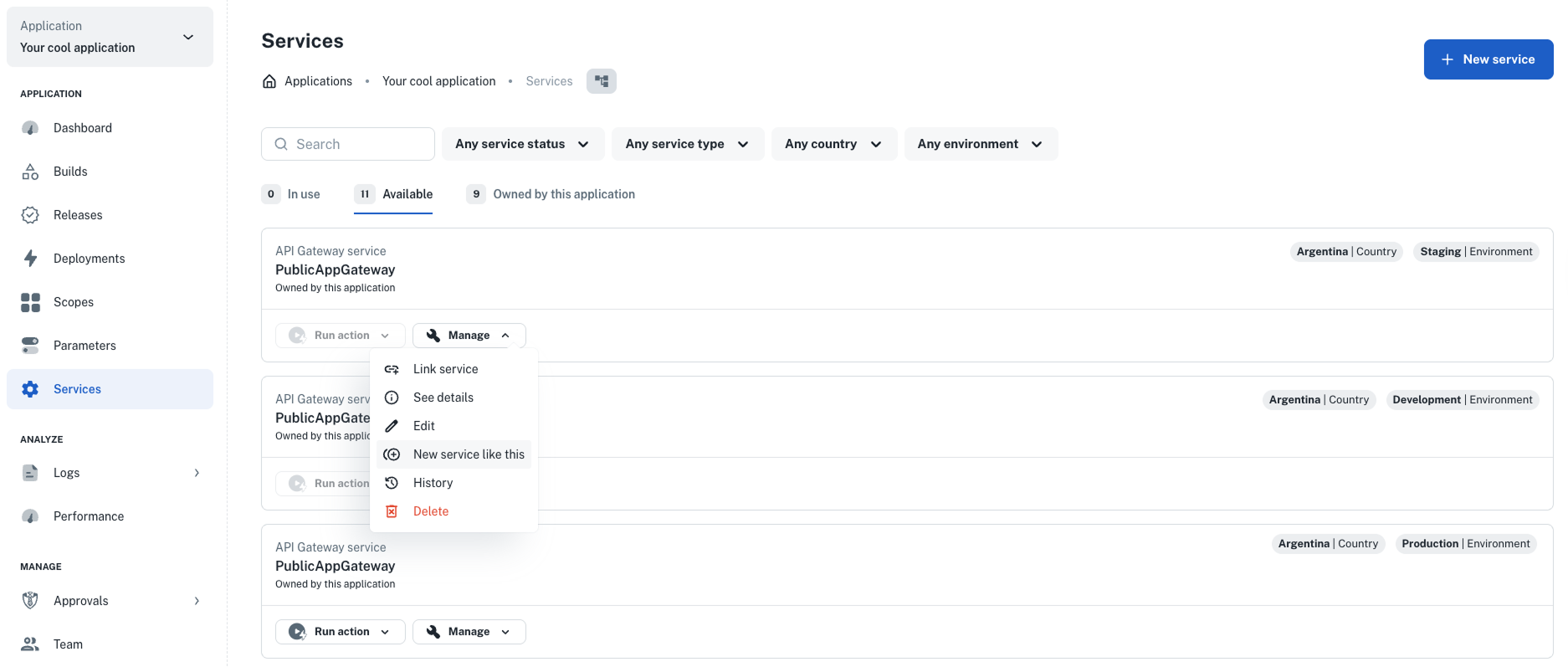
## ✨ Create services based on existing ones
You can now **create a new service** using the configuration of one that already exists—making it **easier and faster to
promote services** across environments, with fewer chances for mistakes.
**How it works**
Say you want to set up a new "API Gateway" service that’s similar to one you’ve already created—but for a different
country or with a different set of dimensions. You can now do that right from the UI:
1. Head to your application’s **Development** dashboard and open the **Services** view.
2. Find the service you want to reuse and click **Manage > New service like this**.
3. A editable form will open with the original service’s details already filled in.
4. Make any changes you need—like updating the target dimensions or environment.
5. Click **Create service** to finish up.
That’s it! You’ve just created a new service based on one you already know works.
👉 For more info, see our docs on
[creating services based on existing ones](/docs/services/promote-service/create-service-from-service).
 ## ✨ Recreate your scopes
If your Kubernetes cluster encounters issues—like a restart—that cause a scope to stop working, you can now
**recreate the scope** with a single action.
This new feature simplifies recovery by automating the teardown and recreation process.
**How it works:**
- Recreating a scope **deletes the broken scope** and **rebuilds it using the same configuration**.
- The recreated scope retains:
- The **same scope ID and slug**
- Its **original configuration**
- Any **custom domain and DNS settings**
:::warning Important:
- Recreating a scope **causes downtime**.
- It may leave behind **residual infrastructure** if the original scope was in an unstable state.
- The new scope is **not automatically deployed**—you’ll need to deploy it manually.
:::
👉 Learn more in our
[Recreate Kubernetes scopes](https://docs.nullplatform.com/docs/agent-backed-scopes/troubleshooting/recreate-scopes) docs.
## ✨ New Helm chart for the nullplatform agent
We’ve launched a **new Helm chart** to help you install and manage the `nullplatform-agent` in your clusters more
easily.
The **nullplatform agent** powers automation for services and agent-backed scopes, handling builds, deployments, and
more—based on the scopes it’s tagged to manage.
What’s new:
- **Git integration made easy** – run automation commands directly from your private GitHub repo.
- **Configurable setup** – provide secrets and settings using standard Helm values.
- **Targeted control** – use tags to decide which scopes or environments each agent should manage.
- **Resource tuning** – set memory and CPU limits, or enable autoscaling when needed.
If you're managing services or scopes across different clusters or environments, this chart gives you more control with
less setup.
👉 Get started with the [Agent chart docs](/docs/agent/installation).
## ✨ New UI views to browse all services and agent-backed scopes
You can now view **all services and agent-backed scopes** across your organization from two new UI pages—no more clicking
through individual applications.
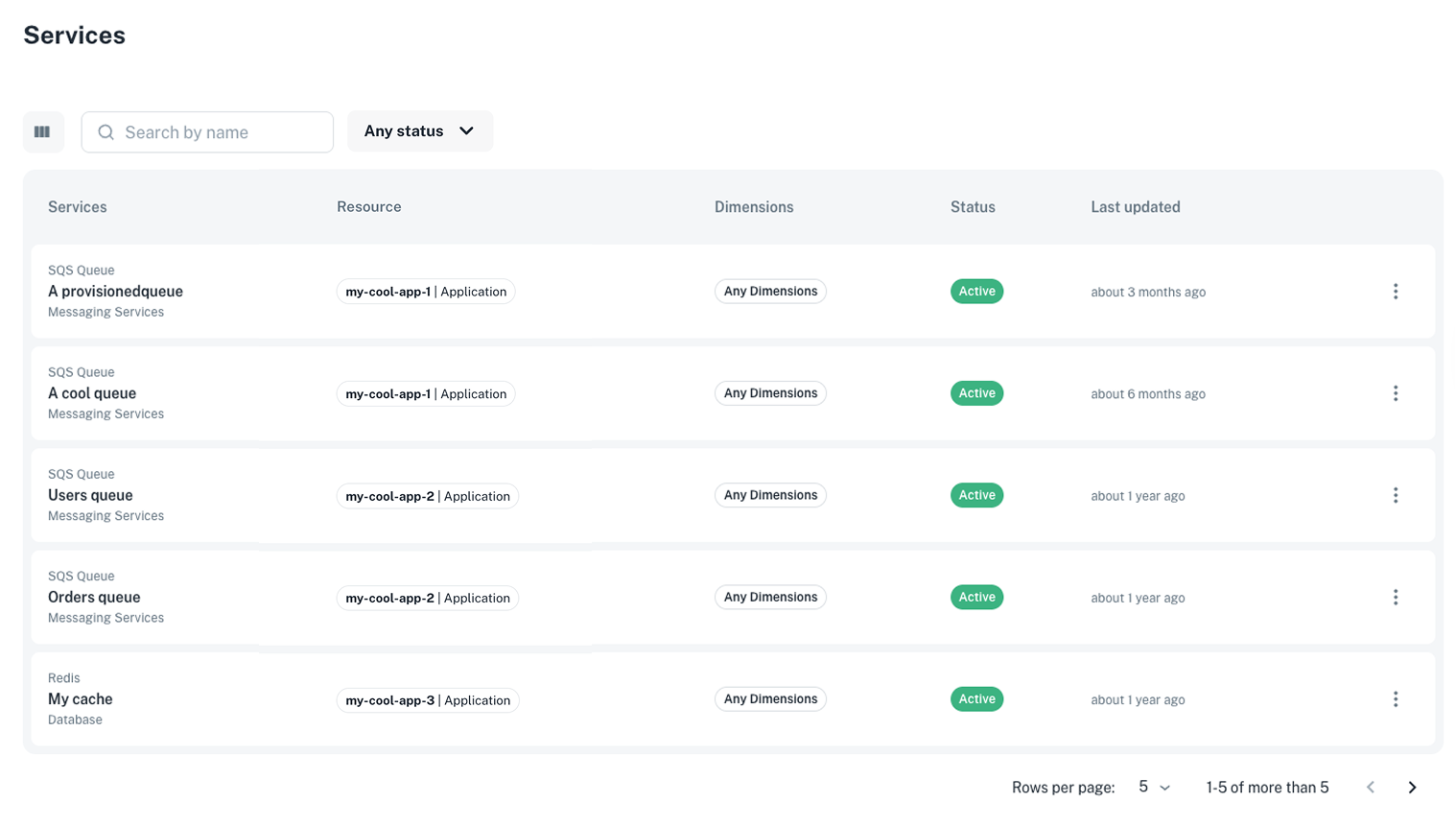
### List services view
Navigate to **Platform settings > Services > List** to:
- Browse all services in one place.
- View key details like name, status, dimensions, and linked resources.
- Take quick actions:
- **Edit** the service instance
- Open the **service specification** dashboard
- **Delete** the service, if needed
## ✨ Recreate your scopes
If your Kubernetes cluster encounters issues—like a restart—that cause a scope to stop working, you can now
**recreate the scope** with a single action.
This new feature simplifies recovery by automating the teardown and recreation process.
**How it works:**
- Recreating a scope **deletes the broken scope** and **rebuilds it using the same configuration**.
- The recreated scope retains:
- The **same scope ID and slug**
- Its **original configuration**
- Any **custom domain and DNS settings**
:::warning Important:
- Recreating a scope **causes downtime**.
- It may leave behind **residual infrastructure** if the original scope was in an unstable state.
- The new scope is **not automatically deployed**—you’ll need to deploy it manually.
:::
👉 Learn more in our
[Recreate Kubernetes scopes](https://docs.nullplatform.com/docs/agent-backed-scopes/troubleshooting/recreate-scopes) docs.
## ✨ New Helm chart for the nullplatform agent
We’ve launched a **new Helm chart** to help you install and manage the `nullplatform-agent` in your clusters more
easily.
The **nullplatform agent** powers automation for services and agent-backed scopes, handling builds, deployments, and
more—based on the scopes it’s tagged to manage.
What’s new:
- **Git integration made easy** – run automation commands directly from your private GitHub repo.
- **Configurable setup** – provide secrets and settings using standard Helm values.
- **Targeted control** – use tags to decide which scopes or environments each agent should manage.
- **Resource tuning** – set memory and CPU limits, or enable autoscaling when needed.
If you're managing services or scopes across different clusters or environments, this chart gives you more control with
less setup.
👉 Get started with the [Agent chart docs](/docs/agent/installation).
## ✨ New UI views to browse all services and agent-backed scopes
You can now view **all services and agent-backed scopes** across your organization from two new UI pages—no more clicking
through individual applications.
### List services view
Navigate to **Platform settings > Services > List** to:
- Browse all services in one place.
- View key details like name, status, dimensions, and linked resources.
- Take quick actions:
- **Edit** the service instance
- Open the **service specification** dashboard
- **Delete** the service, if needed
 ### List scopes view
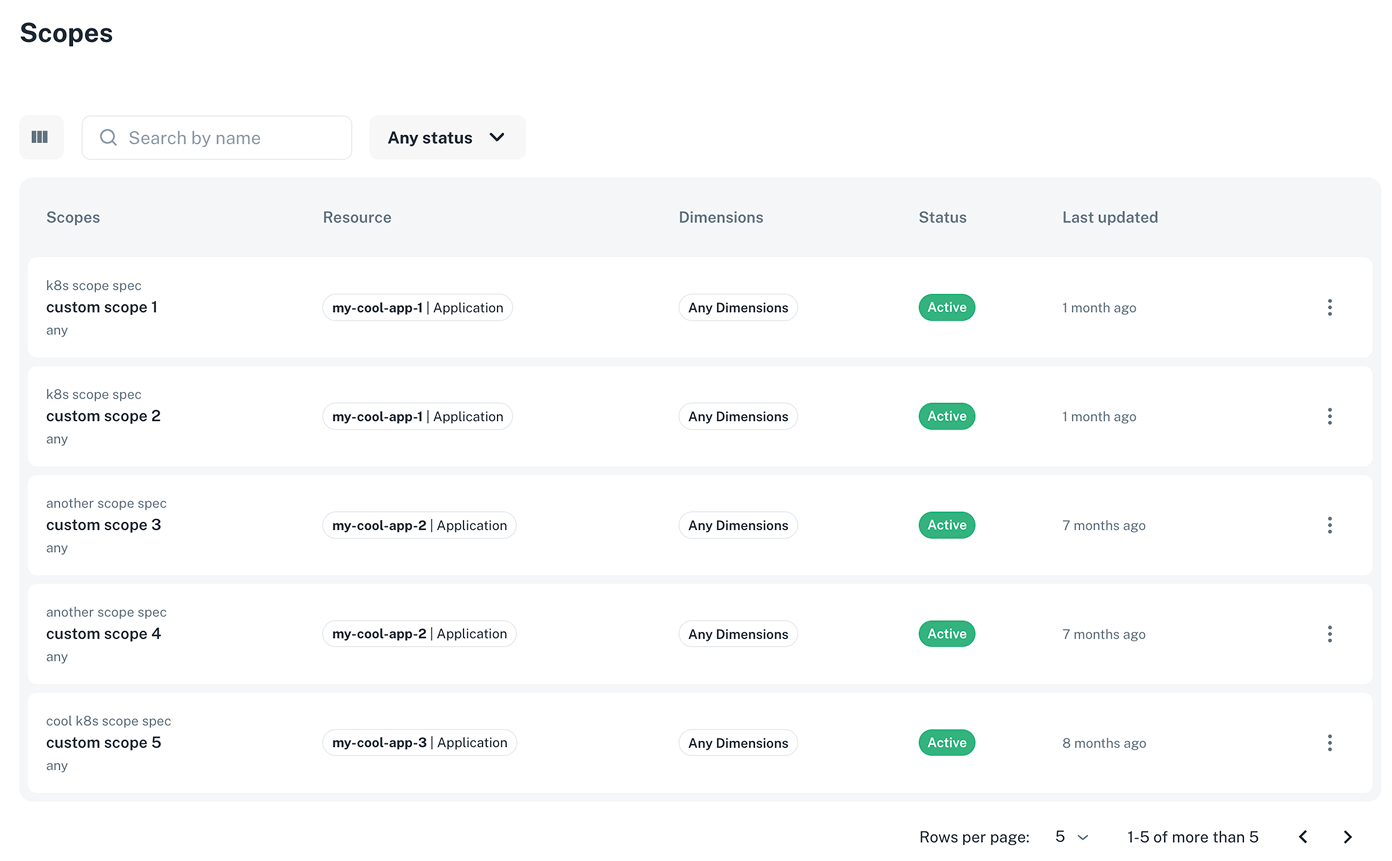
From the **List scopes view**, you can:
Navigate to **Platform settings > Scopes > List** to:
- Browse all agent-backed scopes in your organization.
- View their name, status, dimensions, and associated resources.
- Take quick actions:
- Open the **agent-backed specification** dashboard
- **Delete** the scope, if needed
### List scopes view
From the **List scopes view**, you can:
Navigate to **Platform settings > Scopes > List** to:
- Browse all agent-backed scopes in your organization.
- View their name, status, dimensions, and associated resources.
- Take quick actions:
- Open the **agent-backed specification** dashboard
- **Delete** the scope, if needed
 ## ✨ New policy view for approvals
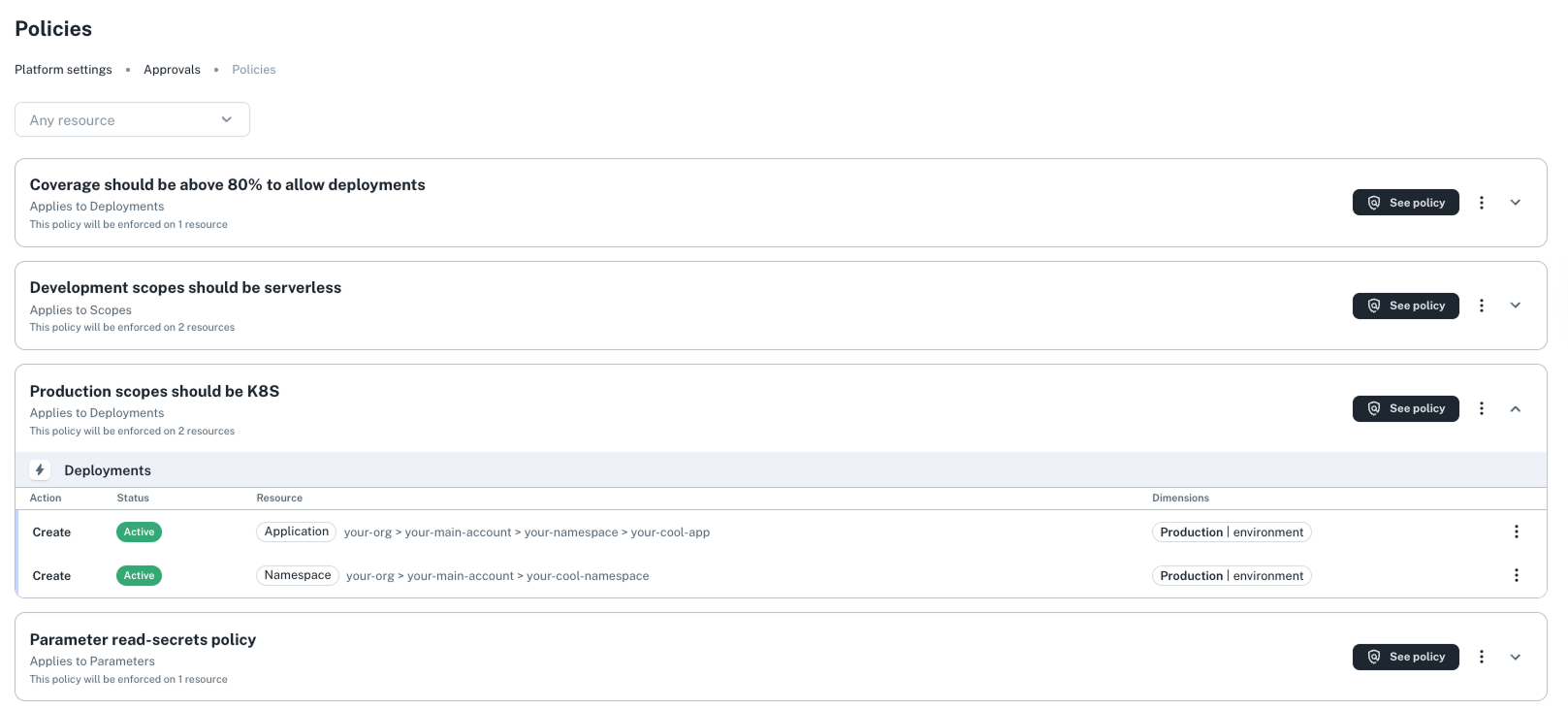
You can now explore and review your approval policies in a dedicated **Policies view**, giving you more visibility into
your policy configurations.
- Just navigate to **Platform settings > Approvals > Policies**.
This gives you full visibility into your organization’s approval policies—helping teams stay aligned and compliant.
With this update, you can:
- Browse all existing policies and their match rules
- See which entities (like scopes or services) each policy applies to
- Understand how approval logic is enforced across workflows
👉 Learn more in our [Policies docs](https://docs.nullplatform.com/docs/approvals/policies).
## ✨ New policy view for approvals
You can now explore and review your approval policies in a dedicated **Policies view**, giving you more visibility into
your policy configurations.
- Just navigate to **Platform settings > Approvals > Policies**.
This gives you full visibility into your organization’s approval policies—helping teams stay aligned and compliant.
With this update, you can:
- Browse all existing policies and their match rules
- See which entities (like scopes or services) each policy applies to
- Understand how approval logic is enforced across workflows
👉 Learn more in our [Policies docs](https://docs.nullplatform.com/docs/approvals/policies).
 ## ✨ Updates to our IaC provider plugin
We’ve improved our **Infrastructure as Code (IaC)** provider plugin to better support approval workflows.
New resource:
- `approval_action_policy_association` – enables one-to-one associations between an approval action and a policy.
This gives you tighter governance and automation across deployments.
👉 Check it out on our
[IaC plugin page](https://registry.terraform.io/providers/nullplatform/nullplatform/latest/docs/resources/approval_action_policy_association).
## ✨ List calls in the API now include total results
Most API **list** endpoints now return a `total` field—showing the number of results that match your query, even across
paginated pages.
This helps you quickly understand dataset sizes and improve pagination UX.
Example response:
```json
{
"paging": {
"total": 30,
"offset": 0,
"limit": 200
},
"results": [...]
}
```
👉 Explore the [API reference](/docs/api-getting-started) to see the latest.
## ✨ Compare parameter values via the API
Back in March, we introduced the ability to [see parameter changes before deploying a scope](/changelog/march-2025#see-changes-to-parameters-before-deploying-a-scope). Now, we’ve added a **dedicated API endpoint** to
support the same capability—making it easier to integrate into custom workflows.
Use this when:
- Troubleshooting unexpected behavior between environments
- Auditing or reviewing parameter changes
**How it works:**
The response includes a `diff_type` value:
- `"changed"` – the values are different
- `"unchanged"` – the values are the same
- `"not_comparable"` – the values couldn’t be compared
Example:
```json
{
"diff_type": "changed"
}
```
👉 See how it works in our [API reference](/docs/api/parameter-values-compare).
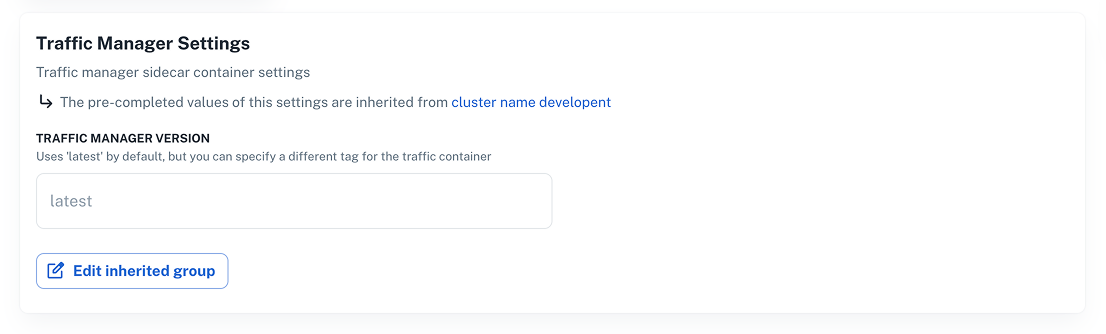
## ✨ New version support for EKS traffic manager
We now support the latest version of **Traffic Manager** for **Amazon EKS** clusters.
**How to set it up:**
1. Go to **Platform settings > Container orchestration**.
2. Click **+ New configuration** and select **EKS**.
3. Fill in your configuration details.
4. Click **Additional configurations > Traffic Manager Settings**.
5. Click **Create configuration** to save your setup.
👉 Check out the [Supported integrations](/docs/providers/supported-integrations) docs for full setup details.
## ✨ Updates to our IaC provider plugin
We’ve improved our **Infrastructure as Code (IaC)** provider plugin to better support approval workflows.
New resource:
- `approval_action_policy_association` – enables one-to-one associations between an approval action and a policy.
This gives you tighter governance and automation across deployments.
👉 Check it out on our
[IaC plugin page](https://registry.terraform.io/providers/nullplatform/nullplatform/latest/docs/resources/approval_action_policy_association).
## ✨ List calls in the API now include total results
Most API **list** endpoints now return a `total` field—showing the number of results that match your query, even across
paginated pages.
This helps you quickly understand dataset sizes and improve pagination UX.
Example response:
```json
{
"paging": {
"total": 30,
"offset": 0,
"limit": 200
},
"results": [...]
}
```
👉 Explore the [API reference](/docs/api-getting-started) to see the latest.
## ✨ Compare parameter values via the API
Back in March, we introduced the ability to [see parameter changes before deploying a scope](/changelog/march-2025#see-changes-to-parameters-before-deploying-a-scope). Now, we’ve added a **dedicated API endpoint** to
support the same capability—making it easier to integrate into custom workflows.
Use this when:
- Troubleshooting unexpected behavior between environments
- Auditing or reviewing parameter changes
**How it works:**
The response includes a `diff_type` value:
- `"changed"` – the values are different
- `"unchanged"` – the values are the same
- `"not_comparable"` – the values couldn’t be compared
Example:
```json
{
"diff_type": "changed"
}
```
👉 See how it works in our [API reference](/docs/api/parameter-values-compare).
## ✨ New version support for EKS traffic manager
We now support the latest version of **Traffic Manager** for **Amazon EKS** clusters.
**How to set it up:**
1. Go to **Platform settings > Container orchestration**.
2. Click **+ New configuration** and select **EKS**.
3. Fill in your configuration details.
4. Click **Additional configurations > Traffic Manager Settings**.
5. Click **Create configuration** to save your setup.
👉 Check out the [Supported integrations](/docs/providers/supported-integrations) docs for full setup details.
 ---
Wishing you a fantastic month ahead – from the **nullplatform** team! ❤️
---
Wishing you a fantastic month ahead – from the **nullplatform** team! ❤️