---
date: 2025-03-31T00:00:00.000Z
tags:
- api reference
- cli
- providers
- parameters
- entity hooks
- custom domains
- roles
- monthly
toc_max_heading_level: 3
doc_id: dad4fce8-1738-46b9-97d4-f7bfaa18874a
description: >-
March updates: simplified role assignments, custom domains for scopes, and new
CLI examples in API reference.
keywords:
- role management
- custom domains
- CLI
- permissions
- API reference
title: March 2025
slug: march-2025
---
March updates: simplified role assignments, custom domains for scopes, and new CLI examples in API reference.
{/* truncate */}
## ✨ Simplified role assignment
We've made it easier to manage roles and permissions in nullplatform:
- **Admin** roles now automatically include **Developer** permissions.
- All roles (**Admin, Developer, Ops, and SecOps**) now inherently include the **Member** role.
Before, Admin users in an application might have needed additional Developer permissions for actions like creating builds or initiating deployments. With this update, that’s no longer necessary—Admins can now perform Developer actions without extra configuration.
What you need to know:
- This update is now the **default behavior, applies retroactively, and requires no action on your part**."
- It only applies to the **Admin → Developer** and any **role → Member** relationships.
Check our [Roles](/docs/authorization/roles) docs for more info.
## ✨ New feature: custom domains for your scopes
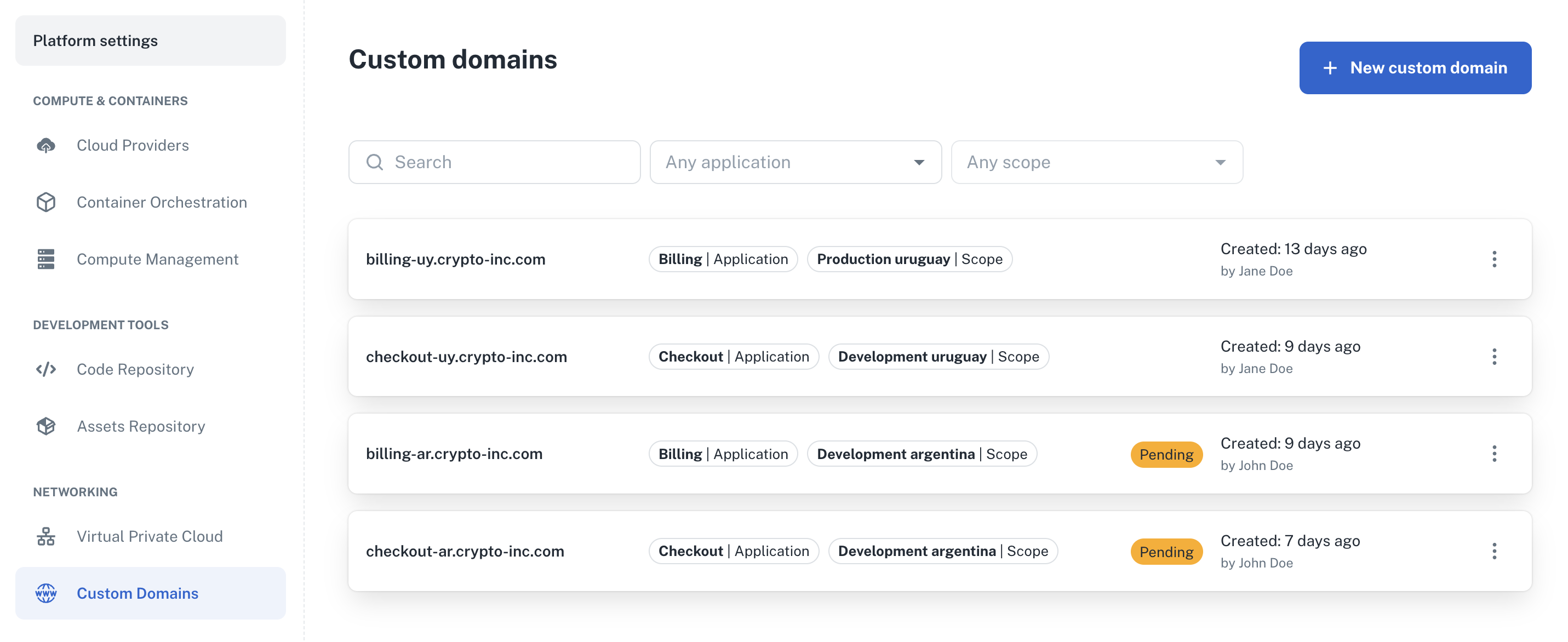
You can now create and associate custom domains with your scopes. These **custom domains won't replace the automatically
generated domain** but serve as an additional option, ideal for improving branding and user experience in public-facing applications.
How to configure custom domains:
- To set up a custom domain, simply navigate to **Platform settings > Networking > Custom Domains** and follow the configuration steps.
:point_right: For more info, see our [Custom domains](/docs/scopes-legacy/custom-domains/) docs.
 ## ✨ New CLI examples in our API reference
You can now check and test the **nullplatform CLI** in our [API reference](/docs/api-getting-started) for each supported
endpoint. This update streamlines testing and integration workflows, making it easier to interact with nullplatform programmatically.
How to try it out:
- Just find the endpoint you need in the API reference.
- Authenticate, enter your parameters, and test the CLI commands.
👉 Explore our [API reference](/docs/api-getting-started).
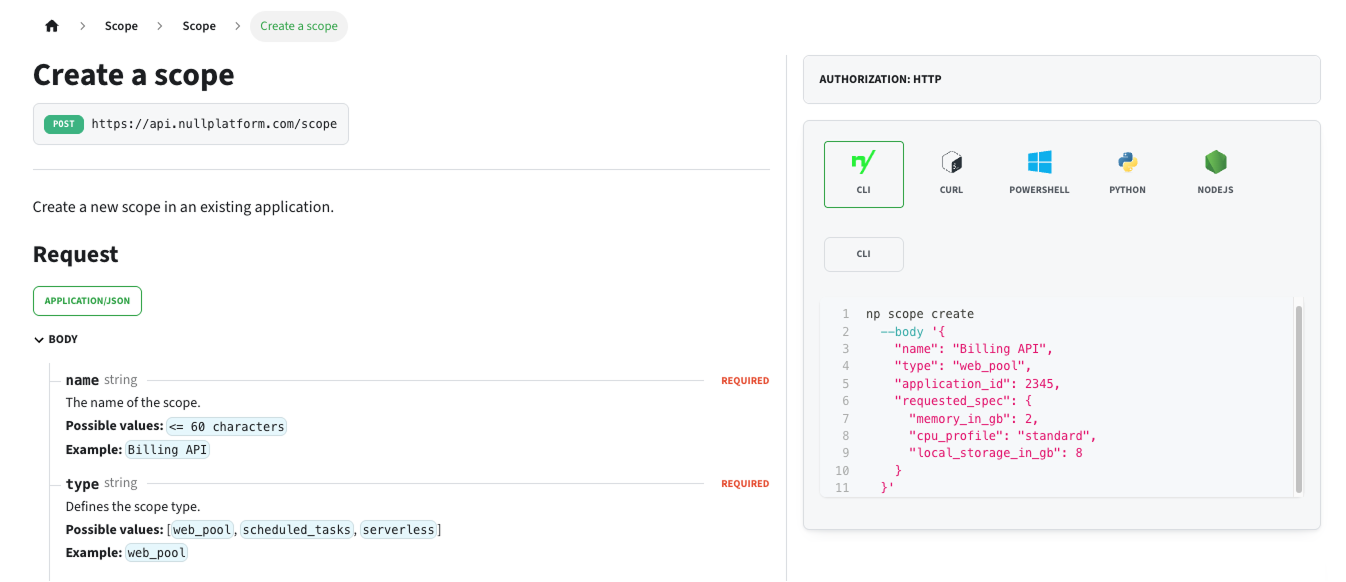
Here’s an example from our API reference showing how to create a scope using the CLI:
## ✨ New CLI examples in our API reference
You can now check and test the **nullplatform CLI** in our [API reference](/docs/api-getting-started) for each supported
endpoint. This update streamlines testing and integration workflows, making it easier to interact with nullplatform programmatically.
How to try it out:
- Just find the endpoint you need in the API reference.
- Authenticate, enter your parameters, and test the CLI commands.
👉 Explore our [API reference](/docs/api-getting-started).
Here’s an example from our API reference showing how to create a scope using the CLI:
 ## ✨ More updates to our CLI
We've added new features and improvements to our CLI:
### Entity support
- **Custom domains** and **Entity hooks** support – You can now create and manage custom domains and entity hooks directly from the CLI.
- Added support for `np application patch` to update your applications.
- We renamed `np scope-type` to `np scope type` for consistency with other commands.
👉 Check out our [CLI docs](/docs/cli) and explore examples in our [API reference](/docs/api-getting-started).
### Skip login when pushing images via GitHub Actions
You can now push images to GitHub Container Registry (GHCR) using GitHub Actions without configuring credentials.
Authentication is handled through the token automatically provided by GitHub Actions.
What you need to know:
- No manual login required: The login step is now explicit and uses the GitHub Actions-provided `TOKEN`.
- Required permissions: Ensure your workflow has `packages:write` permissions.
- Provisioner configuration: While credentials aren't needed, you must still configure the provisioner for `docker_server`, as it is used to build the `repository_url` during application creation.
👉 See our [Providers](/docs/providers/overview) docs for more info.
## ✨ Updates to parameters
### Store your parameters in your own HCP Vault
We’re beta testing an integration with HCP Vault that allows you to store application parameters in your own
infrastructure—while keeping all the perks of nullplatform, such as specialization by dimensions or scope, versioning, and more.
### See changes to parameters before deploying a scope
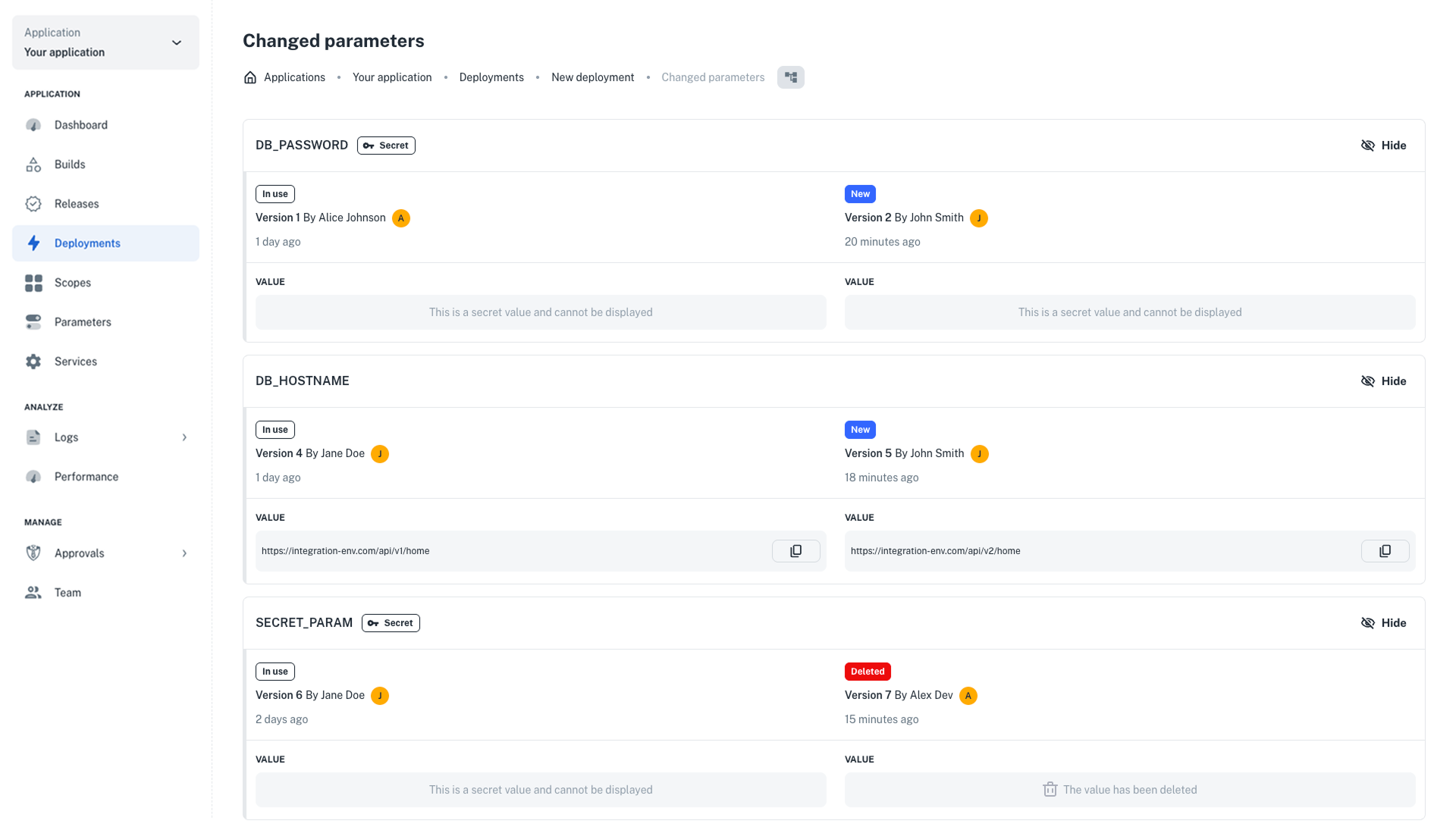
Before deploying a scope, nullplatform now highlights if there are outdated parameters, directly in the UI. From there, you can review the changes between deployments and decide whether to redeploy the scope and update the parameters.
This update helps prevent application failures caused by unexpected parameter changes.
## ✨ More updates to our CLI
We've added new features and improvements to our CLI:
### Entity support
- **Custom domains** and **Entity hooks** support – You can now create and manage custom domains and entity hooks directly from the CLI.
- Added support for `np application patch` to update your applications.
- We renamed `np scope-type` to `np scope type` for consistency with other commands.
👉 Check out our [CLI docs](/docs/cli) and explore examples in our [API reference](/docs/api-getting-started).
### Skip login when pushing images via GitHub Actions
You can now push images to GitHub Container Registry (GHCR) using GitHub Actions without configuring credentials.
Authentication is handled through the token automatically provided by GitHub Actions.
What you need to know:
- No manual login required: The login step is now explicit and uses the GitHub Actions-provided `TOKEN`.
- Required permissions: Ensure your workflow has `packages:write` permissions.
- Provisioner configuration: While credentials aren't needed, you must still configure the provisioner for `docker_server`, as it is used to build the `repository_url` during application creation.
👉 See our [Providers](/docs/providers/overview) docs for more info.
## ✨ Updates to parameters
### Store your parameters in your own HCP Vault
We’re beta testing an integration with HCP Vault that allows you to store application parameters in your own
infrastructure—while keeping all the perks of nullplatform, such as specialization by dimensions or scope, versioning, and more.
### See changes to parameters before deploying a scope
Before deploying a scope, nullplatform now highlights if there are outdated parameters, directly in the UI. From there, you can review the changes between deployments and decide whether to redeploy the scope and update the parameters.
This update helps prevent application failures caused by unexpected parameter changes.
 ## ✨ Improvements to supported providers
### Cluster authentication modes for Azure Kubernetes Service
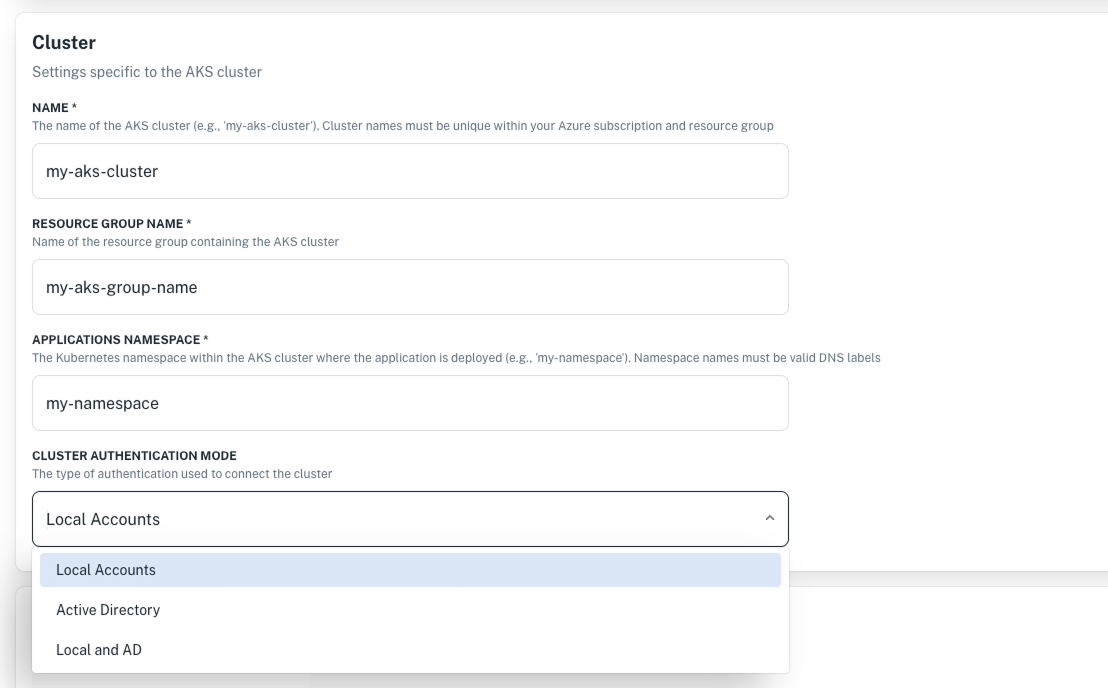
Now you can configure the authentication type for your AKS cluster directly from the UI, making cluster management more
secure and flexible. You can select from:
- **Local Accounts**: Authentication is done by local accounts.
- **Active Directory**: Authentication is done by Azure's Active Directory.
- **Local and AD**: Both modes are enabled, but local accounts take precedence.
How to configure:
1. Go to **Platform settings > Container orchestration**.
2. Click **+ New configuration** and select **Azure Kubernetes Service**.
3. Fill in the required configuration details and select your cluster authentication mode.
4. Click **Create configuration** to save your setup.
:point_right: For more info, visit our [Supported integrations](/docs/providers/supported-integrations/#metrics) documentation.
## ✨ Improvements to supported providers
### Cluster authentication modes for Azure Kubernetes Service
Now you can configure the authentication type for your AKS cluster directly from the UI, making cluster management more
secure and flexible. You can select from:
- **Local Accounts**: Authentication is done by local accounts.
- **Active Directory**: Authentication is done by Azure's Active Directory.
- **Local and AD**: Both modes are enabled, but local accounts take precedence.
How to configure:
1. Go to **Platform settings > Container orchestration**.
2. Click **+ New configuration** and select **Azure Kubernetes Service**.
3. Fill in the required configuration details and select your cluster authentication mode.
4. Click **Create configuration** to save your setup.
:point_right: For more info, visit our [Supported integrations](/docs/providers/supported-integrations/#metrics) documentation.
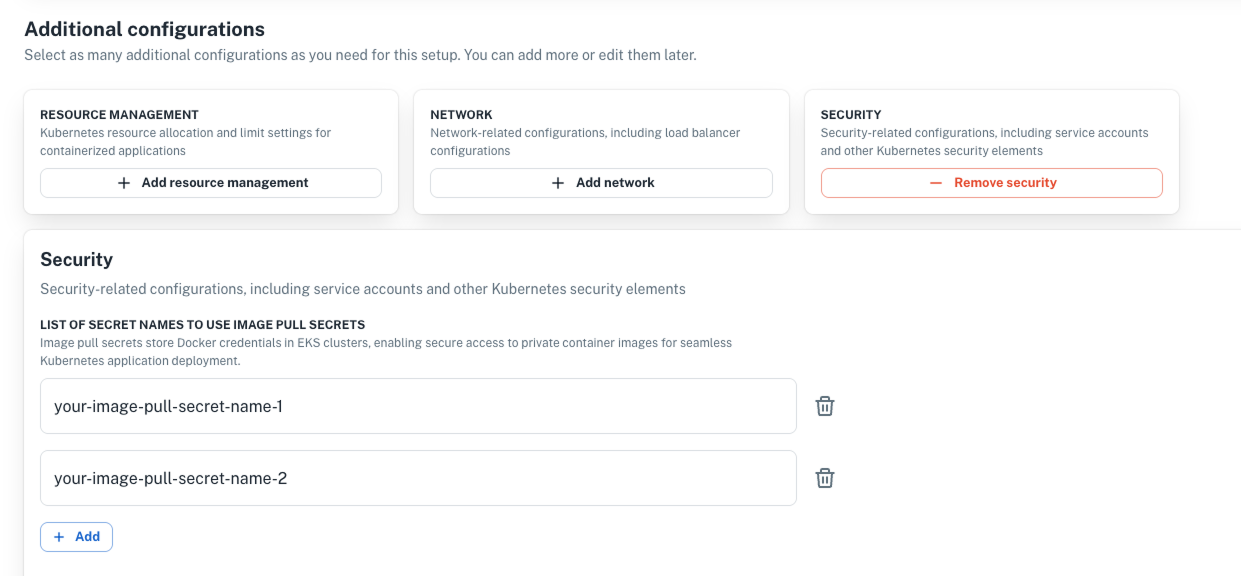
 ### Specify image pull secrets in the UI
Now you can specify secret names for image pull secrets directly from the UI, improving security and simplifying access
to private container images in Kubernetes clusters.
### Specify image pull secrets in the UI
Now you can specify secret names for image pull secrets directly from the UI, improving security and simplifying access
to private container images in Kubernetes clusters.
 ---
Wishing you a fantastic month ahead – from the **nullplatform** team! ❤️
---
Wishing you a fantastic month ahead – from the **nullplatform** team! ❤️