---
date: 2025-10-31T00:00:00.000Z
tags:
- notifications
- scopes
- agent-backed-scopes
- websocket
- releases
- accounts
- personal access token
- chrome extension
- templates
- agent
- cli
- monthly
doc_id: 9e4b2a17-8b4f-4d6a-9e21-5c6b7a3e4f29
toc_max_heading_level: 2
description: >
October updates: notification events view, scoped target types, releases from
the UI, account deletion, agent-backed scopes, and CLI 2.3.0.
keywords:
- agent-backed copes
- notifications
- scopes
- templates
- releases
- parameters
- websocket
- chrome extension
- accounts
- agent
- CLI
- personal access token
title: October 2025
slug: october-2025
---
October updates: notification events view, scoped target types, releases from the UI, account deletion, agent-backed scopes, and CLI 2.3.0.
{/* truncate */}
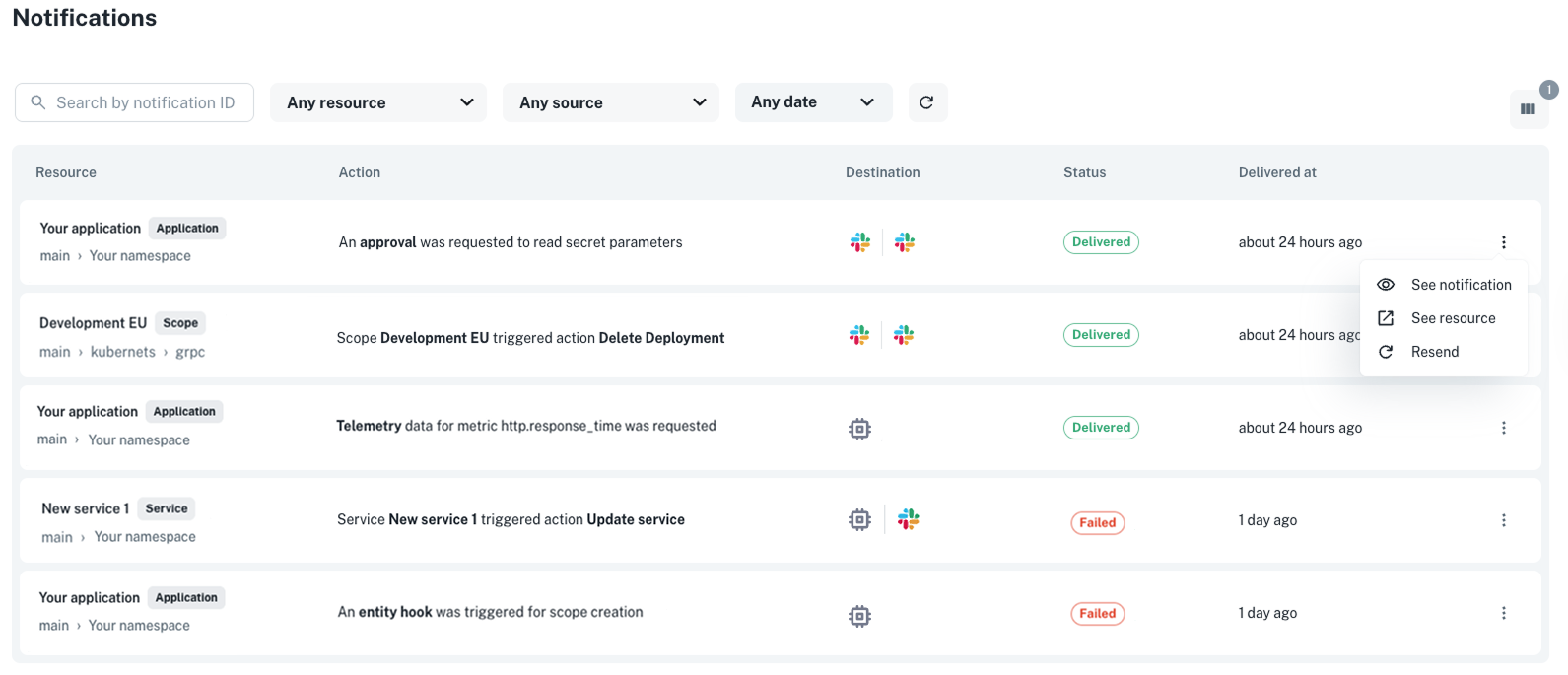
## ✨ New notification events view
Ever wondered what happened to a notification that didn’t reach its destination? You can now **inspect, debug, and
resend notifications** with the new **Notification Events** view, a single place to understand
exactly how notifications are triggered and delivered across your organization.
**Where to find it**: Go to **Platform settings > Notifications > Events**.
Use it to **check whether a notification was created correctly, see its delivery status, or inspect the reason behind a
failure**.
If something went wrong, you can **resend the notification** to verify that your fix (for example, updating a channel
configuration) worked as expected.
You can also access notification event data programmatically via our [API](/docs/notification-api-index).
👉 See the [Notification events](/docs/notifications/event-payloads) docs for more info.
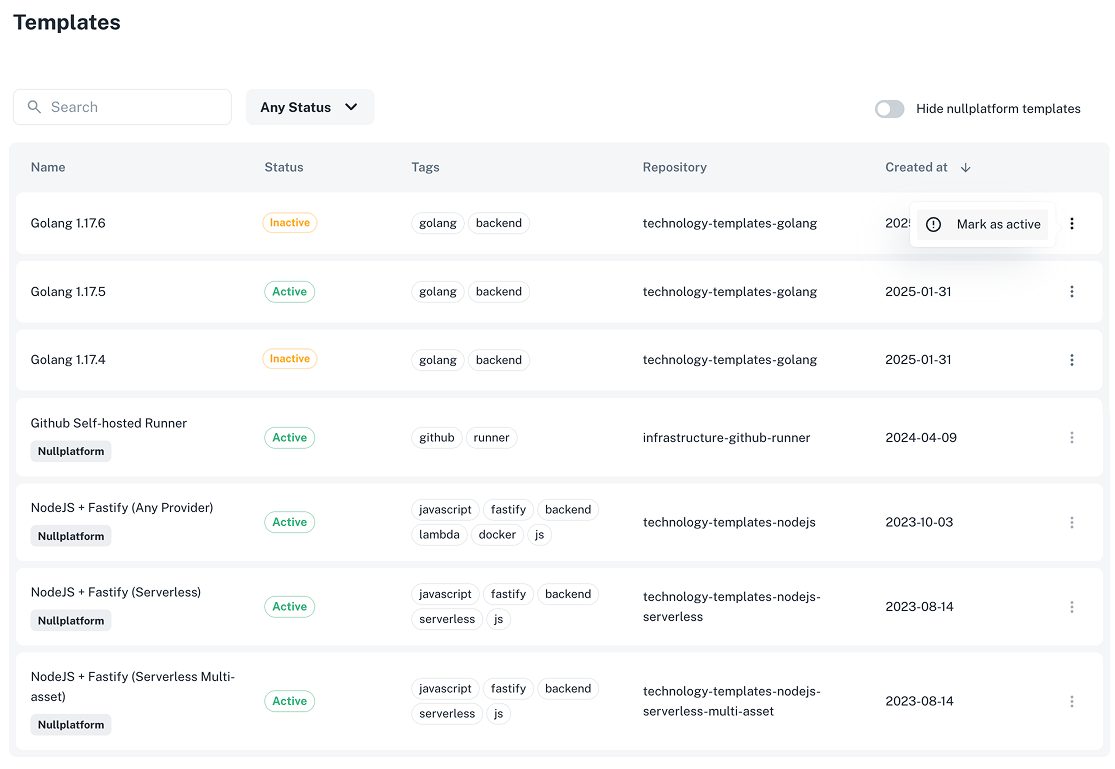
 ## ✨ Manage which templates users can use to create applications
You can now use the new **Templates** view in **Platform settings** to see all the technology templates available in your organization.
This view shows **both**:
- Templates that belong to your **organization**.
- Templates that are provided **by default by nullplatform**.
From here, you can **control which templates developers can select** when creating new applications.
Here’s how it works:
- You can **hide all default nullplatform templates** by enabling the toggle **“Hide nullplatform templates.”**
When enabled, these default templates will **not appear as selectable options** for developers when creating new applications, but they will still be visible in the Templates view.
- For **organization-owned templates**, you can **individually mark them as Active or Inactive**.
Only templates marked as **Active** will be available for your developers to use.
This allows you to curate which internal templates remain visible and selectable for application creation.
👉 See the [Templates](/docs/applications/naming-patterns#understanding-templates) docs for more info.
**Where to find it:** Go to **Platform settings > Templates**.
## ✨ Manage which templates users can use to create applications
You can now use the new **Templates** view in **Platform settings** to see all the technology templates available in your organization.
This view shows **both**:
- Templates that belong to your **organization**.
- Templates that are provided **by default by nullplatform**.
From here, you can **control which templates developers can select** when creating new applications.
Here’s how it works:
- You can **hide all default nullplatform templates** by enabling the toggle **“Hide nullplatform templates.”**
When enabled, these default templates will **not appear as selectable options** for developers when creating new applications, but they will still be visible in the Templates view.
- For **organization-owned templates**, you can **individually mark them as Active or Inactive**.
Only templates marked as **Active** will be available for your developers to use.
This allows you to curate which internal templates remain visible and selectable for application creation.
👉 See the [Templates](/docs/applications/naming-patterns#understanding-templates) docs for more info.
**Where to find it:** Go to **Platform settings > Templates**.
 ## ✨ Control which scope types developers can use
You can now decide **which scope types developers can select** when creating new scopes.
This prevents misconfigurations and streamlines scope creation for your team.
Before, the **Target** selector showed *all* available scope types in nullplatform (such as *Serverless*,
*Instances*, or *Kubernetes*).
Now, it only displays the scope types configured in **Platform settings**, so developers can pick from the options
approved and supported by your organization.
For example:
- *Serverless* will appear only if there’s a provider configured under **Compute management > AWS Lambda**.
- *Instances* will appear if there’s a provider under **Compute management > AWS EC2**.
- *Kubernetes* will appear if you have a provider configured under **Container orchestration > EKS, AKS, or GKE**.
👉 See the [Providers](/docs/providers/supported-integrations/) docs for more info.
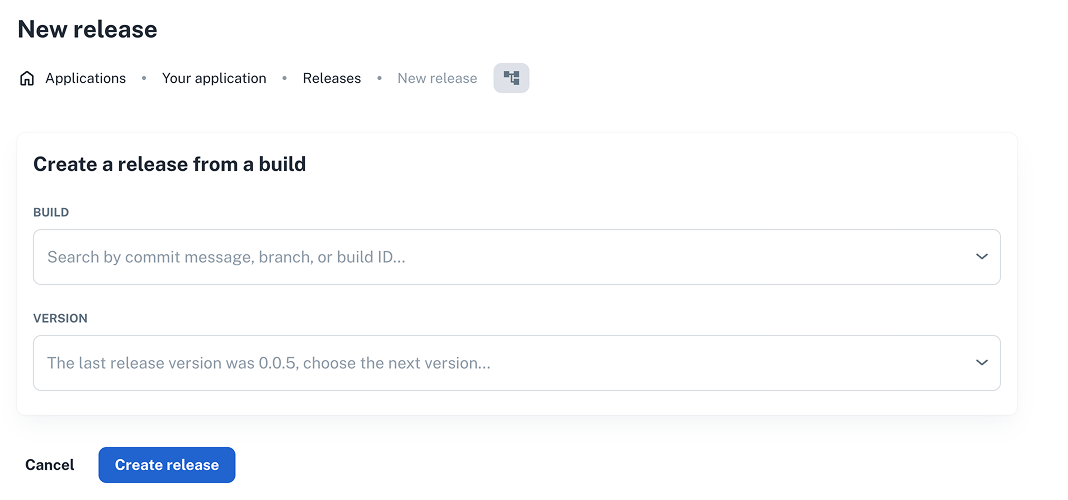
## ✨ Create releases directly from the Releases view
Releasing new versions just got easier. You can now **create a release directly from the Releases view** without
switching pages.
**How it works:**
1. Go to **Development > Releases**, and click **+ New release**.
2. Choose a **build** (by commit message, branch, or build ID) and select the **next version**.
3. Click **Create release** to finalize.
This update simplifies the release workflow and helps teams prepare deployments faster with fewer context switches.
## ✨ Control which scope types developers can use
You can now decide **which scope types developers can select** when creating new scopes.
This prevents misconfigurations and streamlines scope creation for your team.
Before, the **Target** selector showed *all* available scope types in nullplatform (such as *Serverless*,
*Instances*, or *Kubernetes*).
Now, it only displays the scope types configured in **Platform settings**, so developers can pick from the options
approved and supported by your organization.
For example:
- *Serverless* will appear only if there’s a provider configured under **Compute management > AWS Lambda**.
- *Instances* will appear if there’s a provider under **Compute management > AWS EC2**.
- *Kubernetes* will appear if you have a provider configured under **Container orchestration > EKS, AKS, or GKE**.
👉 See the [Providers](/docs/providers/supported-integrations/) docs for more info.
## ✨ Create releases directly from the Releases view
Releasing new versions just got easier. You can now **create a release directly from the Releases view** without
switching pages.
**How it works:**
1. Go to **Development > Releases**, and click **+ New release**.
2. Choose a **build** (by commit message, branch, or build ID) and select the **next version**.
3. Click **Create release** to finalize.
This update simplifies the release workflow and helps teams prepare deployments faster with fewer context switches.
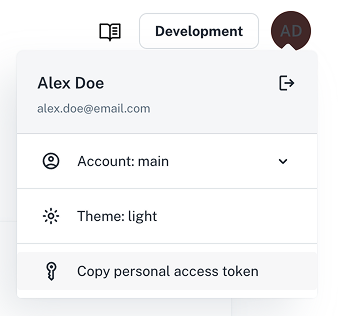
 ## ✨ Get your personal access token from the UI
You can now **copy your personal access token directly from the nullplatform UI**, no extensions or extra setup
required.
Just click your user icon in the top-right corner and select **Copy personal access token**.
From now on, **we recommend using this new UI-based method to get your tokens**. The legacy **Chrome extension** will
remain available and functional, but it’s no longer actively maintained. That means you can continue using it if needed,
but all future updates and support will focus on the UI experience.
👉 See the [Authorization docs](/docs/authorization/) for more info.
## ✨ Get your personal access token from the UI
You can now **copy your personal access token directly from the nullplatform UI**, no extensions or extra setup
required.
Just click your user icon in the top-right corner and select **Copy personal access token**.
From now on, **we recommend using this new UI-based method to get your tokens**. The legacy **Chrome extension** will
remain available and functional, but it’s no longer actively maintained. That means you can continue using it if needed,
but all future updates and support will focus on the UI experience.
👉 See the [Authorization docs](/docs/authorization/) for more info.
 ## ✨ Updates to agent-backed scopes
We shipped two improvements to agent-backed scopes.
### File parameters
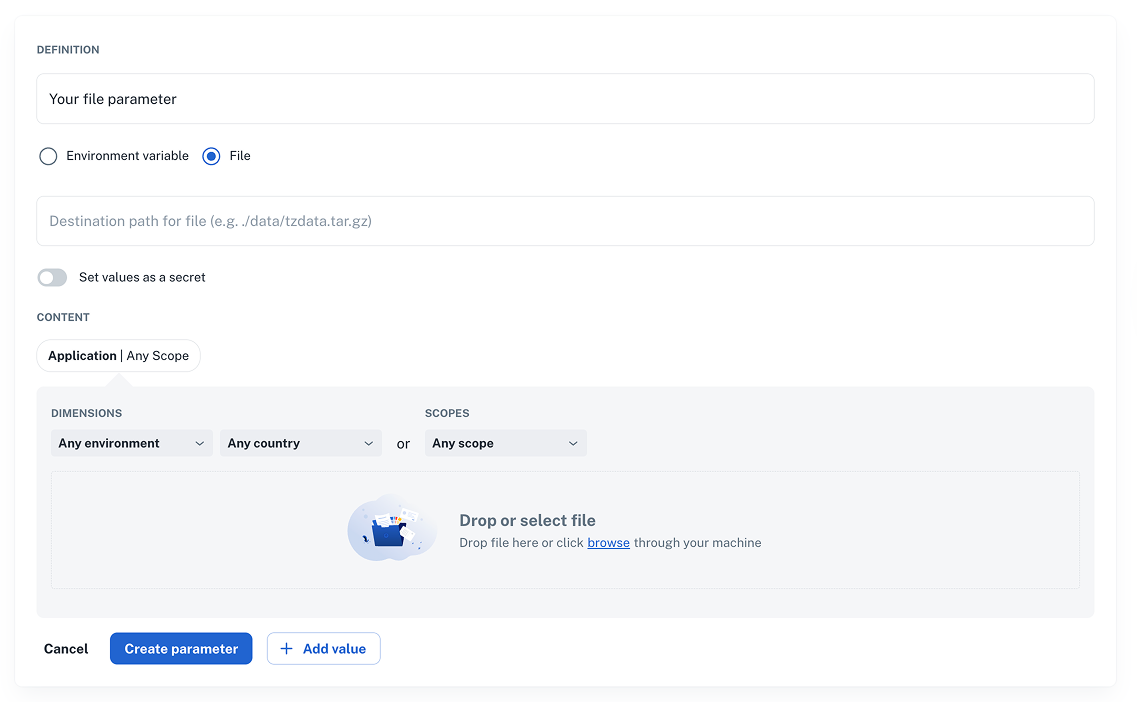
You can now deliver parameters as **files** for agent-backed scopes. This is useful for shipping configuration files,
certificates, or other artifacts alongside your deployments.
**How to enable:**
1. Go to **Development > Parameters** and click **+ New parameter**.
2. Select **File** and set the **destination path** for the file.
3. Upload your file.
4. Click **Create parameter** to save.
👉 See the [Parameters docs](/docs/parameters) for info on file support limitations.
## ✨ Updates to agent-backed scopes
We shipped two improvements to agent-backed scopes.
### File parameters
You can now deliver parameters as **files** for agent-backed scopes. This is useful for shipping configuration files,
certificates, or other artifacts alongside your deployments.
**How to enable:**
1. Go to **Development > Parameters** and click **+ New parameter**.
2. Select **File** and set the **destination path** for the file.
3. Upload your file.
4. Click **Create parameter** to save.
👉 See the [Parameters docs](/docs/parameters) for info on file support limitations.
 ### WebSocket support
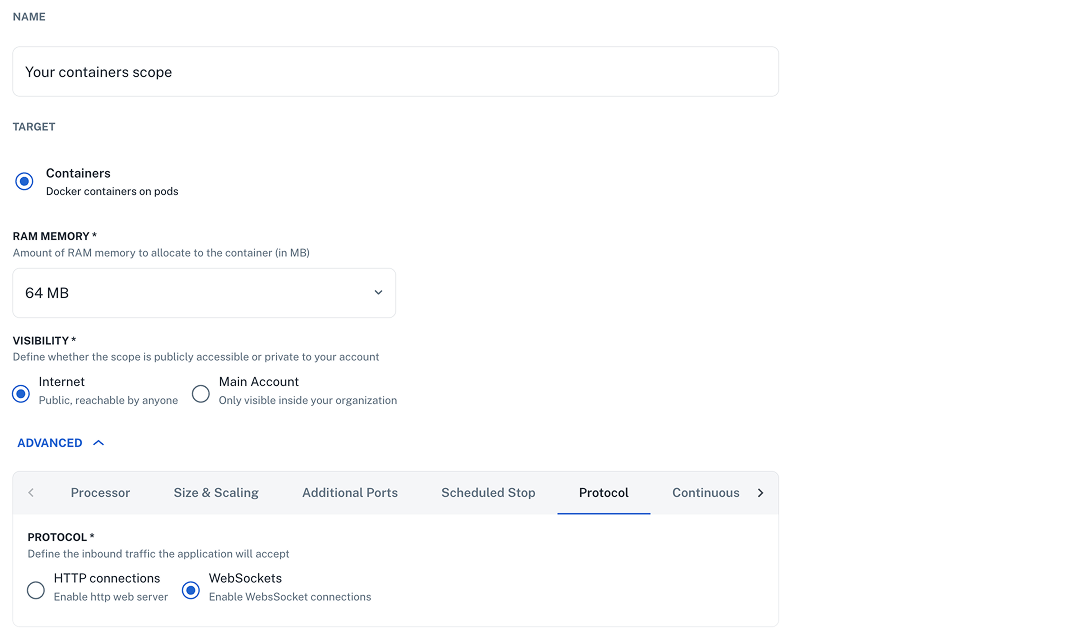
Define inbound **WebSocket** traffic for your applications so scopes can accept the correct protocols.
Where to enable:
1. Go to **Development > Scopes** and **+ Create scope**.
2. Fill in the form with the scope details.
3. Click on **Advanced**, then **Protocol**.
4. Click **Create scope** to save your changes.
👉 See the [Scopes](/docs/agent-backed-scopes/) docs for more info.
### WebSocket support
Define inbound **WebSocket** traffic for your applications so scopes can accept the correct protocols.
Where to enable:
1. Go to **Development > Scopes** and **+ Create scope**.
2. Fill in the form with the scope details.
3. Click on **Advanced**, then **Protocol**.
4. Click **Create scope** to save your changes.
👉 See the [Scopes](/docs/agent-backed-scopes/) docs for more info.
 ## ✨ CLI 2.3.0
We’ve released version `2.3.0` of the nullplatform CLI, bringing new features and fixes.
**What’s new:**
- New `np account delete` command.
- New `--profile` flag for `np nrn read`.
- New `np template` command group for managing templates.
- Fixed concurrency and parameter handling issues in `np service workflow exec`.
**Install the latest version:**
```bash
curl https://cli.nullplatform.com/install.sh | sh
```
👉 See the [CLI docs](/docs/cli) for more info.
---
Wishing you a fantastic month ahead – from the **nullplatform** team! ❤️
## ✨ CLI 2.3.0
We’ve released version `2.3.0` of the nullplatform CLI, bringing new features and fixes.
**What’s new:**
- New `np account delete` command.
- New `--profile` flag for `np nrn read`.
- New `np template` command group for managing templates.
- Fixed concurrency and parameter handling issues in `np service workflow exec`.
**Install the latest version:**
```bash
curl https://cli.nullplatform.com/install.sh | sh
```
👉 See the [CLI docs](/docs/cli) for more info.
---
Wishing you a fantastic month ahead – from the **nullplatform** team! ❤️