---
date: 2025-09-30T00:00:00.000Z
tags:
- services
- scopes
- deployments
- logging
- cli
- approvals
- ui
- monthly
doc_id: 3f2a8b0e-9c55-4d4d-9b79-1e1f7d9a4c6f
toc_max_heading_level: 2
description: >-
September updates: faster services with parallel actions, scope restrictions,
container/K8s improvements (gRPC, external DNS, custom domains, memory
autoscaling), channel descriptions, and a new CLI version.
keywords:
- services
- parallel actions
- scopes
- Kubernetes
- external DNS
- custom domains
- memory autoscaling
- CLI
- channels
- descriptions
title: September 2025
slug: september-2025
---
September updates: faster services with parallel actions, scope restrictions, container/K8s improvements (gRPC, external DNS, custom domains, memory autoscaling), channel descriptions, and a new CLI version.
{/* truncate */}
## ✨ Run service and scope actions in parallel for faster performance
Some actions don’t need to wait in line anymore. You can now **run selected service and scope actions in parallel**,
giving teams faster workflows and better throughput.
**What you can do:**
- Use the new `parallelize` flag in your **action specifications**.
- Decide which actions can safely run side-by-side, and which should remain sequential.
- Speed up operations that are independent and repeatable, without risking conflicts.
```json
{
"actions": {
"send-message": { "parallelize": true },
"poll-for-messages": { "parallelize": false }
}
}
```
**Examples:**
- For **services**: Run multiple **SQS sends** or **DynamoDB batch writes** at the same time, while keeping polling sequential to avoid race conditions.
- For **scopes**: Run **instance readiness checks** (`wait-for-instances`) in parallel across deployments, while keeping switch traffic or rollback steps sequential to preserve order and safety.
👉 Learn more in the
[Action specification docs](/docs/services/craft-a-service/service-actions)
and [Scope lifecycle docs](/docs/agent-backed-scopes/craft-scopes/scope-action-spec).
## ✨ Restrict services to specific scopes
Not every service belongs everywhere. With this update, you can now **limit services and links to the scopes where
they make sense**, restricting availability to the right environments.
**What’s new:**
- Use the new scopes attribute in your **service** or **link specifications**.
- Restrict by **scope type** (e.g. `AWS:SERVERLESS:LAMBDA`, `AZURE:WEB_POOL:AKS`).
- Or pin down to a **specific scope spec UUID** if you need precision.
- Keep services out of incompatible scopes, reducing clutter and errors.
```json
{
"scopes": {
"values": [
"AWS:SERVERLESS:LAMBDA",
"AWS:WEB_POOL:EC2INSTANCES",
"uuid-of-a-specific-scope-specification"
]
}
}
```
**Example:**
- An **Airflow operator service** could only be available in **Airflow job scopes**. With this restriction, it won’t appear
under other environments (like Kubernetes or Lambda) where it can’t run.
- A **Helm Release Deployer** is only relevant for **Kubernetes deployments**. Restricting it to `K8S:DEPLOYMENT`
scopes makes sure it doesn’t show up in non-Kubernetes projects.
👉 See [Service specification docs](/docs/services/craft-a-service/service-specs#restrict-services-to-specific-scopes)
for more info.
## ✨ Improved visibility on channels with descriptions
We added a **description** field to notification channels. Use it to briefly explain what the channel is for and why it
exists. This improves findability so teams can identify the right channel at a glance.
**How to use it**
1. Go to **Platform settings > Notifications > Channels**.
2. Create or edit a channel and add a description in the new field.
You can also set descriptions via the [Notification channels API](/docs/channel-api-index).
👉 See the [Notifications docs](/docs/notifications/channels) for more info.
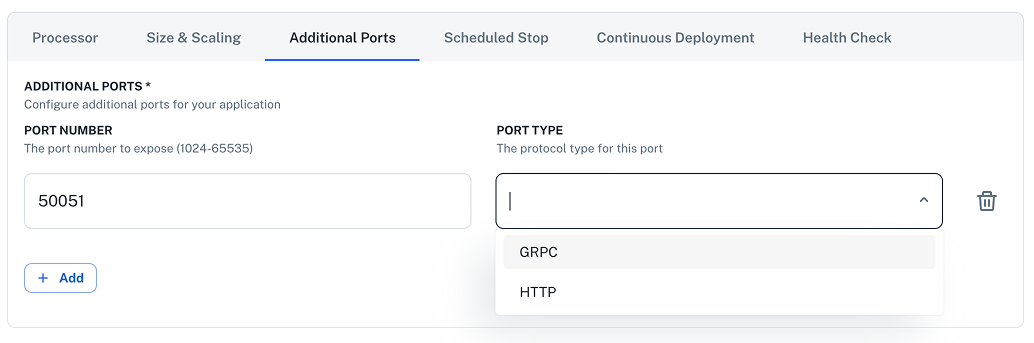
## ✨ Expose gRPC ports in scopes
Agent-backed scopes now support **exposing gRPC ports**, out of the box.
Define gRPC ports in your scope configuration and they’ll be surfaced with the right protocol hints so your services
communicate reliably. In this way, you'll be able to use your services both through HTTP and gRPC.
**How to configure:**
1. To configure additional ports, go to **Development > Scopes** and click to create or edit an existing scope.
2. Scroll down to the bottom of the info panel and click **ADVANCED** to open additional settings.
3. Click **Additional Ports** and provide the port number and select gRPC as protocol type.
 ## ✨ Memory-based autoscaling for agent-backed scopes
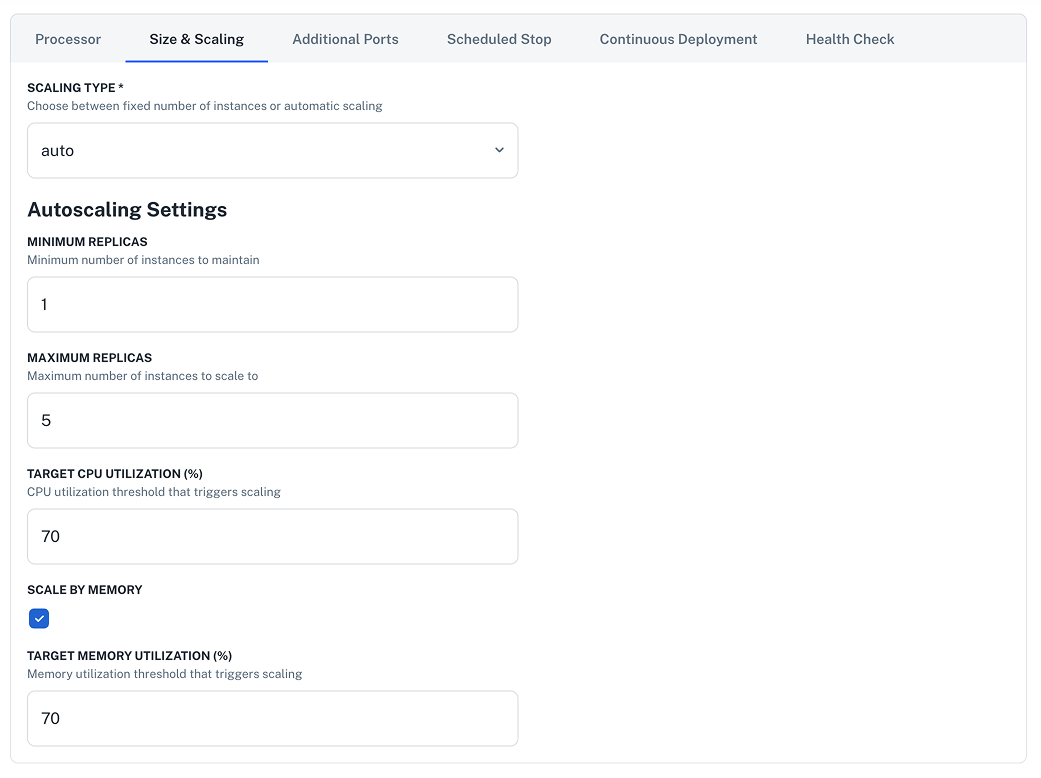
Agent-backed scopes now support **memory-target autoscaling**, letting you scale based on memory utilization in addition to CPU.
**How to enable:** Open a scope, and in **Advanced > Size & Scaling**, toggle **Target memory** and set the threshold
that should trigger scaling up/down.
## ✨ Memory-based autoscaling for agent-backed scopes
Agent-backed scopes now support **memory-target autoscaling**, letting you scale based on memory utilization in addition to CPU.
**How to enable:** Open a scope, and in **Advanced > Size & Scaling**, toggle **Target memory** and set the threshold
that should trigger scaling up/down.
 ## ✨ Custom domains for agent-backed scopes
Attach **custom domains** to your agent-backed scopes directly from the UI. Map production-friendly hostnames to services
without leaving the platform.
**Where:** Go to **Platform settings > Domains**, and click **+ New custom domain**.
> ℹ️ **Note:** Each scope can have **multiple** custom domains, but a single custom domain can be assigned to **only one**
> scope.
👉 Learn more in [Custom domains](/docs/scopes-legacy/custom-domains).
### External DNS for scopes
Scopes now support **external DNS** management, so hostnames are created and reconciled automatically based
on your scope configuration.
## ✨ CLI updates
We’ve released a new version `2.2.0` of the nullplatform CLI, bringing improvements and new features.
**What’s new:**
- `np log` — Create and manage log configurations.
- `np agent` — Create and manage agents.
- Logs each step when you run `np service workflow exec`.
- Automatic retries on transient errors (HTTP **5xx**, **429**, **408**, **401**).
**Install the latest updates:**
```bash
curl https://cli.nullplatform.com/install.sh | sh
```
👉 See the [CLI docs](/docs/cli) for more info.
---
Wishing you a fantastic month ahead – from the **nullplatform** team! ❤️
## ✨ Custom domains for agent-backed scopes
Attach **custom domains** to your agent-backed scopes directly from the UI. Map production-friendly hostnames to services
without leaving the platform.
**Where:** Go to **Platform settings > Domains**, and click **+ New custom domain**.
> ℹ️ **Note:** Each scope can have **multiple** custom domains, but a single custom domain can be assigned to **only one**
> scope.
👉 Learn more in [Custom domains](/docs/scopes-legacy/custom-domains).
### External DNS for scopes
Scopes now support **external DNS** management, so hostnames are created and reconciled automatically based
on your scope configuration.
## ✨ CLI updates
We’ve released a new version `2.2.0` of the nullplatform CLI, bringing improvements and new features.
**What’s new:**
- `np log` — Create and manage log configurations.
- `np agent` — Create and manage agents.
- Logs each step when you run `np service workflow exec`.
- Automatic retries on transient errors (HTTP **5xx**, **429**, **408**, **401**).
**Install the latest updates:**
```bash
curl https://cli.nullplatform.com/install.sh | sh
```
👉 See the [CLI docs](/docs/cli) for more info.
---
Wishing you a fantastic month ahead – from the **nullplatform** team! ❤️