September 2026
September updates: the redesigned deployment page arrives as a rollout you control, API keys can hold exactly the permissions they need, entity hooks can hand data back to the entity they're gating, packages pin a service specification together with its artifacts, you can push assets to ECR with an IAM role instead of long-lived keys, and new CLI, agent, and scopes releases bring readable Kubernetes object names and one-time scheduled tasks.
✨ The deployment page, redesigned
The page you land on after starting a deployment was rebuilt, for single deployments and deployment groups alike. Now you can see where a deployment is at a glance and understand what happened in each stage, without piecing it together from one long log stream. The run is laid out as a line of stages, each with its own outcome, so when something stalls you know which stage it stopped in and why. Click any completed stage to go back to it: the panel shows what that stage did, and the logs narrow to the minutes that matter.
Take the walkthrough below, the same one the platform offers beside the page title:
You can switch back anytime
The new page reaches your organization as a rollout you can walk back: if it doesn't work for you, Previous version beside the page title puts you back on the old one right away.
👉 See Deployment view.
✨ API keys with exactly the permissions they need
An API key's grant used to be a role on a resource, so a CI pipeline that needed two actions got every action of the closest role. A grant can now start from roles, adjust them permission by permission, or skip roles entirely and hold only the permissions you tick. Either way, you can only hand out what you could grant yourself on that resource.
It's all in the New API key form, under Platform settings > API keys. Take the walkthrough:
Through the API, the same three options are role_slug or role_id, inherits with actions.add and actions.remove, or a custom actions list.
👉 See Manage your API keys.
✨ Entity hooks can change the entity they're gating
An entity hook used to answer one question: does this operation go ahead or not. Now it can also hand data back. Add a callback_body object to the PATCH you send to the hook's callback_url, and nullplatform merges those fields into the entity when it resumes the operation.
{
  "status": "success",
  "callback_body": {
    "repository_url": "https://github.com/my-org/my-service"
  }
}
For example, a before-hook on application:create can pick the repository the application lives in by your own rules, instead of whatever the developer typed. callback_body accepts any field the entity's update endpoint accepts.
👉 See Updating the entity from the hook. The Entity hook API is also in the reference now.
✨ Packages: pin a specification and its artifacts
A package is a versioned bundle of what makes a service work. Each revision carries an immutable bill of materials that pins service, action and link specifications together with the artifacts behind them, so changing a specification later never changes what a published revision pins. A service binds to its package's default revision when you create it, and desired_package_revision_id moves it to another one.
👉 See Service and link specifications API, which walks through packaging a specification step by step, and the Packages reference.
✨ Push to ECR without long-lived AWS keys
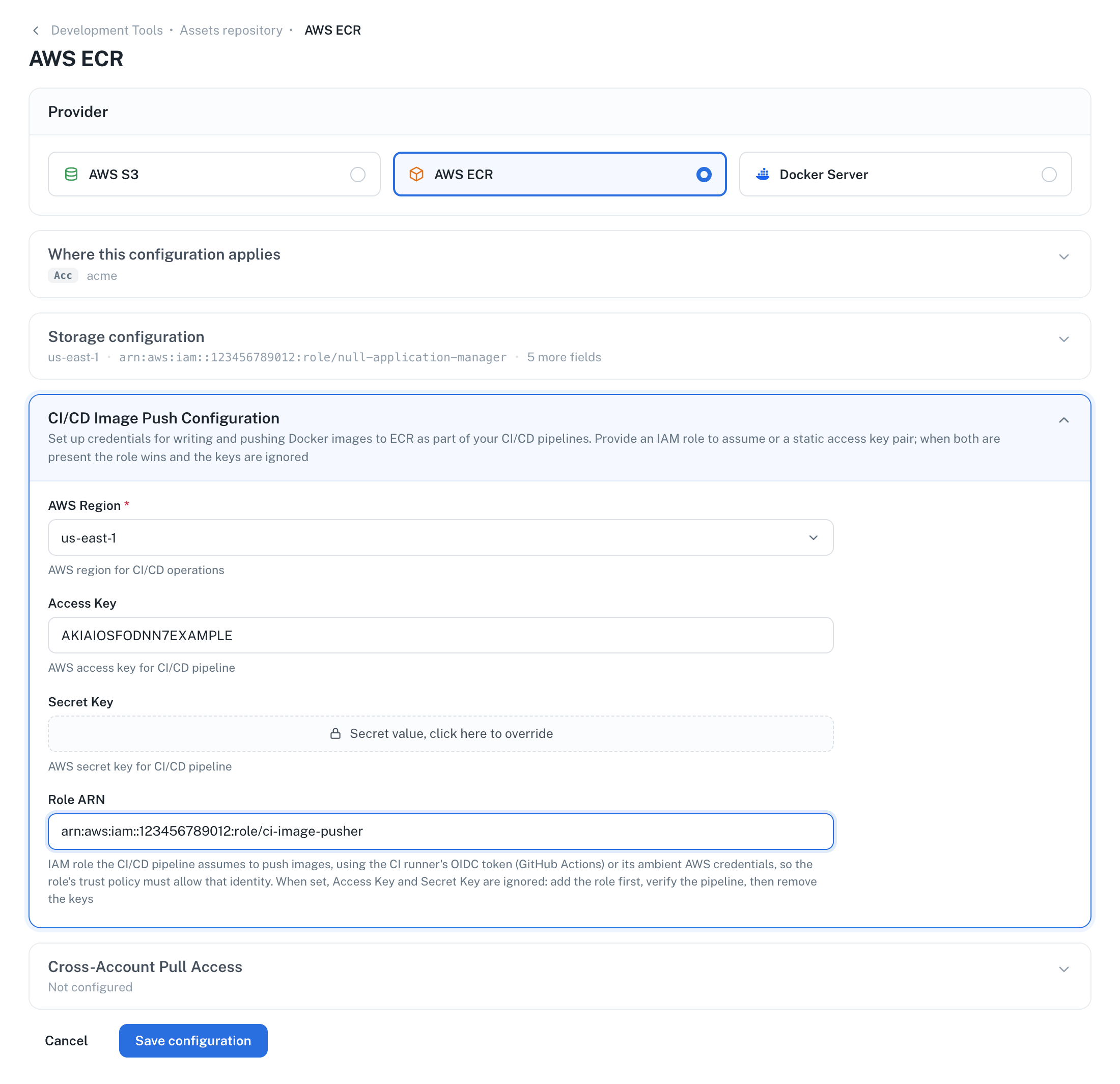
np asset push takes its registry credentials from the asset repository provider configured in nullplatform, which for ECR meant storing an access key and a secret key. You can now store an IAM role instead, and CLI 2.11.0 assumes it at push time with your CI tool's OpenID Connect (OIDC) token. No long-lived AWS credentials, not in the pipeline and not in nullplatform.
Set it in Platform settings > Asset repository, on your ECR configuration, under CI/CD Image Push Configuration:
On GitHub Actions, the job only needs the id-token: write permission:
permissions:
  id-token: write
  contents: read
GitLab CI, Bitbucket Pipelines and CircleCI work too, with a few more lines. Once a role is configured, the provider's keys are ignored, so you can add the role, confirm your pipelines still push, and then remove the keys.
👉 See Asset push authentication for the setup per CI tool and the IAM permissions the role needs.
✨ CLI, agent, and scopes releases
CLI 2.11.0
The CLI shipped 2.11.0: np asset push can assume the IAM role on your ECR provider, np mcp serve adds an np_request tool for API paths the entity tools don't cover, and np service workflow build-context exposes every provider of a category by its specification slug.
👉 See the CLI 2.11.0 release notes.
Agent 0.12.0 and 0.13.0
The control plane agent shipped two releases:
- Security update. 0.12.0 is built with Go 1.26.8 and updated
grpcandx/cryptomodules, clearing known vulnerabilities. - CLI 2.11.0 in the image. 0.13.0 ships the latest nullplatform CLI.
plaintextnames the no-TLS worker mode. SetNP_WORKER_SECURITY=plaintext.insecurestill works as a deprecated alias and logs a warning.
👉 See every agent release.
Scopes 1.17.0 and 1.18.0
The scopes repository shipped two releases:
- Readable Kubernetes object names. Containers scopes can name their objects from the application and scope slugs, so a Deployment reads
checkout-api-staging-789012instead ofd-123456-789012, or from a pattern you write. Existing scopes keep their names. See Resource naming. - Run once for scheduled tasks. A scheduled task scope can run a single time when it's deployed, instead of on a recurring schedule.
- Turning the health check off removes the probes. Until now the setting was accepted and the probes stayed, so an application that was slow to answer kept being restarted.
And more: a Kubernetes scope can use a custom domain and additional ports together, rollbacks explain why the deployment failed, and Route53 scopes keep their ALB on every deployment. 👉 See every scopes release.
✨ Sign in from the docs and the website
The docs navbar and the header of nullplatform.com now have a Sign in button. Both take you to Sign in to your workspace, where you enter your organization's URL and continue to nullplatform.
After your first sign-in, the page remembers your workspace. Next time, pick it from Your recent workspaces instead of typing the URL again.
Also in September
- A failed checklist run has three outcomes, not two. The approval action's
on_checklist_faildecides whether the request is denied, stays pending, or goes to manual review right away. See Choose what a failed run does. - Deleting an application is a status change, not a
DELETE. Patch the application's status todeletingfrom the UI,np application patch, or the API. See Delete applications. - A map for the service and specification APIs. Two new index pages list every entity with its endpoints and what it nests under: Service and link specifications API and Service and link API.
That's all for September, from the nullplatform team! ❤️