Action item owners
Every action item is scoped to a place in your NRN hierarchy, so you always know which team is responsible for it. An owner narrows that down to one person: whoever is working on the item.
Ownership is optional, and it isn't permanent. Items start out unassigned, so anyone can pick one up, pass it to a teammate, or hand it back.
Assign an owner
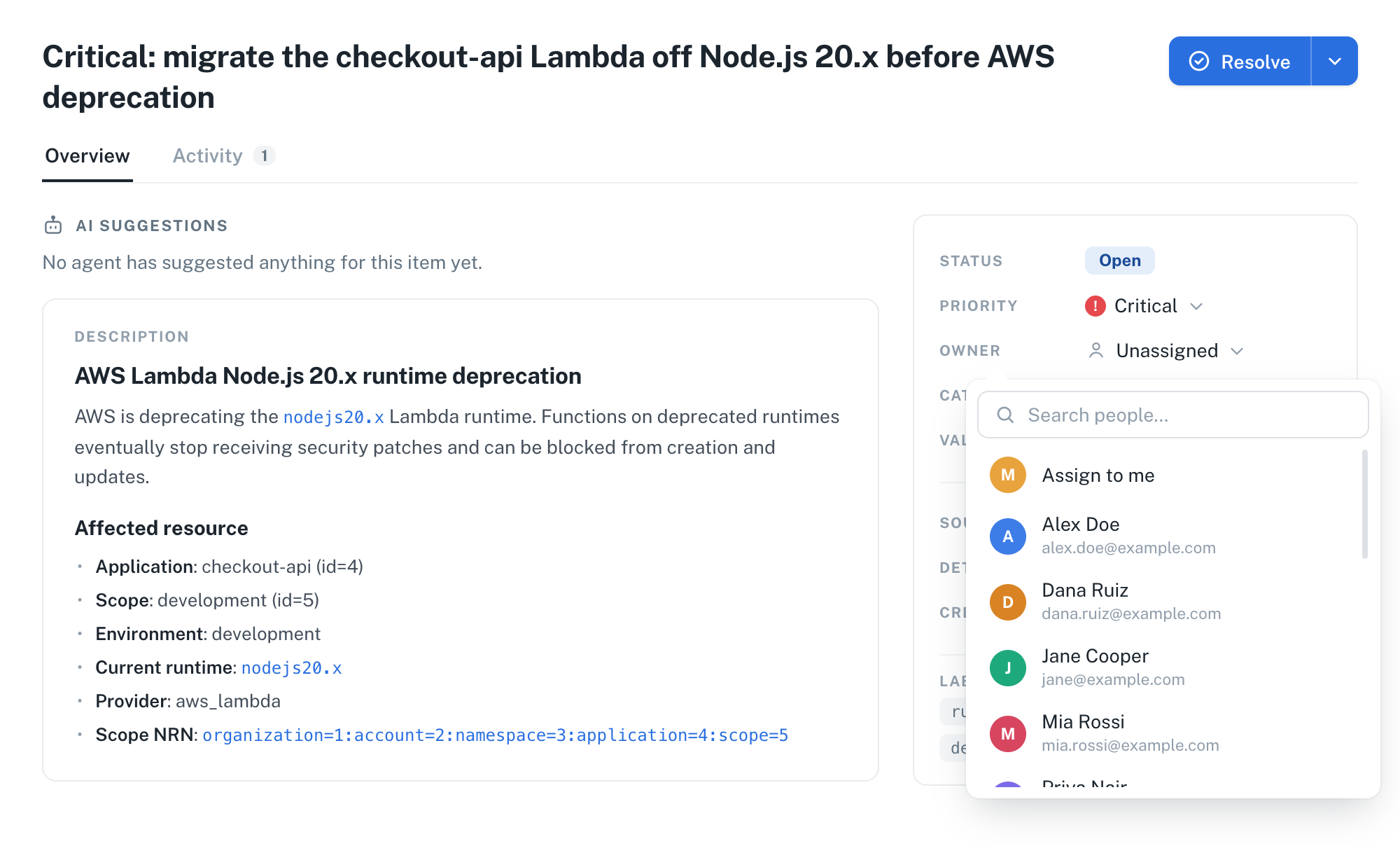
You can set the owner from the Owner column in the action items list, or from the Owner field in an item's detail view. Both open the same picker.
- UI
- cURL
- Go to Manage > Action Items from the application sidebar.
- Click the Owner cell of the item you want to assign. In the detail view, click the Owner field instead.
- Click Assign to me to take the item, or search for a teammate by name or email. The search covers everyone in your organization, not only the names already on the list.
- Click the person you want. The item is assigned right away, with no confirmation step.
ℹ️ Note: The picker only lists people. Machine identities such as API keys are never offered as owners.
Send a POST request to /action_item/{id}/assign with the nullplatform user ID of the new owner. The response is the updated item.
curl -L -X POST 'https://api.nullplatform.com/action_item/xYz789AbCdEf/assign' \
-H 'Content-Type: application/json' \
-H 'Authorization: Bearer <token>' \
-d '{
    "user_id": 2345
}'
You can only change the owner while an item still represents work: open, deferred, pending_deferral, pending_verification, and pending_rejection. Once an item reaches resolved, rejected, or closed, the dashboard hides the control and the API answers 400.
Change or remove the owner
An item has one owner at a time, so assigning someone to an item that already has one reassigns it. Unassigning returns the item to the unassigned pool, which is what you want when you're not the right person for it, or when you're handing it back for someone else to pick up.
- UI
- cURL
- Click the current owner in the Owner column, or the Owner field in the item's detail view.
- Pick a different person to reassign the item.
- To leave the item unassigned, click Unassign at the bottom of the picker.
Reassigning uses the same endpoint as assigning. Send the assign request again with a different user_id, and the new owner replaces the previous one:
curl -L -X POST 'https://api.nullplatform.com/action_item/xYz789AbCdEf/assign' \
-H 'Content-Type: application/json' \
-H 'Authorization: Bearer <token>' \
-d '{
    "user_id": 6789
}'
To release an item, send a POST request to /action_item/{id}/unassign. It takes no body, and unassigning an item that nobody owns answers 400:
curl -L -X POST 'https://api.nullplatform.com/action_item/xYz789AbCdEf/unassign' \
-H 'Authorization: Bearer <token>'
Filter by owner
The action items list has an Owner filter, next to the category, priority, and status ones. It takes several people at once, and Unassigned is one of the choices, so you can see your own items together with the ones still up for grabs instead of switching between two views.
Over the API, the listing accepts assignee_id as a comma-separated list, where none stands for the unassigned pool. This is what that combined view sends:
curl -L -X GET 'https://api.nullplatform.com/action_item?assignee_id=none,2345&status_not_in=closed,rejected' \
-H 'Authorization: Bearer <token>'
To see how the work is spread across the team instead, open the board and set Group by to owner. The cards split into one horizontal lane per person, so you can tell at a glance who's carrying what.
Track ownership changes
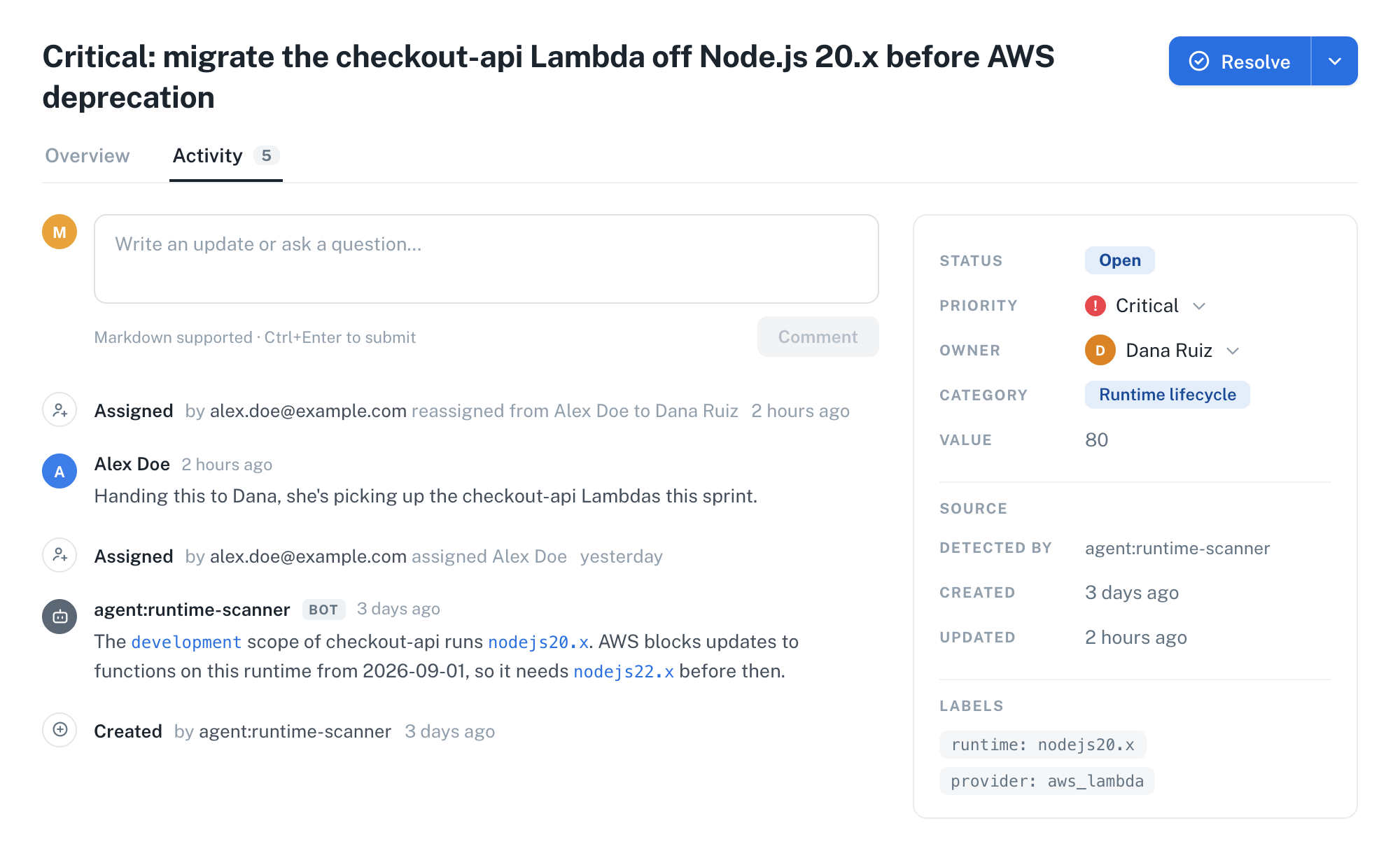
Every assignment and every release is recorded on the item, so the Activity tab reads as a history of who picked the work up and when. They show up as Assigned and Unassigned entries with the actor and the timestamp, and a reassignment names both the previous and the new owner.
Comments share the same chronology, so the reason for a handover sits right next to the handover itself.
Next steps
- Triage and resolve action items: decide what happens to the items you own
- Action items overview: see how the detect-triage-resolve cycle fits together
- NRN: understand the hierarchy that scopes items to teams and applications
- Assign an action item: the endpoint reference for assignment