---
title: Refresh agent sources
sidebar_label: Refresh agent sources
toc_max_heading_level: 3
doc_id: 3d6b9b62-2b35-4c8e-9b2e-7b8d83a358a7
description: Refresh an installed agent so it pulls the latest changes from the repositories.
keywords:
- agent
- refresh
- AGENT_REPO
- sources
- repositories
- kubernetes
- helm
- nullplatform
---
# Refresh agent sources
Use **Refresh sources** to make an agent **get up to date with the repositories** you configured in `AGENT_REPO`.
This is helpful after you push updates (new scopes, handlers, config, etc.) and want the agent to use them, without
reinstalling or redeploying.
> ℹ️ This action **does not** reinstall or upgrade the agent binary or Helm chart. To change or update your Helm release
> or rerun the installer.
## How to refresh agent sources
You can refresh sources from the UI or via the API. In both cases, the agent pulls the latest from your configured repository (or repositories) and reloads its sources.
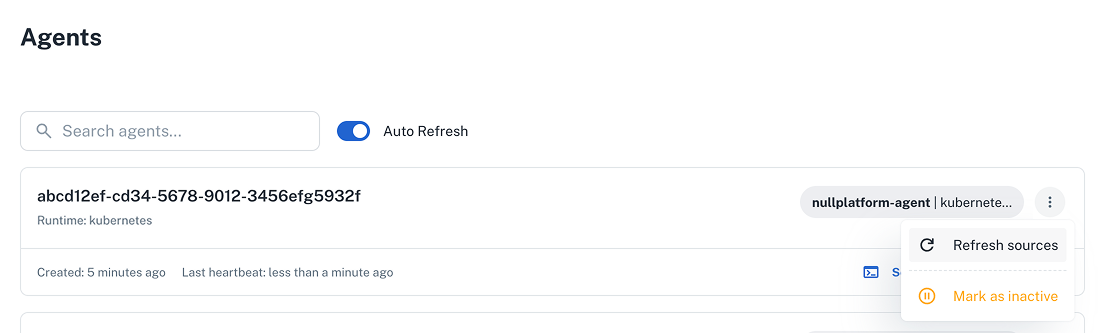
### From the UI
1. Go to **Platform settings > Agents**.
2. Find the agent to update.
3. Open its menu and click **Refresh sources**.
 ### Using the API
Send a **POST** request to the [Agent command API](/docs/api/agent-command-execute) with the `refresh-sources` command:
```bash
curl -L 'https://api.nullplatform.com/controlplane/agent_command' \
-H 'Content-Type: application/json' \
-H 'Accept: application/json' \
-H 'Authorization: Bearer ' \
-d '{
"command": {
"type": "refresh-sources",
"data": {}
},
"selector": {
"key": "value"
}
}'
```
- Replace the `"key": "value"` pair with your selector, for example: `"cluster": ""`.
## When to use it
- You pushed changes to the branch in `AGENT_REPO` and want the agent to use them.
- You added/removed repositories in a comma-separated `AGENT_REPO` value.
- You changed repo-backed configuration the agent reads at runtime.
## What it does (and doesn’t)
**It does:**
- Get the latest version from each repo/branch listed in `AGENT_REPO`.
- Reload sources the agent reads from those repos (e.g., scopes/handlers/config).
**It doesn’t:**
- Change runtime flags or environment variables (e.g., `TAGS`, `NP_API_KEY`).
- Upgrade the agent binary or Helm chart.
- Create/modify permissions or API keys.
> 📖 To update your Helm release or reinstall the agent, see
> [Install the agent](installation.md) docs.
## Tips and troubleshooting
- **Ensure changes are pushed**: Refresh gets updates from the remote branch (`...repo.git#branch`), not local work.
- **Multiple repos**: Use comma-separated URLs (no spaces) in `AGENT_REPO`.
- **Private repos**: If your URL embeds a token, verify it’s valid and not expired.
- **Heartbeat and logs**: Confirm the agent shows a recent **Last heartbeat** and check logs if updates don’t appear.
### Using the API
Send a **POST** request to the [Agent command API](/docs/api/agent-command-execute) with the `refresh-sources` command:
```bash
curl -L 'https://api.nullplatform.com/controlplane/agent_command' \
-H 'Content-Type: application/json' \
-H 'Accept: application/json' \
-H 'Authorization: Bearer ' \
-d '{
"command": {
"type": "refresh-sources",
"data": {}
},
"selector": {
"key": "value"
}
}'
```
- Replace the `"key": "value"` pair with your selector, for example: `"cluster": ""`.
## When to use it
- You pushed changes to the branch in `AGENT_REPO` and want the agent to use them.
- You added/removed repositories in a comma-separated `AGENT_REPO` value.
- You changed repo-backed configuration the agent reads at runtime.
## What it does (and doesn’t)
**It does:**
- Get the latest version from each repo/branch listed in `AGENT_REPO`.
- Reload sources the agent reads from those repos (e.g., scopes/handlers/config).
**It doesn’t:**
- Change runtime flags or environment variables (e.g., `TAGS`, `NP_API_KEY`).
- Upgrade the agent binary or Helm chart.
- Create/modify permissions or API keys.
> 📖 To update your Helm release or reinstall the agent, see
> [Install the agent](installation.md) docs.
## Tips and troubleshooting
- **Ensure changes are pushed**: Refresh gets updates from the remote branch (`...repo.git#branch`), not local work.
- **Multiple repos**: Use comma-separated URLs (no spaces) in `AGENT_REPO`.
- **Private repos**: If your URL embeds a token, verify it’s valid and not expired.
- **Heartbeat and logs**: Confirm the agent shows a recent **Last heartbeat** and check logs if updates don’t appear.