---
sidebar_label: Specs and actions
toc_max_heading_level: 3
doc_id: 24e5713b-af89-4e96-9bd0-99c9a7b2d8bc
description: >-
Reference for checklist specs and their actions: crafting a spec in the UI
or the API, connecting it to an approval action, publishing new versions,
dry-running it, routing failures, and who can do what.
keywords:
- checklists
- checklist specification
- approvals
- api
- checklist_fail_mode
- roles
- nullplatform
---
import Tabs from '@theme/Tabs';
import TabItem from '@theme/TabItem';
# Specs and actions
A [checklist](/docs/approvals/checklists) is carried by two entities:
- **Checklist specification**, spec for short: the items themselves, plus how their results add up to an outcome.
- **Approval action**: which requests the spec governs, which version of it they run against, and what happens when it fails.
This page is the contract for both: crafting, wiring, and permissions. If you haven't built a checklist yet, start with [your first checklist](/docs/approvals/your-first-checklist) instead; everything the skill did there is this API.
## What a checklist spec looks like
A spec is a name, an NRN, and a `definition` holding the items:
```json
{
"items": [
{
"id": "coverage_gate",
"type": "condition",
"behavior": "gate",
"severity": "major",
"title": "Build coverage above 80%",
"query": { "build.metadata.coverage.lines.percent": { "$gte": 80 } }
},
{
"id": "snyk_high_severity",
"type": "condition",
"behavior": "gate",
"severity": "critical",
"title": "No high-severity Snyk findings",
"query": { "build.metadata.snyk.high": { "$eq": 0 } }
},
{
"id": "security_signoff",
"type": "manual",
"behavior": "gate",
"severity": "major",
"title": "Security team sign-off",
"description": "Required for changes that touch auth or PII.",
"applies_when": { "scope.dimensions.environment": "production" }
},
{
"id": "cab_override",
"type": "manual",
"behavior": "override",
"title": "CAB emergency override",
"description": "Use only when a blocking item is misconfigured and the change must ship."
}
]
}
```
Conditions use the same query language and the same field paths as [policies](/docs/approvals/policies), so a predicate you already trust can move across unchanged.
:::note
Note the paths carry no `context.` prefix. The full item contract, including structured inputs, validations, and groups, is in the [items reference](/docs/approvals/checklist-items).
:::
Next to `items`, the definition takes an optional `aggregation` block that says how the outcome is computed:
| `aggregation.type` | What it does |
|---|---|
| `derived` (the default) | Nullplatform builds the expression from your items: every `gate` item must pass, or an `override` item must be approved |
| `expression` | You supply the boolean expression yourself in an `expression` field. An escape hatch, not a normal crafting step |
Leaving `aggregation` out entirely is the same as `derived`. See [how the outcome is computed](/docs/approvals/checklist-items#how-the-outcome-is-computed) for the expression language.
## Craft the specification
Describing the spec to the **np-checklist** skill is the quickest way to get one, and [your first checklist](/docs/approvals/your-first-checklist) walks through that. To craft it yourself:
1. Go to **Platform settings > Approvals > Checklists** and click **+ New specification**. The editor opens on a working one-item spec:
```json
{
"name": "my-checklist-specification",
"description": "",
"definition": {
"items": [
{
"id": "manual_approval",
"type": "manual",
"behavior": "gate",
"severity": "major",
"title": "Manual approval",
"require_comment": true
}
],
"aggregation": {
"type": "derived"
}
}
}
```
2. Build your definition on top of it. The **Condition**, **Manual**, **External**, and **Group** buttons drop ready-made blocks into the editor, so you can write a spec without keeping the schema in your head.
3. Check it in the pane on the right, which revalidates while you type. **Checklist preview** renders the list a developer would see, and **Preview as** flips it through **Not started**, **In progress**, **Everything passed**, and **A gate failed**, none of which creates a run.
4. Click **Create**. The spec appears in the **Checklists** list with its version, its status, and how many approval actions currently run on it.
Send a [POST request](/docs/api/checklist-specification-create) with the definition in the request body:
```bash
curl -L 'https://api.nullplatform.com/approval/checklist/specification' \
-H 'Authorization: Bearer ' \
-H 'Content-Type: application/json' \
-d '{
"nrn": "organization=1:account=2:namespace=3",
"name": "my-checklist-specification",
"description": "",
"definition": {
"items": [
{
"id": "manual_approval",
"type": "manual",
"behavior": "gate",
"severity": "major",
"title": "Manual approval",
"require_comment": true
}
],
"aggregation": {
"type": "derived"
}
}
}'
```
The response carries the generated spec id, which looks like `spec_abc123def456ghij`, and the boolean expression nullplatform derived from your items to compute the outcome. Reading that expression back is the quickest way to confirm the spec enforces what you meant.
## Connect it to an approval action
A spec does nothing until an approval action points at it. An action runs on a checklist **or** on policies, never both, so nothing can end up with two sets of rules disagreeing about the same request.
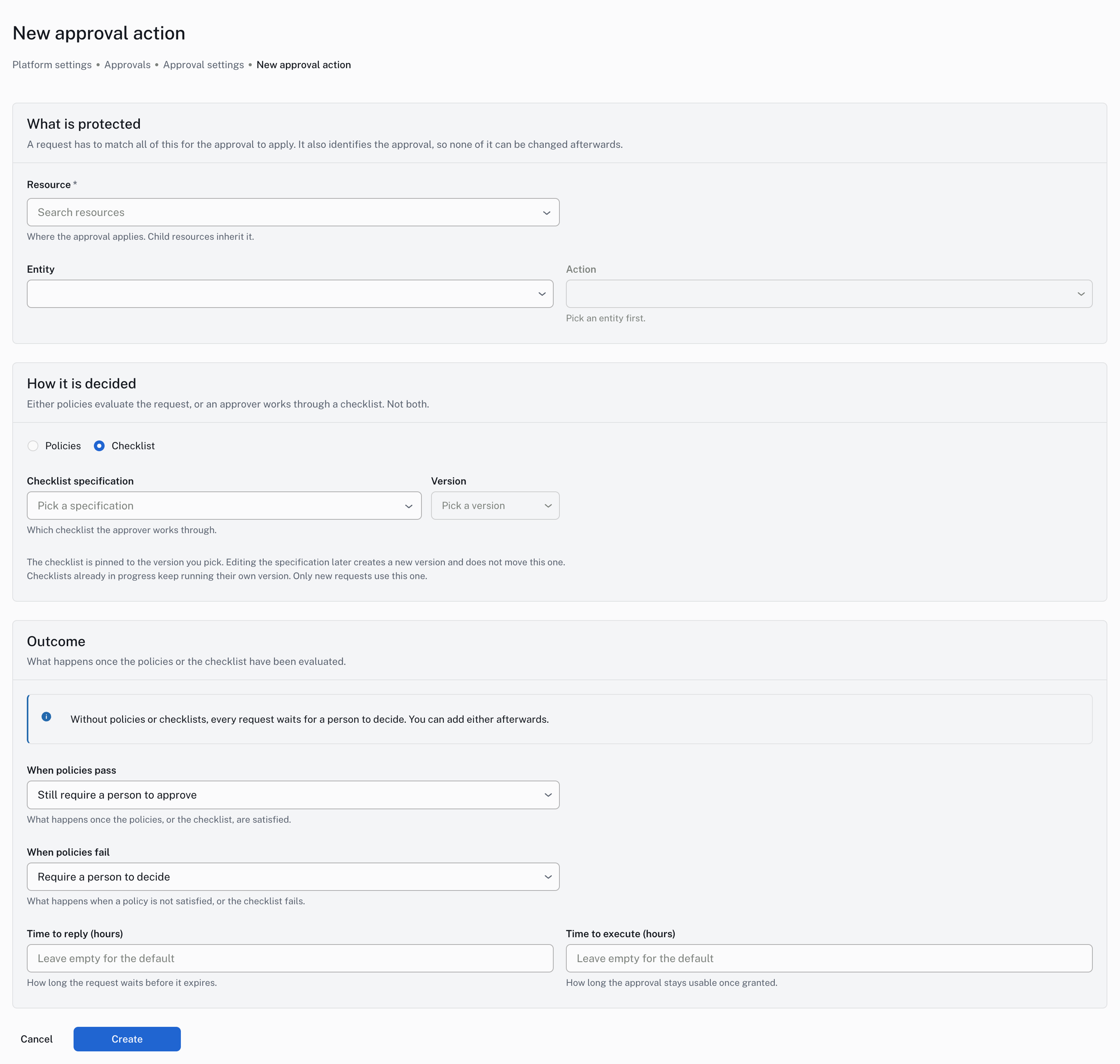
Go to **Platform settings > Approvals > Settings** and click **+ New approval action**. The form creates the action with the checklist already attached. Choose the resource, entity, and action to protect, pick **Checklist** along with the specification and the version to pin it to, and set what happens once the run is evaluated. The form explains every field as you fill it in.
 To point an action that already exists at a spec, send a [POST request](/docs/api/approval-action-link-checklist-specification) to the action:
```bash
curl -L 'https://api.nullplatform.com/approval/action/1842/checklist_specification' \
-H 'Authorization: Bearer ' \
-H 'Content-Type: application/json' \
-d '{ "checklist_specification_id": "spec_abc123def456ghij" }'
```
If the action still has policies attached, the call fails with `409` and a message naming how many policies are in the way. Reach out to the nullplatform team to move an action that already runs on policies onto a checklist.
## Change a spec that's already live
Updating a spec never edits it in place. Every update publishes a **new version**: a new spec id under the same name and NRN, with the version number bumped.
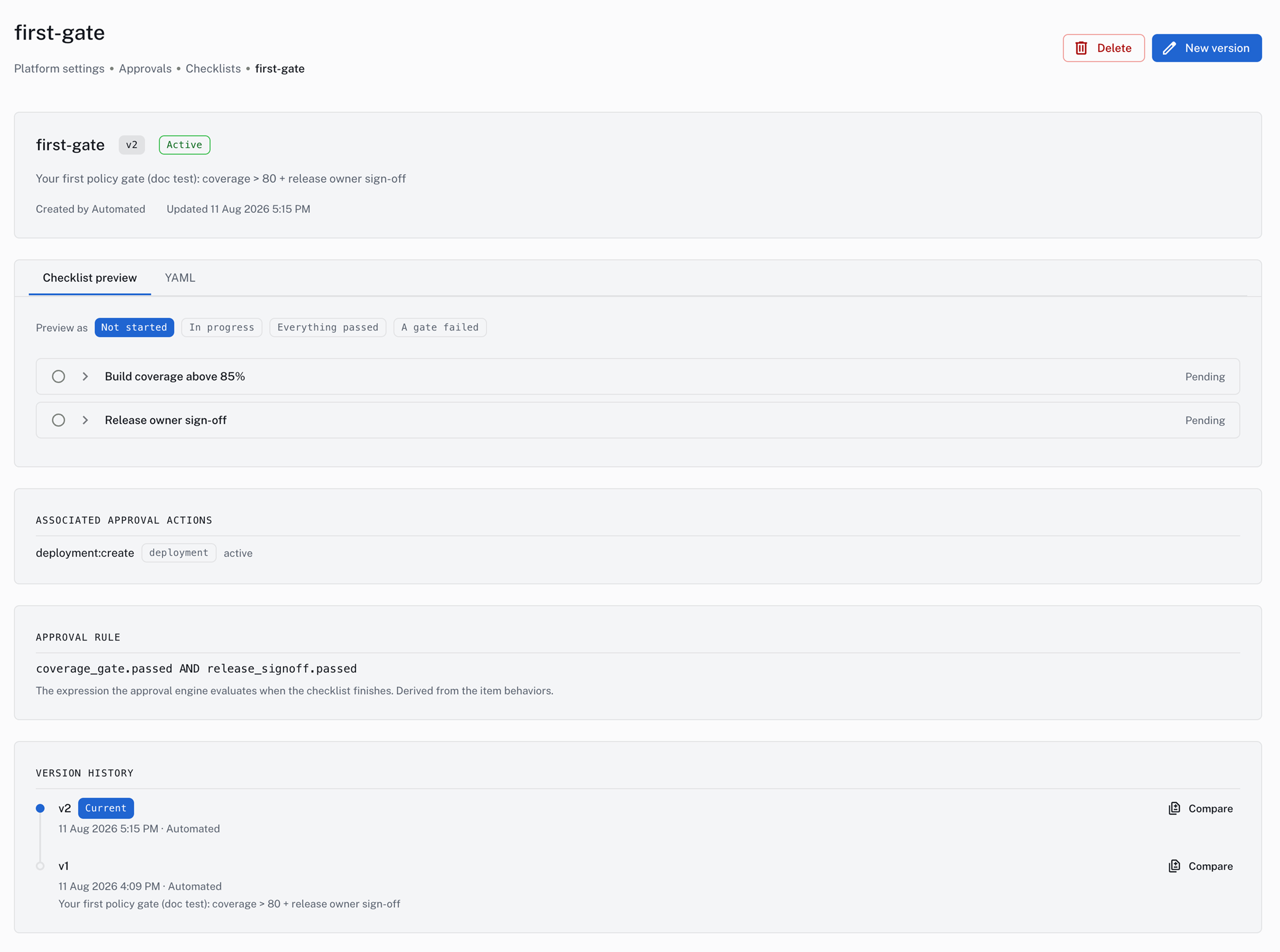
Go to **Platform settings > Approvals > Checklists** and open the checklist you want to change. In its detail view, click **New version**: the spec editor reopens on the current definition, with the same validation and preview panes you had when you created it. Edit whatever you need and click **Save as new version**.
The detail view doubles as the version history, and **Compare** shows any two versions side by side. It also lists the approval actions currently running on the spec, and the expression the engine evaluates when the checklist finishes.
To point an action that already exists at a spec, send a [POST request](/docs/api/approval-action-link-checklist-specification) to the action:
```bash
curl -L 'https://api.nullplatform.com/approval/action/1842/checklist_specification' \
-H 'Authorization: Bearer ' \
-H 'Content-Type: application/json' \
-d '{ "checklist_specification_id": "spec_abc123def456ghij" }'
```
If the action still has policies attached, the call fails with `409` and a message naming how many policies are in the way. Reach out to the nullplatform team to move an action that already runs on policies onto a checklist.
## Change a spec that's already live
Updating a spec never edits it in place. Every update publishes a **new version**: a new spec id under the same name and NRN, with the version number bumped.
Go to **Platform settings > Approvals > Checklists** and open the checklist you want to change. In its detail view, click **New version**: the spec editor reopens on the current definition, with the same validation and preview panes you had when you created it. Edit whatever you need and click **Save as new version**.
The detail view doubles as the version history, and **Compare** shows any two versions side by side. It also lists the approval actions currently running on the spec, and the expression the engine evaluates when the checklist finishes.
 Send a [PATCH request](/docs/api/checklist-specification-update) with the new definition:
```bash
curl -L -X PATCH 'https://api.nullplatform.com/approval/checklist/specification/spec_abc123def456ghij' \
-H 'Authorization: Bearer ' \
-H 'Content-Type: application/json' \
-d '{ "definition": { "items": [ ... ] } }'
```
The response is version 2 with its own `spec_…` id.
Publishing doesn't switch anything over. Version 1 stays active and the action keeps evaluating the version id it holds, so a spec change is a two-step rollout: publish, then point the action at the new id. Pointing it back at the old id is the rollback, and runs already in flight finish on the version they snapshotted.
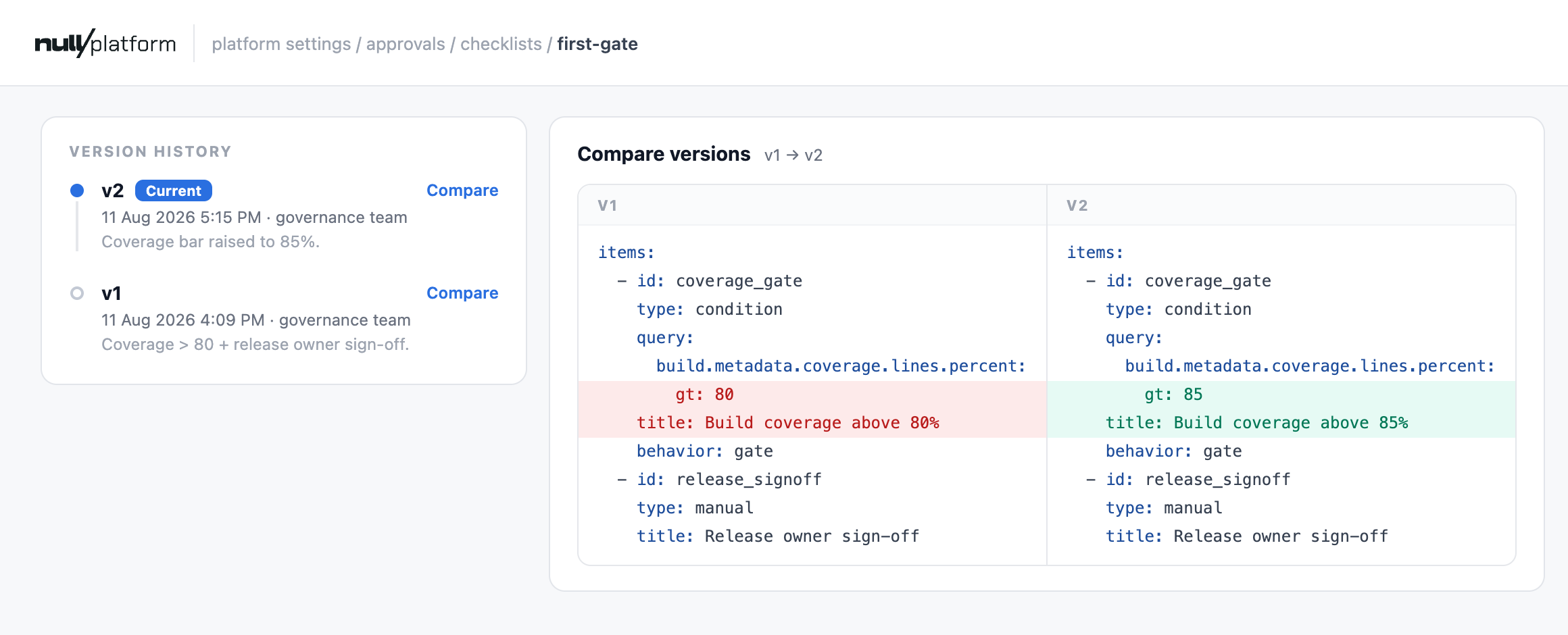
**Compare** puts the two definitions side by side, so you can see exactly what moved before you point an action at the new version.
Send a [PATCH request](/docs/api/checklist-specification-update) with the new definition:
```bash
curl -L -X PATCH 'https://api.nullplatform.com/approval/checklist/specification/spec_abc123def456ghij' \
-H 'Authorization: Bearer ' \
-H 'Content-Type: application/json' \
-d '{ "definition": { "items": [ ... ] } }'
```
The response is version 2 with its own `spec_…` id.
Publishing doesn't switch anything over. Version 1 stays active and the action keeps evaluating the version id it holds, so a spec change is a two-step rollout: publish, then point the action at the new id. Pointing it back at the old id is the rollback, and runs already in flight finish on the version they snapshotted.
**Compare** puts the two definitions side by side, so you can see exactly what moved before you point an action at the new version.
 ## Dry-run a spec before it governs anything
A dry run resolves the same action a real request would resolve and previews the run without creating it. It is what you do right after connecting a spec, and again after every new version. Send a [POST request](/docs/api/approval-dry-run) describing the request you want previewed:
```bash
curl -L 'https://api.nullplatform.com/approval/dry-run' \
-H 'Authorization: Bearer ' \
-H 'Content-Type: application/json' \
-d '{
"nrn": "organization=1:account=2:namespace=3:application=4",
"action": "deployment:create",
"approval_mode": "checklist",
"entity_id": 9876,
"requested": { "scope_id": 5521, "release_id": 7710 }
}'
```
`approval_mode` takes `auto` (the default: the checklist if the action has one, policies otherwise), `checklist`, or `policy`. Forcing `checklist` on an action with no spec attached is an error rather than a silent fallback, which is what you want when the thing you are verifying is the wiring.
The response predicts the run item by item:
```json
{
"mode": "checklist",
"specification_snapshot": {
"id": "spec_abc123def456ghij",
"name": "staging-deploy-gate",
"version": 2
},
"preview": {
"items": [
{ "id": "coverage_gate", "type": "condition", "behavior": "gate", "predicted_status": "failed", "would_run": true, "message": "condition_not_met" },
{ "id": "security_signoff", "type": "manual", "behavior": "gate", "predicted_status": "pending", "would_pend_for_user": true }
],
"aggregate_prediction": { "best_case": "fail", "worst_case": "fail", "status": "resolved" }
}
}
```
Conditions are genuinely evaluated, so their `predicted_status` is the real verdict. Everything asynchronous reports what it would wait for instead: a manual item comes back `pending` with `would_pend_for_user`, an `on_demand` external comes back `latent`, and an `auto` external is only dispatched when it declares `dry_run_safe: true`. `aggregate_prediction` closes the loop: `best_case` says whether the request can be approved at all, and when it matches `worst_case` the outcome is already decided.
Pass a `context` object in the body to preview against values of your choosing rather than the ones nullplatform would build from the request. That is how you check a threshold from both sides without producing a build that fails it.
## Choose what a failed run does
By default, a failed blocking item doesn't page anyone. The request stays open and resumable: the developer reads which item failed, fixes the cause, and redeploys, or asks for a manual review when they genuinely need another human. Reviewers are only notified at that point.
If your checklist is something the requester can never resolve on their own, set `checklist_fail_mode` on the approval action:
| `checklist_fail_mode` | What a failed run does |
|---|---|
| `on_request` (default) | The request stays open. The requester fixes and redeploys, cancels, or asks for manual review. Nobody is notified until they ask |
| `auto` | Reviewers are notified immediately and the run moves to manual review |
Keep the default when the requester can fix what failed, like a coverage threshold or a compliance rule they can address in code. Reserve `auto` for checklists the requester has no way to resolve on their own.
`checklist_fail_mode` only comes into play when the action's `on_policy_fail` is `manual`, which is the **Require a person to decide** option in the form above. If `on_policy_fail` is `reject`, a failed run denies the request outright and neither mode applies.
## Who can do what
Configuring guardrails and executing them are deliberately different jobs.
| Operation | Roles |
|---|---|
| Create, update, or delete checklist specs | `secops`, `ops`, `admin` |
| Link a checklist spec to an approval action | `secops`, `ops`, `admin` |
| [Dry-run](#dry-run-a-spec-before-it-governs-anything) a checklist spec against a context | `secops`, `ops`, `admin`, `developer` |
| Sign off a manual item or retry an external one | the team that owns the run's NRN |
| Read checklist specs and runs | all roles, including `member` and `troubleshooting` |
See [authorization](/docs/authorization/) for how roles and grants work.
## What's next
- [Items reference](/docs/approvals/checklist-items): the full contract of every item type, behavior, and validation rule
- [Approval actions](/docs/approvals/actions): everything an action can govern beyond deployments
## Dry-run a spec before it governs anything
A dry run resolves the same action a real request would resolve and previews the run without creating it. It is what you do right after connecting a spec, and again after every new version. Send a [POST request](/docs/api/approval-dry-run) describing the request you want previewed:
```bash
curl -L 'https://api.nullplatform.com/approval/dry-run' \
-H 'Authorization: Bearer ' \
-H 'Content-Type: application/json' \
-d '{
"nrn": "organization=1:account=2:namespace=3:application=4",
"action": "deployment:create",
"approval_mode": "checklist",
"entity_id": 9876,
"requested": { "scope_id": 5521, "release_id": 7710 }
}'
```
`approval_mode` takes `auto` (the default: the checklist if the action has one, policies otherwise), `checklist`, or `policy`. Forcing `checklist` on an action with no spec attached is an error rather than a silent fallback, which is what you want when the thing you are verifying is the wiring.
The response predicts the run item by item:
```json
{
"mode": "checklist",
"specification_snapshot": {
"id": "spec_abc123def456ghij",
"name": "staging-deploy-gate",
"version": 2
},
"preview": {
"items": [
{ "id": "coverage_gate", "type": "condition", "behavior": "gate", "predicted_status": "failed", "would_run": true, "message": "condition_not_met" },
{ "id": "security_signoff", "type": "manual", "behavior": "gate", "predicted_status": "pending", "would_pend_for_user": true }
],
"aggregate_prediction": { "best_case": "fail", "worst_case": "fail", "status": "resolved" }
}
}
```
Conditions are genuinely evaluated, so their `predicted_status` is the real verdict. Everything asynchronous reports what it would wait for instead: a manual item comes back `pending` with `would_pend_for_user`, an `on_demand` external comes back `latent`, and an `auto` external is only dispatched when it declares `dry_run_safe: true`. `aggregate_prediction` closes the loop: `best_case` says whether the request can be approved at all, and when it matches `worst_case` the outcome is already decided.
Pass a `context` object in the body to preview against values of your choosing rather than the ones nullplatform would build from the request. That is how you check a threshold from both sides without producing a build that fails it.
## Choose what a failed run does
By default, a failed blocking item doesn't page anyone. The request stays open and resumable: the developer reads which item failed, fixes the cause, and redeploys, or asks for a manual review when they genuinely need another human. Reviewers are only notified at that point.
If your checklist is something the requester can never resolve on their own, set `checklist_fail_mode` on the approval action:
| `checklist_fail_mode` | What a failed run does |
|---|---|
| `on_request` (default) | The request stays open. The requester fixes and redeploys, cancels, or asks for manual review. Nobody is notified until they ask |
| `auto` | Reviewers are notified immediately and the run moves to manual review |
Keep the default when the requester can fix what failed, like a coverage threshold or a compliance rule they can address in code. Reserve `auto` for checklists the requester has no way to resolve on their own.
`checklist_fail_mode` only comes into play when the action's `on_policy_fail` is `manual`, which is the **Require a person to decide** option in the form above. If `on_policy_fail` is `reject`, a failed run denies the request outright and neither mode applies.
## Who can do what
Configuring guardrails and executing them are deliberately different jobs.
| Operation | Roles |
|---|---|
| Create, update, or delete checklist specs | `secops`, `ops`, `admin` |
| Link a checklist spec to an approval action | `secops`, `ops`, `admin` |
| [Dry-run](#dry-run-a-spec-before-it-governs-anything) a checklist spec against a context | `secops`, `ops`, `admin`, `developer` |
| Sign off a manual item or retry an external one | the team that owns the run's NRN |
| Read checklist specs and runs | all roles, including `member` and `troubleshooting` |
See [authorization](/docs/authorization/) for how roles and grants work.
## What's next
- [Items reference](/docs/approvals/checklist-items): the full contract of every item type, behavior, and validation rule
- [Approval actions](/docs/approvals/actions): everything an action can govern beyond deployments