Checklists New
Checklists are in early release and may not be enabled in your organization yet. If you'd like to try them or want to know more, reach out to us and we'll get you set up.
A checklist is the list of requirements that must pass before a protected action goes through: a deployment, a secret read, a scope change.
- Some items check facts automatically,
- some wait for a person to sign off, and
- some hand the check to one of your own systems.
Every item shows its own status, so the developer who triggered the action sees what passed, what's still running, and who owes a signature.
That list is where your organization's guardrails live. Instead of a runbook nobody reads, the rules that govern an action are declared once, applied on every request, and recorded item by item for the audit.
Checklists vs policies
Policies will be deprecated in favor of checklists. Start any new guardrail as a checklist. If you want to migrate policies to checklists, reach out to the nullplatform team.
Both guard the same actions from the same Approvals area. The difference is the shape of the answer.
-
A policy answers one question: do these conditions hold, yes or no? All its conditions resolve to a single verdict.
-
A checklist turns that single verdict into the list of requirements behind it, each with its own status, owner, and result. A policy gives you the answer; a checklist shows the requirements that produced it, so the developer waiting knows which one is missing and the person signing off knows what they're signing.
Migrate policies into checklists
If you're already running on policies, you don't have to rebuild anything. A policy that grew past a single condition is usually a checklist waiting to happen, and checklists use the same condition language and the same field paths, so your predicates carry over unchanged.
If you want to move an action from policies to a checklist, reach out to the nullplatform team.
What a checklist is made of
Three pieces carry the feature:
- A checklist specification, spec for short, is the versioned definition of the requirements: authored once, reused on every request. The nullplatform UI lists them under Platform settings > Approvals > Checklists, where + New specification creates one. Specs and their lifecycle live in Specs and actions.
- Items are the requirements inside a spec. There are four item types and one list can mix them, so a single checklist can check facts automatically, wait for a person, hand a check to one of your systems, and group related requirements together.
- A run is one instantiation of the spec against one request: the thing developers actually see and auditors actually read.
Here's a complete spec, the same two-item gate you'll build in your first checklist:
{
  "name": "first-gate",
  "definition": {
    "items": [
      {
        "id": "coverage_gate",
        "type": "condition",
        "behavior": "gate",
        "title": "Build coverage above 80%",
        "query": { "build.metadata.coverage.lines.percent": { "$gte": 80 } }
      },
      {
        "id": "release_signoff",
        "type": "manual",
        "behavior": "gate",
        "title": "Release owner sign-off"
      }
    ]
  }
}
In that spec, the condition item type resolves on its own the moment a run is created, and the manual item type waits for a person. Those are two of the four types:
| Item type | What it does |
|---|---|
condition | Evaluates a query against the request context, like coverage or environment |
manual | Waits for a person to sign off, with their identity recorded |
external | Hands the check to one of your systems, typically a workflow, and waits for the result |
group | Nests other items to organize the list |
Each item also declares a behavior, which decides what its result does to the action: a gate item stops the action when it fails, an informational item reports without ever blocking, and an override lets an authorized person send the action through even though a gate item failed. The items reference covers every type, behavior, and status in detail.
How a run works
A run starts when a developer triggers one of the operations the checklist governs: creating a deployment, reading a secret, changing a scope. Which operations those are is decided by the approval action the spec is attached to, so the same checklist can guard deploys in one account and secret reads in another.
From there, nullplatform creates an approval request, instantiates the spec into a run, and starts resolving it: conditions evaluate immediately, external items are dispatched, and everything else waits for humans or callbacks.
When the run is created, nullplatform snapshots both the spec and the request context into it. Those snapshots are immutable, which has two consequences worth knowing before you author anything:
- Conditions are evaluated once, at the moment the request is created. They don't re-evaluate while the approval sits open, so a checklist judges the request as it was submitted.
- Editing a spec never rewrites history. In-flight runs keep evaluating the version they started with, and the audit trail shows exactly what was checked.
What your developers see
Once a checklist is live, the developer who triggers the action gets the list instead of a verdict. Items that evaluate automatically already show their result, external checks report as they call back, and anything waiting on a person says so.
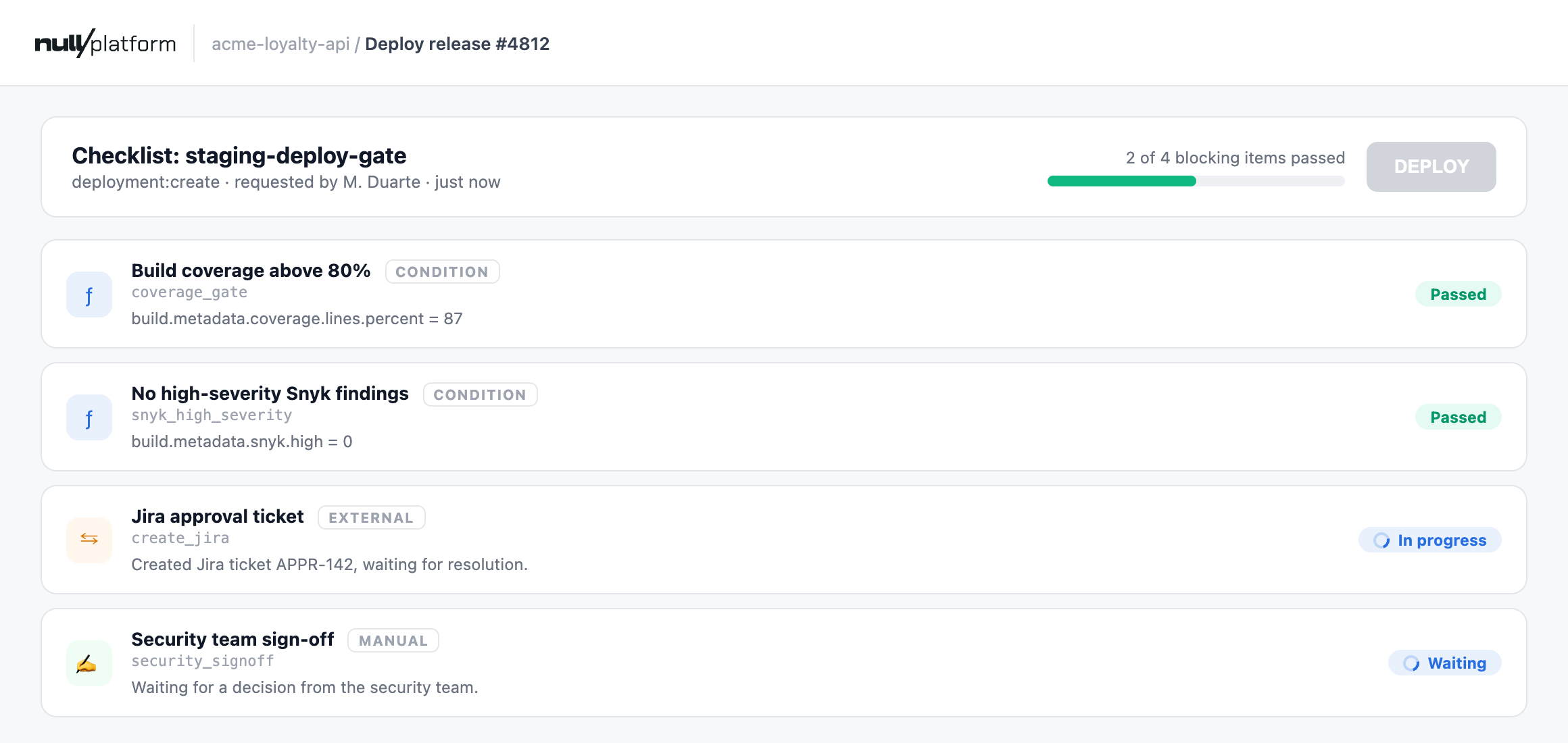
Manual items collect a decision and a comment from a named person, and the run keeps that on record: who signed off, what they said, and when.
An override never turns a failed item into a passing one. The item stays failed and the run resolves as approve_with_override, so the record shows that the action went through despite the failure, and who decided it should.
A failing item doesn't end the request either. By default it stays open and resumable: the developer reads which item failed, fixes the cause, and redeploys, or asks for a manual review when the call needs a human. How failures route is configurable per action.
Every transition lands in an event trail per run, and external items keep their own logs, which is what makes a checklist answerable to an auditor: not just what was decided, but what was checked, when, and by whom.
Learning path
From a first checklist to autonomous compliance
- Your first checklistDescribe a two-item gate to your coding assistant, dry-run it, and watch it govern a real deploy.10 min
- Gate deploys on a Jira ticketA person decides, Jira mediates: approvals in the tool your team already uses.20 min
- Match friction to deploy riskA risk matrix scores every deploy and routes it to exactly the approval it deserves.25 min
- AI architecture complianceAn agent audits every deploy against your architecture rules, one execution per rule.25 min
The items reference covers every item type, behavior, status, and validation rule, and Specs and actions covers the API, failure routing, and roles.