Your first checklist
What you'll build
A small checklist on your staging deployments: one condition that checks build coverage, and one manual sign-off. Nothing to host, no workflow yet, no external system.
What matters is the loop around it: describe, connect, dry-run, deploy, update. Every checklist you build after this one is that same loop with more interesting items, up to fully autonomous compliance.
Before you start
You need three things:
- Checklists enabled for your organization. It's an early release feature. If you don't see it yet, reach out to us.
- A nullplatform API key. See API keys to create one. Creating specs takes the
secops,ops, oradminrole. - The np-checklist skill, part of the nullplatform AI plugins for your coding assistant (Claude Code, Kiro, Cursor, and others). Follow Set up the AI plugins to install them.
1. Describe the two checklist items you want
In a session of your coding assistant with the plugin installed, describe the guardrail you want:
/np-checklist create a checklist named first-gate for all deployments in
staging across my account:

- A condition requiring build coverage above 80%.
- A manual sign-off titled "Release owner sign-off", so a person confirms
  before the deploy goes out.

Don't connect it to anything yet, I'll do that next.
Checklists scope as narrowly as you like. If a whole account feels too broad to experiment on, describe the same checklist for a single namespace or application, and widen it once you trust it.
The skill turns that into a checklist specification, spec for short: the versioned definition of your two items. Nullplatform validates the spec before saving it, so a malformed condition path or an item id that collides with a reserved word comes back as an error in the conversation, not on your first deploy.
Two details worth noticing in the definition it shows:
- The condition's query addresses
build.metadata.coverage.lines.percentwith nocontext.prefix, the same condition language policies use. - Both items declare
behavior: gate, so either one blocks the deploy when it fails. Items can also beinformational(report without ever blocking) oroverride(let the deploy through even though agateitem failed).
💡 Tip: Ask the skill to show the derived outcome expression. For this spec it reads
coverage_gate.passed AND release_signoff.passed, which is exactly the sentence you meant.
✅ Checkpoint
The skill reports the spec created, with an id like spec_abc123def456ghij, and its two items listed.
2. Connect it to your staging deploys
A spec does nothing until something points at it. Attach it in the same conversation:
now connect first-gate so it governs those staging deploys (create
whatever's needed)
The skill creates or reuses an approval action, which is the record that says which operations the checklist governs: here, creating a deployment in staging. You don't have to configure actions yourself for this tutorial. You will when you want finer control, like a different checklist per environment.
One rule to know now: an action runs on a checklist or on policies (to be deprecated), never both. If the action already has policies, the skill says so. Reach out to the nullplatform team to move it onto a checklist.
✅ Checkpoint
The skill confirms the connection and reports the action pointing at your spec. From this moment, staging deploys in your account wait on the checklist.
3. Dry-run it against a sample build
Your checklist is live. Before spending a real deploy on it, preview what one would face:
dry-run first-gate against a sample context where build coverage is 72%
The dry run previews the run without creating it, showing the list as a developer would see it: the coverage item failed at 72%, the sign-off pending, the run blocked. Run it again at 85% and the coverage item passes, leaving only the sign-off.
Two things to take from this. First, conditions are evaluated once, when the request is created, against a snapshot of it. They don't re-evaluate while the approval sits open, so a checklist judges the request as it was submitted. Second, the dry run needs step 2: it resolves the approval action first, then evaluates whatever spec that action points at. That's why you connect before you dry-run.
💡 Tip: Your checklist has a preview of its own in the nullplatform UI. Go to Platform settings > Approvals > Checklists, open
first-gatefrom the list, and flip the preview through its states: Not started, In progress, Everything passed, and Everything failed. No request involved.
✅ Checkpoint
You've seen the same spec block at 72% coverage and wait on the sign-off at 85%, without creating a single approval request.
4. Deploy, then sign off
Trigger a deployment of any application in staging. Instead of going straight out, it shows your list: the coverage condition already resolved, because it evaluated when the request was created, and the sign-off waiting for a person.
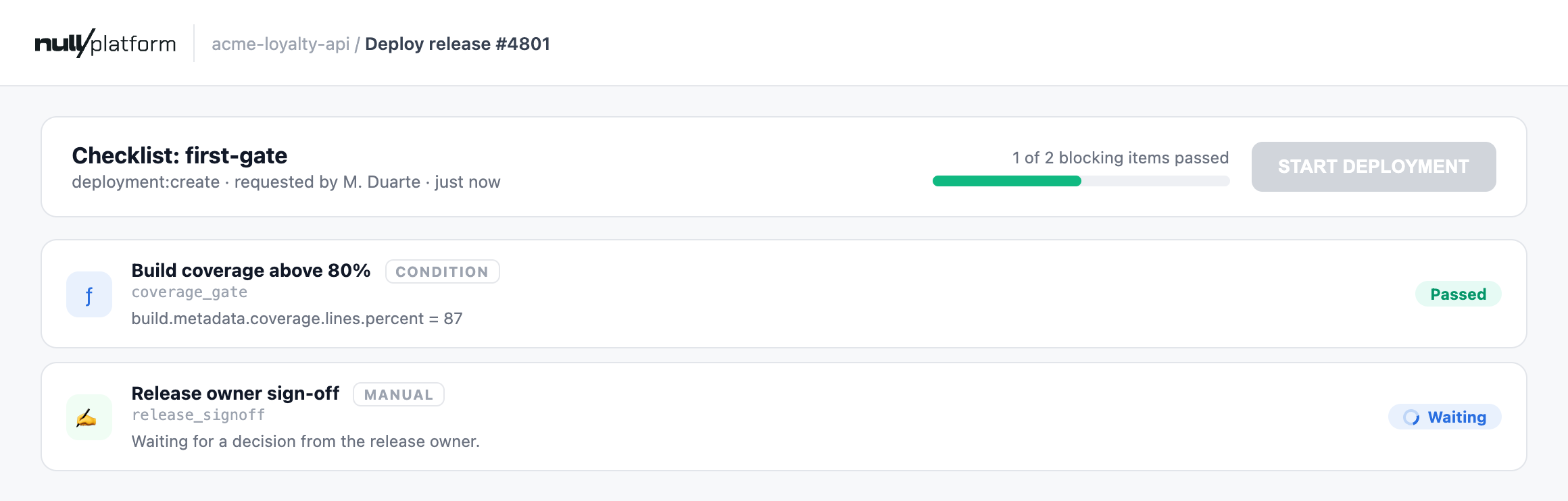
Now sign it off: open the manual item, leave a comment, and confirm. The item passes, the outcome is computed, and the deploy button unlocks. The run keeps your sign-off on record: who signed, what they said, and when.
Had the coverage condition failed, the request would stay open and resumable by default: fix the build, redeploy, and the new request gets its own run. Failure routing is configurable per action.
✅ Checkpoint
The deploy waited, you signed, and it went out: the run shows approve with both items passed and your name on the sign-off.
5. Update it with a new version
Raise the coverage threshold, again in the same conversation:
update first-gate: require coverage above 85 instead of 80
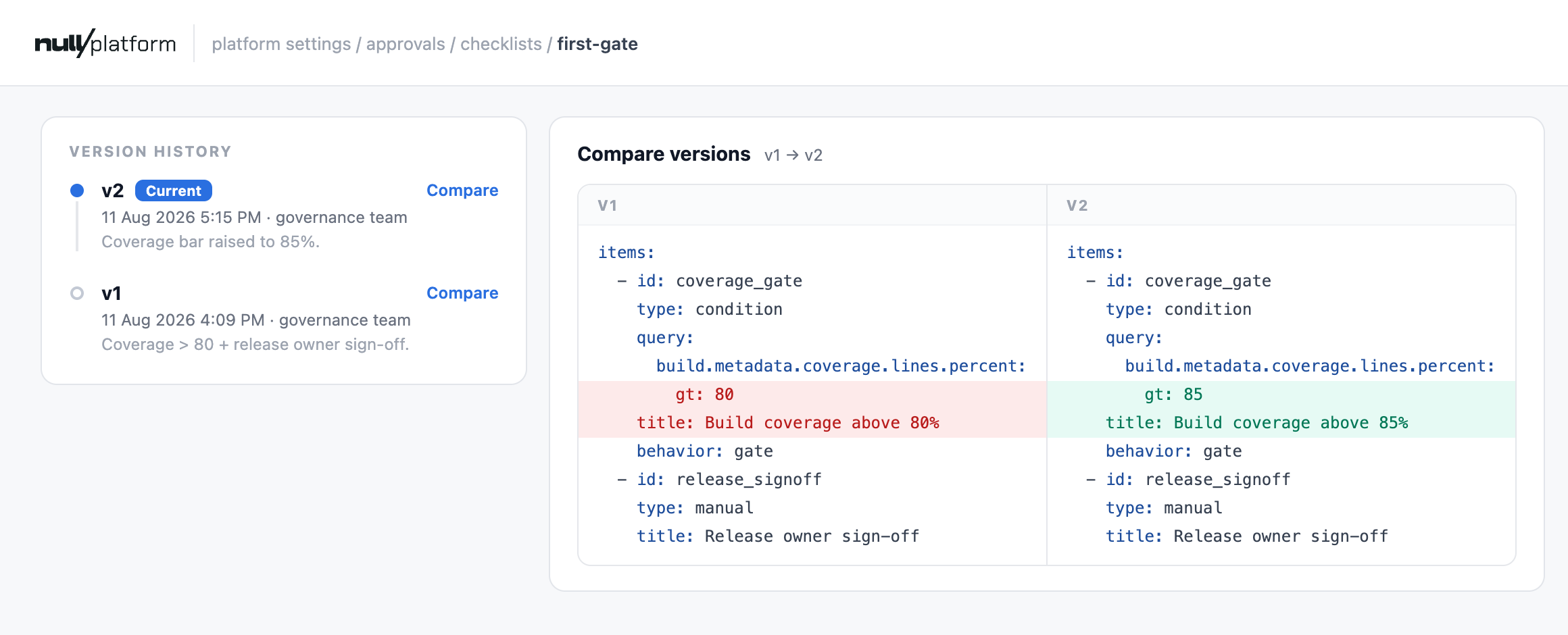
The skill doesn't edit the spec in place. It publishes version 2, a new spec id carrying the stricter condition, and points the action at it. Version 1 stays as it was. Three rules follow from that:
- Spec versions are immutable. An update is always a new version, so nobody can quietly rewrite the rule a deploy was judged against.
- The action picks the version that governs. Deploys kept facing version 1 until the action moved, which means a half-finished edit never leaks into a live deploy.
- Finished runs keep their snapshot. The run you approved in step 4 still shows coverage above 80, because that's what it enforced. Opening a past run shows what was checked then, not what the spec says now.
Dry-run it again at 82% to see the difference: the same context that passed version 1 now fails.
The nullplatform UI tells the same story. Back on your checklist's page, under Platform settings > Approvals > Checklists, the version history lists both versions and compares any two of them side by side:
✅ Checkpoint
The spec lists two versions, the action points at version 2, and your step 4 run still shows the version 1 items it was resolved against.
All done! 🎉 When you're finished experimenting, ask the skill to detach the spec from the action so staging deploys stop waiting on it.
Where to next
You now know the whole loop: describe, connect, dry-run, deploy, update. Every checklist is this loop with more interesting items, so point it at a real guardrail: 🚀
- Gate deploys on a Jira ticket your team already uses: swap the manual item for a ticket a workflow manages
- Items reference: everything an item can be, including structured inputs and validation rules like four-eyes
- Specs and actions: the API behind what the skill just did