---
title: Create and edit instances
doc_id: c441ac3b-db19-4068-866a-8edd9484f809
description: >-
Learn how to create and edit catalog instances for entities like applications,
builds, and namespaces in nullplatform.
keywords:
- catalog instances
- nullplatform
- entity management
- JSON Schema
- application configuration
---
import Tabs from '@theme/Tabs';
import TabItem from '@theme/TabItem';
# Create and edit catalog instances
Once a catalog specification exists for an entity, like an application, build, or namespace, you can start adding actual values to it. These values are known as **catalog instances**.
A catalog instance is a structured set of data that:
- Follows the rules defined in the catalog spec (JSON Schema)
- Is attached to a specific entity (e.g., a particular application)
- Can be created and edited from the **UI**, **API**, or **CLI**
## When is an instance created?
Catalog instances are created in one of two moments:
- **During entity creation**
If a spec exists for that entity type, nullplatform automatically renders a form so users can fill in the catalog
on the spot.
- **Later, in the entity’s dashboard**
After creation, the catalog appears in the catalog section of the entity. Click **"Show all"** to view or edit all
fields from the associated specs.
> 💡 This UI-based flow is available for `application`, `build`, and `namespace`.
## Example: catalog in the application dashboard
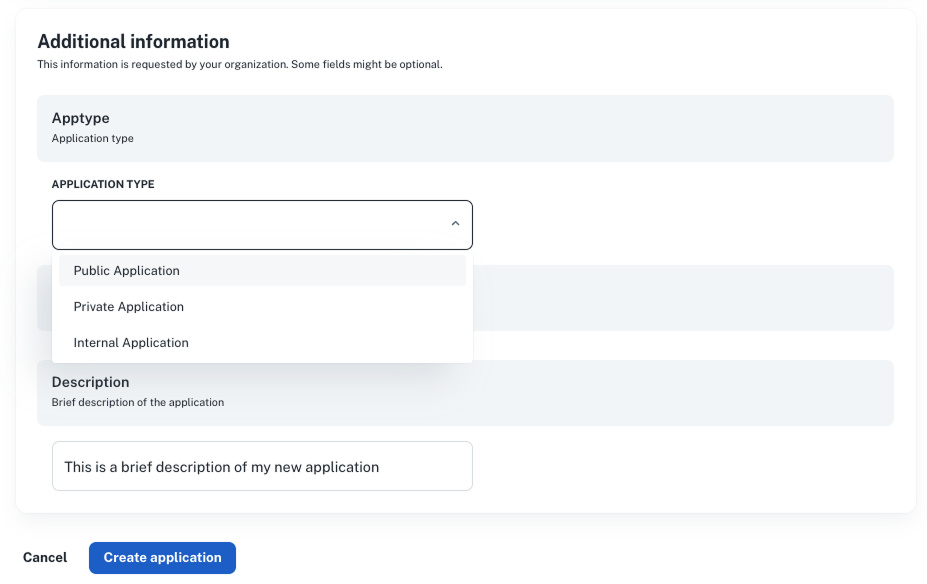
When a developer creates a new application, nullplatform will:
1. Detect available catalog specs for `application`
2. Render a form for fields like `application_type`, `description`, or any other item
3. Let the user fill them out and save
Later, on the application detail page:
- Each catalog spec appears as a box in the right sidebar
- Clicking **“Show all”** opens a modal where the fields can be edited
*Example:*
- “Apptype” → dropdown rendered from enum values
- “Description” → freeform string field
 ## Example: build catalog via quality insights
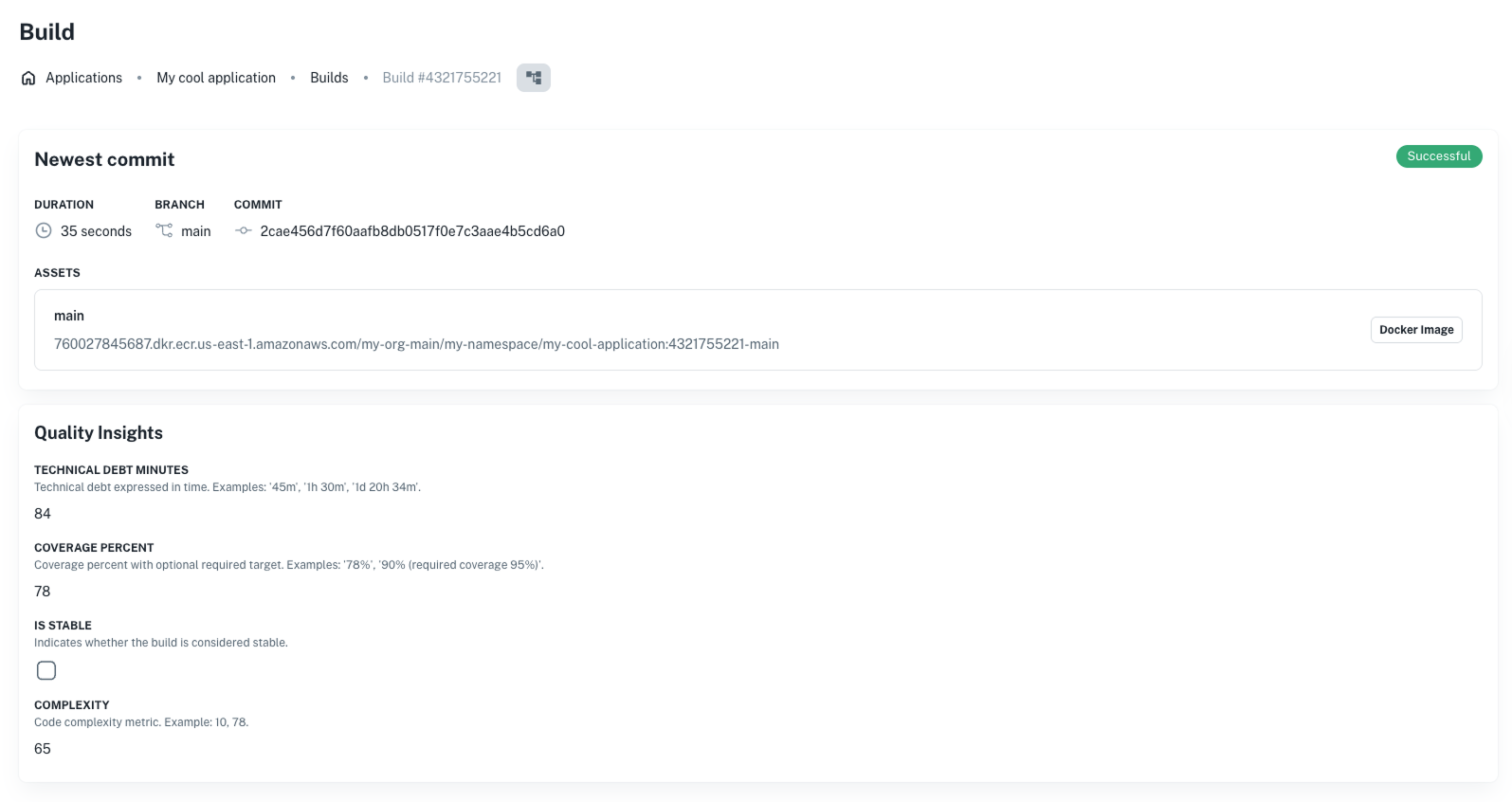
For builds, the catalog shows up as part of the **Quality Insights** section:
```json
{
"quality_insights": {
"coverage_percent": 78,
"technical_debt_minutes": 84,
"complexity": 65,
"vulnerabilities": 3
}
}
```
Each of these fields is defined in the catalog spec, and:
- Is rendered automatically in the build UI
- Can be edited (if `visibleOn` includes `update`)
- Can also be synced from CI pipelines using the API
*Example:*
## Example: build catalog via quality insights
For builds, the catalog shows up as part of the **Quality Insights** section:
```json
{
"quality_insights": {
"coverage_percent": 78,
"technical_debt_minutes": 84,
"complexity": 65,
"vulnerabilities": 3
}
}
```
Each of these fields is defined in the catalog spec, and:
- Is rendered automatically in the build UI
- Can be edited (if `visibleOn` includes `update`)
- Can also be synced from CI pipelines using the API
*Example:*
 ## Creating instances via the API
If you're integrating with CI/CD or automating catalog population, you can use the API to create or update catalog data
directly using either the [Catalog instance (multiple keys) API](/docs/catalog-instance-multiple-api-index)
or the [Catalog instance (single key) API](/docs/catalog-instance-single-api-index).
#### Multiple keys (batch creation)
Use this approach when you want to send data for **several metadata keys at once**. This is ideal for creating or updating
all catalog values for an entity in a single request.
```bash
np metadata create
--id :id
--entity build
--body '{
"coverage": {
"percent": "95",
"report": "https://reports.my-organization.com/coverage/build-a82c3d45-19e6-4f2b-b7d0-63f9a1842c1e.html"
},
"vulnerabilities": {
"high": 0,
"medium": 0,
"low": 2,
"report": "https://reports.my-organization.com/vulnerabilities/build-d4e5f678-2a31-4c89-9b01-ef45d32a7b90.html"
}
}'
```
```bash
curl -L -X POST 'https://api.nullplatform.com/metadata/build/:id' \
-H 'Content-Type: application/json' \
-H 'Authorization: Bearer ' \
-d '{
"coverage": {
"percent": "95",
"report": "https://reports.my-organization.com/coverage/build-f1b4be69-1147-4870-a35b-6e718b029f80.html"
},
"vulnerabilities": {
"high": 0,
"medium": 0,
"low": 2,
"report": "https://reports.my-organization.com/vulnerabilities/build-f1b4be69-1147-4870-a35b-6e718b029f80.html"
}
}'
```
#### Single key
Use this approach when you only need to **create or update one metadata key** for an entity. This is best for fine-grained
updates where only one catalog value changes.
To send data for a single catalog key (e.g., "apptype"), use the
[Create catalog instance (single key) API](/docs/api/catalog-instance-single-create):
```bash
curl -L -X POST 'https://api.nullplatform.com/metadata/build/:id/coverage' \
-H 'Content-Type: application/json' \
-H 'Authorization: Bearer ' \
-d '{
"application_type": "internal"
}'
```
## Reading instances
To fetch all catalog data for a given entity, use the [Read catalog instance (all keys) API](/docs/api/catalog-instance-multiple-read):
```bash
np metadata read
--id :id
--entity build
```
```bash
curl -L 'https://api.nullplatform.com/metadata/build/:id' \
-H 'Authorization: Bearer '
```
This returns a complete view of the entity's catalog data, enriched with schema and tag information.
## Catalog data validation
Whether filled in via the UI or API, catalog data is always validated against the JSON Schema defined in the
catalog specification. Validation rules include:
- Required fields (`required`)
- Enum values
- Field type matching (`string`, `number`, etc.)
- Disallowing extra fields (`additionalProperties: false`)
If validation fails, the platform will return an error detailing which parts of the input didn't match the spec.
## Creating instances via the API
If you're integrating with CI/CD or automating catalog population, you can use the API to create or update catalog data
directly using either the [Catalog instance (multiple keys) API](/docs/catalog-instance-multiple-api-index)
or the [Catalog instance (single key) API](/docs/catalog-instance-single-api-index).
#### Multiple keys (batch creation)
Use this approach when you want to send data for **several metadata keys at once**. This is ideal for creating or updating
all catalog values for an entity in a single request.
```bash
np metadata create
--id :id
--entity build
--body '{
"coverage": {
"percent": "95",
"report": "https://reports.my-organization.com/coverage/build-a82c3d45-19e6-4f2b-b7d0-63f9a1842c1e.html"
},
"vulnerabilities": {
"high": 0,
"medium": 0,
"low": 2,
"report": "https://reports.my-organization.com/vulnerabilities/build-d4e5f678-2a31-4c89-9b01-ef45d32a7b90.html"
}
}'
```
```bash
curl -L -X POST 'https://api.nullplatform.com/metadata/build/:id' \
-H 'Content-Type: application/json' \
-H 'Authorization: Bearer ' \
-d '{
"coverage": {
"percent": "95",
"report": "https://reports.my-organization.com/coverage/build-f1b4be69-1147-4870-a35b-6e718b029f80.html"
},
"vulnerabilities": {
"high": 0,
"medium": 0,
"low": 2,
"report": "https://reports.my-organization.com/vulnerabilities/build-f1b4be69-1147-4870-a35b-6e718b029f80.html"
}
}'
```
#### Single key
Use this approach when you only need to **create or update one metadata key** for an entity. This is best for fine-grained
updates where only one catalog value changes.
To send data for a single catalog key (e.g., "apptype"), use the
[Create catalog instance (single key) API](/docs/api/catalog-instance-single-create):
```bash
curl -L -X POST 'https://api.nullplatform.com/metadata/build/:id/coverage' \
-H 'Content-Type: application/json' \
-H 'Authorization: Bearer ' \
-d '{
"application_type": "internal"
}'
```
## Reading instances
To fetch all catalog data for a given entity, use the [Read catalog instance (all keys) API](/docs/api/catalog-instance-multiple-read):
```bash
np metadata read
--id :id
--entity build
```
```bash
curl -L 'https://api.nullplatform.com/metadata/build/:id' \
-H 'Authorization: Bearer '
```
This returns a complete view of the entity's catalog data, enriched with schema and tag information.
## Catalog data validation
Whether filled in via the UI or API, catalog data is always validated against the JSON Schema defined in the
catalog specification. Validation rules include:
- Required fields (`required`)
- Enum values
- Field type matching (`string`, `number`, etc.)
- Disallowing extra fields (`additionalProperties: false`)
If validation fails, the platform will return an error detailing which parts of the input didn't match the spec.