---
title: Insights
sidebar_label: Insights
toc_max_heading_level: 3
doc_id: a1f3c8e2-6b47-4d9a-8e2f-3c7a5b1d9e04
description: >-
Build AI-powered dashboards from natural language questions. Visualize
deployments, errors, performance, and team activity across your organization.
keywords:
- AI insights
- dashboard builder
- AI builder
- engineering metrics
- platform analytics
- management dashboard
---
# Insights
:::info 🚀 Early release
AI-powered features are in early release and may not be available in your organization yet. If you'd like to try them or want to know more, [reach out to us](https://docs.nullplatform.com/docs/support) and we'll get you set up.
:::
AI Insights is a dashboard builder powered by an AI assistant. Ask a question like "*Show errors by service in the last 7 days*" and the assistant generates a visual dashboard with KPI cards, charts, and tables backed by live platform data. Save your dashboards as private drafts or publish them to your organization.
## What you can do
- **Build dashboards from natural language**: type a question in the AI chat panel and get a visual dashboard instantly. The assistant generates KPI cards, bar charts, pie charts, line charts, and tables.
- **Edit and iterate**: refine dashboards through follow-up questions in the chat, or manually reorder widgets and change chart types in the editor.
- **Share with your organization**: publish dashboards so your team can access them from the Insights sidebar. Control visibility: organization-wide or private.
- **Use predefined dashboards**: access built-in dashboards for Apps & Scopes, Builds, Specs & Instances, Deployments, and DORA metrics without any setup.
## The AI assistant
The AI assistant in Insights is dedicated to building and analyzing dashboards. It's separate from the [nullplatform AI assistant](/docs/ai-assistant/overview), which handles platform operations like exploring resources, investigating failures, and generating CLI commands.
The **Insights assistant** operates in two modes:
- **Build mode**: generates widgets (KPI cards, charts, tables) from your prompt. See [Dashboard builder](./dashboard-builder.md) for the full workflow.
- **Analysis mode**: reads live data in your dashboards and answers questions about it. See [Analyze a dashboard](./visibility-and-reporting.md#analyze-a-dashboard) for details.
## Roles and permissions
| Role | Permissions |
|---|---|
| **Insights admin** | Create, edit, publish, and share dashboards. Full write access to all Insights features. |
| **Insights viewer** | View published dashboards and reports. Read-only access to organization insights. |
Check our [Roles](/docs/authorization/roles) docs for more information.
:::info
Contact your organization admin to request access if you don't see the **Insights** button in the console header.
:::
## How to access
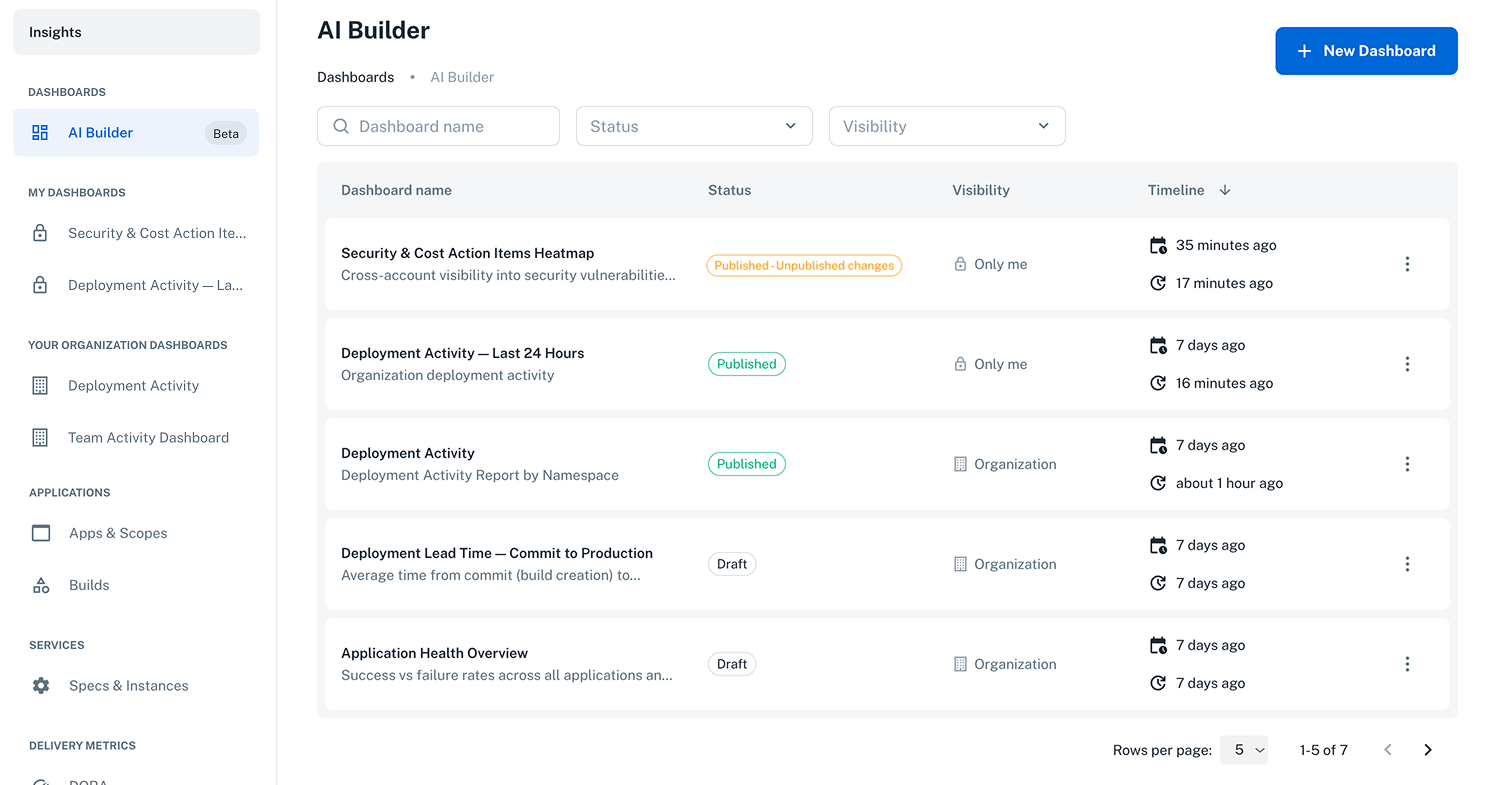
Click **Insights** in the nullplatform console header to open the dashboard view. From here you can:
- Browse **predefined dashboards** in the sidebar (Applications, Services, Delivery Metrics).
- Access your published dashboards under **My Dashboards** in the sidebar.
- See dashboards published by your team under **\{Organization\} Dashboards** in the sidebar, read-only for users with the insights viewer role.
- View and manage all dashboards, both drafts and published, from the main list.
- Click **+ New Dashboard** to create a new AI-generated dashboard.
## Next steps
| Page | What it covers |
|---|---|
| [**Dashboard builder**](./dashboard-builder.md) | Create, edit, save, publish, and manage dashboards with the AI Builder |
| [**What you can ask about**](./visibility-and-reporting.md) | Common use cases (team activity, deployments, costs, security) and how to analyze dashboards with the AI chat |
| [**AI Usage**](/docs/ai/ai-usage) | Monitor token and concurrent session consumption against org and user quotas |
 ## Next steps
| Page | What it covers |
|---|---|
| [**Dashboard builder**](./dashboard-builder.md) | Create, edit, save, publish, and manage dashboards with the AI Builder |
| [**What you can ask about**](./visibility-and-reporting.md) | Common use cases (team activity, deployments, costs, security) and how to analyze dashboards with the AI chat |
| [**AI Usage**](/docs/ai/ai-usage) | Monitor token and concurrent session consumption against org and user quotas |
## Next steps
| Page | What it covers |
|---|---|
| [**Dashboard builder**](./dashboard-builder.md) | Create, edit, save, publish, and manage dashboards with the AI Builder |
| [**What you can ask about**](./visibility-and-reporting.md) | Common use cases (team activity, deployments, costs, security) and how to analyze dashboards with the AI chat |
| [**AI Usage**](/docs/ai/ai-usage) | Monitor token and concurrent session consumption against org and user quotas |