Serverless functions running on AWS Lambda
This page covers legacy scopes. They remain supported for existing workloads, but for new implementations use agent-backed scopes instead.
Overview
Nullplatform supports AWS Lambda as a target for serverless scopes.
When you define a scope with the Serverless target, it represents a specific AWS Lambda deployment environment with region-specific and execution-specific configuration.
You can define:
- Regional settings: Choose the AWS region where the function will be deployed and configure S3 replication for multi-region setups.
- Concurrency settings: Control how many executions can run simultaneously and whether the function should use provisioned capacity to minimize cold starts.
Multi-region deployment
Deploying AWS Lambda functions across multiple regions requires additional configuration due to a key AWS constraint: the S3 bucket hosting the deployment asset must reside in the same region as the Lambda function itself.
For example, a Lambda in sa-east-1 (São Paulo) cannot access an asset stored in an S3 bucket located in us-east-1 (Virginia).
To work around this limitation, you can use S3 replication and configure your CI pipeline to register separate assets for each region within nullplatform.
1. Create a regional S3 bucket
Create a new S3 bucket in the target region where you want to deploy the Lambda function (e.g., sa-east-1).
2. Set up S3 replication
Configure S3 replication from the source bucket (e.g., us-east-1) to the newly created target bucket (e.g., sa-east-1).
ℹ️ Note: See the S3 Replication Walkthrough (AWS Docs) for more information.
3. Extend your CI pipeline
Update your CI pipeline to:
- Fetch the current build
- Identify the original asset created in the source bucket
- Rewrite the asset URL to point to the replicated bucket
- Register a second asset in nullplatform, scoped for the target region
Here is a sample Bash script to automate this step:
#!/bin/bash

# Replace this with the name of the bucket in sa-east-1
replicated_bucket=replication_bucket_name

# Replace this with the name you want to identify the sa-east-1 asset in the nullplatform UI.
# We recommend using the name of the region so it is clear where it will be deployed.
replicated_asset_name=replication_asset

application_id=$(np application current --format json | jq -r '.id')

build=$(np build list --application_id "$application_id" --format json | jq -r 'first(.results[] | select(.status == "in_progress"))')

build_id=$(echo $build | jq '.id' -r)

original_asset=$(np asset list --build-id $build_id --format json | jq -r ".results[0]")
original_asset_path=$(echo $original_asset | jq -r ".url")

replicated_asset_path=$(echo "$original_asset_path" | sed -E "s#^(s3://)[^/]+#\1$replicated_bucket#")

np asset create --body "{
    \"type\": \"lambda\",
    \"url\": \"$replicated_asset_path\",
    \"name\": \"$replicated_asset_name\",
    \"build_id\": "$build_id",
    \"application_id\": "$application_id",
    \"metadata\":{}
}"
4. Configure AWS credentials and region via Providers
Use nullplatform’s provider configuration to ensure that each scope has the correct AWS credentials and region.
For example:
- Set production scopes to use
sa-east-1 - Set development scopes to use
us-east-1
ℹ️ Note: See our docs for configuring AWS as a provider.
What it looks like in the UI
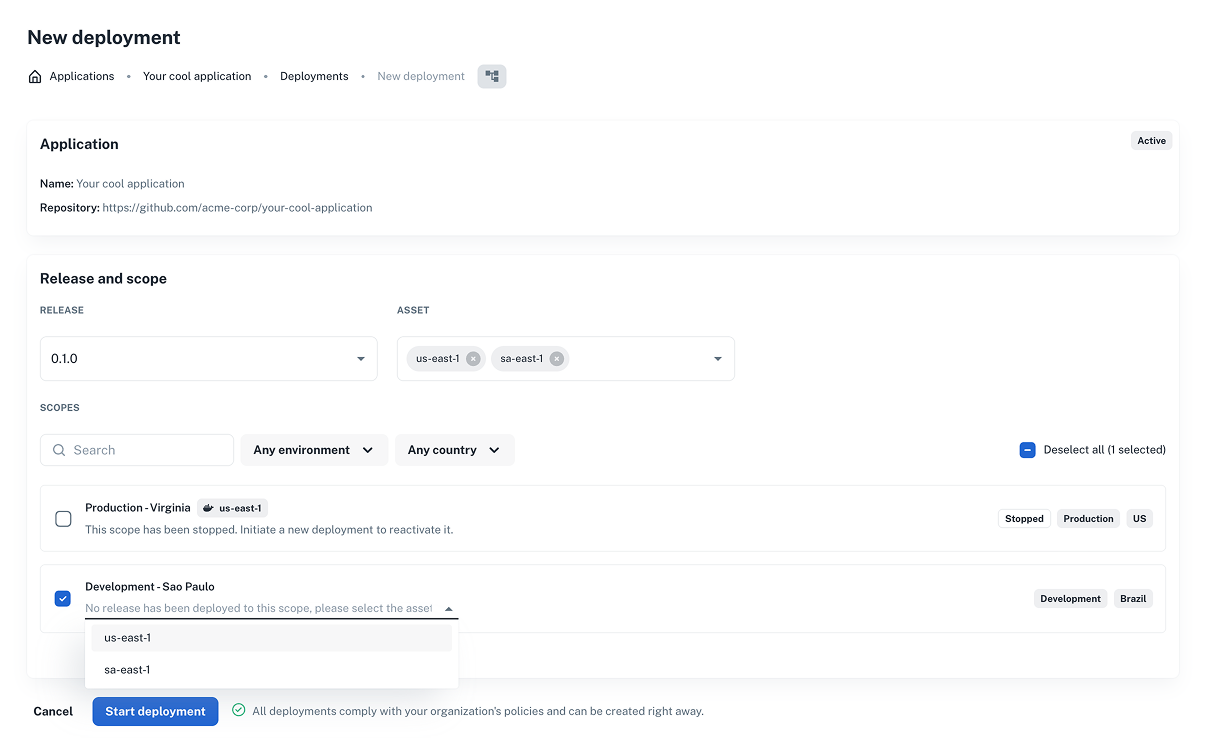
Once you’ve configured scopes for multi-region Lambda deployment, you’ll be able to select them in the New Deployment flow.
- Go to Deployments > + New Deployment
- Select the appropriate asset and scopes
- You’ll see region-specific options for your Lambda scopes
Managing concurrency in AWS Lambda scopes
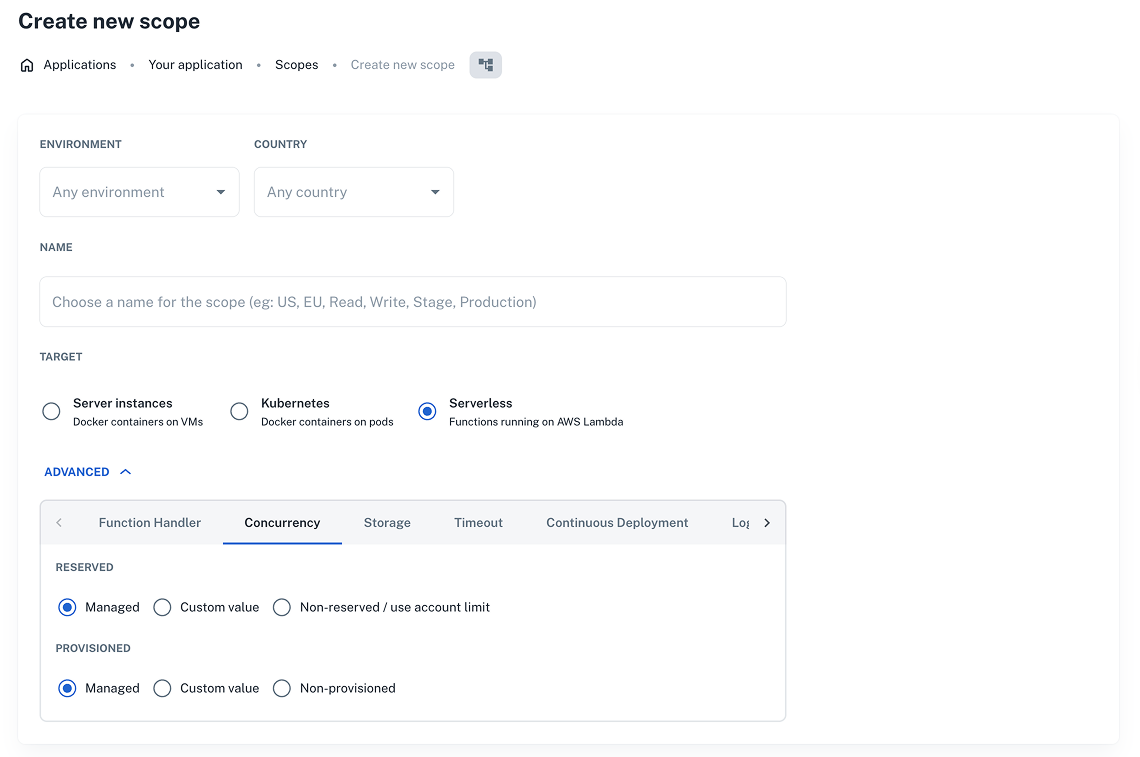
Control how AWS Lambda handles concurrent executions for your serverless functions.
You can configure two types of concurrency:
- Reserved concurrency: Sets a fixed number of concurrent executions reserved for this function.
- Provisioned concurrency: Pre-warms a specific number of instances to reduce cold start latency.
Each type supports three configuration modes:
- Managed – Uses the concurrency settings managed at the organization level.
- Custom value – Allows you to define a specific concurrency value for this scope.
- Non-provisioned / Use account limit – Runs functions using the standard concurrency limits from your AWS account.
Version-based concurrency management
Nullplatform uses version-based provisioned concurrency, since alias-based configurations are not compatible with blue/green deployments.
If your function is currently configured with an alias-based provisioned concurrency, you must disable it and redeploy the scope.
During deployment, nullplatform automatically provisions the new version. Once the blue/green rollout is complete, the previous version is cleaned up automatically.
ℹ️ Note: Deployments with provisioned concurrency include an additional waiting step while AWS completes the provisioning process.
How to enable concurrency settings
- Go to Development > Scopes and click + Create scope (or edit an existing one).
- Expand the Advanced section and open the Concurrency tab.
- Choose your configuration and save your changes.