---
sidebar_label: Link specifications
toc_max_heading_level: 3
doc_id: 8f779049-f5f1-430c-b3f6-4d1c668741c1
description: >-
Guide for designing and implementing service link specifications with roles,
properties, and multiple link types.
keywords:
- link specifications
- service linking
- API reference
- JSON schema
- UI schema
---
import Tabs from '@theme/Tabs';
import TabItem from '@theme/TabItem';
# Link specifications
:::note Before you start
If you haven't done it yet, read about [services' main concepts](../getting-started.md#specifications).
Also keep these handy references:
* **Link Specification API**
* [Our API reference](/docs/link-specification-api-index)
* **Schemas**
* [JSON Schema (external link)](https://json-schema.org/learn/getting-started-step-by-step) | [Additional keywords supported by nullplatform](/docs/json-ui-schema/json-schema)
* [UI Schema (external link)](https://jsonforms.io/docs/uischema/) | [How UI schema is integrated in nullplatform](/docs/json-ui-schema/overview)
:::
## Design your link specifications
Now that you have your service and action specifications, you can link your service.
Here are some design questions to answer:
| Question | Guidance |
| ------------------------------------------------------------ | ----------------------------------------------------------------------------------------------------------------------------------------------------------------------------------------------------------------------------------------------------------------------------------------------------------- |
| Which roles will applications have when linking my service? | It's common for services to be linked for roles such as read, write, push, consume, and so on. In simple scenarios, you can handle these situations with a property, but in more complex scenarios, you'll want to implement [multiple link types](#multiple-link-types). Read the section for more details. |
| Which properties do I need to hold for the link? | These are the properties that define the link. They are usually a combination of input parameters plus values obtained from the cloud provider upon service creation. Set these as a JSON schema in the `attributes` field. |
| Where in the organization is the link going to be available? | A good default is to start by making the service visible everywhere with the value `organization=your-org-id:account=*`. Set your choice in the `visible_to` array. |
| What can be done with the link? | Define standard actions in the link specification to control what users can do with the service. |
## Defining standard actions in the link spec
As with service specs, new link specifications automatically generate their standard actions: **create**, **update**, and **delete** (`use_default_actions` defaults to `true`). The three actions are built from the spec's attributes schema and stay in sync with it as it evolves, with no manual upkeep.
To shape how the generated actions behave:
- Use the `visibleOn` and `editableOn` keywords in your schema to control when each property should be shown or editable during the instance lifecycle.
> For example:
>
> - `visibleOn: ["create", "update"]` makes a property visible when creating or updating an instance.
> - `editableOn: ["create"]` makes a property editable only at creation time.
You can check our [Special schema keys](/docs/json-ui-schema/json-schema) page for more information on these keywords.
By using this approach, you manage everything from a single source of truth, the link specification schema, without the need to define or maintain separate action specifications.
:::info Autogenerated actions vs. Action specifications
We recommend keeping the autogenerated standard actions unless:
- You need to update your standard actions. **Autogenerated actions can't be edited directly**, so changes and updates must be made using action specifications.
- You prefer to manage the default **create**, **update**, and **delete** actions manually using **action specifications**.
In both cases, set `"use_default_actions": false` explicitly when creating the specification. On specs with autogenerated actions you can still add **custom** actions, but you can't override the generated `create`, `update`, or `delete`. Specifications created before this default changed keep the value they were saved with.
See [Action specifications](/docs/services/craft-a-service/service-actions) for more information on how to design actions for your services.
:::
## Automatic link naming
New link specifications also default to `"use_default_naming": true`, which makes the `name` field optional when someone links a service: if the caller doesn't provide one, nullplatform generates it from the specification name plus a short suffix, or takes it from the schema's `name` property when the attributes schema defines one. Set `"use_default_naming": false` if you want callers to always provide a name explicitly. Specifications created before this flag existed keep requiring a name.
## Multiple link types
When applications need to link your service for different uses such as "read", "write", "push", or "consume", it can be
useful to have several link types. By doing so you will be able to:
- Have separate forms, schemas, and parameters for each link type.
- Implement different sets of actions, particularly custom actions.
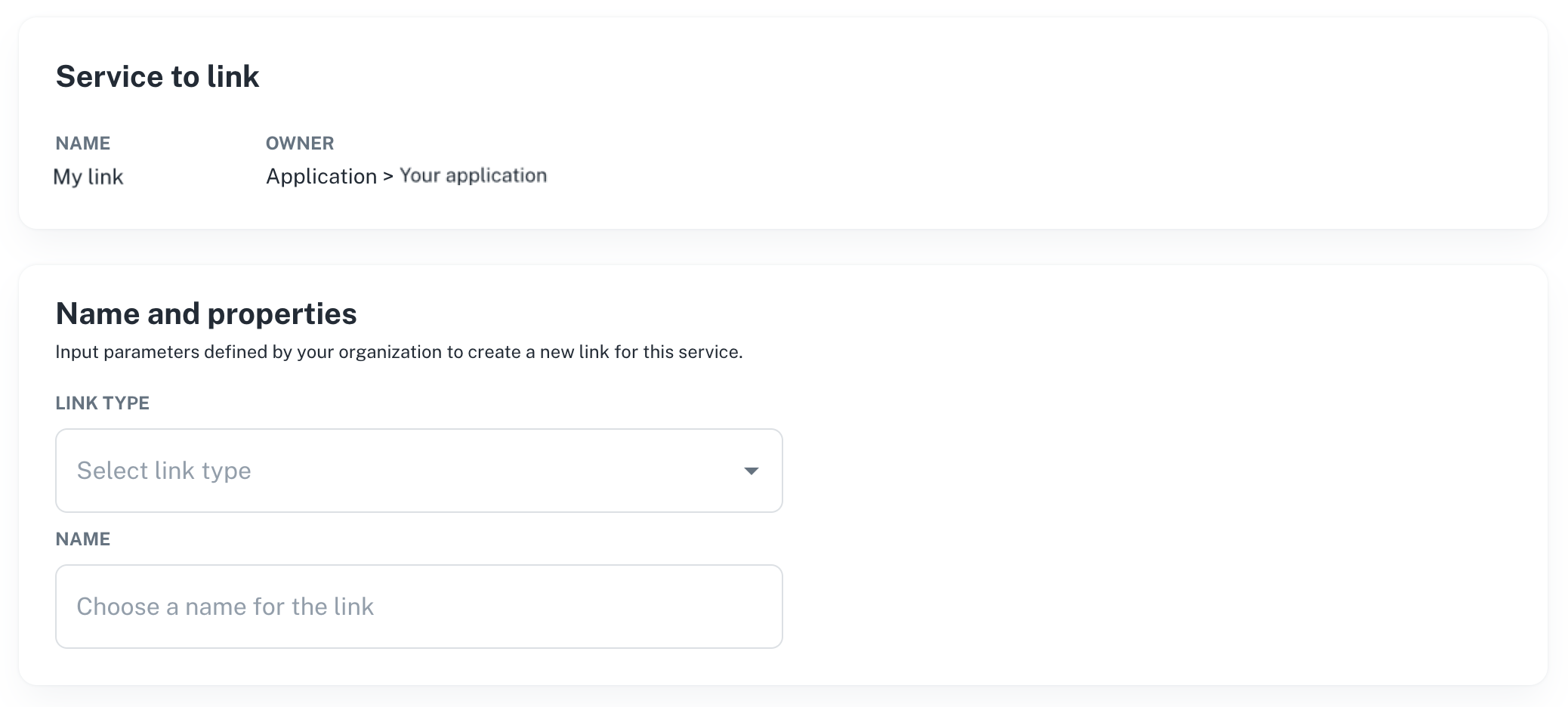
When you create several link specifications for the same service, the platform will display a dropdown menu for end
users to select the type of link they want to create:
 The drawback of multiple link types is that you end up with more specifications to manage, but it greatly improves UX
and simplifies the provisioning code.
## Create a link specification
Link specifications work much like [service specifications](/docs/services/craft-a-service/service-specs), and you can create them using our [CLI](/docs/cli/) or [API](/docs/api/link-specification-create).
Here’s an example of how to create one:
```bash
np link-specification create \
--body '{
"name": "my-link-specification",
"specification_id": "fb2c761d-a3d5-19c3-58e7-72a182d49b61",
"unique": true,
"dimensions": {
"environment": "production"
},
"use_default_actions": true,
"attributes": {
"schema": {
"type": "object",
"properties": {
"my_string_property": {
"type": "string",
"visibleOn": ["read", "create", "update"],
"editableOn": ["create"]
},
"my_number_property": {
"type": "number",
"default": 0,
"visibleOn": ["read", "create"],
"editableOn": ["create"]
}
},
"required": [
"my_string_property"
]
},
"values": {}
}
}'
```
```bash
curl -L 'https://api.nullplatform.com/link_specification' \
-H 'Content-Type: application/json' \
-H 'Accept: application/json' \
-H 'Authorization: Bearer the-token' \
-d '{
"name": "my-link-specification",
"specification_id": "fb2c761d-a3d5-19c3-58e7-72a182d49b61",
"unique": true,
"assignable_to": "dimension",
"dimensions": {
"environment": "production"
},
"use_default_actions": true,
"attributes": {
"schema": {
"type": "object",
"properties": {
"my_string_property": {
"type": "string",
"visibleOn": ["read", "create", "update"],
"editableOn": ["create"]
},
"my_number_property": {
"type": "number",
"default": 0,
"visibleOn": ["read", "create"],
"editableOn": ["create"]
}
},
"required": [
"my_string_property"
]
},
"values": {}
}
}
```
#### Some attributes to consider
Here’s a breakdown of a few key fields from the JSON above:
- **`specification_id`**: The unique ID of the service specification this link is associated with.
- **`assignable_to`**: Determines what type of entities the link can be assigned to.
- **`use_default_actions`**: Autogenerates the standard `create`, `update`, and `delete` actions from the attributes schema and keeps them in sync with it. Defaults to `true` on new specifications; set it to `false` to define those actions yourself.
- **`use_default_naming`**: Makes the link `name` optional: when no name is sent, nullplatform generates one or takes it from the schema's `name` property. Defaults to `true` on new specifications.
- **`attributes`**: Describes the configuration and layout of the service using JSON Schema.
You can always refer to our [API reference](/docs/api/link-specification-create) for more details on link specification requests.
The drawback of multiple link types is that you end up with more specifications to manage, but it greatly improves UX
and simplifies the provisioning code.
## Create a link specification
Link specifications work much like [service specifications](/docs/services/craft-a-service/service-specs), and you can create them using our [CLI](/docs/cli/) or [API](/docs/api/link-specification-create).
Here’s an example of how to create one:
```bash
np link-specification create \
--body '{
"name": "my-link-specification",
"specification_id": "fb2c761d-a3d5-19c3-58e7-72a182d49b61",
"unique": true,
"dimensions": {
"environment": "production"
},
"use_default_actions": true,
"attributes": {
"schema": {
"type": "object",
"properties": {
"my_string_property": {
"type": "string",
"visibleOn": ["read", "create", "update"],
"editableOn": ["create"]
},
"my_number_property": {
"type": "number",
"default": 0,
"visibleOn": ["read", "create"],
"editableOn": ["create"]
}
},
"required": [
"my_string_property"
]
},
"values": {}
}
}'
```
```bash
curl -L 'https://api.nullplatform.com/link_specification' \
-H 'Content-Type: application/json' \
-H 'Accept: application/json' \
-H 'Authorization: Bearer the-token' \
-d '{
"name": "my-link-specification",
"specification_id": "fb2c761d-a3d5-19c3-58e7-72a182d49b61",
"unique": true,
"assignable_to": "dimension",
"dimensions": {
"environment": "production"
},
"use_default_actions": true,
"attributes": {
"schema": {
"type": "object",
"properties": {
"my_string_property": {
"type": "string",
"visibleOn": ["read", "create", "update"],
"editableOn": ["create"]
},
"my_number_property": {
"type": "number",
"default": 0,
"visibleOn": ["read", "create"],
"editableOn": ["create"]
}
},
"required": [
"my_string_property"
]
},
"values": {}
}
}
```
#### Some attributes to consider
Here’s a breakdown of a few key fields from the JSON above:
- **`specification_id`**: The unique ID of the service specification this link is associated with.
- **`assignable_to`**: Determines what type of entities the link can be assigned to.
- **`use_default_actions`**: Autogenerates the standard `create`, `update`, and `delete` actions from the attributes schema and keeps them in sync with it. Defaults to `true` on new specifications; set it to `false` to define those actions yourself.
- **`use_default_naming`**: Makes the link `name` optional: when no name is sent, nullplatform generates one or takes it from the schema's `name` property. Defaults to `true` on new specifications.
- **`attributes`**: Describes the configuration and layout of the service using JSON Schema.
You can always refer to our [API reference](/docs/api/link-specification-create) for more details on link specification requests.