---
title: Audit every deploy against your architecture rules
description: "🎯 Your architecture handbook becomes a deploy gate: every release is audited rule by rule, compliant deploys go out on their own, and violations come back as findings with fix instructions."
sidebar_label: AI architecture compliance
doc_id: c3a8e5f2-9d14-4b67-8e29-5f7b1d0c4a93
toc_max_heading_level: 3
tutorial_type: tutorial
tutorial_category: checklists
tutorial_time: 25 min
tutorial_featured: true
tutorial_cover: /img/tutorials/covers/ai-architecture-compliance.svg
keywords:
- checklists
- workflows
- ai
- architecture compliance
- deployment gate
- governance
- nullplatform
tags:
- governance
- checklists
---
import WorkflowCanvas from '@site/src/components/WorkflowCanvas';
import archRuleCheck from '@site/src/components/WorkflowCanvas/examples/arch-rule-check';
# Audit every deploy against your architecture rules
> 🎯 **Goal:** Two prompts to your coding assistant, and every deploy is audited against your architecture rules before it goes out: each rule gets its own AI review of the code, compliant releases approve themselves, and a violation comes back as a concrete finding with fix instructions, not a "denied".
## Introduction
Your organization has architecture rules. No secrets in code, only approved dependencies, every service exposes a health endpoint. They live in a handbook, they come up in code review when someone remembers them, and nothing checks them automatically.
This tutorial turns that handbook into a deploy gate. It takes two prompts:
- **One prompt creates the checklist spec**: your rules, grouped by standard, each one written as plain instructions
- **One prompt creates the workflow** that audits a single rule against the repository and reports the result back
From then on, every gated deploy is checked rule by rule. Nothing to remember in code review, and no human in the loop unless a rule actually fails.
## What you'll set up
- A [checklist](/docs/approvals/checklists) on `deployment:create` where each architecture rule is its own external item, so the developer sees exactly which rule passed and which failed
- One auditing workflow serving all of them: each rule item triggers its own execution, so eight rules audit in parallel
- Incremental audits: a redeploy that doesn't touch files relevant to a rule carries the previous verdict over instead of re-auditing, and a rule that failed last time is re-checked in fix-verification mode
- Actionable failures: a violated rule resolves with the files at fault, what is wrong with them, and fix instructions a developer, or a coding agent, can apply before redeploying
> 💡 **Want the machinery first?** Jump to [What you just built](#what-you-just-built), then come back.
## Prerequisites
- Checklists enabled in your organization ([early release](/docs/approvals/checklists))
- The np-workflow and np-checklist skills, part of the [nullplatform AI plugins](https://github.com/nullplatform/ai-plugins) for your coding assistant. See [Set up the AI plugins](/docs/ai-ops/ai-plugins) to install them
- A GitHub token with read access to the repositories the auditor will inspect
## Step 1: Write your rules as a checklist
Start with the rules. Each one becomes an external item whose inputs carry the rule's title and its instruction, which is the text the auditor enforces:
```
/np-checklist create a checklist for deployments in the "loyalty" namespace:
External items of kind "arch-rule-check", grouped like this, all gates
unless noted:
- Platform standards: "nullplatform_services_only" (data stores and queues
must be nullplatform services, no hand-rolled infrastructure), and
"approved_dependencies" (only dependencies from our approved list).
- Security standards: "no_secrets_in_code" (no credentials, tokens, or
API keys anywhere in the repository), and "audit_logging" (every
state-changing endpoint writes an audit log entry).
- Quality standards: "health_endpoint" (the service exposes /health),
"has_tests" (a test suite exists and covers the main flows), and
"readme_runbook" as informational (README explains how to run and
operate the service).
- An informational "architecture_summary" item that describes this
deployment's changes for whoever reads the run.
Each item carries rule_id, rule_title, and instruction in its inputs,
where instruction is the full rule text the auditor should enforce.
Associate it with the deployment:create approval action for that
namespace (create the action if it doesn't exist).
```
Two decisions in that prompt are worth explaining. The action lives at the **namespace** NRN, so every application in that team or domain gets the same gate, with no per-application setup. And the rules travel **in the items' inputs**, not in the workflow: your handbook lives in the checklist spec, and editing a rule's text changes what's enforced on the next deploy without touching any code.
#### ✅ Checkpoint
The skill reports the checklist spec created, grouped as described, and linked to the action. A dry run shows every rule item pending.
## Step 2: Create the workflow that audits each rule
Now the workflow that answers those items:
```
/np-workflow create a workflow that resolves checklist items of kind
"arch-rule-check", one execution per item:
Before auditing, compare the commit being deployed against the one this
rule last analyzed on this application. If nothing relevant changed, carry
the previous verdict over instead of auditing again. Otherwise fetch the
files the rule applies to from GitHub.
Then have an AI agent audit that one rule against those files and answer
in a fixed schema: passed, failed or not applicable, a short summary,
findings with file, issue and fix, and fix instructions when it fails.
Finish by logging the findings to the item, resolving it with the verdict,
and recording the commit that was analyzed so the next run can compare
against it. If anything crashes, resolve the item as failed with the error
instead of leaving it unanswered.
Publish it but don't activate anything yet.
```
The workflow reads three configuration entries:
| Entry | Type | What it is |
|---|---|---|
| `NP_API_KEY` | Secret | API key the trigger uses to subscribe to gate dispatches |
| `GITHUB_TOKEN` | Secret | Read-only token the preparer fetches repository content with |
| `NP_ORGANIZATION_ID` | Variable | Your organization id, for the trigger's NRN |
> 💡 **Tip:** the AI runs in exactly one step, with deterministic code on both sides of it. The code that decides *what* to audit and the code that *resolves* the item leave nothing to the agent, which only judges one rule against one snapshot and must answer in a fixed schema. A crashed audit fails the item explicitly, so the checklist never passes because the auditor stopped responding.
#### ✅ Checkpoint
The skill reports the workflow as published, activation skipped, subscribed to kind `arch-rule-check`.
## Step 3: Review the workflow and activate it
In the nullplatform UI, open **Platform Settings → Workflow Editor** and click the workflow. Read the canvas left to right: the step that prepares the audit, the carry-over shortcut, the AI step, and the step that resolves the item.
Two things to notice:
- **The carry-over branch is what keeps the cost down.** Every audit stamps the commit it analyzed. On the next deploy, the preparer diffs against that stamp: rules whose relevant files didn't change re-use their verdict without waking the agent. A typical redeploy re-audits one or two rules out of eight.
- **The output schema is the contract.** The agent cannot answer with free text: it must return a status, findings with file, issue and fix, and fix instructions. That is what makes a failure actionable instead of a vague paragraph.
Activate the workflow when you're done looking: **ACTIVATE**, next to RUN in the toolbar. Until then, gate dispatches would go unanswered and time out.
#### ✅ Checkpoint
The workflow shows as active, and its trigger lists `arch-rule-check` as the kind it subscribes to.
## Step 4: Deploy and watch the audit run
Trigger a deployment of any application in the gated namespace. The deploy shows the checklist: eight items, each reporting progress while its audit runs, then resolving one by one with a short review on the card.
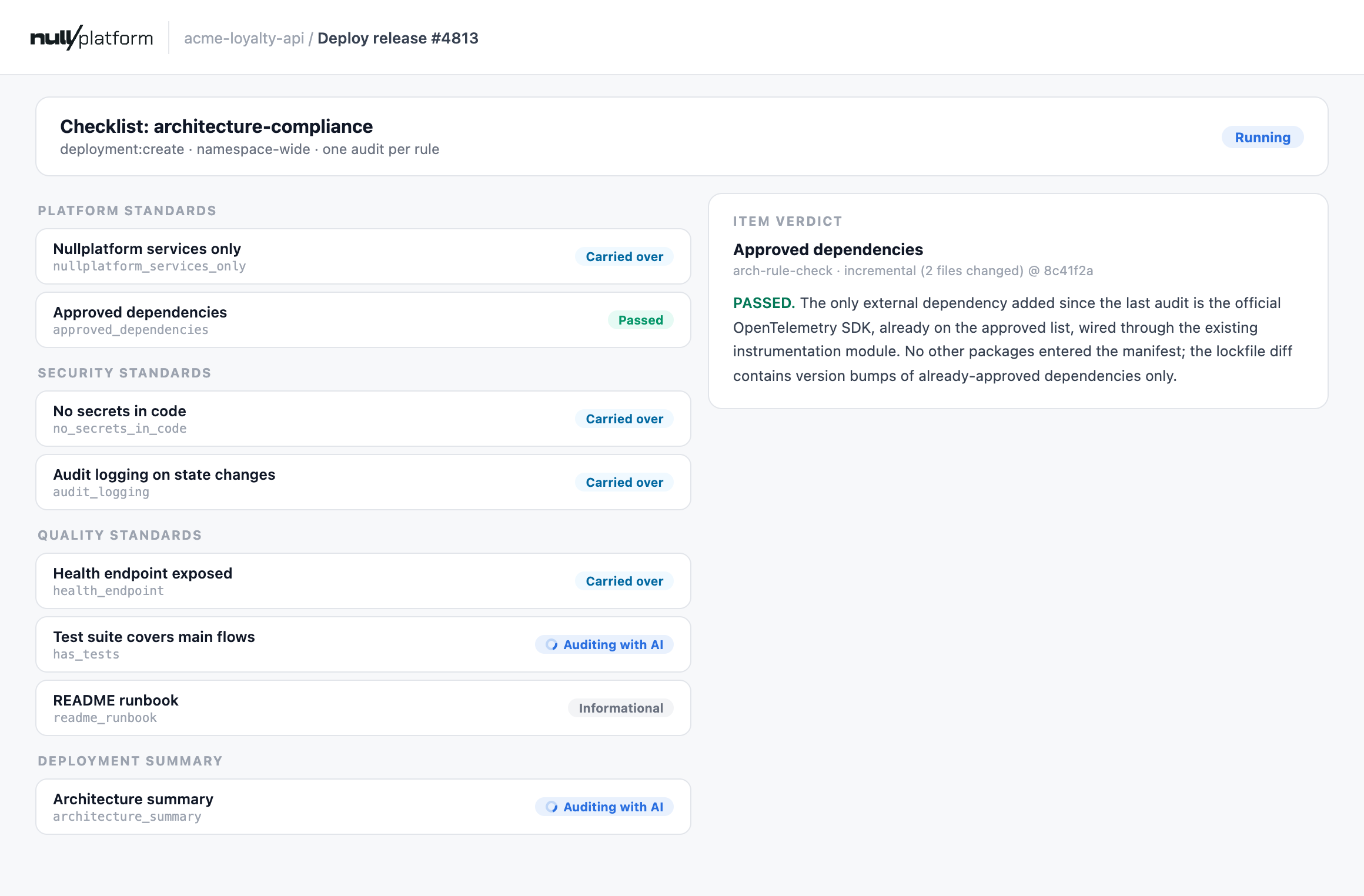 When every rule passes, the run resolves as `approve`, the request is auto-approved, and the deploy proceeds. Nobody clicked anything: the audit trail shows each rule, the commit it analyzed, and its verdict.
When a rule fails, the item card carries the findings: which files, what's wrong, and how to fix it. By default nobody is paged and nothing escalates: the request stays open, the developer (or their coding agent) applies the fix and redeploys, and the failed rule re-checks in fix-verification mode, confirming each finding was resolved. That resumable-by-default behavior is the action's `checklist_fail_mode: on_request` setting, covered in the [items reference](/docs/approvals/checklist-items#when-a-run-fails).
#### ✅ Checkpoint
A compliant deploy resolves `approve` with all rule items passed; each item's card shows a short verdict naming the analyzed commit.
## Make it yours
- **Rules are text, not code.** Each rule's `instruction` is plain text in the checklist spec. Tighten a rule, add an exception, or write a new one, and the next deploy enforces it, with no workflow changes and nothing to redeploy.
- **Add a tech-lead override.** Drop a manual item with `behavior: override` into the spec, and a failed rule stops blocking the moment a tech lead approves it, recorded as an override with their name on it.
- **Route failures to reviewers instead.** If your gate guards something the requester can't self-fix, set `checklist_fail_mode: auto` on the action and failures notify reviewers immediately.
- **Scope rules with `applies_when`.** A frontend design-system rule doesn't belong on backend services: give the item an `applies_when` on the application's metadata, or let the auditor answer `not_applicable`, which counts as passed.
- **Reuse the pattern for other reviews.** Rule text in the spec, one agent execution per rule, deterministic code to gather and resolve around it: that structure audits anything a person could review. Swap architecture rules for security policies, accessibility standards, or documentation requirements, and the same workflow enforces them.
## What you just built
When every rule passes, the run resolves as `approve`, the request is auto-approved, and the deploy proceeds. Nobody clicked anything: the audit trail shows each rule, the commit it analyzed, and its verdict.
When a rule fails, the item card carries the findings: which files, what's wrong, and how to fix it. By default nobody is paged and nothing escalates: the request stays open, the developer (or their coding agent) applies the fix and redeploys, and the failed rule re-checks in fix-verification mode, confirming each finding was resolved. That resumable-by-default behavior is the action's `checklist_fail_mode: on_request` setting, covered in the [items reference](/docs/approvals/checklist-items#when-a-run-fails).
#### ✅ Checkpoint
A compliant deploy resolves `approve` with all rule items passed; each item's card shows a short verdict naming the analyzed commit.
## Make it yours
- **Rules are text, not code.** Each rule's `instruction` is plain text in the checklist spec. Tighten a rule, add an exception, or write a new one, and the next deploy enforces it, with no workflow changes and nothing to redeploy.
- **Add a tech-lead override.** Drop a manual item with `behavior: override` into the spec, and a failed rule stops blocking the moment a tech lead approves it, recorded as an override with their name on it.
- **Route failures to reviewers instead.** If your gate guards something the requester can't self-fix, set `checklist_fail_mode: auto` on the action and failures notify reviewers immediately.
- **Scope rules with `applies_when`.** A frontend design-system rule doesn't belong on backend services: give the item an `applies_when` on the application's metadata, or let the auditor answer `not_applicable`, which counts as passed.
- **Reuse the pattern for other reviews.** Rule text in the spec, one agent execution per rule, deterministic code to gather and resolve around it: that structure audits anything a person could review. Swap architecture rules for security policies, accessibility standards, or documentation requirements, and the same workflow enforces them.
## What you just built
How the pieces fit together
You have a checklist spec that holds your rules, and one workflow that can audit any of them.
The **checklist spec** declares one external item per rule, grouped by standard, each carrying `rule_id`, `rule_title`, and `instruction` in its inputs. The **auditor workflow** subscribes to the kind they all share. When a deploy is requested, the run dispatches every applicable item, and the engine starts one execution per rule: eight rules, eight parallel audits.
```mermaid
flowchart LR;
A["Gated deploy
requested"] --> B["Run dispatches items
kind: arch-rule-check"];
B --> C["One execution per rule:
checkpoint + diff"];
C --> D["Carry over verdict
(nothing relevant changed)"];
C --> E["AI audits the rule
against the snapshot"];
E --> F["Findings logged,
item resolved"];
D --> G["All items in:
auto-approve or block"];
F --> G;
classDef np fill:#e6faf4,stroke:#00b894,color:#1a1a1a;
classDef infra fill:#eef3fb,stroke:#274a86,color:#1a1a1a;
class A,B,F,G np;
class C,D,E infra;
linkStyle default stroke:#9aa5b1,stroke-width:1.5px;
```
A rule travels as data in the spec, never as code in the workflow:
```json
{
"id": "no_secrets_in_code",
"type": "external",
"behavior": "gate",
"external": {
"kind": "arch-rule-check",
"trigger": "auto",
"timeout_seconds": 900,
"inputs": {
"rule_id": "no_secrets_in_code",
"rule_title": "No secrets in code",
"instruction": "No credentials, tokens, or API keys anywhere in the repository. Environment configuration must come from nullplatform parameters. Flag any hardcoded connection string, .env file with real values, or key material, and name the exact file."
}
}
}
```
The auditor receives that `instruction` as part of its prompt, judges only that rule, and answers in the output schema. Editing the instruction edits the gate.
Notice there are no repository URLs, rule lists, or organization ids hardcoded in the workflow: the trigger carries each rule's inputs, the application's repository comes from its own metadata, and credentials live in the folder's secrets. The same workflow runs unchanged in any organization, serving any spec that emits its kind.
### Building blocks used
| Block | Role in this suite |
|---|---|
| [Triggers](/docs/workflows/building-blocks/triggers) | `np-checklist-trigger` starts one execution per dispatched rule item |
| [Nodes](/docs/workflows/building-blocks/nodes) | `code-exec` prepares the audit and resolves the item; `conditional` routes carry-over vs analyze |
| [AI nodes](/docs/workflows/building-blocks/ai-nodes) | `claude-code-agent` judges one rule against the snapshot, constrained by an output schema |
| [Secrets and variables](/docs/workflows/building-blocks/secrets-and-variables) | The GitHub token and NP API key as folder secrets |
| [Runs and versions](/docs/workflows/building-blocks/runs-and-versions) | Eight parallel executions per deploy, each with per-step logs feeding the item's audit trail |
## What's next
- [Gate deploys on a Jira ticket your team already uses](/docs/tutorials/jira-approval-gate): the same handoff with a person deciding
- [Checklists](/docs/approvals/checklists): fail modes, migration from policies, and who can author specs
---
## Related docs
- [Items reference](/docs/approvals/checklist-items)
- [Approval actions](/docs/approvals/actions)