---
title: Create an SQS queue service
description: "🎯 Build and test an AWS SQS service specification using the Service Spec Playground, then copy the generated IaC."
toc_max_heading_level: 2
sidebar_label: Create an SQS queue service
doc_id: c8b20935-ddbc-4508-a508-e416563a26f9
tutorial_type: tutorial
tutorial_category: services
tutorial_time: 30 min
tutorial_featured: false
tutorial_cover: /img/tutorials/covers/service-create-sqs.svg
keywords:
- services
- service specification
- sqs
- aws
- json schema
- ui schema
- terraform
tags:
- services
- automation
- sqs
---
import Tabs from '@theme/Tabs';
import TabItem from '@theme/TabItem';
# Create an SQS queue service
> 🎯 **Goal:** Craft a **ready-to-use AWS SQS queue service specification**—complete with schema, UI, and IaC—so your teams can consistently provision queues in your organization.
## Introduction
In this guide you’ll model a **reusable service specification** that provisions an AWS SQS queue. You’ll design the
**JSON Schema** (what’s configurable), optionally add a **UI Schema** (layout & hints), and finally copy the IaC that the
playground generates so teams can roll this out with **Terraform/OpenTofu** or the CLI. You’ll also create a **link specification** for the service, so it can be triggered from other entities in your organization.
## What you’ll set up
By the end of this guide, you'll have:
- A **service specification** for SQS queues with sensible defaults
- An optional **UI Schema** that groups advanced options
- A **copy‑pastable Terraform/OpenTofu snippet** (or CLI) from the playground
- A **link specification** wired to your service
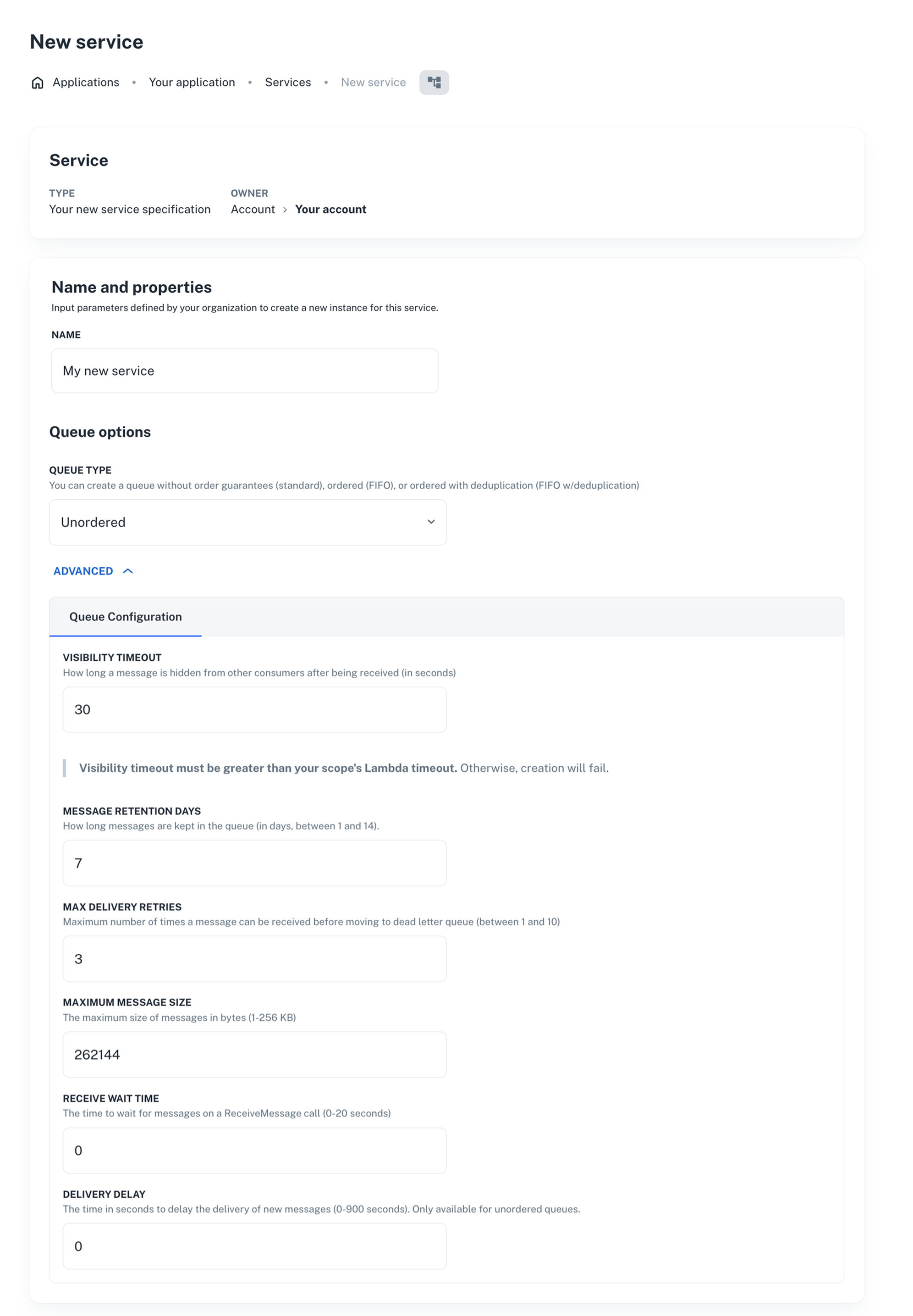
This is how the SQS queue service will look like for developers:
 ---
## Prerequisites
You’ll need:
- Terraform/OpenTofu
- A [**nullplatform API key**](/docs/authorization/api-keys) with the **Ops** role assigned (recommended at the **organization** level)
- If you're planning to use the nullplatform CLI instead of Terraform/OpenTofu, the [**nullplatform CLI**](/docs/cli/) installed:
```bash
curl https://cli.nullplatform.com/install.sh | sh
```
## 1. Open the service specification playground
1. Go to **Platform settings > Services > Specifications**.
2. Click **+ New service specification**. The playground opens with three tabs: **Specification data**, **Schema**, and **UI schema**.
The playground also includes **Terraform/OpenTofu** and **CLI** tabs that render ready‑to‑use snippets from your schema.
> 💡 **Tip:** You can also open an existing spec to iterate on it. Preview updates live in the right‑hand panel.
## 2. Fill in specification data (name, visibility, defaults)
In **Specification data**, define general settings for the service (name, visibility, dimensions, default actions).
**Default template shown in the UI:**
```json
{
"name": "My new service specification",
"visible_to": [
"organization="
],
"type": "dependency",
"use_default_actions": true,
"dimensions": {},
"assignable_to": "any",
"attributes": {
"values": {}
}
}
```
### Key fields
- **visible_to** lets you limit where the service is available by specifying which NRNs can access it (org, account, namespace, or application). Example for a specific application:
`["organization=1:account=2:namespace=3:application=4"]`
> 💡 **Tip:** We recommend keeping a wildcard at the namespace level so the service remains visible to app‑level users too. If you don’t set it this way, developers who only have application‑level permissions might not see the service.
>
> Like this: `["organization=1:account=2:namespace=*"]`
- **assignable_to** lets you control where instances can be attached. Keep `any` unless you need to constrain it (e.g., only by dimension `"assignable_to": "dimension"`).
## 3. Add the SQS **Schema**
Switch to **Schema** and paste the example below. You’ll see the form update in the **Preview** panel in real time.
> 💡 **Tip**: Tweak defaults and limits to match your org’s guardrails.
```json
{
"$schema": "http://json-schema.org/draft-07/schema#",
"type": "object",
"title": "SQS Queue Configuration",
"description": "Essential configuration for an AWS SQS Queue",
"properties": {
"queue_type": {
"type": "string",
"oneOf": [
{
"const": "standard",
"title": "Unordered"
},
{
"const": "fifo",
"title": "Ordered (FIFO)"
},
{
"const": "fifo_with_deduplication",
"title": "Ordered (FIFO) with content-based deduplication"
}
],
"title": "Queue Type",
"default": "standard",
"description": "Create a queue without order guarantees (standard), ordered (FIFO), or ordered with deduplication (FIFO with content-based deduplication).",
"editableOn": ["create"]
},
"queue_arn": {
"type": "string",
"readOnly": true,
"visibleOn": ["read", "update"]
},
"max_message_size": {
"type": "integer",
"title": "Maximum Message Size",
"default": 262144,
"maximum": 262144,
"minimum": 1024,
"description": "The maximum size of messages in bytes (1024 bytes – 262144 bytes)"
},
"visibility_timeout": {
"type": "integer",
"description": "How long a message is hidden from other consumers after being received (in seconds)",
"minimum": 0,
"maximum": 43200,
"placeholder": 30,
"default": 30,
"examples": [30, 60, 300, 900]
},
"message_retention_days": {
"type": "integer",
"description": "How long messages are kept in the queue (in days, between 1 and 14).",
"minimum": 1,
"maximum": 14,
"placeholder": 7,
"default": 7
},
"receive_wait_time_seconds": {
"type": "integer",
"title": "Receive Wait Time",
"default": 0,
"maximum": 20,
"minimum": 0,
"description": "The time to wait for messages on a ReceiveMessage call (0-20 seconds)"
},
"delay_seconds": {
"type": "integer",
"title": "Delivery Delay",
"default": 0,
"maximum": 900,
"minimum": 0,
"description": "The time in seconds to delay the delivery of new messages (0-900 seconds). Only available for unordered queues."
},
"max_delivery_retries": {
"type": "integer",
"description": "Maximum number of times a message can be received before moving to dead letter queue (between 1 and 10)",
"minimum": 1,
"maximum": 10,
"placeholder": 3,
"default": 3,
"examples": [1, 3, 5, 10]
},
"enable_dlq": {
"type": "boolean",
"description": "Whether to create a dead-letter queue for failed messages",
"default": true
},
"dead_letter_arn": {
"type": "string",
"description": "ARN of the created DLQ (available when the DLQ option is set to true)",
"export": true,
"pattern": "^arn:aws:sqs:[a-z0-9-]+:[0-9]+:([a-zA-Z0-9_-]+\\.fifo|[a-zA-Z0-9_-]+)$",
"visibleOn": ["read"],
"editableOn": []
},
"fifoQueue": {
"type": "boolean",
"description": "Whether this should be a FIFO queue (guarantees order and exactly-once delivery)",
"default": false
}
},
"required": [],
"additionalProperties": false
}
```
### Special keys used in the schema
- **visible_on**: defined the visibility of properties based on the lifecycle of the instance (e.g., `["create", "read"]`).
- **editable_on**: control when a property can be edited, based on the lifecycle of the instance (e.g., `["create"]`).
## 4. (Optional) Design the **UI Schema**
Open **UI schema** and paste the example below to customize layout and add helpful hints. This step is optional if
you want a more guided form experience, or skip it if the default layout works for your team.
```json
{
"type": "VerticalLayout",
"elements": [
{
"text": "### Queue options",
"type": "Label",
"options": {
"format": "markdown"
}
},
{
"type": "Control",
"scope": "#/properties/queue_type"
},
{
"type": "Control",
"scope": "#/properties/queue_arn"
},
{
"type": "Categorization",
"options": {
"collapsable": {
"label": "ADVANCED",
"collapsed": true
}
},
"elements": [
{
"type": "Category",
"label": "Queue Configuration",
"elements": [
{
"type": "Control",
"scope": "#/properties/visibility_timeout"
},
{
"text": "> **Visibility timeout must be greater than your scope's Lambda timeout.** Otherwise, creation will fail.",
"type": "Label",
"options": {
"format": "markdown"
}
},
{
"type": "Control",
"scope": "#/properties/message_retention_days"
},
{
"type": "Control",
"scope": "#/properties/max_delivery_retries"
},
{
"type": "Control",
"scope": "#/properties/max_message_size"
},
{
"type": "Control",
"scope": "#/properties/receive_wait_time_seconds"
},
{
"rule": {
"effect": "HIDE",
"condition": {
"scope": "#/properties/queue_type",
"schema": {
"enum": [
"fifo",
"fifo_with_deduplication"
]
}
}
},
"type": "Control",
"scope": "#/properties/delay_seconds"
}
]
}
]
}
]
}
```
#### ✅ Checkpoint
Confirm the preview shows the **basic fields** plus an **ADVANCED** group. Changing **Queue Type** to FIFO should automatically **hide** the *Delivery Delay* field.
## 5. Copy the generated **IaC**
Once your spec looks good, open the **Terraform/OpenTofu** tab (or **CLI** tab) in the playground. Copy the rendered resources into your
infrastructure repo and apply as usual. The playground keeps the IaC **in sync** with your schema edits.
```hcl
terraform {
required_providers {
nullplatform = {
source = "nullplatform/nullplatform"
}
}
}
provider "nullplatform" {}
resource "nullplatform_service_specification" "my_new_service_specification" {
name = "My new service specification"
type = "dependency"
assignable_to = "any"
use_default_actions = true
visible_to = [
""
]
dimensions = jsonencode({})
attributes = jsonencode({
"values": {},
"schema": {
"$schema": "http://json-schema.org/draft-07/schema#",
"type": "object",
"title": "SQS Queue Configuration",
"description": "Essential configuration for an AWS SQS Queue",
"properties": {
"queue_type": {
"type": "string",
"oneOf": [
{
"const": "standard",
"title": "Unordered"
},
{
"const": "fifo",
"title": "Ordered (FIFO)"
},
{
"const": "fifo_with_deduplication",
"title": "Ordered (FIFO) with content-based deduplication"
}
],
"title": "Queue Type",
"default": "standard",
"description": "Create a queue without order guarantees (standard), ordered (FIFO), or ordered with deduplication (FIFO with content-based deduplication).",
"editableOn": [
"create"
]
},
"queue_arn": {
"type": "string",
"readOnly": true,
"visibleOn": [
"read",
"update"
]
},
"max_message_size": {
"type": "integer",
"title": "Maximum Message Size",
"default": 262144,
"maximum": 262144,
"minimum": 1024,
"description": "The maximum size of messages in bytes (1-256 KB)"
},
"visibility_timeout": {
"type": "integer",
"description": "How long a message is hidden from other consumers after being received (in seconds)",
"minimum": 0,
"maximum": 43200,
"placeholder": 30,
"default": 30,
"examples": [
30,
60,
300,
900
]
},
"message_retention_days": {
"type": "integer",
"description": "How long messages are kept in the queue (in days, between 1 and 14).",
"minimum": 1,
"maximum": 14,
"placeholder": 7,
"default": 7
},
"receive_wait_time_seconds": {
"type": "integer",
"title": "Receive Wait Time",
"default": 0,
"maximum": 20,
"minimum": 0,
"description": "The time to wait for messages on a ReceiveMessage call (0-20 seconds)"
},
"delay_seconds": {
"type": "integer",
"title": "Delivery Delay",
"default": 0,
"maximum": 900,
"minimum": 0,
"description": "The time in seconds to delay the delivery of new messages (0-900 seconds). Only available for unordered queues."
},
"max_delivery_retries": {
"type": "integer",
"description": "Maximum number of times a message can be received before moving to dead letter queue (between 1 and 10)",
"minimum": 1,
"maximum": 10,
"placeholder": 3,
"default": 3,
"examples": [
1,
3,
5,
10
]
},
"enable_dlq": {
"type": "boolean",
"description": "Whether to create a dead-letter queue for failed messages",
"default": true
},
"dead_letter_arn": {
"type": "string",
"description": "ARN of the created DLQ (available when the DLQ option is set to true)",
"export": true,
"pattern": "^arn:aws:sqs:[a-z0-9-]+:[0-9]+:([a-zA-Z0-9_-]+\\.fifo|[a-zA-Z0-9_-]+)$",
"visibleOn": [
"read"
],
"editableOn": []
},
"fifoQueue": {
"type": "boolean",
"description": "Whether this should be a FIFO queue (guarantees order and exactly-once delivery)",
"default": false
}
},
"required": [],
"additionalProperties": false,
"uiSchema": {
"type": "VerticalLayout",
"elements": [
{
"text": "### Queue options",
"type": "Label",
"options": {
"format": "markdown"
}
},
{
"type": "Control",
"scope": "#/properties/queue_type"
},
{
"type": "Control",
"scope": "#/properties/queue_arn"
},
{
"type": "Categorization",
"options": {
"collapsable": {
"label": "ADVANCED",
"collapsed": true
}
},
"elements": [
{
"type": "Category",
"label": "Queue Configuration",
"elements": [
{
"type": "Control",
"scope": "#/properties/visibility_timeout"
},
{
"text": "> **Visibility timeout has to be higher than your scope's lambda timeout.** Failing to meet this condition will make the service creation to fail. You can check your lambda's timeout from the \"Scopes\" section in the sidebar.",
"type": "Label",
"options": {
"format": "markdown"
}
},
{
"type": "Control",
"scope": "#/properties/message_retention_days"
},
{
"type": "Control",
"scope": "#/properties/max_delivery_retries"
},
{
"type": "Control",
"scope": "#/properties/max_message_size"
},
{
"type": "Control",
"scope": "#/properties/receive_wait_time_seconds"
},
{
"rule": {
"effect": "HIDE",
"condition": {
"scope": "#/properties/queue_type",
"schema": {
"enum": [
"fifo",
"fifo_with_deduplication"
]
}
}
},
"type": "Control",
"scope": "#/properties/delay_seconds"
}
]
}
]
}
]
}
}
})
}
```
```bash
np service specification create --body '{
"name": "My new service specification",
"visible_to": [
"organization="
],
"use_default_actions": true,
"dimensions": {},
"assignable_to": "any",
"attributes": {
"values": {},
"schema": {
"$schema": "http://json-schema.org/draft-07/schema#",
"type": "object",
"title": "SQS Queue Configuration",
"description": "Essential configuration for an AWS SQS Queue",
"properties": {
"queue_type": {
"type": "string",
"oneOf": [
{
"const": "standard",
"title": "Unordered"
},
{
"const": "fifo",
"title": "Ordered (FIFO)"
},
{
"const": "fifo_with_deduplication",
"title": "Ordered (FIFO) with content-based deduplication"
}
],
"title": "Queue Type",
"default": "standard",
"description": "Create a queue without order guarantees (standard), ordered (FIFO), or ordered with deduplication (FIFO with content-based deduplication).",
"editableOn": [
"create"
]
},
"queue_arn": {
"type": "string",
"readOnly": true,
"visibleOn": [
"read",
"update"
]
},
"max_message_size": {
"type": "integer",
"title": "Maximum Message Size",
"default": 262144,
"maximum": 262144,
"minimum": 1024,
"description": "The maximum size of messages in bytes (1-256 KB)"
},
"visibility_timeout": {
"type": "integer",
"description": "How long a message is hidden from other consumers after being received (in seconds)",
"minimum": 0,
"maximum": 43200,
"placeholder": 30,
"default": 30,
"examples": [
30,
60,
300,
900
]
},
"message_retention_days": {
"type": "integer",
"description": "How long messages are kept in the queue (in days, between 1 and 14).",
"minimum": 1,
"maximum": 14,
"placeholder": 7,
"default": 7
},
"receive_wait_time_seconds": {
"type": "integer",
"title": "Receive Wait Time",
"default": 0,
"maximum": 20,
"minimum": 0,
"description": "The time to wait for messages on a ReceiveMessage call (0-20 seconds)"
},
"delay_seconds": {
"type": "integer",
"title": "Delivery Delay",
"default": 0,
"maximum": 900,
"minimum": 0,
"description": "The time in seconds to delay the delivery of new messages (0-900 seconds). Only available for unordered queues."
},
"max_delivery_retries": {
"type": "integer",
"description": "Maximum number of times a message can be received before moving to dead letter queue (between 1 and 10)",
"minimum": 1,
"maximum": 10,
"placeholder": 3,
"default": 3,
"examples": [
1,
3,
5,
10
]
},
"enable_dlq": {
"type": "boolean",
"description": "Whether to create a dead-letter queue for failed messages",
"default": true
},
"dead_letter_arn": {
"type": "string",
"description": "ARN of the created DLQ (available when the DLQ option is set to true)",
"export": true,
"pattern": "^arn:aws:sqs:[a-z0-9-]+:[0-9]+:([a-zA-Z0-9_-]+\\.fifo|[a-zA-Z0-9_-]+)$",
"visibleOn": [
"read"
],
"editableOn": []
},
"fifoQueue": {
"type": "boolean",
"description": "Whether this should be a FIFO queue (guarantees order and exactly-once delivery)",
"default": false
}
},
"required": [],
"additionalProperties": false,
"uiSchema": {
"type": "VerticalLayout",
"elements": [
{
"text": "### Queue options",
"type": "Label",
"options": {
"format": "markdown"
}
},
{
"type": "Control",
"scope": "#/properties/queue_type"
},
{
"type": "Control",
"scope": "#/properties/queue_arn"
},
{
"type": "Categorization",
"options": {
"collapsable": {
"label": "ADVANCED",
"collapsed": true
}
},
"elements": [
{
"type": "Category",
"label": "Queue Configuration",
"elements": [
{
"type": "Control",
"scope": "#/properties/visibility_timeout"
},
{
"text": "> **Visibility timeout must be greater than your scope's Lambda timeout.** Otherwise, creation will fail.",
"type": "Label",
"options": {
"format": "markdown"
}
},
{
"type": "Control",
"scope": "#/properties/message_retention_days"
},
{
"type": "Control",
"scope": "#/properties/max_delivery_retries"
},
{
"type": "Control",
"scope": "#/properties/max_message_size"
},
{
"type": "Control",
"scope": "#/properties/receive_wait_time_seconds"
},
{
"rule": {
"effect": "HIDE",
"condition": {
"scope": "#/properties/queue_type",
"schema": {
"enum": [
"fifo",
"fifo_with_deduplication"
]
}
}
},
"type": "Control",
"scope": "#/properties/delay_seconds"
}
]
}
]
}
]
}
}
}
}'
```
#### ✅ Checkpoint
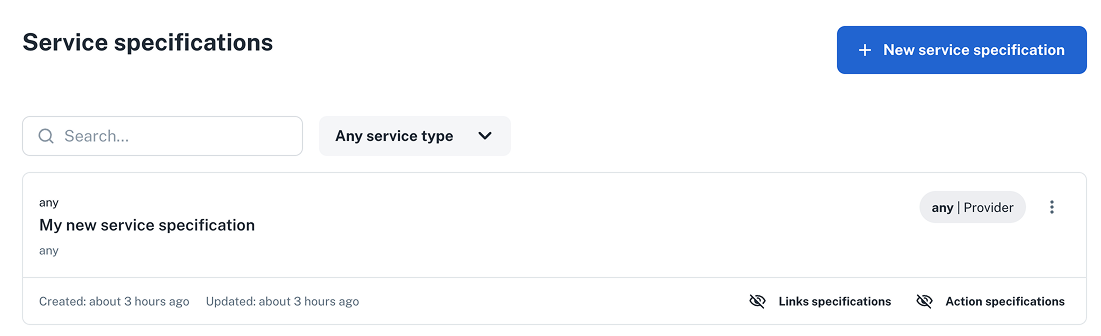
Verify that your new service specification appears under **Platform settings > Services > Specifications**.
---
## Prerequisites
You’ll need:
- Terraform/OpenTofu
- A [**nullplatform API key**](/docs/authorization/api-keys) with the **Ops** role assigned (recommended at the **organization** level)
- If you're planning to use the nullplatform CLI instead of Terraform/OpenTofu, the [**nullplatform CLI**](/docs/cli/) installed:
```bash
curl https://cli.nullplatform.com/install.sh | sh
```
## 1. Open the service specification playground
1. Go to **Platform settings > Services > Specifications**.
2. Click **+ New service specification**. The playground opens with three tabs: **Specification data**, **Schema**, and **UI schema**.
The playground also includes **Terraform/OpenTofu** and **CLI** tabs that render ready‑to‑use snippets from your schema.
> 💡 **Tip:** You can also open an existing spec to iterate on it. Preview updates live in the right‑hand panel.
## 2. Fill in specification data (name, visibility, defaults)
In **Specification data**, define general settings for the service (name, visibility, dimensions, default actions).
**Default template shown in the UI:**
```json
{
"name": "My new service specification",
"visible_to": [
"organization="
],
"type": "dependency",
"use_default_actions": true,
"dimensions": {},
"assignable_to": "any",
"attributes": {
"values": {}
}
}
```
### Key fields
- **visible_to** lets you limit where the service is available by specifying which NRNs can access it (org, account, namespace, or application). Example for a specific application:
`["organization=1:account=2:namespace=3:application=4"]`
> 💡 **Tip:** We recommend keeping a wildcard at the namespace level so the service remains visible to app‑level users too. If you don’t set it this way, developers who only have application‑level permissions might not see the service.
>
> Like this: `["organization=1:account=2:namespace=*"]`
- **assignable_to** lets you control where instances can be attached. Keep `any` unless you need to constrain it (e.g., only by dimension `"assignable_to": "dimension"`).
## 3. Add the SQS **Schema**
Switch to **Schema** and paste the example below. You’ll see the form update in the **Preview** panel in real time.
> 💡 **Tip**: Tweak defaults and limits to match your org’s guardrails.
```json
{
"$schema": "http://json-schema.org/draft-07/schema#",
"type": "object",
"title": "SQS Queue Configuration",
"description": "Essential configuration for an AWS SQS Queue",
"properties": {
"queue_type": {
"type": "string",
"oneOf": [
{
"const": "standard",
"title": "Unordered"
},
{
"const": "fifo",
"title": "Ordered (FIFO)"
},
{
"const": "fifo_with_deduplication",
"title": "Ordered (FIFO) with content-based deduplication"
}
],
"title": "Queue Type",
"default": "standard",
"description": "Create a queue without order guarantees (standard), ordered (FIFO), or ordered with deduplication (FIFO with content-based deduplication).",
"editableOn": ["create"]
},
"queue_arn": {
"type": "string",
"readOnly": true,
"visibleOn": ["read", "update"]
},
"max_message_size": {
"type": "integer",
"title": "Maximum Message Size",
"default": 262144,
"maximum": 262144,
"minimum": 1024,
"description": "The maximum size of messages in bytes (1024 bytes – 262144 bytes)"
},
"visibility_timeout": {
"type": "integer",
"description": "How long a message is hidden from other consumers after being received (in seconds)",
"minimum": 0,
"maximum": 43200,
"placeholder": 30,
"default": 30,
"examples": [30, 60, 300, 900]
},
"message_retention_days": {
"type": "integer",
"description": "How long messages are kept in the queue (in days, between 1 and 14).",
"minimum": 1,
"maximum": 14,
"placeholder": 7,
"default": 7
},
"receive_wait_time_seconds": {
"type": "integer",
"title": "Receive Wait Time",
"default": 0,
"maximum": 20,
"minimum": 0,
"description": "The time to wait for messages on a ReceiveMessage call (0-20 seconds)"
},
"delay_seconds": {
"type": "integer",
"title": "Delivery Delay",
"default": 0,
"maximum": 900,
"minimum": 0,
"description": "The time in seconds to delay the delivery of new messages (0-900 seconds). Only available for unordered queues."
},
"max_delivery_retries": {
"type": "integer",
"description": "Maximum number of times a message can be received before moving to dead letter queue (between 1 and 10)",
"minimum": 1,
"maximum": 10,
"placeholder": 3,
"default": 3,
"examples": [1, 3, 5, 10]
},
"enable_dlq": {
"type": "boolean",
"description": "Whether to create a dead-letter queue for failed messages",
"default": true
},
"dead_letter_arn": {
"type": "string",
"description": "ARN of the created DLQ (available when the DLQ option is set to true)",
"export": true,
"pattern": "^arn:aws:sqs:[a-z0-9-]+:[0-9]+:([a-zA-Z0-9_-]+\\.fifo|[a-zA-Z0-9_-]+)$",
"visibleOn": ["read"],
"editableOn": []
},
"fifoQueue": {
"type": "boolean",
"description": "Whether this should be a FIFO queue (guarantees order and exactly-once delivery)",
"default": false
}
},
"required": [],
"additionalProperties": false
}
```
### Special keys used in the schema
- **visible_on**: defined the visibility of properties based on the lifecycle of the instance (e.g., `["create", "read"]`).
- **editable_on**: control when a property can be edited, based on the lifecycle of the instance (e.g., `["create"]`).
## 4. (Optional) Design the **UI Schema**
Open **UI schema** and paste the example below to customize layout and add helpful hints. This step is optional if
you want a more guided form experience, or skip it if the default layout works for your team.
```json
{
"type": "VerticalLayout",
"elements": [
{
"text": "### Queue options",
"type": "Label",
"options": {
"format": "markdown"
}
},
{
"type": "Control",
"scope": "#/properties/queue_type"
},
{
"type": "Control",
"scope": "#/properties/queue_arn"
},
{
"type": "Categorization",
"options": {
"collapsable": {
"label": "ADVANCED",
"collapsed": true
}
},
"elements": [
{
"type": "Category",
"label": "Queue Configuration",
"elements": [
{
"type": "Control",
"scope": "#/properties/visibility_timeout"
},
{
"text": "> **Visibility timeout must be greater than your scope's Lambda timeout.** Otherwise, creation will fail.",
"type": "Label",
"options": {
"format": "markdown"
}
},
{
"type": "Control",
"scope": "#/properties/message_retention_days"
},
{
"type": "Control",
"scope": "#/properties/max_delivery_retries"
},
{
"type": "Control",
"scope": "#/properties/max_message_size"
},
{
"type": "Control",
"scope": "#/properties/receive_wait_time_seconds"
},
{
"rule": {
"effect": "HIDE",
"condition": {
"scope": "#/properties/queue_type",
"schema": {
"enum": [
"fifo",
"fifo_with_deduplication"
]
}
}
},
"type": "Control",
"scope": "#/properties/delay_seconds"
}
]
}
]
}
]
}
```
#### ✅ Checkpoint
Confirm the preview shows the **basic fields** plus an **ADVANCED** group. Changing **Queue Type** to FIFO should automatically **hide** the *Delivery Delay* field.
## 5. Copy the generated **IaC**
Once your spec looks good, open the **Terraform/OpenTofu** tab (or **CLI** tab) in the playground. Copy the rendered resources into your
infrastructure repo and apply as usual. The playground keeps the IaC **in sync** with your schema edits.
```hcl
terraform {
required_providers {
nullplatform = {
source = "nullplatform/nullplatform"
}
}
}
provider "nullplatform" {}
resource "nullplatform_service_specification" "my_new_service_specification" {
name = "My new service specification"
type = "dependency"
assignable_to = "any"
use_default_actions = true
visible_to = [
""
]
dimensions = jsonencode({})
attributes = jsonencode({
"values": {},
"schema": {
"$schema": "http://json-schema.org/draft-07/schema#",
"type": "object",
"title": "SQS Queue Configuration",
"description": "Essential configuration for an AWS SQS Queue",
"properties": {
"queue_type": {
"type": "string",
"oneOf": [
{
"const": "standard",
"title": "Unordered"
},
{
"const": "fifo",
"title": "Ordered (FIFO)"
},
{
"const": "fifo_with_deduplication",
"title": "Ordered (FIFO) with content-based deduplication"
}
],
"title": "Queue Type",
"default": "standard",
"description": "Create a queue without order guarantees (standard), ordered (FIFO), or ordered with deduplication (FIFO with content-based deduplication).",
"editableOn": [
"create"
]
},
"queue_arn": {
"type": "string",
"readOnly": true,
"visibleOn": [
"read",
"update"
]
},
"max_message_size": {
"type": "integer",
"title": "Maximum Message Size",
"default": 262144,
"maximum": 262144,
"minimum": 1024,
"description": "The maximum size of messages in bytes (1-256 KB)"
},
"visibility_timeout": {
"type": "integer",
"description": "How long a message is hidden from other consumers after being received (in seconds)",
"minimum": 0,
"maximum": 43200,
"placeholder": 30,
"default": 30,
"examples": [
30,
60,
300,
900
]
},
"message_retention_days": {
"type": "integer",
"description": "How long messages are kept in the queue (in days, between 1 and 14).",
"minimum": 1,
"maximum": 14,
"placeholder": 7,
"default": 7
},
"receive_wait_time_seconds": {
"type": "integer",
"title": "Receive Wait Time",
"default": 0,
"maximum": 20,
"minimum": 0,
"description": "The time to wait for messages on a ReceiveMessage call (0-20 seconds)"
},
"delay_seconds": {
"type": "integer",
"title": "Delivery Delay",
"default": 0,
"maximum": 900,
"minimum": 0,
"description": "The time in seconds to delay the delivery of new messages (0-900 seconds). Only available for unordered queues."
},
"max_delivery_retries": {
"type": "integer",
"description": "Maximum number of times a message can be received before moving to dead letter queue (between 1 and 10)",
"minimum": 1,
"maximum": 10,
"placeholder": 3,
"default": 3,
"examples": [
1,
3,
5,
10
]
},
"enable_dlq": {
"type": "boolean",
"description": "Whether to create a dead-letter queue for failed messages",
"default": true
},
"dead_letter_arn": {
"type": "string",
"description": "ARN of the created DLQ (available when the DLQ option is set to true)",
"export": true,
"pattern": "^arn:aws:sqs:[a-z0-9-]+:[0-9]+:([a-zA-Z0-9_-]+\\.fifo|[a-zA-Z0-9_-]+)$",
"visibleOn": [
"read"
],
"editableOn": []
},
"fifoQueue": {
"type": "boolean",
"description": "Whether this should be a FIFO queue (guarantees order and exactly-once delivery)",
"default": false
}
},
"required": [],
"additionalProperties": false,
"uiSchema": {
"type": "VerticalLayout",
"elements": [
{
"text": "### Queue options",
"type": "Label",
"options": {
"format": "markdown"
}
},
{
"type": "Control",
"scope": "#/properties/queue_type"
},
{
"type": "Control",
"scope": "#/properties/queue_arn"
},
{
"type": "Categorization",
"options": {
"collapsable": {
"label": "ADVANCED",
"collapsed": true
}
},
"elements": [
{
"type": "Category",
"label": "Queue Configuration",
"elements": [
{
"type": "Control",
"scope": "#/properties/visibility_timeout"
},
{
"text": "> **Visibility timeout has to be higher than your scope's lambda timeout.** Failing to meet this condition will make the service creation to fail. You can check your lambda's timeout from the \"Scopes\" section in the sidebar.",
"type": "Label",
"options": {
"format": "markdown"
}
},
{
"type": "Control",
"scope": "#/properties/message_retention_days"
},
{
"type": "Control",
"scope": "#/properties/max_delivery_retries"
},
{
"type": "Control",
"scope": "#/properties/max_message_size"
},
{
"type": "Control",
"scope": "#/properties/receive_wait_time_seconds"
},
{
"rule": {
"effect": "HIDE",
"condition": {
"scope": "#/properties/queue_type",
"schema": {
"enum": [
"fifo",
"fifo_with_deduplication"
]
}
}
},
"type": "Control",
"scope": "#/properties/delay_seconds"
}
]
}
]
}
]
}
}
})
}
```
```bash
np service specification create --body '{
"name": "My new service specification",
"visible_to": [
"organization="
],
"use_default_actions": true,
"dimensions": {},
"assignable_to": "any",
"attributes": {
"values": {},
"schema": {
"$schema": "http://json-schema.org/draft-07/schema#",
"type": "object",
"title": "SQS Queue Configuration",
"description": "Essential configuration for an AWS SQS Queue",
"properties": {
"queue_type": {
"type": "string",
"oneOf": [
{
"const": "standard",
"title": "Unordered"
},
{
"const": "fifo",
"title": "Ordered (FIFO)"
},
{
"const": "fifo_with_deduplication",
"title": "Ordered (FIFO) with content-based deduplication"
}
],
"title": "Queue Type",
"default": "standard",
"description": "Create a queue without order guarantees (standard), ordered (FIFO), or ordered with deduplication (FIFO with content-based deduplication).",
"editableOn": [
"create"
]
},
"queue_arn": {
"type": "string",
"readOnly": true,
"visibleOn": [
"read",
"update"
]
},
"max_message_size": {
"type": "integer",
"title": "Maximum Message Size",
"default": 262144,
"maximum": 262144,
"minimum": 1024,
"description": "The maximum size of messages in bytes (1-256 KB)"
},
"visibility_timeout": {
"type": "integer",
"description": "How long a message is hidden from other consumers after being received (in seconds)",
"minimum": 0,
"maximum": 43200,
"placeholder": 30,
"default": 30,
"examples": [
30,
60,
300,
900
]
},
"message_retention_days": {
"type": "integer",
"description": "How long messages are kept in the queue (in days, between 1 and 14).",
"minimum": 1,
"maximum": 14,
"placeholder": 7,
"default": 7
},
"receive_wait_time_seconds": {
"type": "integer",
"title": "Receive Wait Time",
"default": 0,
"maximum": 20,
"minimum": 0,
"description": "The time to wait for messages on a ReceiveMessage call (0-20 seconds)"
},
"delay_seconds": {
"type": "integer",
"title": "Delivery Delay",
"default": 0,
"maximum": 900,
"minimum": 0,
"description": "The time in seconds to delay the delivery of new messages (0-900 seconds). Only available for unordered queues."
},
"max_delivery_retries": {
"type": "integer",
"description": "Maximum number of times a message can be received before moving to dead letter queue (between 1 and 10)",
"minimum": 1,
"maximum": 10,
"placeholder": 3,
"default": 3,
"examples": [
1,
3,
5,
10
]
},
"enable_dlq": {
"type": "boolean",
"description": "Whether to create a dead-letter queue for failed messages",
"default": true
},
"dead_letter_arn": {
"type": "string",
"description": "ARN of the created DLQ (available when the DLQ option is set to true)",
"export": true,
"pattern": "^arn:aws:sqs:[a-z0-9-]+:[0-9]+:([a-zA-Z0-9_-]+\\.fifo|[a-zA-Z0-9_-]+)$",
"visibleOn": [
"read"
],
"editableOn": []
},
"fifoQueue": {
"type": "boolean",
"description": "Whether this should be a FIFO queue (guarantees order and exactly-once delivery)",
"default": false
}
},
"required": [],
"additionalProperties": false,
"uiSchema": {
"type": "VerticalLayout",
"elements": [
{
"text": "### Queue options",
"type": "Label",
"options": {
"format": "markdown"
}
},
{
"type": "Control",
"scope": "#/properties/queue_type"
},
{
"type": "Control",
"scope": "#/properties/queue_arn"
},
{
"type": "Categorization",
"options": {
"collapsable": {
"label": "ADVANCED",
"collapsed": true
}
},
"elements": [
{
"type": "Category",
"label": "Queue Configuration",
"elements": [
{
"type": "Control",
"scope": "#/properties/visibility_timeout"
},
{
"text": "> **Visibility timeout must be greater than your scope's Lambda timeout.** Otherwise, creation will fail.",
"type": "Label",
"options": {
"format": "markdown"
}
},
{
"type": "Control",
"scope": "#/properties/message_retention_days"
},
{
"type": "Control",
"scope": "#/properties/max_delivery_retries"
},
{
"type": "Control",
"scope": "#/properties/max_message_size"
},
{
"type": "Control",
"scope": "#/properties/receive_wait_time_seconds"
},
{
"rule": {
"effect": "HIDE",
"condition": {
"scope": "#/properties/queue_type",
"schema": {
"enum": [
"fifo",
"fifo_with_deduplication"
]
}
}
},
"type": "Control",
"scope": "#/properties/delay_seconds"
}
]
}
]
}
]
}
}
}
}'
```
#### ✅ Checkpoint
Verify that your new service specification appears under **Platform settings > Services > Specifications**.
 ## 6. Create a **link specification**
Now that the service spec is created (with standard actions), create a **link specification** for the service so it can be invoked from scopes or other services.
As with service specs, you can craft link specs using the playground: open the service spec you created above and click **+ New link specification**.
For this guide, we’ll define a minimal link spec using only **Specification data** (name and defaults). You can tweak or extend it later with a custom schema.
```json
{
"name": "My new link specification",
"unique": false,
"use_default_actions": true,
"results": {
"schema": {
"type": "object",
"required": [],
"properties": {}
},
"values": {}
},
"attributes": {}
}
```
## 7. Copy the generated **IaC** (link)
As with services, open the **Terraform/OpenTofu** tab (or **CLI** tab) in the playground. Copy the rendered resources into your
infrastructure repo and apply as usual. The playground keeps the IaC **in sync** with your schema edits.
```hcl
terraform {
required_providers {
nullplatform = {
source = "nullplatform/nullplatform"
}
}
}
provider "nullplatform" {}
resource "nullplatform_link_specification" "my_new_link_specification" {
name = "My new link specification"
type = ""
service_specification_id = ""
retryable = false
use_default_actions = true
attributes = jsonencode({
"schema": {
"type": "object",
"properties": {
"message": {
"type": "string"
}
},
"required": [
"message"
],
"uiSchema": {}
}
})
results = jsonencode({
"schema": {
"type": "object",
"required": [],
"properties": {}
},
"values": {}
})
}
```
```bash
np link-specification create --body '{
"name": "My new link specification",
"unique": false,
"use_default_actions": true,
"results": {
"schema": {
"type": "object",
"required": [],
"properties": {}
},
"values": {}
},
"attributes": {
"schema": {
"type": "object",
"properties": {
"message": {
"type": "string"
}
},
"required": [
"message"
],
"uiSchema": {}
}
}
}'
```
#### ✅ Checkpoint
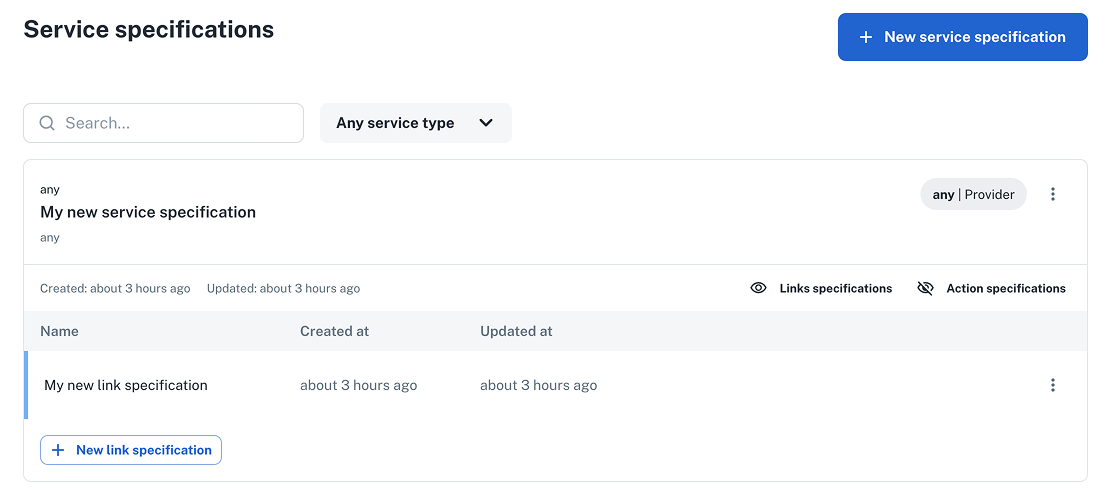
Verify that your new link specification is wired to the service spec and appears under **Platform settings > Services > Specifications**.
## 6. Create a **link specification**
Now that the service spec is created (with standard actions), create a **link specification** for the service so it can be invoked from scopes or other services.
As with service specs, you can craft link specs using the playground: open the service spec you created above and click **+ New link specification**.
For this guide, we’ll define a minimal link spec using only **Specification data** (name and defaults). You can tweak or extend it later with a custom schema.
```json
{
"name": "My new link specification",
"unique": false,
"use_default_actions": true,
"results": {
"schema": {
"type": "object",
"required": [],
"properties": {}
},
"values": {}
},
"attributes": {}
}
```
## 7. Copy the generated **IaC** (link)
As with services, open the **Terraform/OpenTofu** tab (or **CLI** tab) in the playground. Copy the rendered resources into your
infrastructure repo and apply as usual. The playground keeps the IaC **in sync** with your schema edits.
```hcl
terraform {
required_providers {
nullplatform = {
source = "nullplatform/nullplatform"
}
}
}
provider "nullplatform" {}
resource "nullplatform_link_specification" "my_new_link_specification" {
name = "My new link specification"
type = ""
service_specification_id = ""
retryable = false
use_default_actions = true
attributes = jsonencode({
"schema": {
"type": "object",
"properties": {
"message": {
"type": "string"
}
},
"required": [
"message"
],
"uiSchema": {}
}
})
results = jsonencode({
"schema": {
"type": "object",
"required": [],
"properties": {}
},
"values": {}
})
}
```
```bash
np link-specification create --body '{
"name": "My new link specification",
"unique": false,
"use_default_actions": true,
"results": {
"schema": {
"type": "object",
"required": [],
"properties": {}
},
"values": {}
},
"attributes": {
"schema": {
"type": "object",
"properties": {
"message": {
"type": "string"
}
},
"required": [
"message"
],
"uiSchema": {}
}
}
}'
```
#### ✅ Checkpoint
Verify that your new link specification is wired to the service spec and appears under **Platform settings > Services > Specifications**.
 ## Wrap-up 🎉
You’ve built a **reusable SQS service** with a clean UI, validated inputs, and **ready-to-use IaC**, plus a link specification so it can be triggered from other entities.
This ensures teams **can provision queues quickly and consistently**, with your organization’s defaults and guardrails baked in
## What's next
- [Populate form fields with live infrastructure data](/docs/tutorials/external-context-dynamic-values): make your service specification fields pull real-time values from your infrastructure
- [Automatically update application repositories on creation](/docs/tutorials/modify-repository-on-create): pair services with repo automation for a smoother developer experience
----
## Related docs
Quick links to resources used in this guide:
- [Services overview](/docs/services/getting-started)
- [Service specification](/docs/services/craft-a-service/service-specs)
- [Special schema keys](/docs/json-ui-schema/json-schema)
- [Designing the UI](/docs/json-ui-schema/overview)
## Wrap-up 🎉
You’ve built a **reusable SQS service** with a clean UI, validated inputs, and **ready-to-use IaC**, plus a link specification so it can be triggered from other entities.
This ensures teams **can provision queues quickly and consistently**, with your organization’s defaults and guardrails baked in
## What's next
- [Populate form fields with live infrastructure data](/docs/tutorials/external-context-dynamic-values): make your service specification fields pull real-time values from your infrastructure
- [Automatically update application repositories on creation](/docs/tutorials/modify-repository-on-create): pair services with repo automation for a smoother developer experience
----
## Related docs
Quick links to resources used in this guide:
- [Services overview](/docs/services/getting-started)
- [Service specification](/docs/services/craft-a-service/service-specs)
- [Special schema keys](/docs/json-ui-schema/json-schema)
- [Designing the UI](/docs/json-ui-schema/overview)