---
title: Track a runtime migration with Governance and Insights
description: "🎯 Use np-governance to flag all services on a deprecated runtime, then build an Insights dashboard to track migration progress in real time."
sidebar_label: Track a runtime migration
toc_max_heading_level: 3
doc_id: 4d8f1a3c-9e2b-4c7f-8a5d-3b6e9f2c1d8a
tutorial_type: tutorial
tutorial_category: ai
tutorial_time: 15 min
tutorial_featured: true
tutorial_cover: /img/tutorials/covers/governance-track-migration.svg
keywords:
- governance
- migration
- Lambda
- Node.js
- action items
- Insights
- dashboard
- np-governance
tags:
- governance
- automation
- ai
---
# Track a runtime migration with Governance and Insights
> 🎯 **Goal:** Make sure no Lambda function gets blocked by the Node.js 20 deprecation. Flag every affected scope and get a live migration dashboard so your team can track progress, all in two prompts.
## Introduction
When a runtime version reaches end-of-life, you need to find every service running it, assign responsibility, and track progress without losing visibility. Doing this manually means cross-referencing scope configurations, creating tickets one by one, and building reports in a spreadsheet.
This tutorial shows the same workflow done with two prompts. The first prompt scans all serverless scopes for Node.js 20 and creates a tracked action item for each one. The second builds a dashboard that shows migration progress across your organization in real time.
This example uses AWS Lambda + Node.js 20 (deprecated April 30, 2026), but the same approach works for any runtime deprecation.
## What you'll set up
By the end of this guide, you'll have:
- An **"Engineering" category** for migration action items
- One **action item per affected Lambda scope** with the scope as the associated NRN
- A live **Insights dashboard** tracking migration completion rate, item breakdown, and the full action item list
---
## Prerequisites
- The [nullplatform AI plugins](https://github.com/nullplatform/ai-plugins) installed. See [Get started with nullplatform AI plugins](/docs/tutorials/ai-plugins-setup).
- Access to Insights in your nullplatform organization
---
## Phase 1: Create action items with `np-governance`
### 1. Run the governance prompt
Open a Claude Code session and run:
```
/np-governance I want to create action items in the "Engineering" category with HIGH criticality.
AWS Lambda is deprecating Node.js 20, so I need you to find all serverless scopes running
version 20.x and create a migration action item for each one.
Use the scope NRN as the associated NRN.
```
The plugin:
1. Lists all scopes of type `serverless` across your organization
2. Filters for those with a runtime version matching `20.x`
3. Ensures the "Engineering" category exists (creates it if needed)
4. Creates one action item per affected scope with `HIGH` priority, linking the scope as the NRN
#### ✅ Checkpoint — Action items created
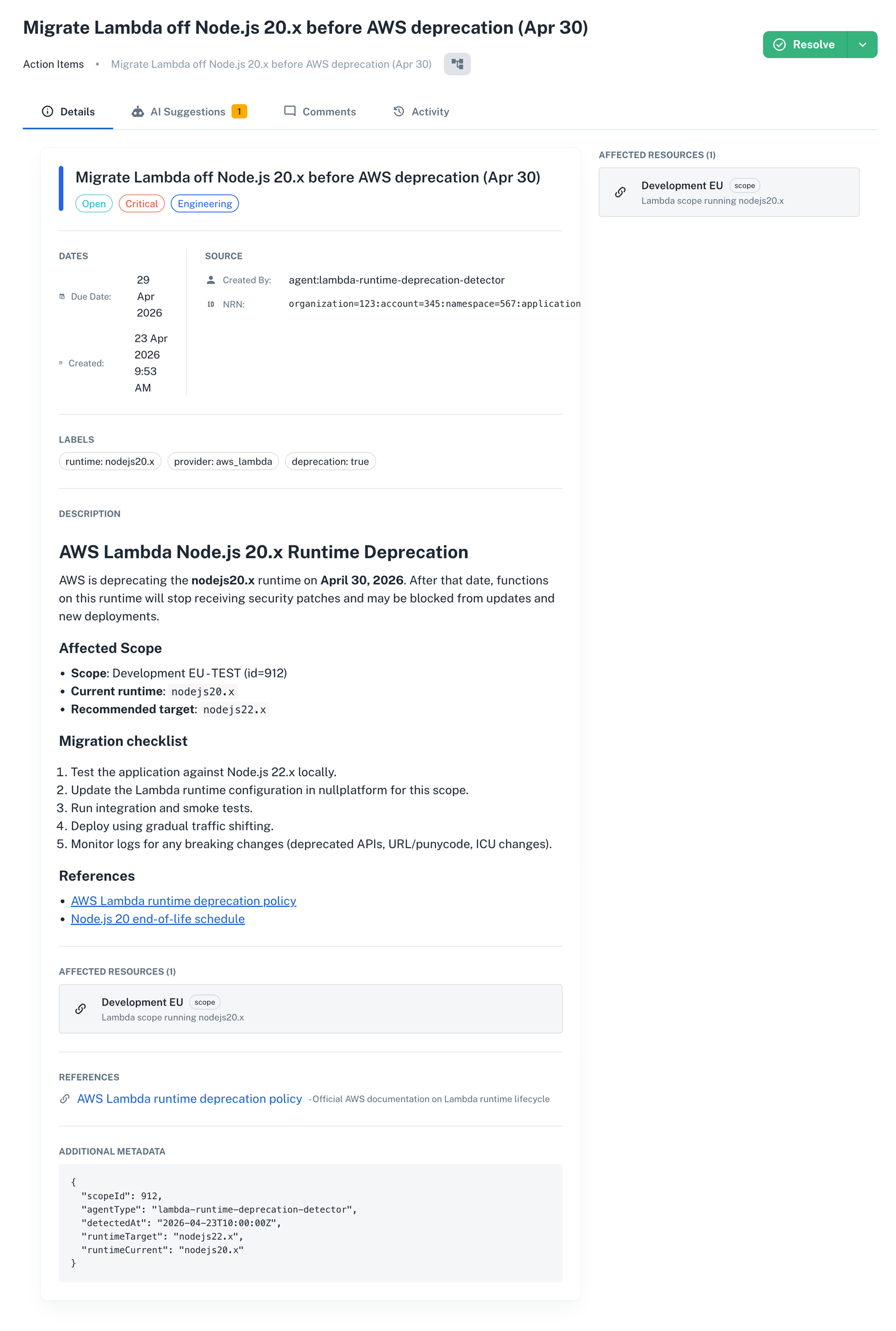
Open any affected application and go to **Manage > Action Items**. You'll find the migration item for that scope, with `HIGH` priority and the full remediation checklist in the description.
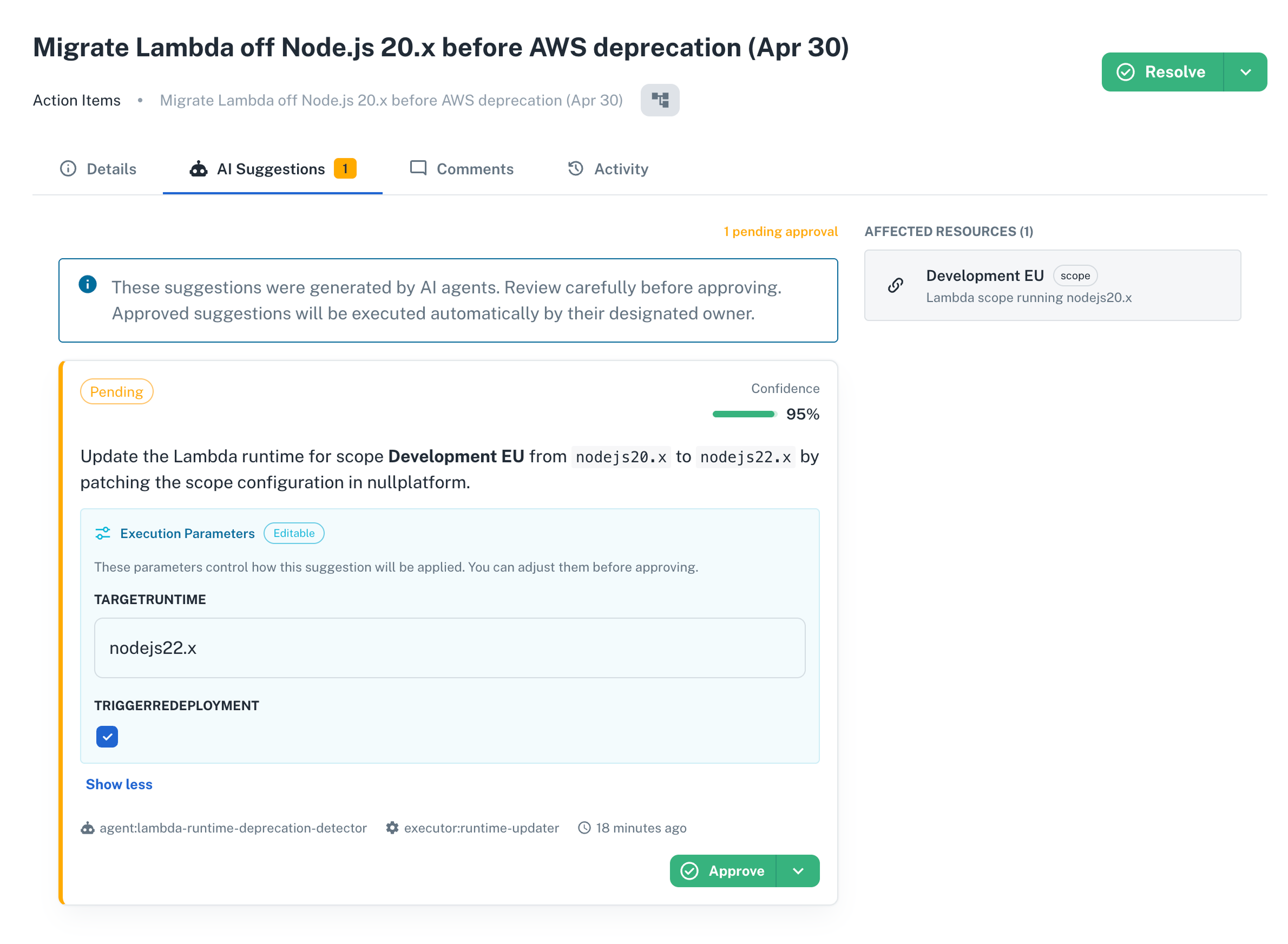
 Each item also comes with an AI suggestion in the **AI Suggestions** tab. The suggestion proposes updating the runtime to `nodejs22.x` and waits for a human to approve before anything runs.
 ---
## Phase 2: Build a tracking dashboard with Insights
### 2. Open the Insights AI Builder
1. In the nullplatform UI, open **Insights** from the top navigation.
2. Click **+ New Dashboard**.
3. The AI Builder chat panel opens on the right.
### 3. Run the Insights prompt
Type this in the AI Builder chat:
```
Create a dashboard to track the completion of action items in the "Engineering" category
related to migrating Lambda from Node.js 20.x to a newer version.
I want charts to understand where we are, followed by the full list of action items.
```
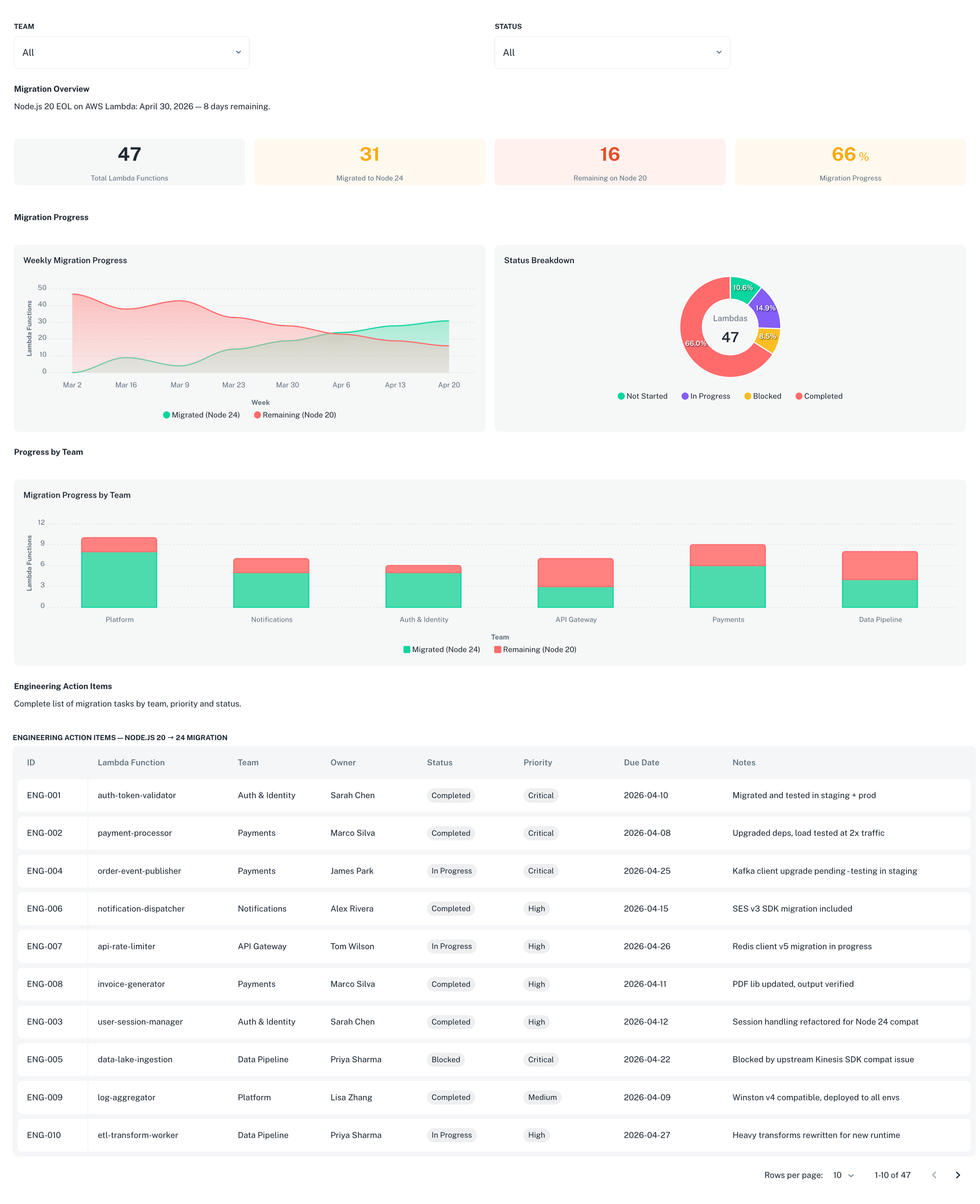
The AI Builder generates a dashboard with:
- **KPI summary row**: total items, open items, closed items, and completion rate
- **Status distribution chart**: a donut or bar chart breaking down items by status
- **Full action items table**: the complete list with title, status, priority, application, and creation date
---
## Phase 2: Build a tracking dashboard with Insights
### 2. Open the Insights AI Builder
1. In the nullplatform UI, open **Insights** from the top navigation.
2. Click **+ New Dashboard**.
3. The AI Builder chat panel opens on the right.
### 3. Run the Insights prompt
Type this in the AI Builder chat:
```
Create a dashboard to track the completion of action items in the "Engineering" category
related to migrating Lambda from Node.js 20.x to a newer version.
I want charts to understand where we are, followed by the full list of action items.
```
The AI Builder generates a dashboard with:
- **KPI summary row**: total items, open items, closed items, and completion rate
- **Status distribution chart**: a donut or bar chart breaking down items by status
- **Full action items table**: the complete list with title, status, priority, application, and creation date
 ### 4. Save and share the dashboard
1. Click **Save** to save the dashboard.
2. To share it with your team, click **Publish** and set visibility to **Organization**.
The dashboard updates in real time as developers close action items. Anyone with access to Insights can open it and see the current migration status without asking for a status update.
---
## Wrap-up 🎉
In two prompts you:
- Identified every Lambda scope running Node.js 20.x across your organization
- Created a high-priority action item for each affected scope, with the scope as the tracked entity
- Built a live dashboard showing migration progress that the whole team can access
The same two-prompt pattern works for any runtime or dependency migration: find the affected scopes, create the action items, build the dashboard.
## What's next
- [Detect stale applications with AI](/docs/tutorials/governance-detect-stale-apps): another governance sweep you can run with a single prompt
- [Enforce build quality gates for prod deployments](/docs/tutorials/build-quality-policies-production): block risky builds from reaching production automatically
---
## Related docs
- [Action items overview](/docs/action-items)
- [AI dashboard builder](/docs/insights/dashboard-builder)
- [AI Insights overview](/docs/insights/overview)
- [Configure and manage action items](/docs/action-items/configure-and-manage)
- [Action items API reference](/docs/api/action-item-list)
### 4. Save and share the dashboard
1. Click **Save** to save the dashboard.
2. To share it with your team, click **Publish** and set visibility to **Organization**.
The dashboard updates in real time as developers close action items. Anyone with access to Insights can open it and see the current migration status without asking for a status update.
---
## Wrap-up 🎉
In two prompts you:
- Identified every Lambda scope running Node.js 20.x across your organization
- Created a high-priority action item for each affected scope, with the scope as the tracked entity
- Built a live dashboard showing migration progress that the whole team can access
The same two-prompt pattern works for any runtime or dependency migration: find the affected scopes, create the action items, build the dashboard.
## What's next
- [Detect stale applications with AI](/docs/tutorials/governance-detect-stale-apps): another governance sweep you can run with a single prompt
- [Enforce build quality gates for prod deployments](/docs/tutorials/build-quality-policies-production): block risky builds from reaching production automatically
---
## Related docs
- [Action items overview](/docs/action-items)
- [AI dashboard builder](/docs/insights/dashboard-builder)
- [AI Insights overview](/docs/insights/overview)
- [Configure and manage action items](/docs/action-items/configure-and-manage)
- [Action items API reference](/docs/api/action-item-list)