---
title: Automatically update application repositories on creation
description: "\U0001F3AF Add files to every new application repo at creation time."
sidebar_label: Automatically update repos on create
doc_id: a59f2a83-f90e-43c6-b053-db9d96930cc2
tutorial_type: tutorial
tutorial_category: automation
tutorial_time: 15 min
tutorial_featured: false
tutorial_cover: /img/tutorials/covers/automate-modify-repository-on-create.svg
keywords:
- automation
- repository management
- hooks
- application creation
- CI/CD
tags:
- automation
- agent
- entity_hooks
---
# Automatically update application repositories on creation
> 🎯 **Goal:** Automatically update application repositories with custom files or changes when new applications are created.
## Introduction
When creating a new application, you might want to add extra files that make the repository more useful from the start.
These could include documentation, configuration, or metadata that other tools can leverage later.
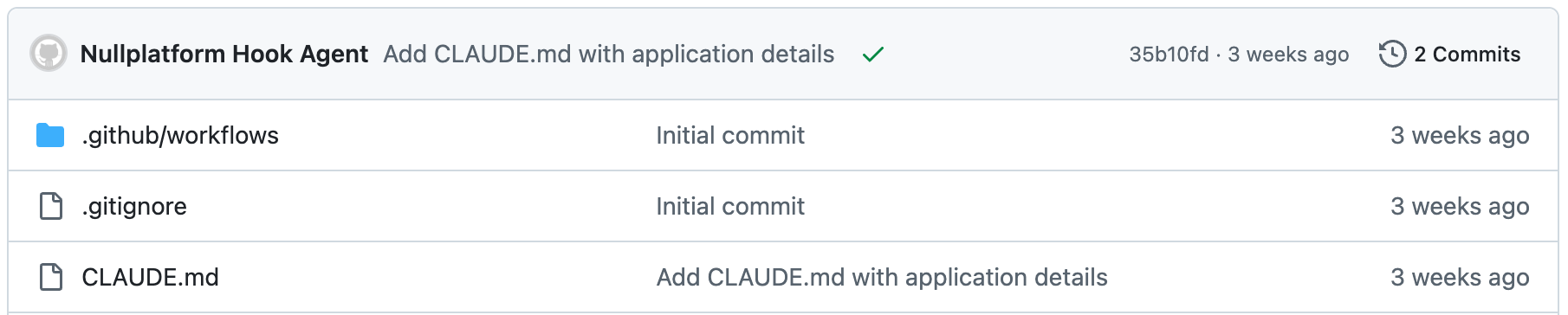
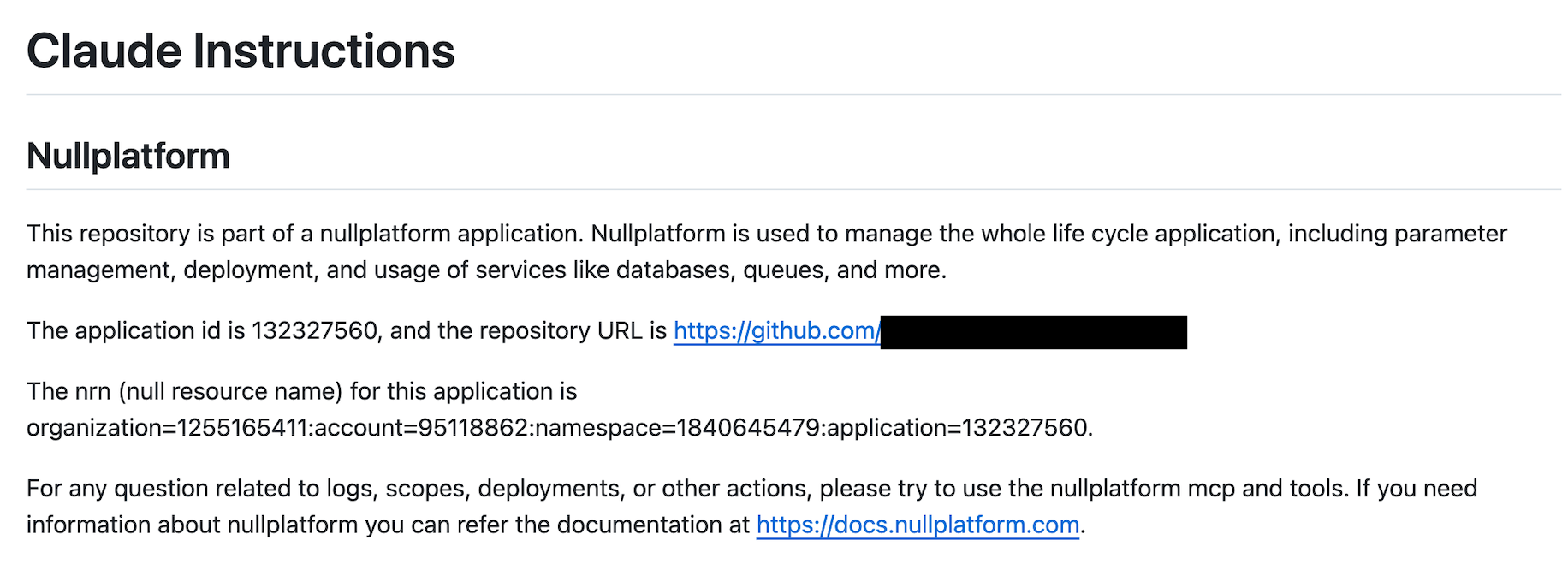
In this guide, we’ll show how to automatically add a `CLAUDE.md` file to the application repository.
This file gives Claude Code additional context about your application’s data, helping you get the most out of the nullplatform MCP.
You’ll set this up using:
- **Hooks** to react to application creation events
- **Notification channels** to forward events to your agent
- **Agent scripts** to modify the repository
## What you’ll set up
By the end of this guide, you’ll have:
- An **after-hook** that reacts to application creation
- A channel that forwards hook notifications to your agent
- An agent script that adds a `CLAUDE.md` file to the repository
 ---
## 1. Create a hook for application creation
Hooks in **nullplatform** let you react to entity changes. Here we’ll create an **“after” hook** that triggers when an
application is successfully created.
Run this command to create the hook:
```bash
np entity-hook action create
--body '{
"nrn": "",
"entity": "application",
"action": "application:create",
"status": "active",
"when": "after",
"type": "hook",
"on": "create"
}'
```
## 2. Create a channel to send notifications
Once the hook is ready, we need a channel so nullplatform knows where to send notifications.
:::note Prerequisites
You’ll need an API key with the `agent` role assigned. See our [API keys](/docs/authorization/api-keys ) docs for more info.
:::
In this example, we’ll use a channel that forwards events to a nullplatform agent.
```bash
np notification channel create
--body '{
"nrn": "",
"source": ["entity"],
"type": "agent",
"configuration": {
"api_key": "",
"command": {
"data": {
"cmdline": "/handle-entity-hooks.sh",
"environment": {
"NP_ACTION_CONTEXT": "${NOTIFICATION_CONTEXT}"
}
},
"type": "exec"
}
},
"status": "active",
"filters": {
"entity": { "$eq": "application" }
}
}'
```
## 3. Add the repository modification logic
Now that your hook and channel are configured, add the script that updates the repository.
In your agent repository (see [Agent docs](/docs/agent/overview) for reference), create a new file at: `/handle-entity-hooks.sh`
```bash
#!/bin/bash -x
WORKING_DIRECTORY="$(dirname "$(realpath "$0")")"
cd "$WORKING_DIRECTORY" || exit 1
echo "Received $NP_ACTION_CONTEXT"
eval "$(np service-action export-action-data --format bash --bash-prefix HOOK)"
if [[ $HOOK_ENTITY == "application" ]]; then
export APPLICATION_ID=$(echo "$HOOK_NRN" | sed 's/.*application=\([0-9]*\).*/\1/')
eval "$(np application read --id $APPLICATION_ID --format bash --bash-prefix APPLICATION)"
if [[ "$HOOK_ON" == "create" ]]; then
APP_DIR="/tmp/$APPLICATION_ID"
mkdir -p "$APP_DIR"
git clone --depth 1 "$APPLICATION_REPOSITORY_URL" "$APP_DIR"
cd "$APP_DIR"
cat << EOF > CLAUDE.md
# Claude Instructions
## Nullplatform
This repository is part of a nullplatform application.
Nullplatform manages the whole application lifecycle: parameters, deployments, and services.
The application ID is $APPLICATION_ID, and the repository URL is $APPLICATION_REPOSITORY_URL.
The NRN (nullplatform resource name) for this application is $HOOK_NRN.
For logs, scopes, deployments, or other actions, use the nullplatform MCP and tools.
Docs: https://docs.nullplatform.com
EOF
git add CLAUDE.md
git commit -m "Add CLAUDE.md with application details"
git push origin main
echo "Application created hook processed successfully."
rm -fr "$APP_DIR"
else
echo "No action taken for this hook context."
fi
fi
```
## Wrap-up 🎉
From now on, whenever you create a new application in nullplatform, a `CLAUDE.md` file will automatically be added to its repository with helpful preloaded information.
This not only gives Claude the right context but also shows how **hooks and agents can streamline automation in nullplatform.**
## What's next
- [Notify when a deployment fully shifts traffic](/docs/tutorials/notify-on-deployment-traffic-shift): another entity-hook pattern, reacting to deployment lifecycle events
- [Populate form fields with live infrastructure data](/docs/tutorials/external-context-dynamic-values): use the agent to pull real-time values into specifications
----
## Related docs
Quick links to resources used in this guide:
- [Entity hooks](/docs/entity-hooks/)
- [Agent](/docs/agent/overview)
- [Notification channel](/docs/notifications/)
---
## 1. Create a hook for application creation
Hooks in **nullplatform** let you react to entity changes. Here we’ll create an **“after” hook** that triggers when an
application is successfully created.
Run this command to create the hook:
```bash
np entity-hook action create
--body '{
"nrn": "",
"entity": "application",
"action": "application:create",
"status": "active",
"when": "after",
"type": "hook",
"on": "create"
}'
```
## 2. Create a channel to send notifications
Once the hook is ready, we need a channel so nullplatform knows where to send notifications.
:::note Prerequisites
You’ll need an API key with the `agent` role assigned. See our [API keys](/docs/authorization/api-keys ) docs for more info.
:::
In this example, we’ll use a channel that forwards events to a nullplatform agent.
```bash
np notification channel create
--body '{
"nrn": "",
"source": ["entity"],
"type": "agent",
"configuration": {
"api_key": "",
"command": {
"data": {
"cmdline": "/handle-entity-hooks.sh",
"environment": {
"NP_ACTION_CONTEXT": "${NOTIFICATION_CONTEXT}"
}
},
"type": "exec"
}
},
"status": "active",
"filters": {
"entity": { "$eq": "application" }
}
}'
```
## 3. Add the repository modification logic
Now that your hook and channel are configured, add the script that updates the repository.
In your agent repository (see [Agent docs](/docs/agent/overview) for reference), create a new file at: `/handle-entity-hooks.sh`
```bash
#!/bin/bash -x
WORKING_DIRECTORY="$(dirname "$(realpath "$0")")"
cd "$WORKING_DIRECTORY" || exit 1
echo "Received $NP_ACTION_CONTEXT"
eval "$(np service-action export-action-data --format bash --bash-prefix HOOK)"
if [[ $HOOK_ENTITY == "application" ]]; then
export APPLICATION_ID=$(echo "$HOOK_NRN" | sed 's/.*application=\([0-9]*\).*/\1/')
eval "$(np application read --id $APPLICATION_ID --format bash --bash-prefix APPLICATION)"
if [[ "$HOOK_ON" == "create" ]]; then
APP_DIR="/tmp/$APPLICATION_ID"
mkdir -p "$APP_DIR"
git clone --depth 1 "$APPLICATION_REPOSITORY_URL" "$APP_DIR"
cd "$APP_DIR"
cat << EOF > CLAUDE.md
# Claude Instructions
## Nullplatform
This repository is part of a nullplatform application.
Nullplatform manages the whole application lifecycle: parameters, deployments, and services.
The application ID is $APPLICATION_ID, and the repository URL is $APPLICATION_REPOSITORY_URL.
The NRN (nullplatform resource name) for this application is $HOOK_NRN.
For logs, scopes, deployments, or other actions, use the nullplatform MCP and tools.
Docs: https://docs.nullplatform.com
EOF
git add CLAUDE.md
git commit -m "Add CLAUDE.md with application details"
git push origin main
echo "Application created hook processed successfully."
rm -fr "$APP_DIR"
else
echo "No action taken for this hook context."
fi
fi
```
## Wrap-up 🎉
From now on, whenever you create a new application in nullplatform, a `CLAUDE.md` file will automatically be added to its repository with helpful preloaded information.
This not only gives Claude the right context but also shows how **hooks and agents can streamline automation in nullplatform.**
## What's next
- [Notify when a deployment fully shifts traffic](/docs/tutorials/notify-on-deployment-traffic-shift): another entity-hook pattern, reacting to deployment lifecycle events
- [Populate form fields with live infrastructure data](/docs/tutorials/external-context-dynamic-values): use the agent to pull real-time values into specifications
----
## Related docs
Quick links to resources used in this guide:
- [Entity hooks](/docs/entity-hooks/)
- [Agent](/docs/agent/overview)
- [Notification channel](/docs/notifications/)