---
title: Require stage deployment before production
description: "\U0001F3AF Enforce progressive promotion by requiring stage before prod."
sidebar_label: Require stage before prod deployments
toc_max_heading_level: 2
doc_id: 68e654d0-f717-45ce-8f28-8fb07397a5d9
tutorial_type: tutorial
tutorial_category: governance
tutorial_time: 15 min
tutorial_featured: false
tutorial_cover: /img/tutorials/covers/enforce-require-stage-before-prod.svg
keywords:
- deployment
- production
- stage
- policies
- metadata
tags:
- governance
- catalog
- production
---
# Require stage deployment before production
> 🎯 **Goal:** Set up nullplatform so a build can only be deployed to production if it has already been deployed to stage.
## Introduction
In many workflows, deployments to production should depend on conditions. A common rule is: only allow
(or require approval for) a production deployment if the build has already gone through stage.
In this guide, you’ll implement that rule in nullplatform using:
- **Metadata** to track deployed environments
- **Hooks** to update metadata automatically
- **Policies** to enforce the restriction
:::note
We’ll assume you’re using the `environment` dimension with the values: `development`, `stage`, and `production`.
:::
## What you’ll set up
By the end of this guide, you’ll have:
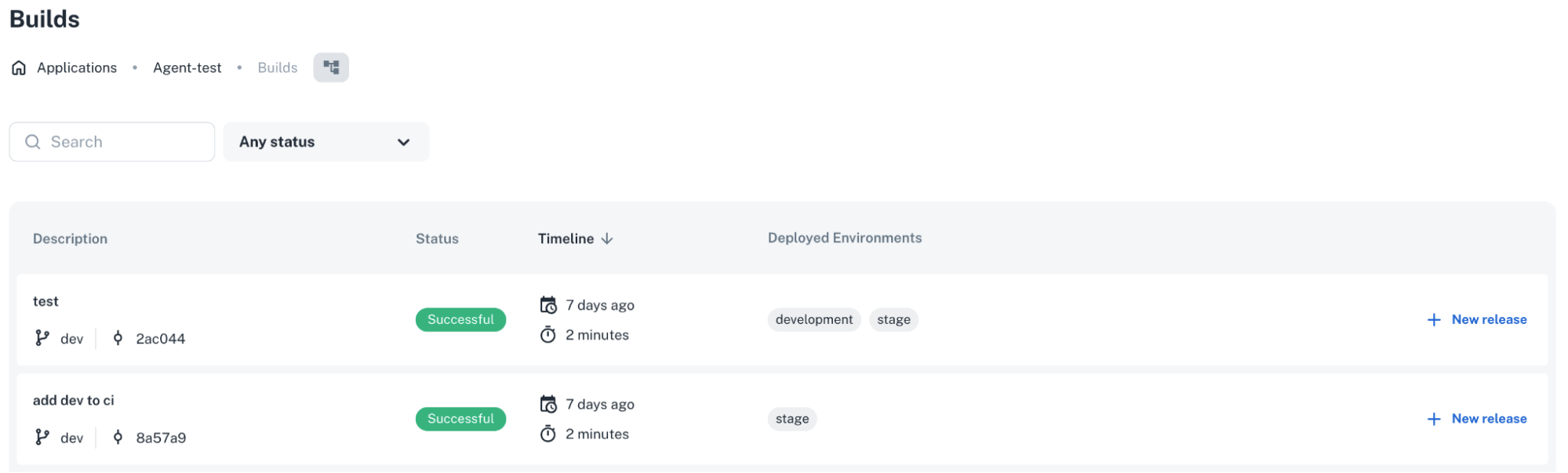
- Builds that track which environments they’ve been deployed to
- Deployments that automatically update that metadata
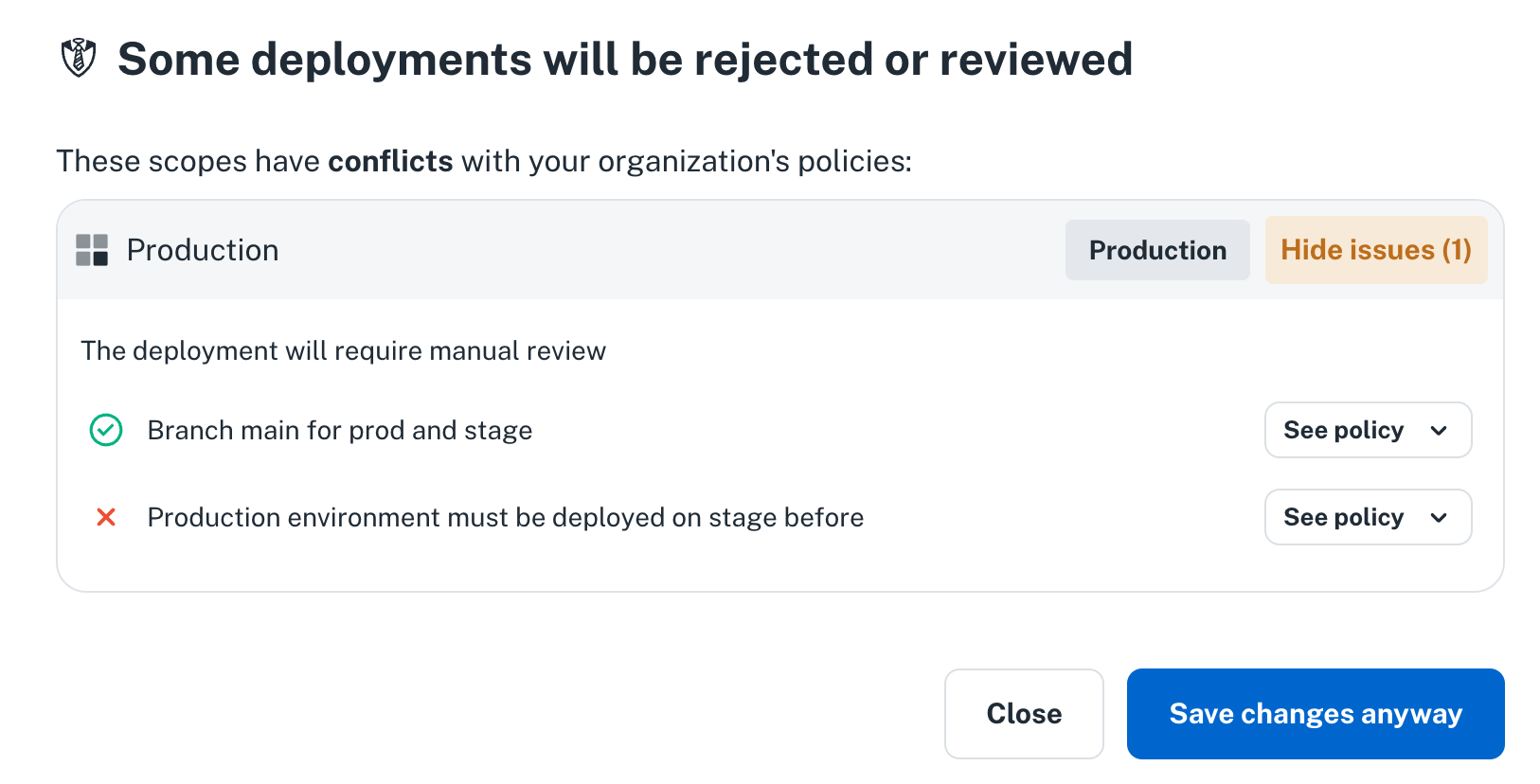
- A policy that blocks production deployments unless the build has already gone through stage
 ---
## 1. Create metadata for builds
Metadata in **nullplatform** lets you extend entities with your own organization-specific behavior.
Here, we’ll add a metadata type to the `build` entity that records the environments where it has been successfully deployed.
Run this to create the metadata specification:
```bash
curl -L 'https://api.nullplatform.com/metadata/metadata_specification' \
-H 'Content-Type: application/json' \
-H 'Authorization: Bearer ' \
-d '{
"entity": "build",
"metadata": "deployed_on",
"nrn": "",
"description": "Tag to track where the build was deployed",
"name": "Build deployed environments",
"schema": {
"type": "object",
"properties": {
"environments": {
"title": "Deployed Environments",
"visibleOn": ["read", "list"],
"type": "array",
"items": {
"type": "string",
"enum": ["development", "stage", "production"]
},
"default": [],
"uniqueItems": true
}
},
"additionalProperties": false
}
}'
```
Once set up, builds can hold metadata like this:
```json
{
"id": 123,
"application_id": 456,
"status": "successful",
"branch": "dev",
"metadata": {
"deployed_on": {
"environments": ["development", "stage"]
}
}
}
```
## 2. Automatically update metadata with a deployment hook
Now that we have the metadata spec, we want deployments to update it automatically.
For that, we’ll create a hook on the `deployment` entity.
Hooks in nullplatform let you respond to entity changes with custom logic. In this case, the hook will run **after a deployment finishes** to update the build metadata.
### Create the hook
Run this command to create the hook:
```bash
np entity-hook action create \
--body '{
"nrn": "",
"entity": "deployment",
"action": "deployment:write",
"when": "after",
"type": "hook",
"on": "update"
}'
```
> **Note:** Replace the `nrn` with NRN of your account or where you want to apply it.
### Create the notification channel
Next, create a channel so the hook notifies your agent.
:::note Prerequisites
To create a channel, you’ll need an API key that:
- Is set at the `account` level
- Has the `agent` and `ops` roles assigned
See [Manage your API keys](/docs/authorization/api-keys) for details.
:::
```bash
np notification channel create
--body '{
"nrn": "",
"type": "agent",
"configuration": {
"api_key": "",
"command": {
"data": {
"cmdline": "/handle-entity-hooks.sh",
"environment": {
"NP_ACTION_CONTEXT": "${NOTIFICATION_CONTEXT}"
}
},
"type": "exec"
}
},
"source": ["entity"],
"status": "active"
}'
```
### Create the handler script
Finally, in your agent repository (see [Agent docs](/docs/agent/overview) for reference), create a new file at:
`/handle-entity-hooks.sh`
```bash
#!/bin/bash
WORKING_DIRECTORY="$(dirname "$(realpath "$0")")"
cd "$WORKING_DIRECTORY" || exit 1
echo "Received $NP_ACTION_CONTEXT"
eval "$(np service-action export-action-data --format bash --bash-prefix HOOK)"
if [[ $HOOK_ENTITY == "deployment" ]]; then
export DEPLOYMENT_ID=$(echo "$HOOK_NRN" | sed 's/.*deployment=\([0-9]*\).*/\1/')
eval "$(np deployment read --id $DEPLOYMENT_ID --format bash --bash-prefix DEPLOYMENT --api-key $NP_API_KEY)"
if [[ "$DEPLOYMENT_STATUS" == "finalized" ]]; then
eval "$(np scope read --id $DEPLOYMENT_SCOPE_ID --format bash --bash-prefix SCOPE)"
eval "$(np release read --id $DEPLOYMENT_RELEASE_ID --format bash --bash-prefix RELEASE)"
eval "$(np build read --id $RELEASE_BUILD_ID --format bash --bash-prefix BUILD)"
if [[ "$BUILD_METADATA_DEPLOYED_ON_ENVIRONMENTS_LENGTH" != "" ]]; then
np metadata update --entity build --id $RELEASE_BUILD_ID --data "{\"deployed_on\":{\"environments\":[\"$SCOPE_DIMENSIONS_ENVIRONMENT\"]}}"
else
np metadata create --entity build --id $RELEASE_BUILD_ID --data "{\"deployed_on\":{\"environments\":[\"$SCOPE_DIMENSIONS_ENVIRONMENT\"]}}"
fi
fi
fi
```
## 3. Create a policy to block production without stage
At this point, builds track their deployed environments automatically.
The last step is to add a policy that prevents deploying to production unless the build has already been through stage.
First, create an approval action:
```bash
np approval action create
--body '{
"nrn": "",
"entity": "deployment",
"action": "deployment:create",
"dimensions": { "environment": "production" },
"status": "active",
"on_policy_success": "approve",
"on_policy_fail": "manual"
}'
```
Then, define the policy:
```bash
np approval policy create
--body '{
"nrn": "",
"name": "Production requires Stage deployment first",
"status": "active",
"conditions": {
"build.metadata.deployed_on.environments": { "$in": ["stage"] }
},
"selector": {
"scope.dimensions.environment": "production"
}
}'
```
Finally, link the policy to the approval action:
```bash
np approval action policy create
--id :id
--body '{
"policy_id": 0
}'
```
## Wrap-up 🎉
You now have a setup where:
- Builds automatically record which environments they’ve been deployed to
- Deployments to production are blocked (or require approval) until the build has been deployed to stage
This pattern enforces safer, progressive promotion of builds while demonstrating how **metadata, hooks, and policies**
in nullplatform can be combined to shape deployment workflows.
## What's next
- [Enforce build quality gates for prod deployments](/docs/tutorials/build-quality-policies-production): add coverage and vulnerability gates on top of progressive promotion
- [Require manual approval for applications in prod](/docs/tutorials/apps-production-approval): require human review for your most sensitive applications
----
## Related docs
Quick links to resources used in this guide:
- [Catalog and metadata](/docs/catalog/getting-started)
- [Notification channel](/docs/notifications/)
- [Entity hooks](/docs/entity-hooks/)
- [Agent](/docs/agent/overview)
- [Approvals](/docs/approvals/)
---
## 1. Create metadata for builds
Metadata in **nullplatform** lets you extend entities with your own organization-specific behavior.
Here, we’ll add a metadata type to the `build` entity that records the environments where it has been successfully deployed.
Run this to create the metadata specification:
```bash
curl -L 'https://api.nullplatform.com/metadata/metadata_specification' \
-H 'Content-Type: application/json' \
-H 'Authorization: Bearer ' \
-d '{
"entity": "build",
"metadata": "deployed_on",
"nrn": "",
"description": "Tag to track where the build was deployed",
"name": "Build deployed environments",
"schema": {
"type": "object",
"properties": {
"environments": {
"title": "Deployed Environments",
"visibleOn": ["read", "list"],
"type": "array",
"items": {
"type": "string",
"enum": ["development", "stage", "production"]
},
"default": [],
"uniqueItems": true
}
},
"additionalProperties": false
}
}'
```
Once set up, builds can hold metadata like this:
```json
{
"id": 123,
"application_id": 456,
"status": "successful",
"branch": "dev",
"metadata": {
"deployed_on": {
"environments": ["development", "stage"]
}
}
}
```
## 2. Automatically update metadata with a deployment hook
Now that we have the metadata spec, we want deployments to update it automatically.
For that, we’ll create a hook on the `deployment` entity.
Hooks in nullplatform let you respond to entity changes with custom logic. In this case, the hook will run **after a deployment finishes** to update the build metadata.
### Create the hook
Run this command to create the hook:
```bash
np entity-hook action create \
--body '{
"nrn": "",
"entity": "deployment",
"action": "deployment:write",
"when": "after",
"type": "hook",
"on": "update"
}'
```
> **Note:** Replace the `nrn` with NRN of your account or where you want to apply it.
### Create the notification channel
Next, create a channel so the hook notifies your agent.
:::note Prerequisites
To create a channel, you’ll need an API key that:
- Is set at the `account` level
- Has the `agent` and `ops` roles assigned
See [Manage your API keys](/docs/authorization/api-keys) for details.
:::
```bash
np notification channel create
--body '{
"nrn": "",
"type": "agent",
"configuration": {
"api_key": "",
"command": {
"data": {
"cmdline": "/handle-entity-hooks.sh",
"environment": {
"NP_ACTION_CONTEXT": "${NOTIFICATION_CONTEXT}"
}
},
"type": "exec"
}
},
"source": ["entity"],
"status": "active"
}'
```
### Create the handler script
Finally, in your agent repository (see [Agent docs](/docs/agent/overview) for reference), create a new file at:
`/handle-entity-hooks.sh`
```bash
#!/bin/bash
WORKING_DIRECTORY="$(dirname "$(realpath "$0")")"
cd "$WORKING_DIRECTORY" || exit 1
echo "Received $NP_ACTION_CONTEXT"
eval "$(np service-action export-action-data --format bash --bash-prefix HOOK)"
if [[ $HOOK_ENTITY == "deployment" ]]; then
export DEPLOYMENT_ID=$(echo "$HOOK_NRN" | sed 's/.*deployment=\([0-9]*\).*/\1/')
eval "$(np deployment read --id $DEPLOYMENT_ID --format bash --bash-prefix DEPLOYMENT --api-key $NP_API_KEY)"
if [[ "$DEPLOYMENT_STATUS" == "finalized" ]]; then
eval "$(np scope read --id $DEPLOYMENT_SCOPE_ID --format bash --bash-prefix SCOPE)"
eval "$(np release read --id $DEPLOYMENT_RELEASE_ID --format bash --bash-prefix RELEASE)"
eval "$(np build read --id $RELEASE_BUILD_ID --format bash --bash-prefix BUILD)"
if [[ "$BUILD_METADATA_DEPLOYED_ON_ENVIRONMENTS_LENGTH" != "" ]]; then
np metadata update --entity build --id $RELEASE_BUILD_ID --data "{\"deployed_on\":{\"environments\":[\"$SCOPE_DIMENSIONS_ENVIRONMENT\"]}}"
else
np metadata create --entity build --id $RELEASE_BUILD_ID --data "{\"deployed_on\":{\"environments\":[\"$SCOPE_DIMENSIONS_ENVIRONMENT\"]}}"
fi
fi
fi
```
## 3. Create a policy to block production without stage
At this point, builds track their deployed environments automatically.
The last step is to add a policy that prevents deploying to production unless the build has already been through stage.
First, create an approval action:
```bash
np approval action create
--body '{
"nrn": "",
"entity": "deployment",
"action": "deployment:create",
"dimensions": { "environment": "production" },
"status": "active",
"on_policy_success": "approve",
"on_policy_fail": "manual"
}'
```
Then, define the policy:
```bash
np approval policy create
--body '{
"nrn": "",
"name": "Production requires Stage deployment first",
"status": "active",
"conditions": {
"build.metadata.deployed_on.environments": { "$in": ["stage"] }
},
"selector": {
"scope.dimensions.environment": "production"
}
}'
```
Finally, link the policy to the approval action:
```bash
np approval action policy create
--id :id
--body '{
"policy_id": 0
}'
```
## Wrap-up 🎉
You now have a setup where:
- Builds automatically record which environments they’ve been deployed to
- Deployments to production are blocked (or require approval) until the build has been deployed to stage
This pattern enforces safer, progressive promotion of builds while demonstrating how **metadata, hooks, and policies**
in nullplatform can be combined to shape deployment workflows.
## What's next
- [Enforce build quality gates for prod deployments](/docs/tutorials/build-quality-policies-production): add coverage and vulnerability gates on top of progressive promotion
- [Require manual approval for applications in prod](/docs/tutorials/apps-production-approval): require human review for your most sensitive applications
----
## Related docs
Quick links to resources used in this guide:
- [Catalog and metadata](/docs/catalog/getting-started)
- [Notification channel](/docs/notifications/)
- [Entity hooks](/docs/entity-hooks/)
- [Agent](/docs/agent/overview)
- [Approvals](/docs/approvals/)