Secrets and variables
Secrets and variables keep everything tenant-specific (credentials, organization ids, category slugs, thresholds) out of the workflow definition. The definition carries only references like ${{ secrets.NP_API_KEY }}; the values live in your organization and are resolved when the workflow runs.
Why credentials stay out of the definition
This is what makes workflow definitions portable. A suite like AMI drift tracking can be shared publicly, imported into any organization, and run unchanged: you set a handful of entries once and activate. It's also what keeps credentials out of git, out of the workflow database, and out of execution history.
If a definition references an entry that isn't set yet, publishing still works and warns you which entry is missing; set the value and you're done, no republish needed. At run time, a missing entry fails the run with an error that names the entry, never as a silent empty value.
Secret or variable: which to use
Both are set the same way and scoped the same way. The difference is what happens after you write them:
| Secret | Variable | |
|---|---|---|
| Referenced as | ${{ secrets.NAME }} | ${{ vars.NAME }} |
| Typical content | API keys, tokens | Organization ids, slugs, thresholds |
| Read back in the editor or API | Never: write-only, replaced but not revealed | Yes |
| In logs and step outputs | Always redacted | Shown as-is |
The two namespaces are deliberately separate: a secret can never leak through vars.*, and redaction follows secrets everywhere, including logs and execution records.
Where an entry lives and how it's resolved
An entry lives either on one workflow or on a folder in your workflows tree. When a workflow references an entry, the engine looks for it in order: the workflow itself, then its folder, then each parent folder up to the root, and the first match wins. The same name closer to the workflow hides the one above it.
In practice that means one NP_API_KEY secret at the root serves every workflow in the organization, while each suite keeps its own settings (a category slug, a due-days threshold) on its own folder.
Set a secret or variable
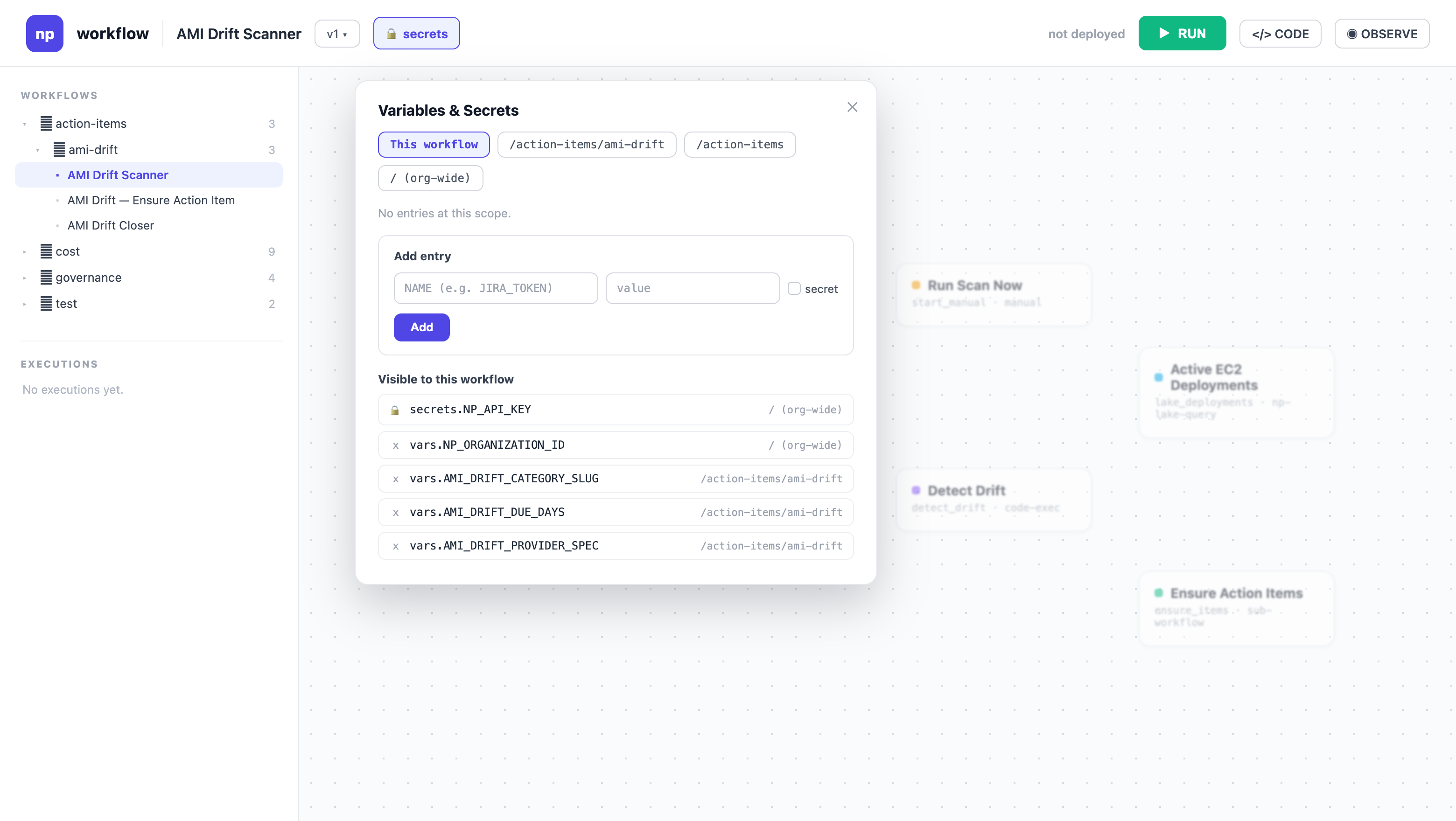
In the workflow editor, open secrets in the top toolbar. In the Variables & Secrets panel, pick the place the entry lives (this workflow, its folder, or the organization root), type a name and a value, and check secret if the value should be write-only. Below the form, the panel lists every entry visible to the workflow you're editing, each tagged with the place it resolves from, so you can see at a glance which value wins.
The same operation through the API is a single call:
curl -L -X POST https://api.nullplatform.com/workflows/config \
  -H 'Authorization: Bearer <token>' \
  -H 'Content-Type: application/json' \
  -d '{"name": "NP_API_KEY", "value": "<the API key>", "secret": true, "path": "/"}'
Scope the entry with path (a folder, where / is the organization root) or workflow (a workflow id), but not both. Writing a name that already exists at that place replaces its value, and the references in workflows keep working. You can't change the name or the secret flag: to turn a variable into a secret, delete the entry and recreate it. You can replace a secret's value at any time, but never read it back.
Next steps
- Expressions: the syntax that reads
secrets.*andvars.* - Detect and roll out AMI updates: the config entries a real suite ships with