Populate form fields with live infrastructure data
🎯 Goal: Create a service specification whose
ownerfield is dynamically populated with real Postgres users fetched from your infrastructure by the nullplatform agent.
Introduction
By default, specification schemas in nullplatform are static: enum values and defaults are defined at design time. External fields changes this by fetching live data from your infrastructure every time a specification is read.
In this tutorial you'll wire up all the pieces end to end: a service specification, an action specification with an external field, a notification channel, and an agent handler script. By the end, reading the specification (from the dashboard or the REST API) returns an owner dropdown populated with actual database users.
What you'll set up
By the end of this tutorial you'll have:
- A service specification for a Postgres database
- An action specification with external fields that fetches users from your database
- A notification channel that routes external field requests to your agent
- A handler script that queries Postgres and returns the result as JSON
Prerequisites
- The nullplatform CLI installed
- The nullplatform agent installed in your infrastructure
- An API key with Agent and Ops roles
- A running Postgres instance accessible from the machine where the agent runs
jqinstalled on the agent machine
1. Create the service specification
Start by creating the service specification that defines the Postgres database attributes. This uses the Create a service specification endpoint.
np service specification create --body '{
  "name": "Postgres Database",
  "slug": "postgres-db",
  "use_default_actions": false,
  "attributes": {
    "schema": {
      "type": "object",
      "properties": {
        "db_name": { "type": "string", "title": "Database name" },
        "owner": { "type": "string", "title": "Database owner", "readOnly": true }
      }
    }
  }
}'
Save the returned id. You'll need it in the next step as $service_spec_id.
2. Create the action specification with external fields
Create the action specification that declares what data to fetch and where to inject it. This uses the Create a service specification action endpoint.
np service specification action specification create \
  --serviceSpecificationId $service_spec_id \
  --body '{
    "name": "Create Postgres Database",
    "type": "create",
    "external": {
      "action": "list-postgres-users",
      "output_schema": {
        "type": "object",
        "properties": {
          "users": { "type": "array", "items": { "type": "string" } }
        },
        "required": ["users"]
      }
    },
    "parameters": {
      "schema": {
        "type": "object",
        "properties": {
          "db_name": { "type": "string", "title": "Database name" },
          "owner": {
            "type": "string",
            "title": "Database owner",
            "additionalKeywords": {
              "enum": ".external.users"
            }
          }
        },
        "required": ["db_name", "owner"]
      },
      "values": {}
    },
    "results": {
      "schema": { "type": "object", "properties": {} },
      "values": {}
    }
  }'
The key parts:
external.action: The action name the agent will receive:"list-postgres-users".external.output_schema: Validates the agent's response. If it doesn't match, the resolution fails gracefully.additionalKeywords.enum: The jq expression.external.usersreferences the resolved data.
3. Create the notification channel
External field notifications use source: "service", which is the same source as infrastructure notifications. Use an action filter to ensure this channel only receives external field requests:
np notification channel create --body '{
  "nrn": "organization=1:account=2:namespace=3:application=4",
  "source": ["service"],
  "description": "External fields for Postgres DB",
  "type": "agent",
  "configuration": {
    "api_key": "AAAA.1234567890abcdef1234567890abcdefPTs=",
    "command": {
      "type": "exec",
      "data": {
        "cmdline": "services/handle-external-context.sh",
        "environment": { "NP_ACTION_CONTEXT": "${NOTIFICATION_CONTEXT}" }
      }
    },
    "selector": { "environment": "local" }
  },
  "filters": {
    "action": { "$in": ["list-postgres-users"] }
  }
}'
The $in filter creates an allowlist of external field actions this channel should handle. This is safer than a $nin denylist. If nullplatform adds new infrastructure action types in the future, they won't accidentally match your channel. See External fields — channel separation for details.
Replace the nrn and api_key values with your own. The nrn should match the application where you want external fields to resolve.
4. Deploy the handler script
On the machine where the agent runs, create services/handle-external-context.sh:
#!/bin/bash
CONTEXT="$NP_ACTION_CONTEXT"
ACTION=$(echo "$CONTEXT" | jq -r '.action')

echo "Resolving external field for action: $ACTION" >&2

case "$ACTION" in
  list-postgres-users)
    USERS=$(psql -h "$DB_HOST" -U "$DB_ADMIN" -t -c "SELECT usename FROM pg_user" | \
      jq -R -s 'split("\n") | map(select(length > 0) | ltrimstr(" ") | rtrimstr(" "))')
    echo "{\"users\": $USERS}"
    ;;
  *)
    echo "Unknown action: $ACTION" >&2
    exit 1
    ;;
esac
Make it executable:
chmod +x services/handle-external-context.sh
The agent captures everything written to stdout and parses it as JSON. Logging, debug prints, or progress indicators will break the response. Always redirect logging to stderr with >&2.
5. Test it
Read the action specification with an application_id to verify external field resolution. This uses the Read an action specification endpoint.
- UI
- CLI
- cURL
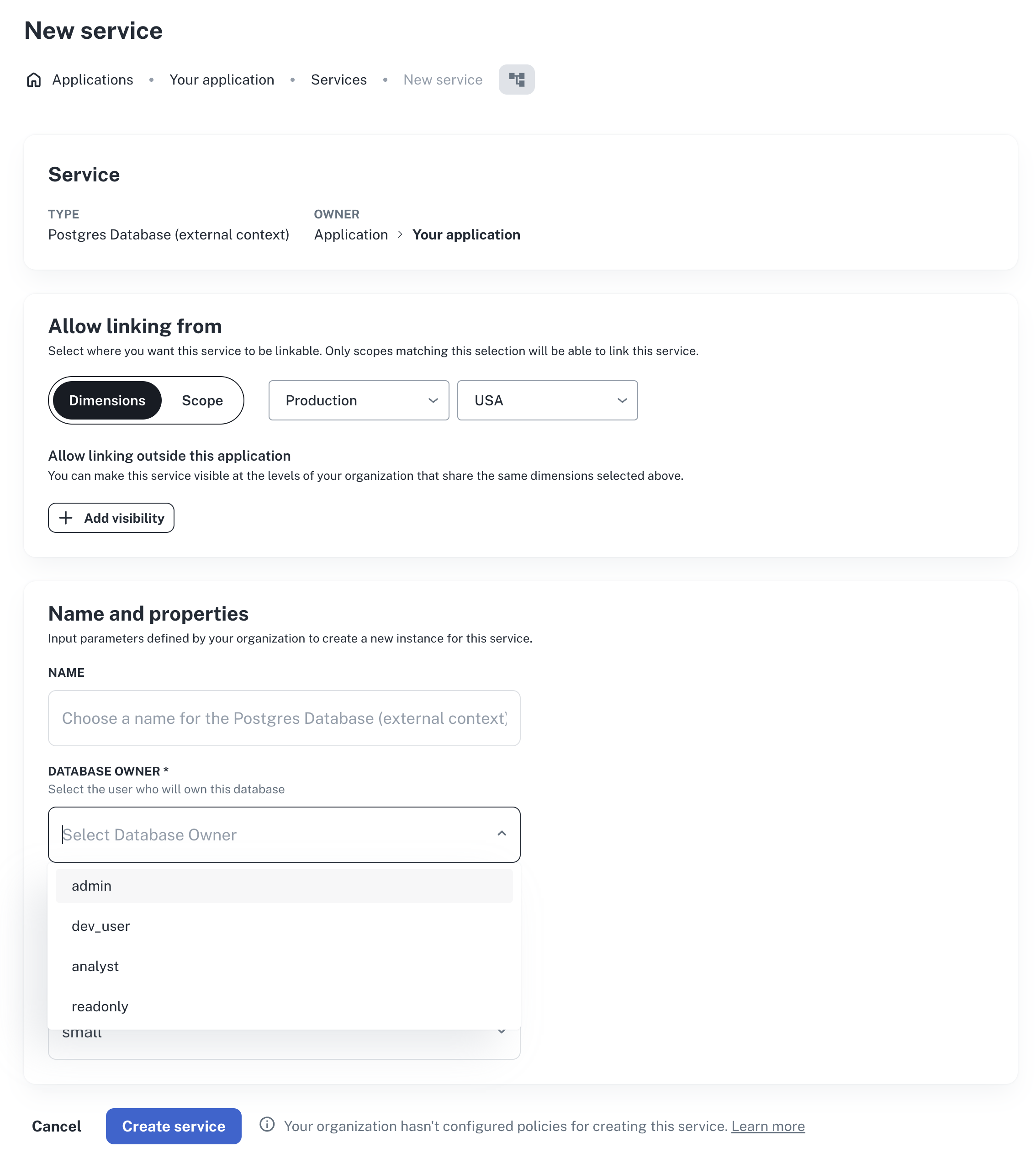
- In the nullplatform dashboard, go to an application that has an agent configured.
- In the Development view, go to Service and click + New service.
- In the service creation form, the
ownerfield should render as a dropdown with the actual Postgres users from your database.
np action specification read \
  --id $action_spec_id \
  --application-id $app_id
In the response, verify that:
parameters.schema.properties.owner.enumcontains the actual Postgres usersexternal_resolution.statusis"success"
curl -s "https://api.nullplatform.com/action_specification/$action_spec_id?application_id=$app_id" \
  -H "Authorization: Bearer <token>" | jq .
In the response, verify that:
parameters.schema.properties.owner.enumcontains the actual Postgres usersexternal_resolution.statusis"success"
If resolution fails, the response includes an external_resolution object with the error details. See Troubleshooting for common issues and fixes.
Next steps
- External fields reference: full reference for configuration, resolution statuses, and troubleshooting
- Additional keywords: learn about jq expressions and the full context available for dynamic schemas
- Action specifications: learn about action specification design and lifecycle