Approve secret access by environment
🎯 Goal: Let your team reveal secret parameter values in lower environments instantly, while production access requires a manual approval.
This tutorial uses policies, which will be deprecated in favor of checklists. For a new guardrail, start with Your first checklist instead. If you want to migrate policies to checklists, reach out to the nullplatform team.
Introduction
Secret parameters often hold one value per environment: a development database password, a staging token, a production key. Not all of those values deserve the same protection — blocking a developer from reading the development value slows them down, while handing out the production value without review is a risk.
Since access requests for secret values carry the dimensions being revealed, you can express this rule as pure configuration: one approval action, one policy, and the environment matrix takes care of itself. Every request is audited, including the auto-approved ones.
What you'll set up
You'll:
- Create an approval action for
parameter:read-secretsthat turns policy results into outcomes. - Attach a policy that passes only for lower environments, so
developmentandstagingrequests auto-approve whileproductionrequests wait for manual review. - Review and approve requests from the Approval requests screen in Platform settings, and optionally get notified in Slack.
Prerequisites
You'll need:
- The nullplatform CLI installed:
curl https://cli.nullplatform.com/install.sh | sh - A valid nullplatform API key with permissions to manage approvals, and an environment variable for the CLI:
export NULLPLATFORM_API_KEY=<your_api_key_here> - An
environmentdimension with values likedevelopment,staging, andproduction. - A secret parameter with values set per environment.
Approvals apply to users who don't hold the direct permission to read secret values (granted through the SecOps role). Users with that permission keep revealing values directly, with no approval step. See Accessing secret values.
1. Create the approval action
The approval action declares that revealing secret values of parameters under an NRN requires an approval, and maps policy results to outcomes: if the policy passes, the request is approved automatically; if it fails, it goes to manual review.
Replace
<organization=XXXX:account=XXXX:namespace=XXXX>with the NRN where the rule should apply.
- CLI
- cURL
np approval action create
  --body '{
    "nrn": "<organization=XXXX:account=XXXX:namespace=XXXX>",
    "entity": "parameter",
    "action": "parameter:read-secrets",
    "dimensions": {},
    "on_policy_success": "approve",
    "on_policy_fail": "manual"
  }'
curl -L -X POST 'https://api.nullplatform.com/approval/action' \
-H 'Content-Type: application/json' \
-H 'Accept: application/json' \
-H 'Authorization: Bearer <token>' \
-d '{
  "nrn": "<organization=XXXX:account=XXXX:namespace=XXXX>",
  "entity": "parameter",
  "action": "parameter:read-secrets",
  "dimensions": {},
  "on_policy_success": "approve",
  "on_policy_fail": "manual"
}'
Setting dimensions to {} makes the action govern requests for any dimensions — the policy decides per request. Save the id from the response; you'll need it in step 3.
✅ Checkpoint
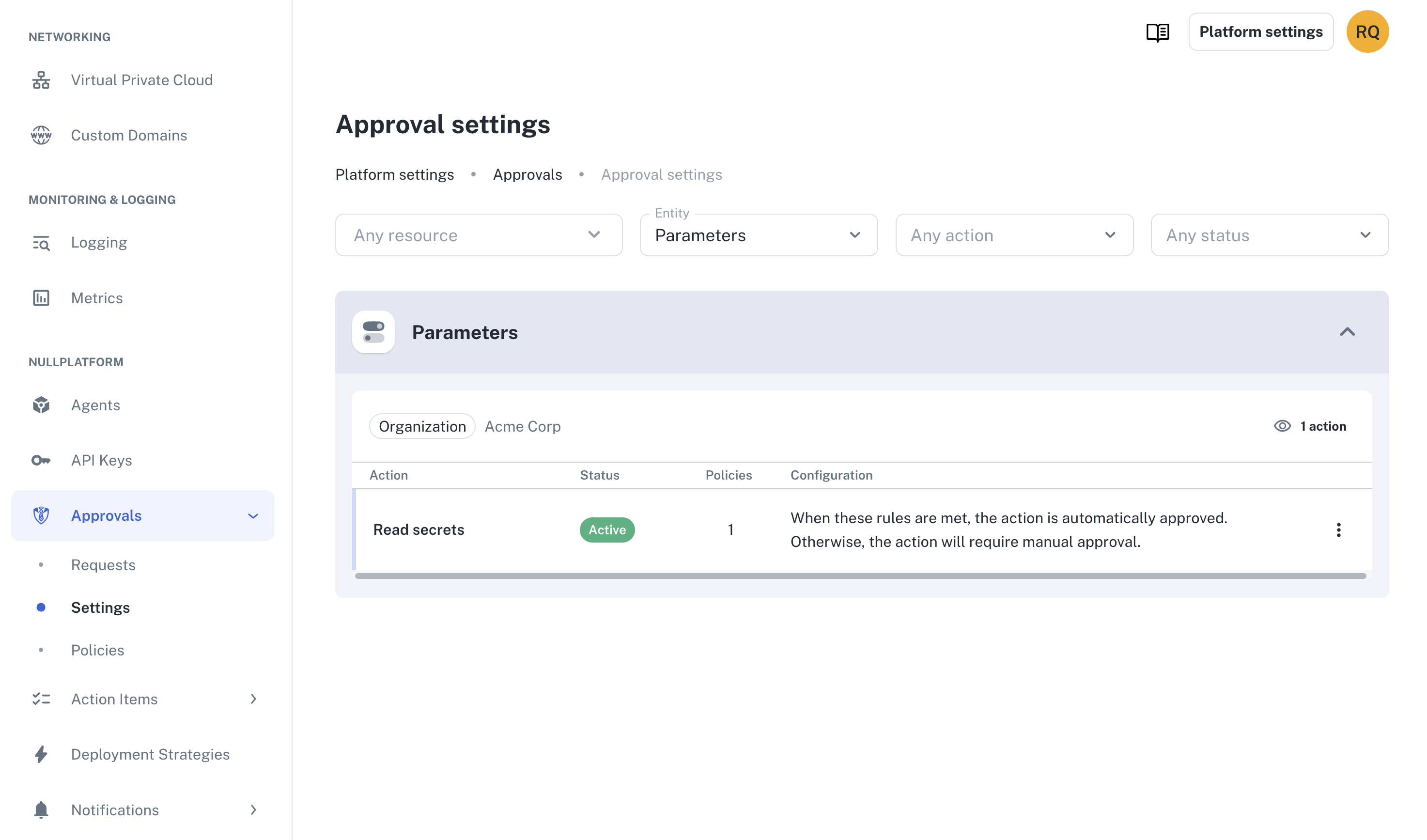
Go to Platform settings → Approvals → Settings and confirm the new action is listed for the Parameters entity.
2. Create the policy
The policy is an allowlist of the environments that may auto-approve. Requests carry the dimensions being revealed, so conditions can reference them directly:
- CLI
- cURL
np approval policy create
  --body '{
    "nrn": "<organization=XXXX:account=XXXX:namespace=XXXX>",
    "name": "Auto-approve secret access in lower environments",
    "conditions": {
      "dimensions.environment": { "$in": ["development", "staging"] }
    }
  }'
curl -L -X POST 'https://api.nullplatform.com/approval/policy' \
-H 'Content-Type: application/json' \
-H 'Accept: application/json' \
-H 'Authorization: Bearer <token>' \
-d '{
  "nrn": "<organization=XXXX:account=XXXX:namespace=XXXX>",
  "name": "Auto-approve secret access in lower environments",
  "conditions": {
    "dimensions.environment": { "$in": ["development", "staging"] }
  }
}'
Use the environment values defined in your organization — yours may differ (for example, dev and prod). Save the policy id from the response.
Keep the conditions an allowlist ($in) of permitted environments. An exclusion like { "$ne": "production" } also passes for requests that don't specify dimensions, which would auto-approve access to every value of the parameter — including production.
3. Associate the policy with the action
Link the policy to the action using the two IDs you saved:
- CLI
- cURL
np approval action policy create
  --id <approval_action_id>
  --body '{
    "policy_id": <policy_id>
  }'
curl -L -X POST 'https://api.nullplatform.com/approval/action/<approval_action_id>/policy' \
-H 'Content-Type: application/json' \
-H 'Accept: application/json' \
-H 'Authorization: Bearer <token>' \
-d '{
  "policy_id": <policy_id>
}'
From this point on, the environment decides the outcome:
| Request | Policy result | Outcome |
|---|---|---|
Reveal development or staging values | Passes | auto_approved — no human step |
Reveal production values | Fails | pending — waits for manual review |
| Reveal the whole parameter (no dimensions) | Fails | pending — waits for manual review |
4. Review requests in Platform settings
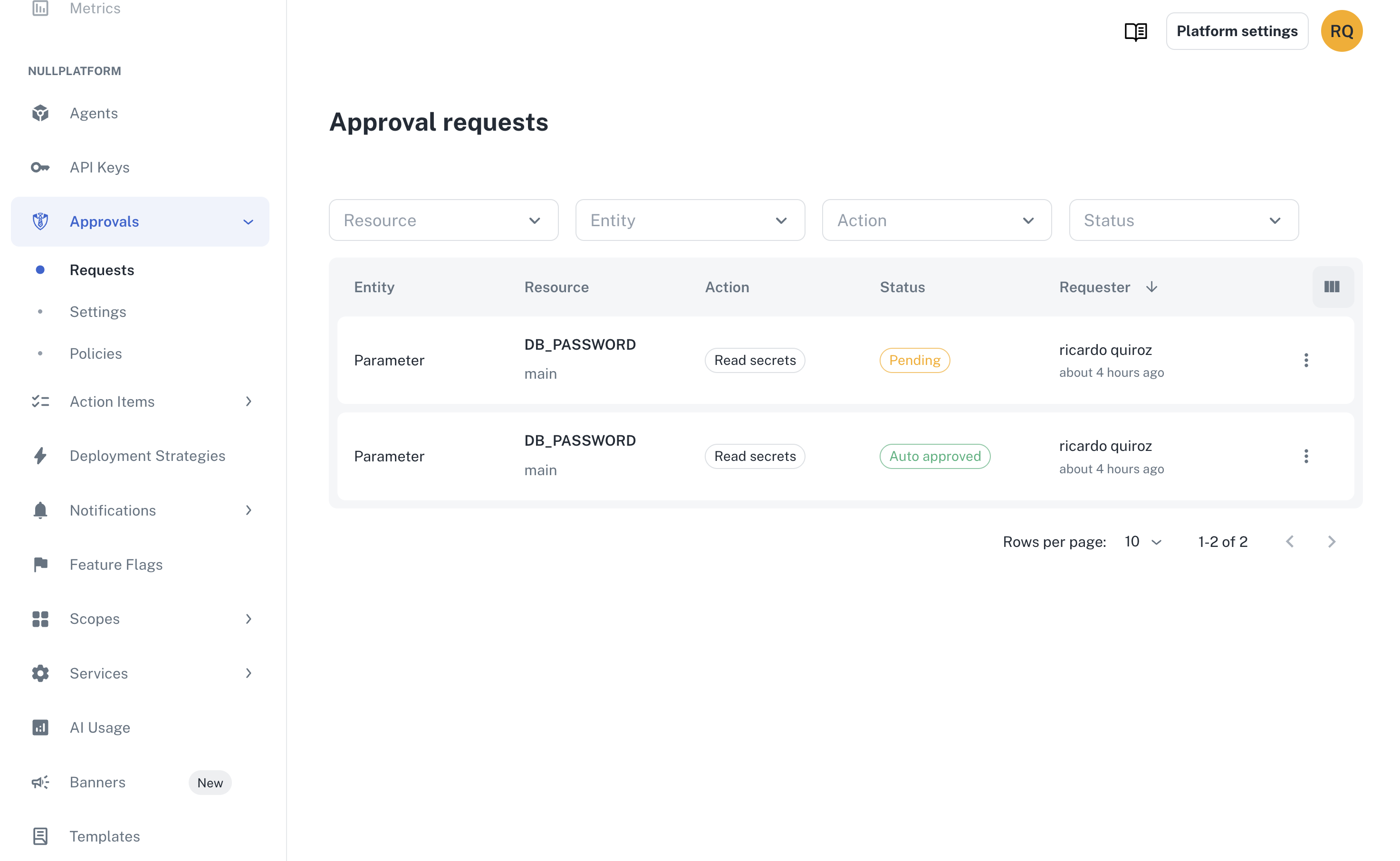
Approvers don't need to leave the platform: the Approval requests screen shows every request that needs attention, and lets you follow up on resolved ones.
- Go to Platform settings → Approvals → Requests.
- Filter by entity Parameter or status Pending to find requests waiting for review.
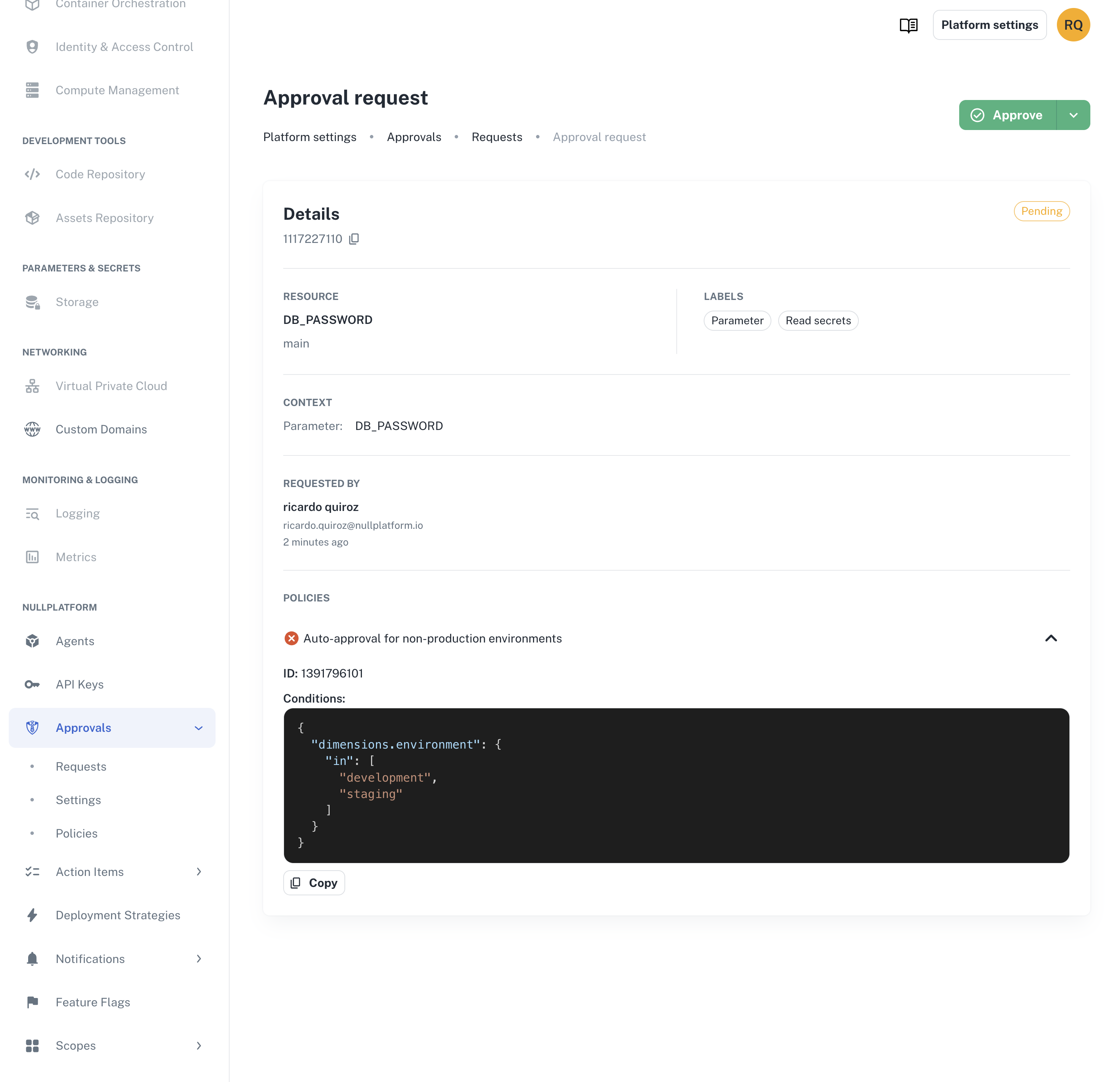
- Open View details to see who requested access, the parameter, the requested dimensions, and the policies that were evaluated.
- Click Approve or Deny. You can add an optional message for the requester.
5. (Optional) Get notified in Slack
To get pinged when a request needs review, create a notification channel filtered to this action. First connect the nullplatform Slack app and invite it to your channel, then:
- CLI
- cURL
np notification channel create
  --body '{
    "nrn": "organization=1",
    "description": "Secret access approvals",
    "source": ["approval"],
    "type": "slack",
    "configuration": {
      "channels": ["secrets-approvals"]
    },
    "filters": {
      "action": "parameter:read-secrets"
    }
  }'
curl -L 'https://api.nullplatform.com/notification/channel' \
-H 'Content-Type: application/json' \
-H 'Accept: application/json' \
-H 'Authorization: Bearer <token>' \
-d '{
  "nrn": "organization=1",
  "description": "Secret access approvals",
  "source": ["approval"],
  "type": "slack",
  "configuration": {
    "channels": ["secrets-approvals"]
  },
  "filters": {
    "action": "parameter:read-secrets"
  }
}'
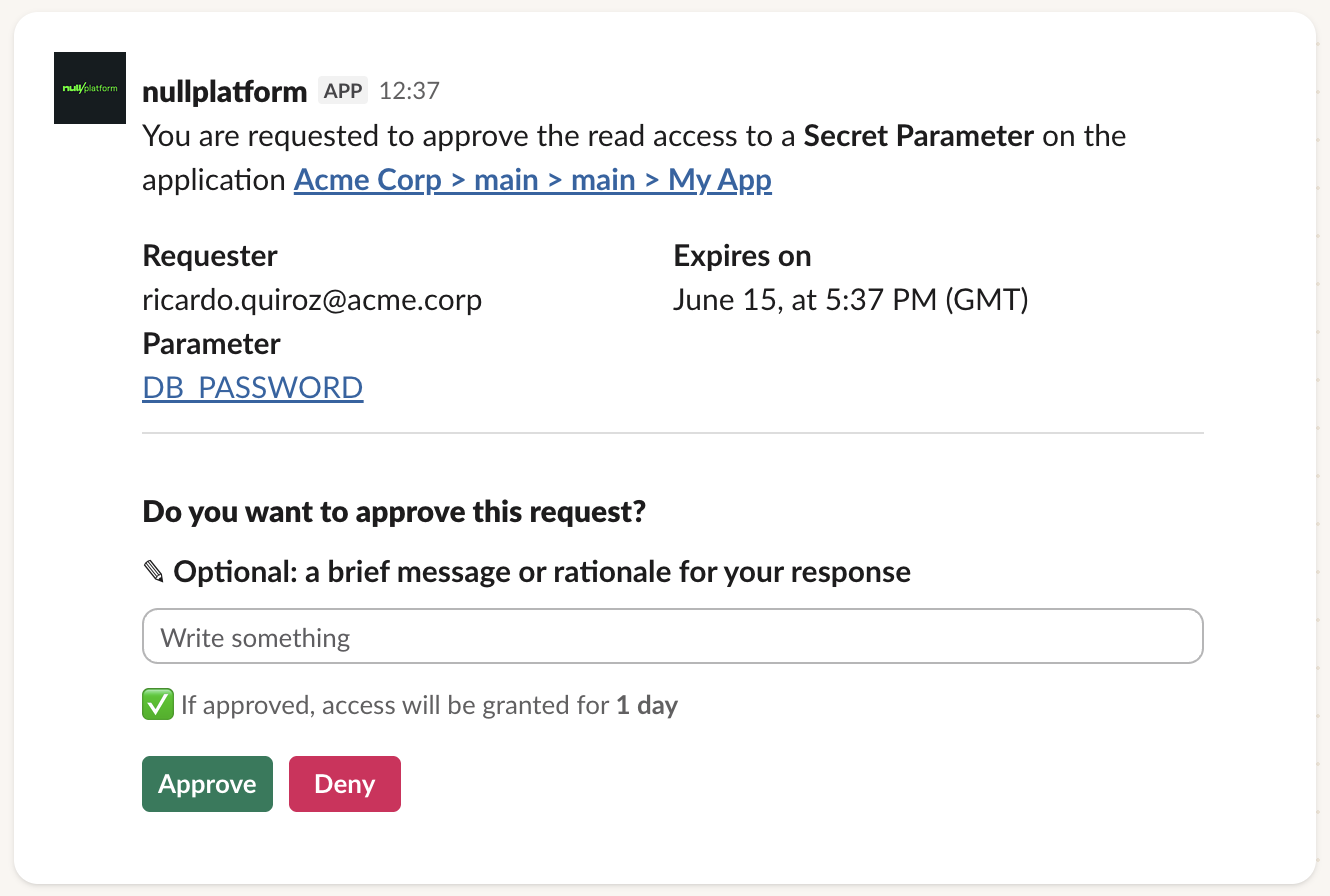
Reviewers get a Slack message for each request and can approve or deny from there. See Set up approval notifications for HTTP channels and more options.
Test that it works
Sign in as a developer who doesn't have direct access to secret values, open the secret parameter, and:
- Reveal the
developmentvalue. Access is approved automatically and the value appears — no waiting. - Request access to the
productionvalue. The request stays pending, and reviewers are notified. - As an approver, go to Platform settings → Approvals → Requests and approve it. Notice the request from step 1 shows as Auto approved, while this one records you as the reviewer.
- Back as the developer, reveal the
productionvalue — it's now visible.
Each reveal only uncovers the values for the requested environment; everything else stays hidden. See Accessing secret values for the details.
Wrap-up 🎉
All done! Now you have:
- Secret access requests that carry the environment being revealed.
- Auto-approval for
developmentandstaging, with a full audit trail. - Manual review for
production, decided from the Approval requests screen or Slack.
What's next
- Require manual approval for applications in prod: apply the same approval model to production deployments
- Require stage deployment before production: enforce progressive promotion across environments