Manage and provision services
Services represent infrastructure or external capabilities that your applications depend on, such as databases, message queues, storage buckets, authentication systems, or custom resources defined by your organization. In nullplatform, you choose where each service belongs in your hierarchy and control which applications can link to it.
This guide helps you understand how ownership works, how to provision a service, and how to make it available to your applications.
Understanding service ownership
Every service belongs to a specific level in your hierarchy:
Organization → Account → Namespace → Application
Ownership determines:
- who is responsible for managing the service
- where provisioning workflows apply
- the part of the hierarchy the service conceptually belongs to
However, ownership does not automatically decide visibility.
Applications gain access to a service through the Linkable from settings (Dimensions or Scope). That means:
- A service owned by a namespace, for example, is available to all applications in that namespace.
- A service owned by an application is typically used by that application alone, unless you configure visibility so other scopes can link to it.
This separation lets you manage responsibility through ownership and control access through linkability.
Provisioning a new service
You provision services from Platform settings, where you define and manage infrastructure resources.
How to provision a service
- Go to Platform settings > Services.
- Select Create service.
- Choose the service type you want to provision.
- Select the Owner that will manage the service:
- Organization
- Account
- Namespace
- Application
- Complete the configuration fields for that service type.
- Click Create service to start the provisioning workflow.
After provisioning, the service becomes available to any application that falls under the owner’s hierarchy.
What happens during provisioning
Provisioning runs the workflow defined for the service type. This may involve:
- Terraform or OpenTofu executions
- CI pipelines like GitHub Actions or GitLab Pipelines
- Custom automation your organization maintains
- or tasks executed by the nullplatform agent inside your infrastructure
Nullplatform orchestrates the workflow, but the infrastructure changes happen inside your environment.
Linking a service to an application
Applications use services through links. A link connects an application to a service instance so it can interact with it.
To link a service:
- Go to Development > Services inside your application.
- Click + Create service.
- Select a service available to your application.
- Select where you want this service to be linkable.
- Confirm the link.
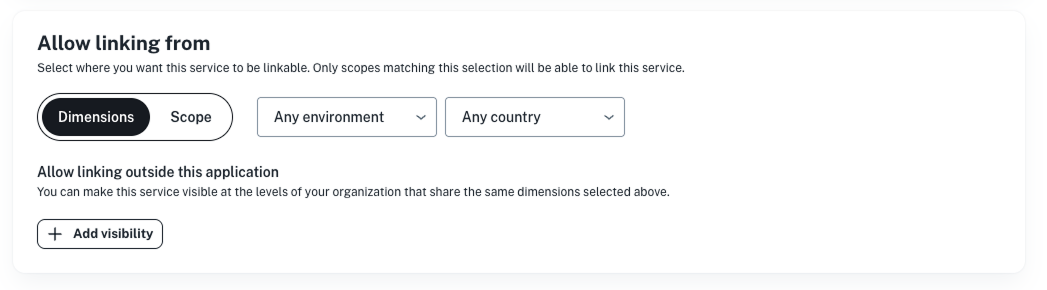
Once created and linked:
- the service appears in your Services view
- related parameters appear under Development > Parameters
- your application can run actions for that service
Rules for linking
- Applications can link to any service that’s made available or whose Linkable from configuration includes their scope.
- You cannot modify or delete services owned by higher levels.
- If a service is owned at a higher level (for example, namespace), the application uses the instance but does not control its lifecycle.
Updating a service
How you update a service depends on the actions available in its specification.
Update with provisioning
This option runs the service's update action and synchronizes changes with your infrastructure. Use this option when the update affects underlying resources.
Update without provisioning
Updates metadata only. Useful when:
- modifying non-infrastructure fields
- working with imported services
- syncing values managed externally
Imported services do not have update actions and can only be updated through patches.
Deleting a service
To delete a service safely:
- Remove any links that reference the service.
- If the service has a delete action, run it to remove its infrastructure.
- Delete the service entity.
You must remove services and links before deleting an application. The platform prevents application deletion when linked services still exist.
Summary
With nullplatform, you can:
- provision services at the level of the hierarchy that makes sense for your organization
- control access through linkable settings
- keep ownership aligned with how your teams work
- run consistent provisioning and update workflows
By choosing the right ownership and linkability, you keep your services organized, predictable, and easy to manage.