Banners
Banners let you broadcast messages to your team directly within the nullplatform UI. Use them to communicate maintenance windows, incidents, outages, or general announcements across specific sections of the platform.
Create a banner
To create a banner, go to Platform Settings > Banners and click New banner. The form includes a live preview so you can see how the banner will look as you fill in the fields.
Only users with the Admin role can create, edit, publish, or delete banners.
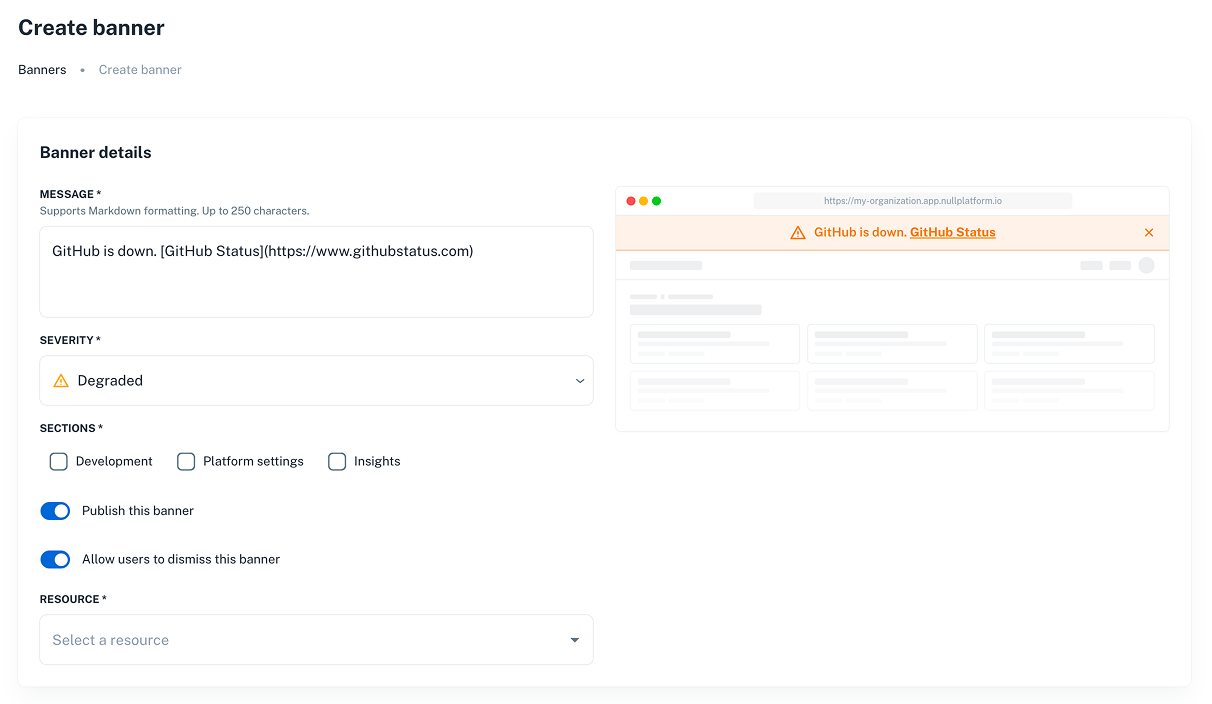
Severity levels
Choose a severity level that matches the nature of your message:
| Severity | Color | Use case |
|---|---|---|
| Informational | Blue | General announcements, feature updates, or tips. |
| Maintenance | Yellow | Planned maintenance windows or scheduled changes. |
| Degraded | Orange | Partial service degradation or intermittent issues. |
| Outage | Red | Critical incidents or full service outages. |
Resource targeting
Banners use the NRN (Nullplatform Resource Name) hierarchy to determine visibility. A banner targeted at a specific resource is visible on that resource and all its children.
For example, a banner targeted at the namespace level is visible on:
- The namespace itself
- All applications within that namespace
- All scopes within those applications
Manage banners
Publish or unpublish
From the banner list, open the actions menu on any banner row and select Publish or Unpublish. Publishing a banner makes it immediately visible to users in the targeted sections. Unpublishing hides it without deleting it.
You can save a banner as a draft by leaving the Publish this banner toggle off, then publish it later from the banner list.
Edit a banner
Click on a banner row or select Edit from the actions menu to update its content, severity, sections, or targeting. When you save changes to a banner that was previously dismissed by a user, it reappears for that user — this ensures important updates aren't missed.
Banner dismissal
When the dismissible option is enabled, users can close the banner. Dismissal is per-user and stored locally in the browser. If an admin updates a dismissed banner, it reappears for all users who previously dismissed it.