Action items
AI Ops features are in early release and may not be available in your organization yet. If you'd like to try them or want to know more, reach out to us and we'll get you set up.
Action items are the tasks your team needs to do to improve the software you run. Think of it as an intelligent ticketing system built into nullplatform: issues worth acting on, such as security vulnerabilities, over-provisioned resources, or configuration drift, become items that developers can triage, prioritize, and resolve.
Each item carries enough context to act on it, a priority, and an estimated value, so you can always tell what matters most.
How action items work
Every action item moves through the same detect-triage-resolve cycle, regardless of who creates it or how it's resolved:
- An issue is detected. It can come from an automated agent scanning your applications, a developer spotting something during a review, or an admin creating an item manually from Platform Settings.
- The item is classified into a category (for example, "Security vulnerabilities" or "Cost optimization") and assigned a priority.
- The developer responsible for the application triages it and decides how to handle it: resolve it, defer it, or reject it as not applicable.
AI-assisted detection and resolution
A specific variant of this flow is end-to-end automation by AI agents. An agent can detect an issue, create the action item, and attach an AI suggestion with a ready-to-apply fix. The developer reviews the suggestion, optionally adjusts parameters, and approves it. The agent then executes the change.
AI-assisted resolution is one path. Most items, especially those created manually or without a suggestion attached, are resolved by the developer directly. Both paths share the same lifecycle, statuses, and governance rules.
A real example: catching a PII leak in production logs
Here's what an action item looks like end to end. The log-pii-scanner agent continuously watches the logs of every application in your organization. During a recent scan of the Pharmacy Shops API, it found 11 occurrences of JWT tokens leaking in URLs on the Production UK scope, a critical PII violation.
The agent opened an action item with all the context a developer needs to act:
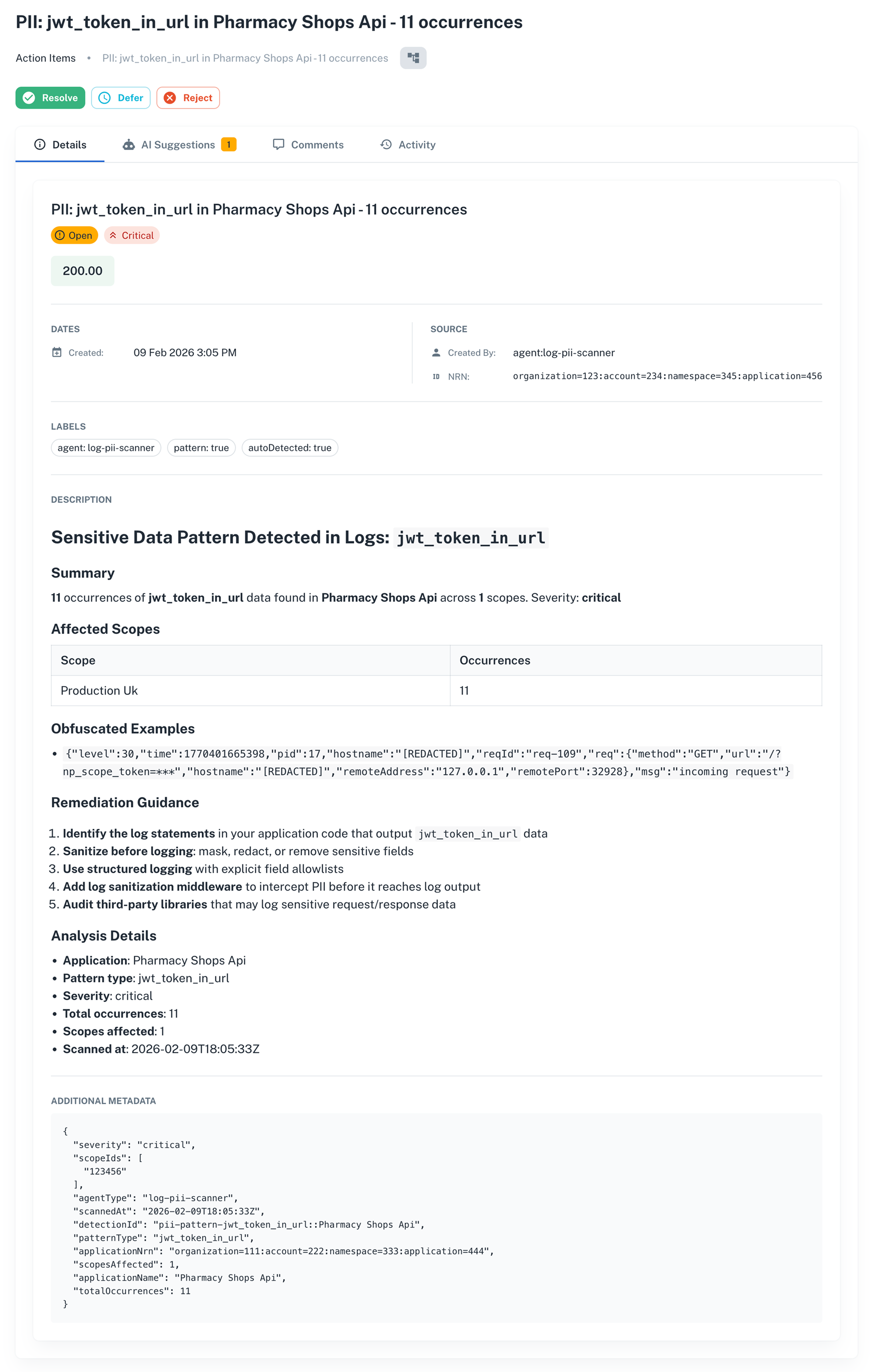
The card packages the detection summary, obfuscated log samples (so developers see the shape of the leak without exposing real tokens), concrete remediation guidance, and structured metadata. No hunting for context, no guessing where to start.
Alongside the details, the same agent attached an AI suggestion with a proposed fix:
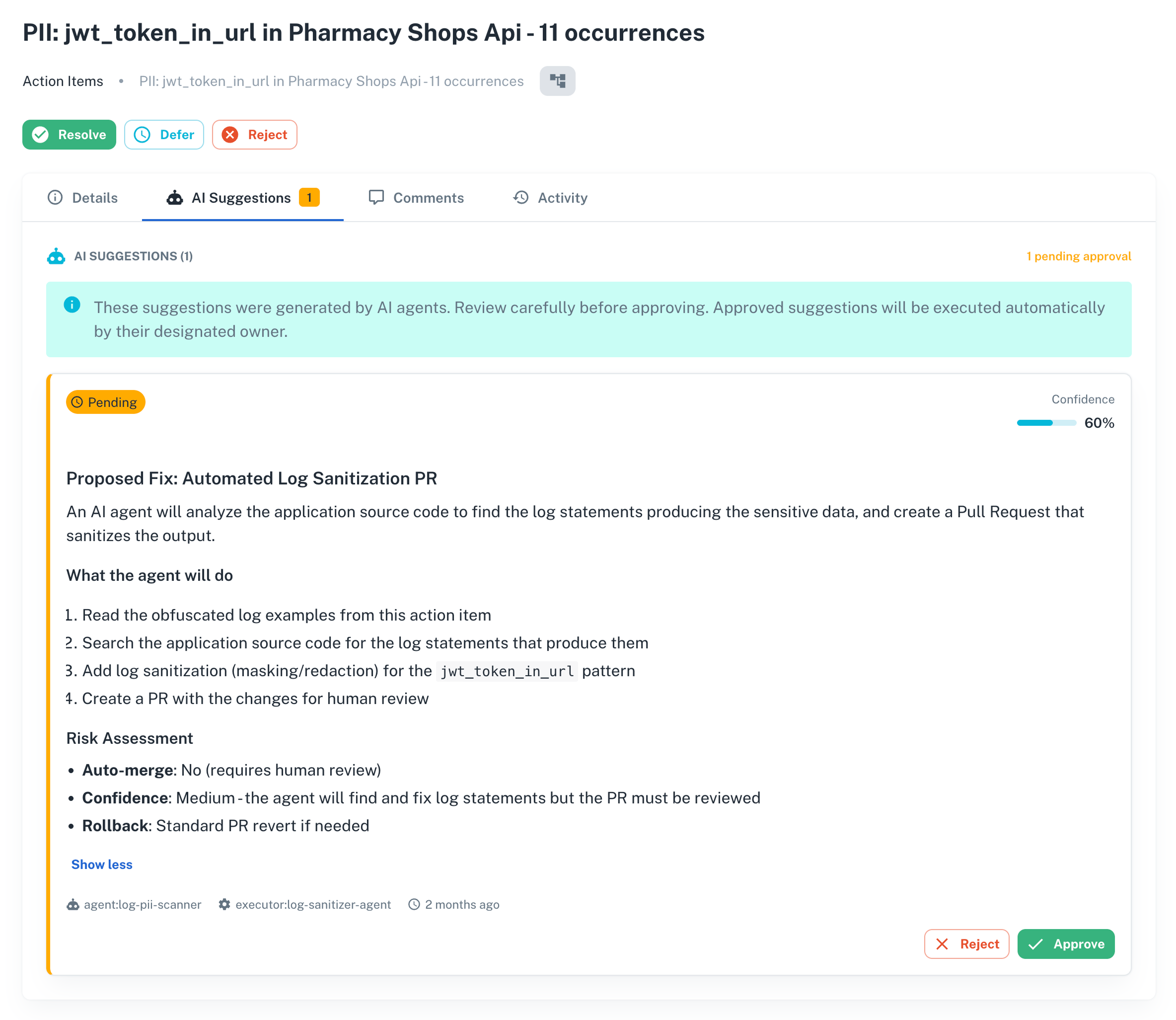
The developer reviews the suggestion, adjusts parameters if needed, and approves. The agent applies the change and the item moves to resolved. From scan to fix, the developer stays in control but skips the mechanical work.
Core concepts
Categories
Categories classify action items into groups. A category defines what the items in it track (for example, dollars saved, hours reduced), how they look in the UI (color and icon), and limits on how items can be deferred.
Categories follow the NRN hierarchy. A category defined at the organization level is inherited by every account, namespace, and application below it, so admins can set it once and apply it everywhere.
Requiring approval before an item can be resolved, deferred, or rejected is handled separately, through nullplatform's approvals engine, so you govern those transitions with the same policies and notification channels you use for deployments and scopes.
Priority and score
Every item has a manual priority, from low to critical, and a value, which represents the estimated benefit of resolving it in the unit defined by its category (such as dollars or hours).
Nullplatform computes a score as value × priority weight. Items in the list view are sorted by score by default, so high-value, high-priority items surface first.
NRN scoping
Action items are scoped to any level of your NRN hierarchy: organization, account, namespace, application, or scope. The list views filter by the current NRN context, so developers only see items for their application, and admins can query across the whole organization.
AI suggestions
An action item can have one or more AI suggestions attached to it. Each suggestion is a proposed fix with a description, a confidence score, and optional parameters the developer can adjust before approving. Once approved, the owning agent applies the fix and reports back with the result.
Who uses action items
Action items have two audiences, each with a different view and set of responsibilities:
| Audience | Where they access it | What they do |
|---|---|---|
| Developers | Application dashboard and Manage > Action Items | See the items assigned to their application, triage them, resolve or defer them, and review AI suggestions. |
| Platform Settings admins | Settings > Action Items | Create categories, set which transitions require approval, and create items manually across the organization. |
The two views are tied together: admins configure categories and governance in Platform Settings, and developers work through items in their application dashboards. Approval requests for gated transitions are reviewed in the approvals flow, the same way as deployments and scopes.
Next steps
- Triage and resolve action items: from the application dashboard, with optional AI-suggested fixes
- Action item owners: assign an item to a person and filter the list by owner
- Configure and manage action items: set up categories, gate transitions with approvals, and oversee items across the organization
- Approvals: require review before items can be resolved, deferred, or rejected
- Action items API reference: endpoints to create, update, and transition action items programmatically