Extend provider support
Scope configurations let you define cloud-specific settings for the Static files scope directly from the nullplatform UI, without setting environment variables on the agent. You can apply a configuration at any level — organization, account, namespace, or individual scope — and override it at a more specific level when needed.
💡 Tip: Scope configurations are the recommended way to set cloud provider settings for the Static files scope. Existing setups that rely on environment variables continue to work.
How to create a configuration
Go to Platform settings > Scopes > Configurations, click + New configuration, and select Static Files as the provider. Choose where the configuration applies, select your cloud provider, and fill in the Provider, Distribution, and Network tabs.
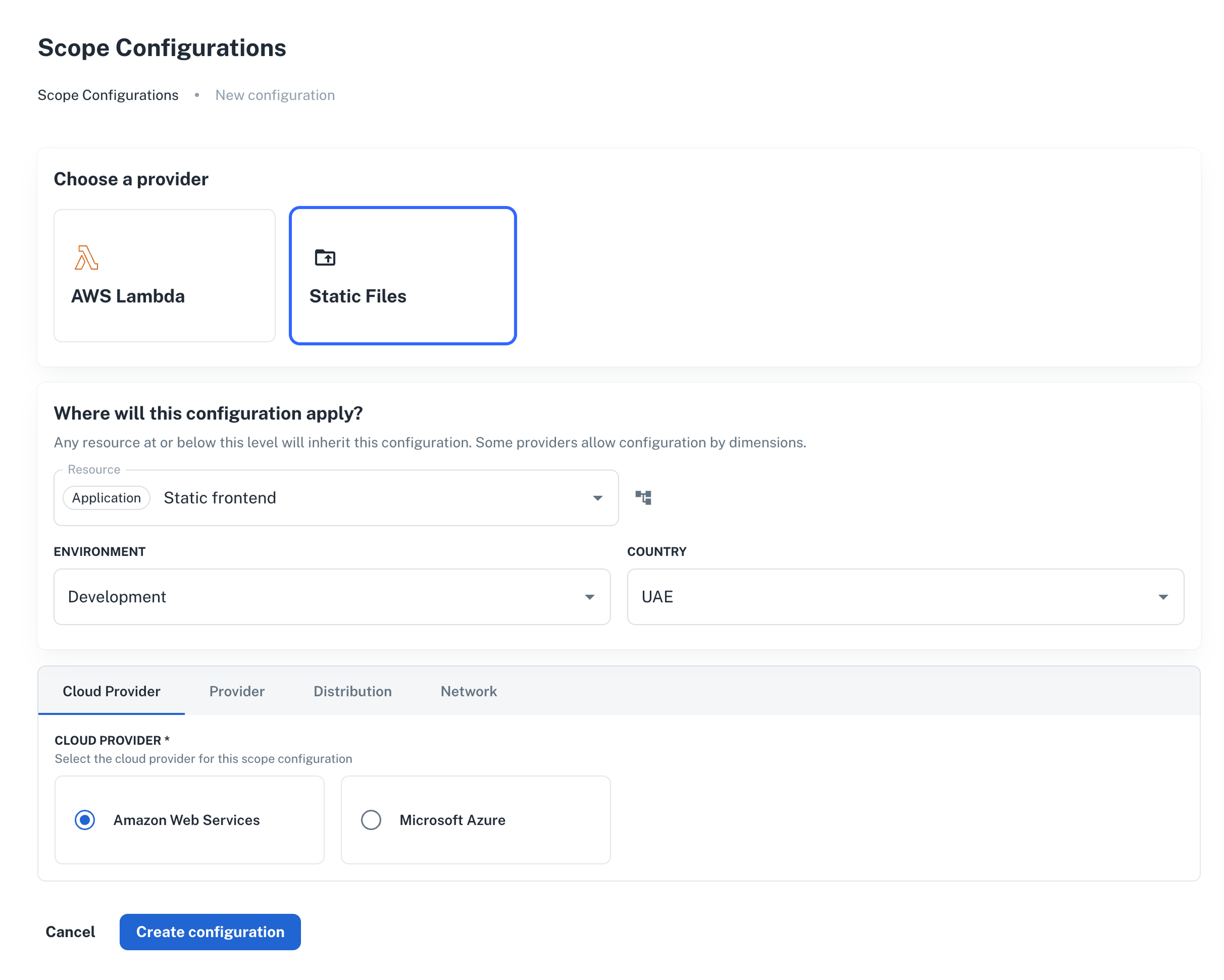
Configuration reference
The available fields are organized across four tabs. The fields in the Provider, Distribution, and Network tabs change depending on the cloud provider selected.
Cloud Provider tab
| Field | Description |
|---|---|
| Cloud Provider | The cloud provider for this configuration: Amazon Web Services or Microsoft Azure |
Provider tab
Configures the agent's state backend and cloud credentials.
AWS
| Field | Description |
|---|---|
| AWS Region | AWS region where resources will be deployed |
| S3 State Bucket | S3 bucket for storing OpenTofu state, also used for S3-native state locking |
🔒 The agent needs an IAM role attached to its Kubernetes service account (IRSA) with permissions for S3, Route 53, CloudFront, ACM, and STS. Configure this in your agent Helm installation via
serviceAccountannotations. See AWS setup for the full IAM policy.
Azure
| Field | Description |
|---|---|
| Azure Subscription ID | Azure subscription where resources will be deployed |
| Azure Resource Group | Resource group for scope resources |
| State Storage Account | Azure storage account for storing OpenTofu state |
| State Container | Blob container name for state files |
Distribution tab
Selects the CDN distribution provider. The scope uses this to provision and manage the CDN endpoint for your static files.
| Cloud | Distribution |
|---|---|
| AWS | Amazon CloudFront |
| Azure | Azure Blob CDN |
Network tab
Configures the DNS zone used to create the scope's custom domain.
AWS
| Field | Description |
|---|---|
| AWS DNS Provider | DNS provider for managing records (Amazon Route 53) |
| Route 53 Hosted Zone ID | Public hosted zone ID for DNS records (e.g., Z1234567890ABC) |
Azure
| Field | Description |
|---|---|
| DNS Zone Name | Azure DNS zone name (e.g., example.com) |
| DNS Zone Resource Group | Resource group that contains the DNS zone |
Inheritance
A configuration set at a higher level applies to all resources below it, unless a more specific configuration exists at a lower level. This lets you set a base domain or region at the organization level and override only what differs per namespace or scope.
For the full resolution order and inheritance model, see Scope configurations.
Next steps
- AWS setup: IAM permissions for the agent on AWS
- Azure setup: RBAC permissions for the agent on Azure
- Scope configurations: how configuration values are resolved and inherited across the resource hierarchy