Generate built-in UI components
Nullplatform includes built-in UI components that render automatically based on specific catalog keys, like links or
about. These don’t require any custom UI configuration or rendering logic.
If you attach an instance using one of these keys, the platform will:
- Recognize it
- Apply default visual styling
- Place it in the appropriate part of the UI
You don't need to create catalog specifications for links and about keys.
Built-in catalog keys
| Catalog key | Entity type(s) | Description |
|---|---|---|
links | namespace, application | Renders grouped links to dashboards, docs, etc. |
about | user | Shows user profile info (title, role, contact) |
💡 These are optional, but when used correctly, they enhance discoverability and visibility across the platform.
The links component
Namespace
To create catalog components of entities in your namespace, send a POST request to create a catalog instance (single key) for links like the following:
curl -L 'https://api.nullplatform.com/metadata/namespace/123/links' \
-H 'Content-Type: application/json' \
-H 'Authorization: Bearer <token>' \
-d '[
  {
    "link_identity": {
      "name": "Trello",
      "icon": "logos:trello"
    },
    "destination": {
      "url": "https://trello.com/w/my-organization-trello/home",
      "description": "Workspace"
    }
  },
  {
    "link_identity": {
      "name": "Github",
      "icon": "bi:github"
    },
    "destination": {
      "url": "https://github.com/my-organization-github",
      "description": "Homepage"
    }
  },
  {
    "link_identity": {
      "name": "Calendar",
      "icon": "logos:google-calendar"
    },
    "destination": {
      "url": "https://calendar.google.com/",
      "description": "Link"
    }
  }
]'
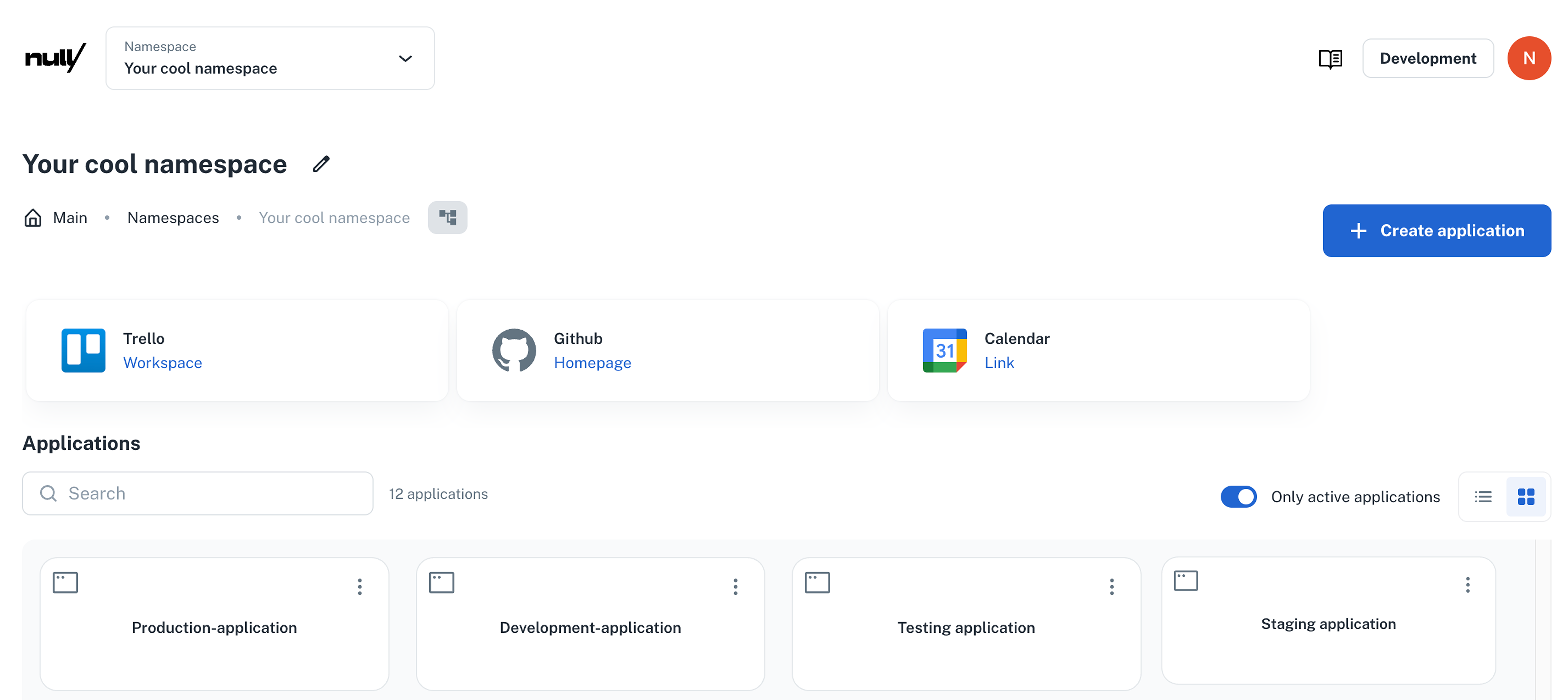
In the namespace dashboard, they appear above the application list:
Application
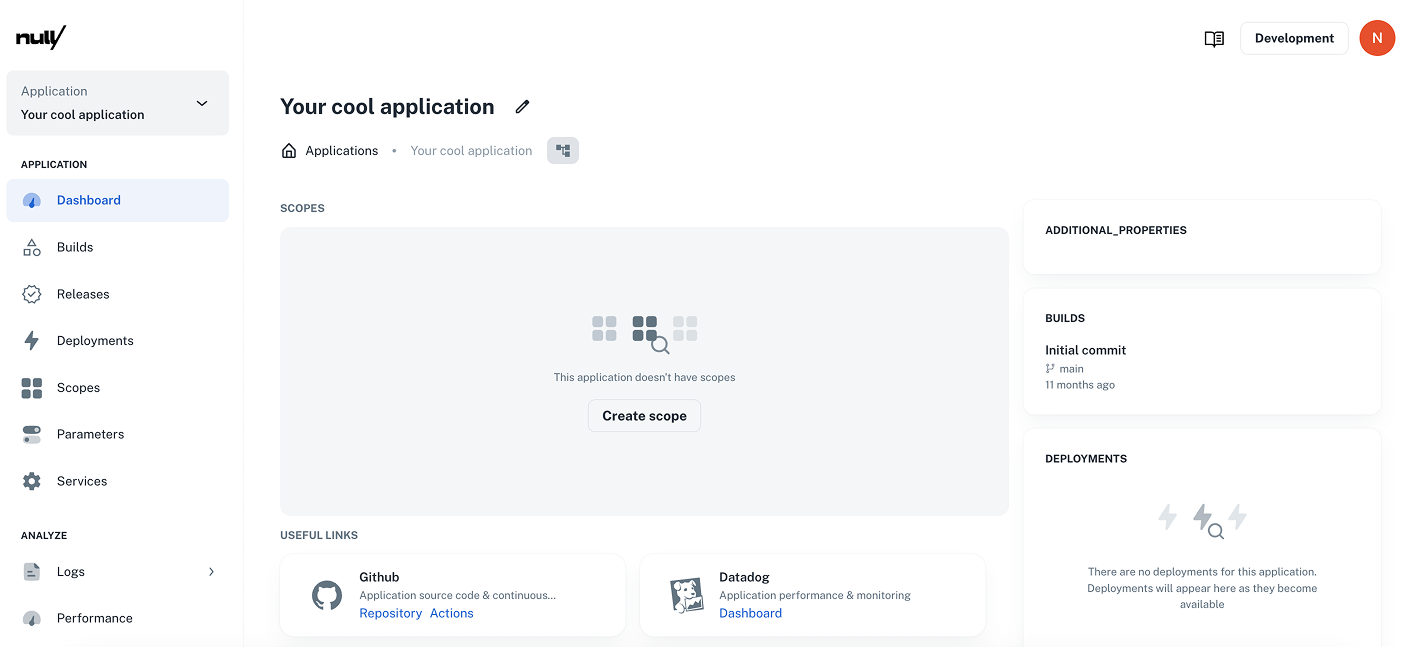
In the application dashboard, they are in the Useful links section.
For example, to add a Datadog component to your application UI, send POST request to create a catalog instance (single key) for links like the following:
curl -L 'https://api.nullplatform.com/metadata/application/123/links' \
-H 'Content-Type: application/json' \
-H 'Authorization: Bearer <token>' \
-d '[
  {
    "link_identity": {
      "name": "Datadog",
      "icon": "simple-icons:datadog"
    },
    "destination": {
      "url": "https://app.datadoghq.com/dashboard/example",
      "description": "Application performance & monitoring"
    }
  }
]'
This will be rendered in the UI like this:
Built-in catalog spec
{
  "type": "array",
  "minItems": 1,
  "items": {
    "type": "object",
    "properties": {
      "link_identity": {
        "type": "object",
        "title": "Link Identity",
        "description": "Set a name and icon to help recognize this link.",
        "properties": {
          "name": {
            "type": "string",
            "title": "Link name",
            "placeholder": "Enter a link name"
          },
          "icon": {
            "type": "string",
            "title": "Icon",
            "placeholder": "Enter an icon name"
          }
        },
        "required": ["name", "icon"]
      },
      "destination": {
        "type": "object",
        "title": "Destination",
        "description": "Set the destination URL and a short description for this link.",
        "properties": {
          "url": {
            "type": "string",
            "title": "URL",
            "format": "url",
            "placeholder": "Enter the url where your link will redirect"
          },
          "description": {
            "type": "string",
            "title": "Description",
            "placeholder": "Enter a description"
          }
        },
        "required": ["url"]
      }
    },
    "required": ["link_identity", "destination"]
  }
}
The about component (user profiles)
Use the about catalog key to display structured profile information for a platform user.
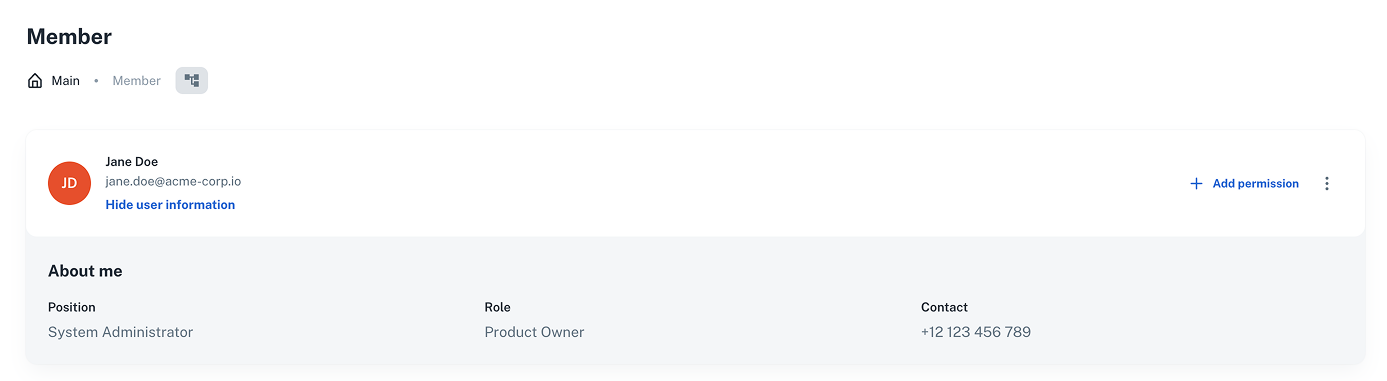
This is rendered on the member profile page and can include title, role, contact info, or other structured data.
Users
To use it, you just need to Create a catalog instance (single key) for the built-in about specification.
Here's a request example:
curl -L 'https://api.nullplatform.com/metadata/user/123/about' \
-H 'Content-Type: application/json' \
-H 'Authorization: Bearer <token>' \
-d '[
  {
    "title": "Position",
    "description": "System Administrator"
  },
  {
    "title": "Role",
    "description": "Product Owner"
  },
  {
    "title": "Contact",
    "description": "+12 123 456 789"
  }
]
Here's a user profile example:
Built-in catalog specs
{
  "type": "array",
  "items": {
    "type": "object",
    "properties": {
      "title": {
        "type": "string",
        "minLength": 4
      },
      "description": {
        "type": "string",
        "minLength": 4
      }
    },
    "required": [
      "title",
      "description"
    ]
  }
}