Set up external parameters
The external-parameters backend doesn't store anything itself. It marks a {NRN, dimensions} tuple as values for this tuple are handled outside nullplatform and forwards every lifecycle event to a notification channel you configure. Your handler decides where the value lives, how it's read, and when it's deleted.
This is the right backend when no off-the-shelf integration matches your storage system, or you want to layer custom logic (audit, replication, multi-region routing) on top of parameter operations.
How it works
Three pieces work together:
- The provider, which you create in nullplatform with the slug
external-parameters. It carries no attributes: its presence on a{NRN, dimensions}tuple is the signal. - A notification channel subscribed to the
parametersource. It tells nullplatform where to send lifecycle events. - Your handler, reachable through the agent or as an HTTP endpoint depending on the channel type. It receives each event, runs your logic, and returns a result to nullplatform.
The handler contract is action-based. Each lifecycle event triggers one of four actions: parameter:store, parameter:retrieve, parameter:delete, parameter:notify. Your handler responds with a small JSON payload that nullplatform validates and persists.
Prerequisites
Before starting, make sure you have:
- A reachable agent running inside your infrastructure. See Install the agent.
- An API key with the Agent role attached. See Authenticate the agent.
- The backend you'll write values to (cloud secret manager, internal vault, key-value store, etc.).
Step 1: Create the external-parameters provider
Create the marker provider on the NRN you want to route externally. It has no configurable attributes.
- UI
- CLI
- Terraform
- cURL
- Go to Platform settings > Security & Secrets > External parameters.
- Click + New provider, pick the resource (NRN) and any dimensions.
- There are no fields to fill in.
- Click Create provider.
np provider create \
  --body '{
    "nrn": "organization=1:account=2:namespace=3:application=4",
    "specification_slug": "external-parameters",
    "dimensions": {},
    "attributes": {}
  }'
data "nullplatform_provider_specification" "external_parameters" {
  slug = "external-parameters"
}

resource "nullplatform_provider" "external_parameters" {
  nrn              = "organization=1:account=2:namespace=3:application=4"
  specification_id = data.nullplatform_provider_specification.external_parameters.id
  attributes       = jsonencode({})
}
curl -L -X POST 'https://api.nullplatform.com/provider' \
  -H 'Content-Type: application/json' \
  -H 'Authorization: Bearer <token>' \
  -d '{
    "nrn": "organization=1:account=2:namespace=3:application=4",
    "specification_slug": "external-parameters",
    "dimensions": {},
    "attributes": {}
  }'
The provider on its own doesn't do anything. The next step wires it up to your agent.
Step 2: Create the notification channel
Create an agent channel that listens for parameter lifecycle events and runs your handler scripts. The same channel handles all four actions: nullplatform passes the action name in the notification context, and your handler dispatches accordingly.
- UI
- CLI
- cURL
- Go to Platform settings > Notifications > Channels, and click + New channel.
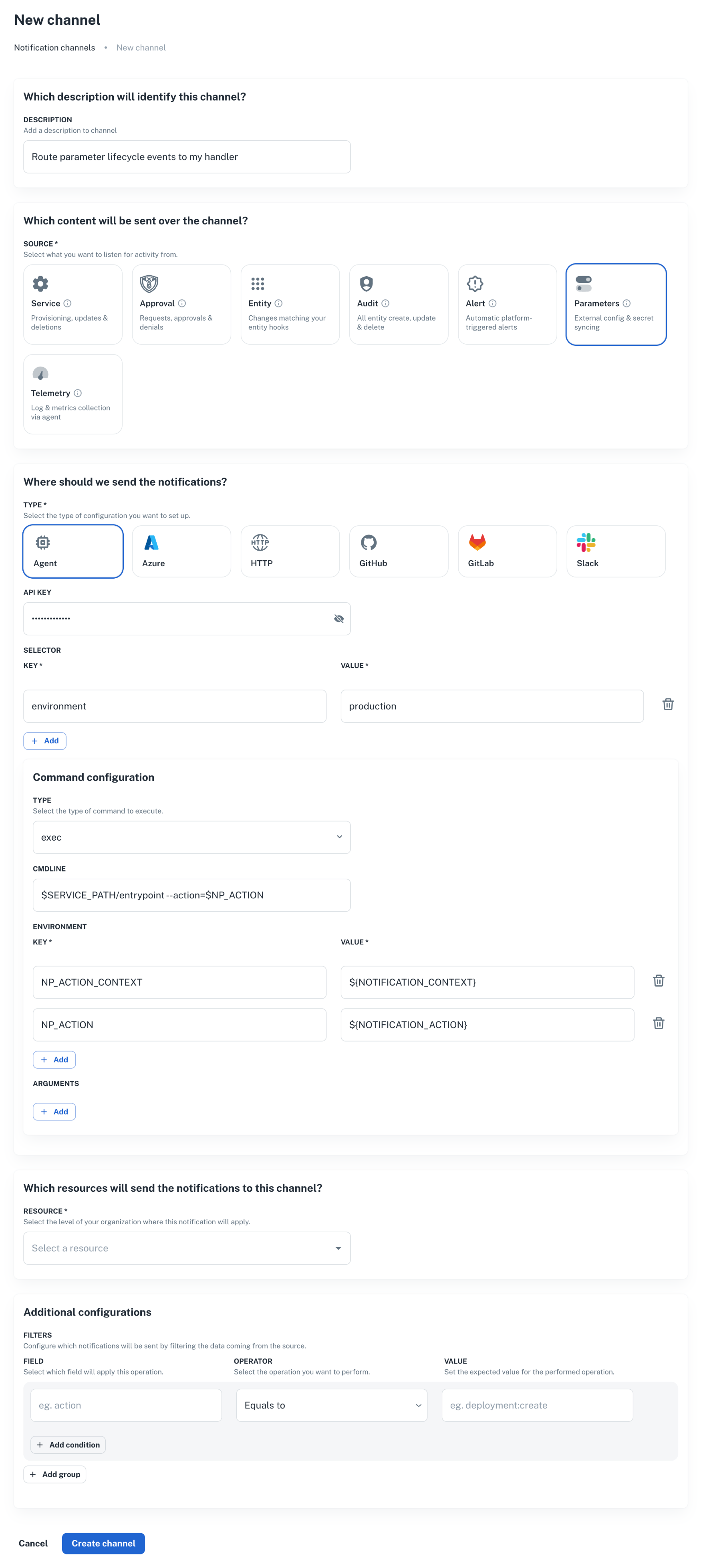
np notification channel create \
  --body '{
    "nrn": "organization=1:account=2:namespace=3:application=4",
    "source": ["parameter"],
    "description": "Route parameter lifecycle events to my handler",
    "type": "agent",
    "configuration": {
      "api_key": "AAAA.1234567890abcdef1234567890abcdefPTs=",
      "command": {
        "type": "exec",
        "data": {
          "cmdline": "$SERVICE_PATH/entrypoint --action=$NP_ACTION",
          "environment": {
            "NP_ACTION_CONTEXT": "${NOTIFICATION_CONTEXT}",
            "NP_ACTION": "${NOTIFICATION_ACTION}"
          }
        }
      },
      "selector": {
        "environment": "production"
      }
    },
    "filters": {}
  }'
curl -L 'https://api.nullplatform.com/notification/channel' \
  -H 'Content-Type: application/json' \
  -H 'Accept: application/json' \
  -H 'Authorization: Bearer <token>' \
  -d '{
    "nrn": "organization=1:account=2:namespace=3:application=4",
    "source": ["parameter"],
    "description": "Route parameter lifecycle events to my handler",
    "type": "agent",
    "configuration": {
      "api_key": "AAAA.1234567890abcdef1234567890abcdefPTs=",
      "command": {
        "type": "exec",
        "data": {
          "cmdline": "$SERVICE_PATH/entrypoint --action=$NP_ACTION",
          "environment": {
            "NP_ACTION_CONTEXT": "${NOTIFICATION_CONTEXT}",
            "NP_ACTION": "${NOTIFICATION_ACTION}"
          }
        }
      },
      "selector": {
        "environment": "production"
      }
    },
    "filters": {}
  }'
A few things to note:
source: ["parameter"]is what makes this channel pick up parameter events. Don't add unrelated sources here; mixing them makes the handler harder to reason about.selectormatches a tag on the agent. Make sure at least one of your agents declares the same tag, otherwise the event has nowhere to go.filterscan narrow events further (for example, only events whereparameter.secret = true). Leave it empty until you have a concrete reason to narrow it.
For the full channel reference, see Set up an agent notification channel.
Step 3: Implement the handler
The agent runs your script for each lifecycle event. It passes:
NP_ACTION(or whatever name you wired incommand.data.environment): the action being processed (parameter:store,parameter:retrieve,parameter:delete,parameter:notify).NP_ACTION_CONTEXT: a JSON blob with the full notification context (parameter name, value, NRN, dimensions, scope, secret flag, etc.).EXTERNAL_ID: forretrieveanddelete, the identifier returned by the previousstorefor the same value.
A working reference implementation lives in nullplatform/scopes, under parameters/keyvault. It targets Azure Key Vault but the contract is the same regardless of where you write to. Use it as a starting point.
What each action expects
parameter:store
Inputs (from NP_ACTION_CONTEXT):
{
  "notification": {
    "parameter_id": 12345,
    "parameter_name": "DB_PASSWORD",
    "value": "the-actual-secret",
    "secret": true,
    "entities": { "application": "advertising-api", "scope": "prod-us" },
    "value_entities": { "scope": "prod-us" },
    "dimensions": { "environment": "production" }
  }
}
Output:
{
  "external_id": "<id-you-pick-to-look-this-value-up-later>",
  "metadata": {
    "any": "extra info you want to keep alongside the reference"
  }
}
The external_id is the only mandatory field. Nullplatform persists it as the value's reference and passes it back as EXTERNAL_ID for future retrieve and delete calls. Pick a deterministic identifier so the same {parameter, scope, dimensions} always resolves to the same record on your side.
parameter:retrieve
Inputs: EXTERNAL_ID env var set from the value's reference. The full context is also available in NP_ACTION_CONTEXT.
Output:
{
  "value": "the-actual-secret"
}
If the value is missing from your backend, return { "value": "value not found" } and exit successfully. Nullplatform treats this as "deleted upstream" rather than as an error.
parameter:delete
Inputs: EXTERNAL_ID.
Output:
{
  "success": true
}
Treat a missing record as success: the value is already gone. This keeps deletes idempotent under retries.
parameter:notify
Fires after a value is stored. Useful for audit trails or downstream replication. If you don't need anything here, return { "success": true } and move on. The Key Vault example is a no-op.
Putting it together
A minimal entrypoint script looks like this:
#!/bin/bash
set -euo pipefail

case "$NP_ACTION" in
  parameter:store)
    "$SERVICE_PATH/store"
    ;;
  parameter:retrieve)
    "$SERVICE_PATH/retrieve"
    ;;
  parameter:delete)
    "$SERVICE_PATH/delete"
    ;;
  parameter:notify)
    "$SERVICE_PATH/notify"
    ;;
  *)
    echo "ERROR: unknown action $NP_ACTION" >&2
    exit 1
    ;;
esac
The four sibling scripts each produce the JSON described above on stdout. Anything written to stderr is captured by the agent and surfaced in nullplatform's notification logs.
Step 4: Verify the flow
Create a parameter value under the NRN you configured:
np parameter-value create \
  --parameter <parameter-id> \
  --nrn organization=1:account=2:namespace=3:application=4 \
  --value "test-value"
Then check, in this order:
- The notification log. Each action should show up as a delivered notification. Failures appear with the stderr captured from your script.
- Your backend. The value should be present, keyed by the
external_idyourstorescript returned. - Read it back.
np parameter-value read <id>returns the value as if it lived in nullplatform. The retrieve action runs in the background to fetch it from your store.
If any step fails, see Troubleshooting below.
Coexistence with other backends
{NRN, dimensions} tupleExternal parameters and HashiCorp Vault can't both apply to the same {NRN, dimensions} tuple. Configuring both creates ambiguity about who owns the value, and nullplatform rejects the second provider at creation time.
You can still mix backends across different NRNs or different dimensions. For example: dimensions: { environment: "production" } routes to Vault, dimensions: { environment: "staging" } routes to your handler. Each tuple resolves independently.
Troubleshooting
The notification never reaches my agent
- Check the channel
selectormatches a tag on at least one agent. A channel without a matching agent silently swallows events. - Check
source: ["parameter"]is set. A channel subscribed only toserviceortelemetrywon't see parameter events. - Inspect the channel and the agent in Platform settings > Notifications > Channels.
parameter:store succeeds but reads return null
The external_id your store script returned was empty or null. Nullplatform stored an empty reference, so the subsequent retrieve has nothing to look up. Make sure store always emits {"external_id": "..."} with a non-empty string.
Reads return values from the previous backend
If you migrated from internal storage or HashiCorp Vault, existing parameter values still point to the old location. Only values created after the external-parameters provider exists go through your handler. Re-create the values you need in the new backend, or build a one-off migration that calls parameter-value create again.
The handler script can't find EXTERNAL_ID
EXTERNAL_ID is only set for retrieve and delete. For store and notify, read everything from NP_ACTION_CONTEXT instead.
Next steps
- HashiCorp Vault: if Vault fits, the managed integration removes the channel and handler steps.
- Set up an agent notification channel: full reference for the channel resource.
- Reference handler in nullplatform/scopes: production-grade implementation for Azure Key Vault.