March
Welcome to our changelog! 🚀
Stay updated on the latest changes and improvements in nullplatform.
✨ External fields in service specifications
Service specifications can now include fields whose values are resolved from your infrastructure. When someone opens the form to create or link a service, the nullplatform agent running in your environment fetches the data and injects it into the schema dynamically.
What you can do with it:
- Populate fields with real infrastructure data: Postgres users to assign as database owners, RabbitMQ vhosts to connect producers and consumers, existing S3 buckets, Route 53 hosted zones, or anything else your agent can query.
- No APIs to expose, no credentials to share: the handler script runs inside your agent. Nullplatform only sends the action context and validates the response against a schema you define.
All you need on your side is a handler script in the agent and a dedicated notification channel. Nullplatform takes care of executing, validating, and resolving.
👉 See the External fields docs or the step-by-step tutorial.
✨ SCIM provisioning
You can now automate user and group provisioning from your identity provider to nullplatform using the SCIM 2.0 protocol (RFC 7644). Instead of managing users manually, your IdP syncs them automatically.
What it enables:
- Automatic user creation, updates, and deactivation when changes happen in your IdP
- Group membership sync for role-based access control
- Real-time consistency between your identity provider and nullplatform
The first supported provider is Azure Entra ID, with a step-by-step guide covering enterprise app setup, attribute mapping, group sync, and troubleshooting.
👉 See the SCIM provisioning docs to get started.
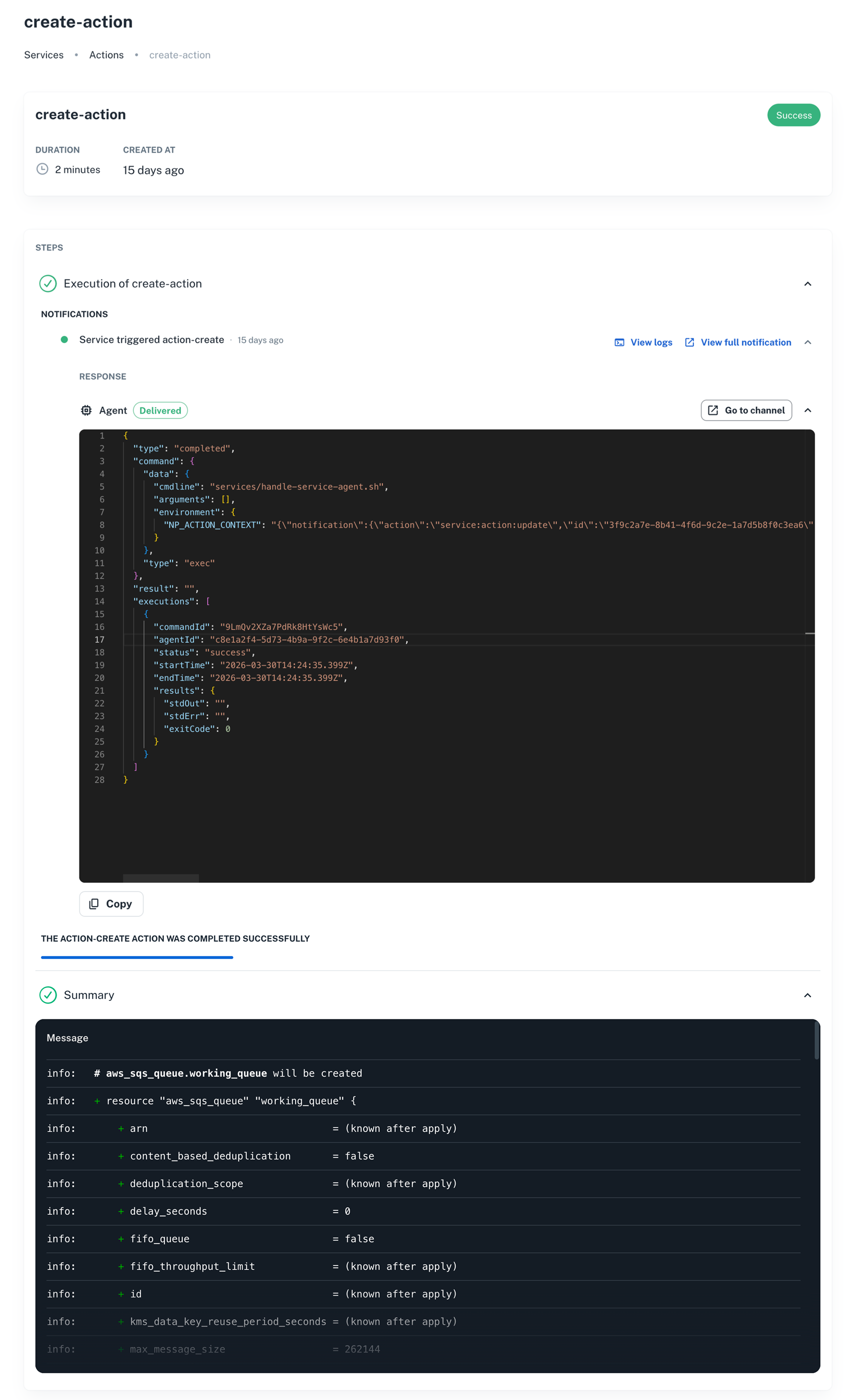
✨ Notification traceability in service actions
You can now see the notifications triggered by a service action directly from the action's workflow view, without jumping between tabs to correlate what was sent and where.
Each notification shows:
- Delivery status: at-a-glance indicator of whether the notification was delivered, failed, or is still in progress.
- Channel used: the destination the event was routed to (agent, Slack, webhook, etc.).
- Quick links: open the full notification detail or jump straight to the agent logs for debugging.
To access it:
- Go to Platform settings → Services.
- Click the (⋮) menu on a service and select Actions.
- Open the Review view of any action.
- Expand an execution step to see its notifications.
That's all for March — from the nullplatform team! ❤️