Set up HashiCorp Vault Self-Hosted as a parameter backend
This guide walks you through using HashiCorp Vault as a parameter backend while keeping the Vault token entirely on your side. You register the Vault address, mount, and base path in nullplatform; nullplatform forwards those values to your handler in every parameter lifecycle event, and your handler talks to Vault using a token sourced from your own environment.
When to choose this variant
This is one of two agent-backed variants exposed under Parameters & Secrets > Storage:
- HashiCorp Vault Self-Hosted (this guide): a Vault-aware variant. You register the Vault address, mount, and base path in nullplatform, and those values reach your handler in every parameter lifecycle event. The Vault token stays in your infrastructure.
- Other agent-backed Storage: a generic marker that routes events to your handler with no specific backend in mind. Use it when your backend isn't Vault.
Pick Self-Hosted when you run Vault and want nullplatform to forward the connection metadata to your handler on each operation, while the rest of the platform keeps behaving as if parameter values lived in nullplatform's own database.
How it works
Like Other agent-backed Storage, this variant doesn't store anything in nullplatform. It marks a {NRN, dimensions} tuple as "values for this tuple are handled outside nullplatform" and forwards every lifecycle event to a notification channel you configure. The extra piece, compared to the generic agent-backed variant, is the provider configuration: nullplatform passes the resolved provider object inside the notification context, so your handler reads context.provider.attributes.setup.vault_address, mount, and secret_path to know which Vault to talk to.
Three pieces work together:
- The provider, which you create with the slug
hashicorp-vault-self-hosted. It carries the Vault connection metadata (vault_address,mount,secret_path) but no token. - A notification channel subscribed to the
parametersource. It tells nullplatform where to send lifecycle events. - Your handler, reachable through the agent. It receives each event, reads the forwarded provider config, talks to Vault using a locally-sourced token, and returns the result to nullplatform.
The handler contract is the same as Other agent-backed Storage: four actions (parameter:store, parameter:retrieve, parameter:delete, parameter:notify) and a small JSON response shape. The only difference is what context contains, covered in Step 3.
Prerequisites
Before you start, make sure you have:
- A reachable HashiCorp Vault instance with a KV v2 secrets engine enabled, accessible from where your handler runs.
- A Vault token available to your handler, with the policy described in Required Vault token policy below. The token is whatever your environment provides: an env var, a customer-side secret manager, a sidecar, anything that doesn't require sending the token to nullplatform.
- A reachable agent running inside your infrastructure. See Install the agent.
- An API key with the Agent role attached. See Authenticate the agent.
- The mount point and base path you want to use (defaults:
secretmount,nullplatformpath).
If you don't yet have Vault running, see HashiCorp's Vault deployment guide and the KV v2 docs. The rest of this page assumes Vault is up and your handler can reach it.
Required Vault token policy
The token your handler uses must be able to create, read, update, and delete secrets under the configured path, plus manage the metadata that sits alongside them. With the defaults (mount: secret, secret_path: nullplatform), the minimum policy is:
path "secret/data/nullplatform/*" {
  capabilities = ["create", "read", "update", "delete"]
}

path "secret/metadata/nullplatform/*" {
  capabilities = ["create", "read", "update", "delete", "list"]
}

path "secret/metadata/nullplatform" {
  capabilities = ["read", "list"]
}
If you customize mount or secret_path in the provider, replace secret and nullplatform in the paths above with your values. The metadata paths are required because traceability metadata (parameter ID, NRN, dimensions, secret flag) is written next to each value.
Step 1: Create the provider
Create a hashicorp-vault-self-hosted provider on the NRN where you want Vault to take over. The setup section captures the Vault connection metadata. There's no security section: the token never leaves your side.
- UI
- CLI
- OpenTofu
- cURL
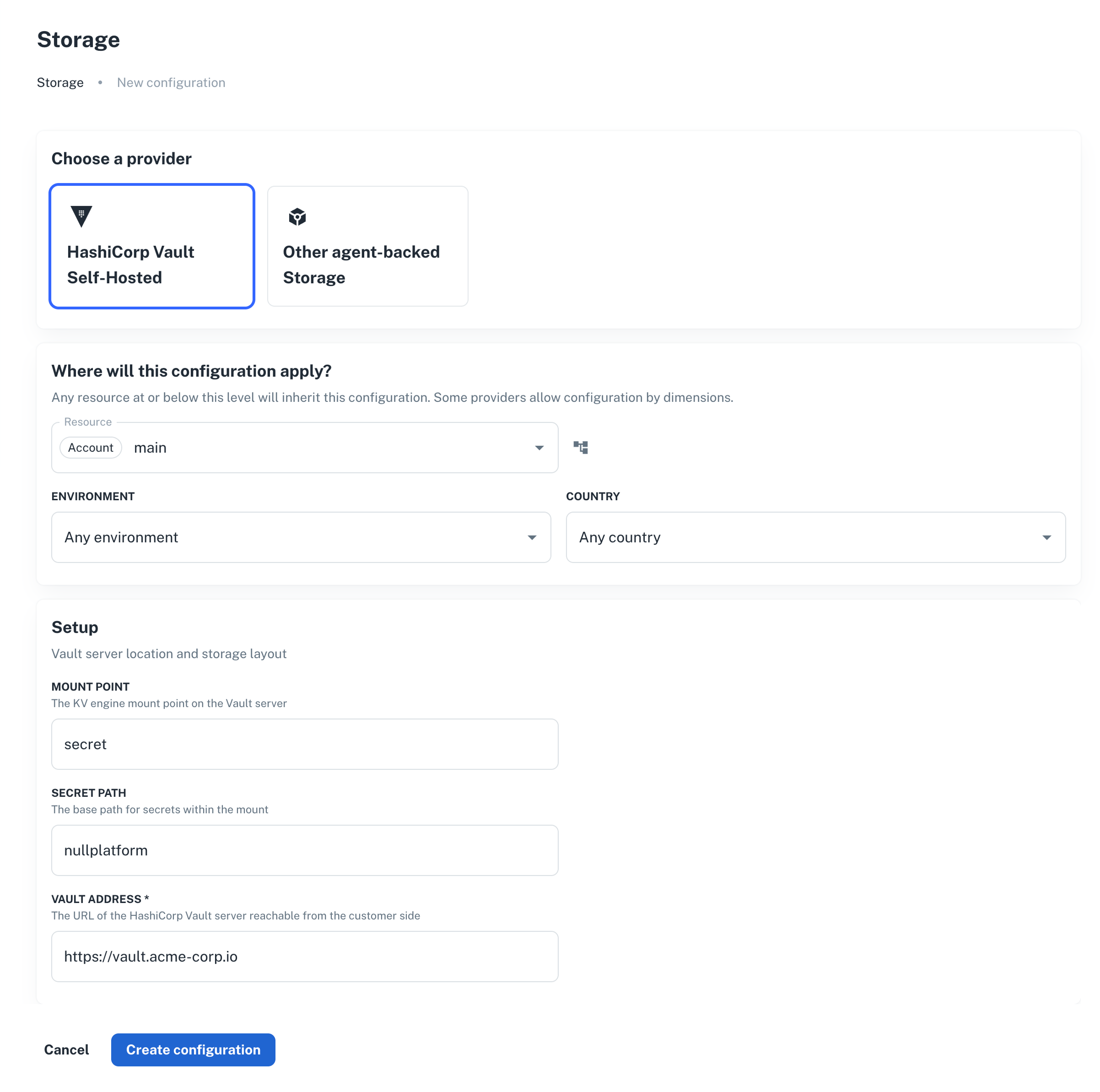
- Go to Platform settings > Parameters & Secrets > Storage, and click + New provider.
- Select HashiCorp Vault Self-Hosted and pick the resource (NRN) and any dimensions.
- Fill in Setup:
- Mount Point: KV v2 engine mount. Defaults to
secret. - Secret Path: base path inside the mount. Defaults to
nullplatform. - Vault Address: full URL reachable from your handler, e.g.
https://vault.acme-corp.io.
- Mount Point: KV v2 engine mount. Defaults to
- Click Create provider.
np provider create \
  --body '{
    "nrn": "organization=1:account=2:namespace=3:application=4",
    "specification_slug": "hashicorp-vault-self-hosted",
    "dimensions": {},
    "attributes": {
      "setup": {
        "vault_address": "https://vault.acme-corp.io",
        "mount": "secret",
        "secret_path": "nullplatform"
      }
    }
  }'
data "nullplatform_provider_specification" "vault_self_hosted" {
  slug = "hashicorp-vault-self-hosted"
}

resource "nullplatform_provider" "vault_self_hosted" {
  nrn              = "organization=1:account=2:namespace=3:application=4"
  specification_id = data.nullplatform_provider_specification.vault_self_hosted.id

  attributes = jsonencode({
    setup = {
      vault_address = "https://vault.acme-corp.io"
      mount         = "secret"
      secret_path   = "nullplatform"
    }
  })
}
curl -L -X POST 'https://api.nullplatform.com/provider' \
  -H 'Content-Type: application/json' \
  -H 'Authorization: Bearer <token>' \
  -d '{
    "nrn": "organization=1:account=2:namespace=3:application=4",
    "specification_slug": "hashicorp-vault-self-hosted",
    "dimensions": {},
    "attributes": {
      "setup": {
        "vault_address": "https://vault.acme-corp.io",
        "mount": "secret",
        "secret_path": "nullplatform"
      }
    }
  }'
The provider on its own doesn't do anything. The next step wires it up to your agent.
Step 2: Create the notification channel
Create an agent channel that listens for parameter lifecycle events and runs your handler scripts. The same channel handles all four actions: nullplatform passes the action name in the notification context, and your handler dispatches accordingly.
- UI
- CLI
- cURL
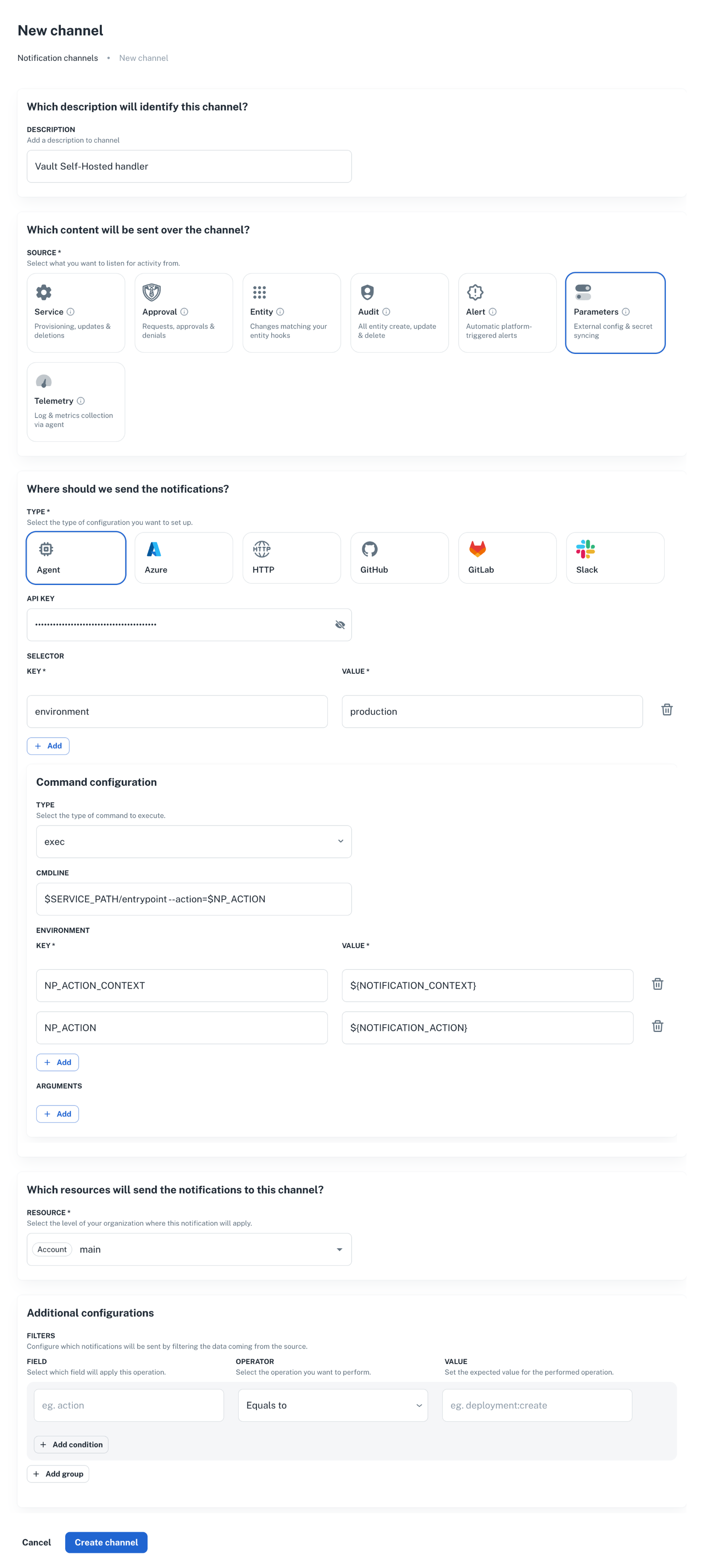
- Go to Platform settings > Notifications > Channels, and click + New channel.
- Set Source to
parameter, pick the resource (NRN) and any dimensions. - Configure the agent command to run your handler. See the CLI tab for a working payload.
np notification channel create \
  --body '{
    "nrn": "organization=1:account=2:namespace=3:application=4",
    "source": ["parameter"],
    "description": "Vault Self-Hosted handler",
    "type": "agent",
    "configuration": {
      "api_key": "AAAA.1234567890abcdef1234567890abcdefPTs=",
      "command": {
        "type": "exec",
        "data": {
          "cmdline": "$SERVICE_PATH/entrypoint --action=$NP_ACTION",
          "environment": {
            "NP_ACTION_CONTEXT": "${NOTIFICATION_CONTEXT}",
            "NP_ACTION": "${NOTIFICATION_ACTION}"
          }
        }
      },
      "selector": {
        "environment": "production"
      }
    },
    "filters": {}
  }'
curl -L 'https://api.nullplatform.com/notification/channel' \
  -H 'Content-Type: application/json' \
  -H 'Accept: application/json' \
  -H 'Authorization: Bearer <token>' \
  -d '{
    "nrn": "organization=1:account=2:namespace=3:application=4",
    "source": ["parameter"],
    "description": "Vault Self-Hosted handler",
    "type": "agent",
    "configuration": {
      "api_key": "AAAA.1234567890abcdef1234567890abcdefPTs=",
      "command": {
        "type": "exec",
        "data": {
          "cmdline": "$SERVICE_PATH/entrypoint --action=$NP_ACTION",
          "environment": {
            "NP_ACTION_CONTEXT": "${NOTIFICATION_CONTEXT}",
            "NP_ACTION": "${NOTIFICATION_ACTION}"
          }
        }
      },
      "selector": {
        "environment": "production"
      }
    },
    "filters": {}
  }'
A few things to note:
source: ["parameter"]is what makes this channel pick up parameter events. Don't add unrelated sources here; mixing them makes the handler harder to reason about.selectormatches a tag on the agent. Make sure at least one of your agents declares the same tag, otherwise the event has nowhere to go.filterscan narrow events further (for example, only events whereparameter.secret = true). Leave it empty until you have a concrete reason to narrow it.
For the full channel reference, see Set up an agent notification channel.
Step 3: Implement the handler
The agent runs your script for each lifecycle event. It passes:
NP_ACTION: the action being processed (parameter:store,parameter:retrieve,parameter:delete,parameter:notify).NP_ACTION_CONTEXT: a JSON blob with the full notification context. For this provider, the context includes aproviderobject with the Vault connection metadata you configured in Step 1.EXTERNAL_ID: forretrieveanddelete, the identifier returned by the previousstorefor the same value.
The provider block in the context
The notification context includes the resolved provider, exactly as nullplatform sees it:
{
  "action": "parameter:store",
  "parameter_id": 12345,
  "parameter_name": "DB_PASSWORD",
  "value": "the-actual-secret",
  "secret": true,
  "entities": { "application": "advertising-api", "scope": "prod-us" },
  "dimensions": { "environment": "production" },
  "provider": {
    "id": "…",
    "nrn": "organization=1:account=2:namespace=3:application=4",
    "dimensions": {},
    "specification_id": "…",
    "attributes": {
      "setup": {
        "vault_address": "https://vault.acme-corp.io",
        "mount": "secret",
        "secret_path": "nullplatform"
      }
    }
  }
}
Your handler reads provider.attributes.setup.vault_address, mount, and secret_path to decide where to write in Vault. The token comes from your environment: pick whatever mechanism fits your setup (env var, customer-side secret manager, sidecar, etc.).
What each action expects
The four actions follow the same contract as Other agent-backed Storage. The differences are mechanical:
parameter:store: build the Vault URL fromprovider.attributes.setup.*, write the value to KV v2, return{ "external_id": "<path-or-id>" }. Pick a deterministic external ID so the same{parameter, scope, dimensions}always resolves to the same Vault key.parameter:retrieve: read the value from Vault usingEXTERNAL_ID+ the forwardedprovider.attributes.setup.*. Return{ "value": "..." }, or{ "value": "value not found" }if the secret is missing in Vault.parameter:delete: delete the secret in Vault. Return{ "success": true }. Treat a missing record as success: the value is already gone.parameter:notify: fires after a value is stored. Useful for audit trails. Return{ "success": true }if you don't need anything custom.
A minimal store handler
#!/bin/bash
set -euo pipefail

# Read connection metadata forwarded by nullplatform.
VAULT_ADDR=$(jq -r '.provider.attributes.setup.vault_address' <<< "$NP_ACTION_CONTEXT")
MOUNT=$(jq -r '.provider.attributes.setup.mount // "secret"' <<< "$NP_ACTION_CONTEXT")
SECRET_PATH=$(jq -r '.provider.attributes.setup.secret_path // "nullplatform"' <<< "$NP_ACTION_CONTEXT")

# Read the token from wherever your environment keeps it.
VAULT_TOKEN="${VAULT_TOKEN_FROM_LOCAL_STORE:?token must be available in env}"

PARAMETER_NAME=$(jq -r '.parameter_name' <<< "$NP_ACTION_CONTEXT")
VALUE=$(jq -r '.value' <<< "$NP_ACTION_CONTEXT")
EXTERNAL_ID="${PARAMETER_NAME}-$(uuidgen)"

curl -fsS -X POST "${VAULT_ADDR}/v1/${MOUNT}/data/${SECRET_PATH}/${EXTERNAL_ID}" \
  -H "X-Vault-Token: ${VAULT_TOKEN}" \
  -H "Content-Type: application/json" \
  -d "{\"data\":{\"value\":${VALUE@Q}}}" \
  > /dev/null

jq -n --arg id "$EXTERNAL_ID" '{ external_id: $id }'
Adapt the same pattern for retrieve, delete, and notify. The four sibling scripts each produce the JSON described above on stdout. Anything written to stderr is captured by the agent and surfaced in nullplatform's notification logs.
Step 4: Verify the flow
Create a parameter value under the NRN you configured:
np parameter-value create \
  --parameter <parameter-id> \
  --nrn organization=1:account=2:namespace=3:application=4 \
  --value "test-value"
Then check, in this order:
- The notification log. Each action should show up as a delivered notification. Failures appear with the stderr captured from your script.
- Vault. The value should be present under
{mount}/data/{secret_path}/...for the NRN you targeted. - Read it back.
np parameter-value read <id>returns the value as if it lived in nullplatform. The retrieve action runs in the background to fetch it from your Vault.
Token rotation
Token rotation is entirely on your side. Update the token wherever your handler reads it from (env var, customer-side secret manager) and roll the handler if needed. Nullplatform doesn't cache the token, doesn't track its expiry, and won't notify you when it's about to expire: that part of the lifecycle stays inside your infrastructure.
If the Vault address itself changes, update the provider in nullplatform with the new vault_address. The resolver caches the configuration per {NRN, dimensions} tuple for up to 5 minutes; existing parameter operations keep working with the previous address until the cache refreshes.
Troubleshooting
The notification never reaches my agent
- Check the channel
selectormatches a tag on at least one agent. A channel without a matching agent silently swallows events. - Check
source: ["parameter"]is set. A channel subscribed only toserviceortelemetrywon't see parameter events. - Inspect the channel and the agent in Platform settings > Notifications > Channels.
parameter:store succeeds but reads return null
The external_id your store script returned was empty or null. Nullplatform stored an empty reference, so the subsequent retrieve has nothing to look up. Make sure store always emits {"external_id": "..."} with a non-empty string.
Handler fails with Vault: permission denied
The token your handler uses doesn't have write permission at the configured path. Confirm the policy attached to the token allows create, update, and delete on {mount}/data/{secret_path}/* and on {mount}/metadata/{secret_path}/*.
Reads return value not found after a successful write
Check that the provider's mount and secret_path match what you actually have in Vault. The forwarded values are in context.provider.attributes.setup.*; log them in your handler to compare against a manual vault kv get.
The provider is created but secrets are still going to nullplatform's database
Two common causes:
- The NRN you used on the parameter value is not under the NRN where you configured the provider, so NRN inheritance doesn't match.
- The dimensions on the value don't overlap with the dimensions on the provider.
List active providers for the same NRN to confirm coverage:
np provider list --nrn organization=1:account=2:namespace=3:application=4
Next steps
- Other agent-backed Storage: the generic variant when your backend isn't Vault.
- Provider inheritance: how nullplatform picks the best matching provider.
- Set up an agent notification channel: full reference for the channel resource.