K8s: Allowing CPU and memory to grow with demand
This page explains how to tune CPU and memory resource limits in a way that can introduce unstable behavior. We strongly recommend you stick to the default behavior.
Default behavior
By default, nullplatform fixes the initial CPU and memory (resources.requests), and the maximum allowed usage (resources.limits) for your application. We recommend this as it favors stability by trading off resource usage.
Danger zone: allowing CPU and memory to grow
Nullplatform also lets you specify different initial and maximum CPU and memory parameters for your application, so resources.requests can be smaller than resources.limits, letting the application request more CPU and memory as it goes.
Raising a limit above its request might allow you to use fewer resources in some situations, but it dangerously changes how Kubernetes schedules, throttles, and evicts your pod.
How to configure limits higher than request
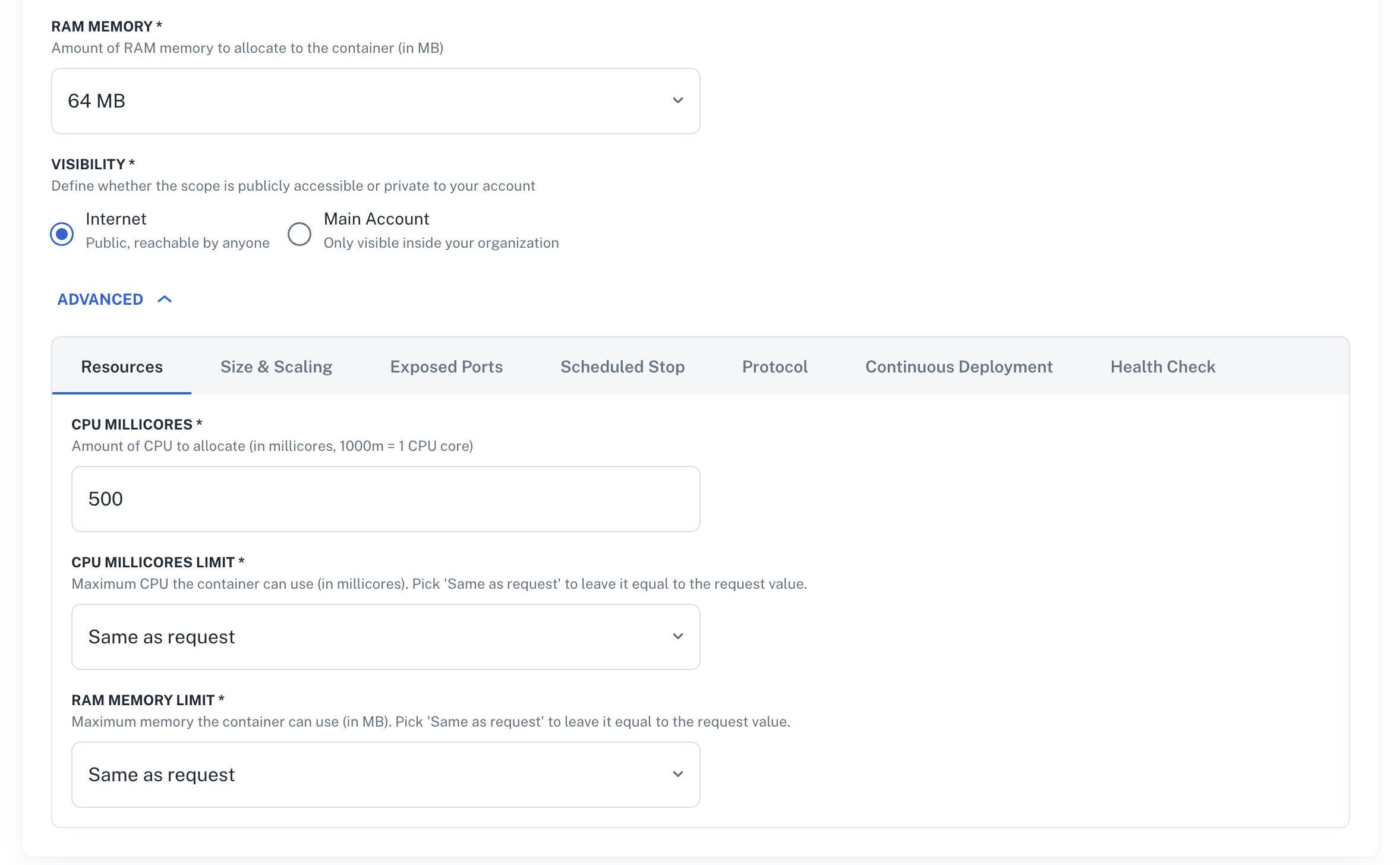
In the scope edit section, RAM Memory (the request) sits at the top. CPU Millicores, CPU Millicores Limit, and RAM Memory Limit all live in the ADVANCED → Resources tab. Both limit fields default to Same as request and validate that limit ≥ request at save time.
Risks
QoS class downgrade
Kubernetes assigns every pod a Quality of Service (QoS) class based on how its requests and limits compare. The QoS class decides which pods get killed first when a node runs out of resources.
| Configuration | QoS class | Eviction priority | Recommendation |
|---|---|---|---|
request == limit for all containers | Guaranteed | Last to be evicted | Recommended (default) |
request != limit for some resource | Burstable | Evicted before Guaranteed | Not recommended, described in this document |
A Kubernetes Containers scope with limits at the defaults renders a Guaranteed pod. The moment you raise either limit above its request, the pod drops to Burstable, first in line if the node needs to free resources to keep critical workloads alive.
A Burstable pod doesn't fail more often on a healthy cluster. It fails more often on a stressed one, exactly when you most want it to stay up.
Memory overcommit and OOMKill
When you allow resources to grow, memory is the dangerous one. CPU contention just slows things down, but memory contention kills processes.
If limits.memory > requests.memory, the scheduler can place the pod on a node where only the request is currently available. The pod is then allowed to grow up to its limit, but the node may not actually have that much free memory anymore if other Burstable pods on the same node also expanded.
When this happens, one of two things kills your pod:
- OOMKill: Your container exceeded
limits.memory. The kernel kills the process andRestartCountincreases. - Node-pressure eviction: The node ran out of memory globally. The kubelet picks Burstable pods that exceed their request first, even if they're still under their limit.
Setting limits.memory > requests.memory is the most common cause of "my pod was killed while I didn't change anything." Reach for it only when you have a clear, intermittent reason to need more memory than your steady state.
CPU throttling
CPU limits cause latency problems. When a container hits its CPU limit, the Linux kernel throttles it via CFS quotas, pausing the process for the rest of the scheduling period (default: 100 ms). A service with requests.cpu: 200m and limits.cpu: 500m can look fine on average but show p99 latency spikes in the seconds whenever it crosses the limit for a single window.
For most steady-state workloads, leaving CPU limit at Same as request is the safer default. Raise it only after you've measured a real burst pattern, and watch container_cpu_cfs_throttled_seconds_total after the change.
Next steps
- Containers scope overview: cluster setup, supported providers, and the full feature list.
- Diagnose: built-in checks that flag scopes whose pods are being evicted or restarted.